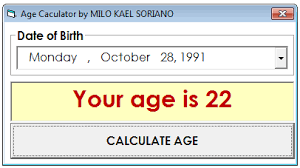
Age Calculation Program in C: A Complete Guide for Beginners
Learning to calculate age in C programming might seem like a simple task. However, it's a great way to understand date manipulation, user input handling, and basic arithmetic operations. Whether you're taking a C programming course in Noida or studying on your own, mastering age calculation programs will build a strong foundation in C programming basics.
Age calculation programs are some of the most useful projects for beginners. They combine several programming concepts, such as input/output operations, conditional statements, and date arithmetic. This guide will help you create solid age calculation programs that deal with different scenarios and edge cases.
Age Calculation Program in C: A Complete Guide for Beginners
Mr. Bambam Kumar Yadav/ 3 days ago
15
11 min read
Understanding the Basics of Age Calculation
Before diving into code, let's understand what calculating age really involves. Age calculation isn't just about subtracting the birth year from the current year; it requires considering months and days to find the exact age. When working with age C programs, you'll need to handle leap years, different month lengths, and ensure your calculations stay correct regardless of the input date.
The basic approach involves comparing the current date with the birth date. If the current month and day haven't reached the birth month and day in the current year, we subtract one from the year difference. This logic forms the basis of any age calculation program.
Simple Age Calculation Program
Let's start with a basic age C program that calculates age based on years only:
                    c
                    #include
                    #include

                    int main() {
                        int birth_year, current_year, age;
                        time_t t = time(NULL);
                        struct tm *current_time = localtime(&t);

                        current_year = current_time->tm_year + 1900;

                        printf("Enter your birth year: ");
                        scanf("%d", &birth_year);

                        age = current_year - birth_year;

                        printf("Your age is approximately %d years\n", age);

                        return 0;
                    }
This simple program demonstrates basic age calculation concepts. However, it's not entirely accurate since it doesn't consider months and days. Students in any C programming course in Noida would quickly identify this limitation and work toward more precise solutions.
Advanced Age Calculation with Complete Date
For accurate age calculation, we need to consider the complete birth date. Here's a more comprehensive age C program:
                    c
                    #include
                    #include

                    int main() {
                        int birth_day, birth_month, birth_year;
                        int current_day, current_month, current_year;
                        int age_years, age_months, age_days;

                        time_t t = time(NULL);
                        struct tm *current_time = localtime(&t);

                        current_day = current_time->tm_mday;
                        current_month = current_time->tm_mon + 1;
                        current_year = current_time->tm_year + 1900;

                        printf("Enter your birth date (DD MM YYYY): ");
                        scanf("%d %d %d", &birth_day, &birth_month, &birth_year);

                        age_years = current_year - birth_year;
                        age_months = current_month - birth_month;
                        age_days = current_day - birth_day;

                        if (age_days < 0) {
                            age_months--;
                            age_days += 30; // Simplified for demonstration
                        }

                        if (age_months < 0) {
                            age_years--;
                            age_months += 12;
                        }

                        printf("Your age is: %d years, %d months, %d days\n",
                            age_years, age_months, age_days);

                        return 0;
                    }
This advanced version provides more accurate results by considering the complete date. However, it still uses a simplified approach for days per month. Professional C programming courses in Noida typically challenge students to handle varying month lengths and leap years correctly.
Handling Edge Cases and Validation
Real-world age C programs must handle various edge cases and validate user input. Consider scenarios like invalid dates, future birth dates, and leap years. Here's how to add input validation:
                    c
                    #include
                    #include
                    #include

                    bool is_valid_date(int day, int month, int year) {
                        if (month < 1 || month > 12) return false;
                        if (day < 1 || day > 31) return false;

                        int days_in_month[] = {31, 28, 31, 30, 31, 30, 31, 31, 30, 31, 30, 31};

                        // Check for leap year
                        if (month == 2 && ((year % 4 == 0 && year % 100 != 0) || (year % 400 == 0))) {
                            days_in_month[1] = 29;
                        }

                        return day <= days_in_month[month - 1]; } int main() { birth_day, birth_month, birth_year; current_day, current_month, current_year; time_t t="time(NULL);" struct tm *current_time="localtime(&t);" current_day="current_time-">tm_mday;
                        current_month = current_time->tm_mon + 1;
                        current_year = current_time->tm_year + 1900;

                        do {
                            printf("Enter your birth date (DD MM YYYY): ");
                            scanf("%d %d %d", &birth_day, &birth_month, &birth_year);

                            if (!is_valid_date(birth_day, birth_month, birth_year)) {
                                printf("Invalid date! Please enter a valid date.\n");
                                continue;
                            }

                            if (birth_year > current_year ||
                                (birth_year == current_year && birth_month > current_month) ||
                                (birth_year == current_year && birth_month == current_month && birth_day > current_day)) {
                                printf("Birth date cannot be in the future!\n");
                                continue;
                            }

                            break;
                        } while (true);

                        // Age calculation logic here

                        return 0;
                    }
This validation ensures your age C program handles incorrect input gracefully, making it more robust and user-friendly. Such attention to detail is emphasized in comprehensive C programming courses in Noida.
Working with Different Date Formats
Users might input dates in different formats. A flexible age calculation program should manage multiple input formats. Consider adding functions that parse dates in formats like MM/DD/YYYY, DD-MM-YYYY, or YYYY-MM-DD.
String manipulation functions like strtok() and sscanf() are useful tools for handling formatted date inputs. This method makes your age C program more versatile and polished.
Performance Optimization and Memory Management
While age calculation programs are usually small, knowing optimization principles is helpful for bigger projects. Use efficient algorithms for leap year detection and reduce memory usage by avoiding unnecessary variables.
Professional C programming courses in Noida often stress the importance of writing clean, efficient code, even for simple programs. This practice becomes essential when you start working on complex software projects later in your career.
Error Handling and User Experience
Robust age C programs should give clear error messages and guide users to the right input. Instead of just saying "Invalid input," explain what the issue is and how to resolve it. This method improves user experience and shows good programming practices.
Think about adding features like letting users retry their input, giving format examples, and providing help messages. These improvements make a basic age calculation program into a well-rounded application.
Integration with Larger Applications
Age calculation functionality often becomes part of larger applications like student management systems, employee databases, or healthcare applications. Understanding how to break down your age C code makes it reusable across different projects. Create separate functions for date validation, age calculation, and result formatting. This modular approach, commonly taught in C programming courses in Noida, helps with code reuse and easier maintenance.
Testing and Debugging
Systematic testing makes sure your age calculation program works correctly in different scenarios. Test with various birth dates, including edge cases like leap year birthdays, end-of-month dates, and boundary situations.
Create test cases that check the correct age calculation for people born on February 29th, those born at the beginning or end of months, and individuals in different age groups. This thorough testing approach builds trust in your program's reliability.
Wrapping Up: Your Journey with Age Calculation Programs
Creating age calculation programs in C provides great practice with essential programming concepts while also building practical skills. These programs involve manipulating dates, handling user input, validating data, and performing mathematical operations in ways that reflect real-world software development challenges.
Whether you're enrolled in a C programming course in Noida or learning on your own, mastering age calculation programs creates a solid foundation for more complex projects. The skills you develop, such as managing edge cases and creating user-friendly interfaces, directly apply to professional software development.
Keep in mind that becoming proficient in programming requires practice and repetition. Start with simple age calculation programs and gradually add features like input validation, error handling, and improved user interfaces. Each enhancement offers valuable insights into software design and implementation.
Frequently Asked Questions (FAQs)
Q: Why doesn't my age C program give accurate results?
A: Most likely, your program only considers years without accounting for months and days. Implement complete date comparison for accurate age calculation.
Q: How do I handle leap years in age calculation programs?
A: Check if the year is divisible by 4 (and not by 100, unless also by 400). Adjust February's days accordingly when validating dates.
Q: Can I calculate age without using system time functions?
A: Yes, but you'll need to manually input the current date. Using system time functions makes programs more practical and automated.
Q: What's the best way to validate date input in age C programs?
A: Create a separate validation function that checks month ranges (1-12), day ranges based on month, and handles leap years correctly.
Q: How can I make my age calculation program more user-friendly?
A: Add clear input prompts, provide format examples, implement error handling with helpful messages, and allow users to retry invalid inputs.