This article dives deep into arrays in C—what they are, how they work, different types, syntax, memory layout, and practical examples.
✅ What is an Array in C?
Before we go into technical definitions, let’s start with a simple idea.
Imagine you want to store the marks of 100 students. Declaring 100 different variables is not only inefficient but also messy. This is where arrays come in handy.
👉 Array Definition in C:
“An array in C is a collection of elements of the same data type stored in contiguous memory locations and accessed using a common name.”
Key Characteristics:
- Fixed size (must be known at compile time).
- Homogeneous data type.
- Indexed access (starting from 0).
-
🔤 Syntax of Arrays in C
The general syntax to declare an array in C is:
c
CopyEdit
data_type array_name[array_size];
Example:
c
CopyEdit
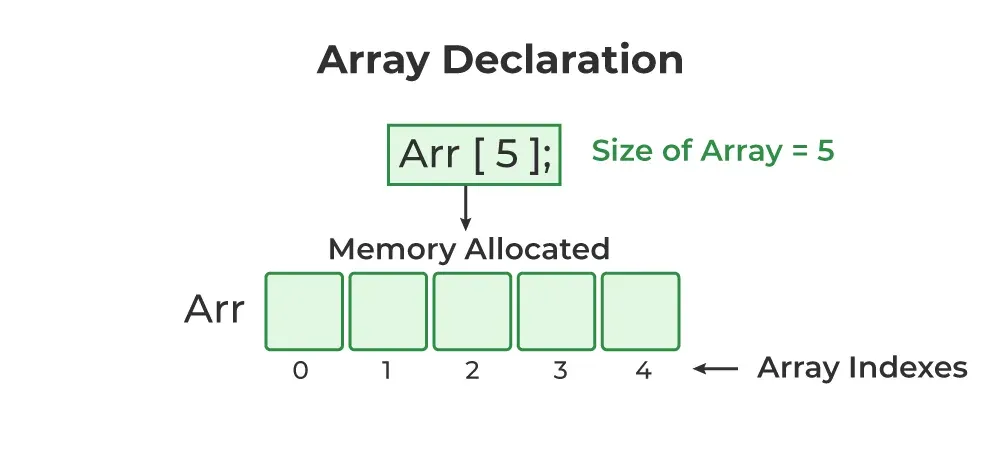
int marks[5];
Here:
- int is the data type.
- marks is the name of the array.
- [5] indicates it can store 5 integer elements (from index 0 to 4).
You can also initialize the array during declaration:
c
CopyEdit
int marks[5] = {90, 85, 78, 92, 88};
If you omit the size but provide elements, C will automatically assign the correct size:
c
CopyEdit
int marks[] = {90, 85, 78, 92, 88}; // Size is 5
🧩 Types of Arrays in C
Arrays in C can be classified based on the number of dimensions:
1. One-Dimensional Array
Stores elements in a single row (linear array).
Example:
c
CopyEdit
int numbers[3] = {1, 2, 3};
2. Two-Dimensional Array
Stores elements in rows and columns—like a matrix.
Example:
c
CopyEdit
Copy Code
int matrix[2][3] = {

    {1, 2, 3},

    {4, 5, 6}

};
3. Multi-Dimensional Array
More than two dimensions, although rarely used in practice.
Example:
c
CopyEdit
int tensor[2][3][4]; // 3D array
🛠 How Arrays Work in Memory
Arrays store elements in contiguous memory locations. Suppose you declare:
c
CopyEdit
int a[3] = {10, 20, 30};
Let’s say the base address is 1000. Then:
- a[0] is at address 1000
- a[1] is at address 1004
- a[2] is at address 1008
(assuming int is 4 bytes)
This contiguous allocation improves performance, especially in loops and pointer arithmetic.
🎯 Accessing Array Elements
Array elements are accessed using index numbers.
Syntax:
c
CopyEdit
array_name[index];
Example:
c
CopyEdit
Copy Code
printf("%d", marks[2]); // prints 78You can use loops to iterate through arrays:
c
CopyEdit
Copy Code
for(int i = 0; i < 5; i++) {

    printf("%d\n", marks[i]);

}
🧪 Code Example: One-Dimensional Array
c
CopyEdit
Copy Code
#include <stdio.h>

int main() {

    int numbers[5] = {10, 20, 30, 40, 50};

    printf("Array elements are:\n");

    for(int i = 0; i < 5; i++) {

        printf("%d ", numbers[i]);

    }

    return 0;

}
Output:
sql
CopyEdit
Array elements are:
10 20 30 40 50
🧪 Code Example: Two-Dimensional Array
c
CopyEdit
Copy Code
#include <stdio.h>

int main() {

    int matrix[2][3] = {

        {1, 2, 3},

        {4, 5, 6}

    };

    printf("Matrix elements are:\n");

    for(int i = 0; i < 2; i++) {

        for(int j = 0; j < 3; j++) {

            printf("%d ", matrix[i][j]);

        }

        printf("\n");

    }

    return 0;

}
Output:
sql
CopyEdit
Matrix elements are:
1 2 3
4 5 6
🧠 Common Operations on Arrays
1. Traversing
Looping through the array elements.
2. Insertion
Hard-coded in C. You need to shift elements manually if inserting at a position.
3. Deletion
Similar to insertion; you must manually shift elements.
4. Searching
You can use linear or binary search (if sorted).
5. Sorting
Bubble Sort, Selection Sort, Quick Sort, etc., can be applied to arrays.
⚠️ Limitations of Arrays in C
Despite their usefulness, arrays have some limitations:
- Fixed size: Once declared, size can't be changed.
- Homogeneous data only: Cannot store multiple data types.
- No built-in bounds checking: Accessing out-of-bound index causes undefined behavior.
- Manual operations: Insertion and deletion require manual effort.
If you’re learning through a Full Stack Developer Course, you’ll explore how languages like Python, JavaScript, or Java overcome these limitations with advanced data structures like lists, vectors, or arrays.
🔁 Pointers and Arrays
In C, arrays and pointers are closely related. The name of the array acts as a pointer to its first element.
Example:
c
CopyEdit
Copy Code
int a[5] = {10, 20, 30, 40, 50};

printf("%d", *(a + 2)); // Outputs 30

Here, a + 2 gives the address of the 3rd element, and * dereferences it.
Understanding this relationship is key to mastering dynamic memory allocation and pointer arithmetic.
📦 Passing Arrays to Functions
You can pass arrays to functions to perform operations on them.
Example:
c
CopyEdit
Copy Code
#include <stdio.h>

void printArray(int arr[], int size) {

    for(int i = 0; i < size; i++) {

        printf("%d ", arr[i]);

    }

}

int main() {

    int data[3] = {5, 10, 15};

    printArray(data, 3);

    return 0;

}
Output:
CopyEdit
5 10 15
🧠 Best Practices When Using Arrays in C
- Always initialize arrays to avoid garbage values.
- Use const when passing arrays to functions if the array won't be modified.
- Be cautious of array index boundaries.
- Consider dynamic memory allocation if array size is unknown at compile time.
📘 Real-World Use Cases of Arrays
- Storing student marks, employee data, or sensor readings
- Image representation (2D arrays)
- Matrix operations
- Implementing stacks, queues, and other data structures
- Handling string data (character arrays)
🔗 Importance of Arrays in a Full Stack Developer Course
While modern full-stack development relies heavily on high-level languages like JavaScript, Python, and frameworks like React or Node.js, understanding low-level constructs like arrays in C helps in:
- Grasping how memory works
- Understanding data structures deeply
- Writing optimized code
- Debugging and performance tuning
Most structured Full Stack Developer Courses begin with foundational programming in C before progressing to frontend and backend development. Mastering arrays early builds your confidence in problem-solving and algorithm development.
🏁 Conclusion
Arrays are one of the most fundamental data structures in C programming. Knowing the array definition in C, understanding its types, syntax, memory structure, and practical implementation is key to mastering not just C but also preparing for more advanced programming concepts.
If you are aspiring to become a well-rounded software engineer or full stack developer, begin your journey with a structured Full Stack Developer Course. It will not only teach you modern technologies but also the foundational principles like arrays, pointers, memory management, and efficient coding practices.