Async vs Defer in JavaScript Explained

When working with JavaScript in HTML, especially for web performance optimization, two attributes often come into play async and defer. These attributes control how external JavaScript files are loaded and executed in relation to the parsing of the HTML document. If you’ve ever wondered which one to use and why, you’re in the right place.

Async vs Defer in JavaScript Explained

In this guide, we’ll break down: 

  • The difference between async and defer 
  • How they affect page loading speed 
  • When to use each one 
  • Real-world examples with code snippets 

By the end, you’ll have a clear understanding of both and will be able to make smarter decisions for your web projects. 

Understanding Script Loading in HTML 

Normally, when you add a JavaScript file in HTML using: 

Copy Code

<script src="script.js"></script>


Here’s what happens: 

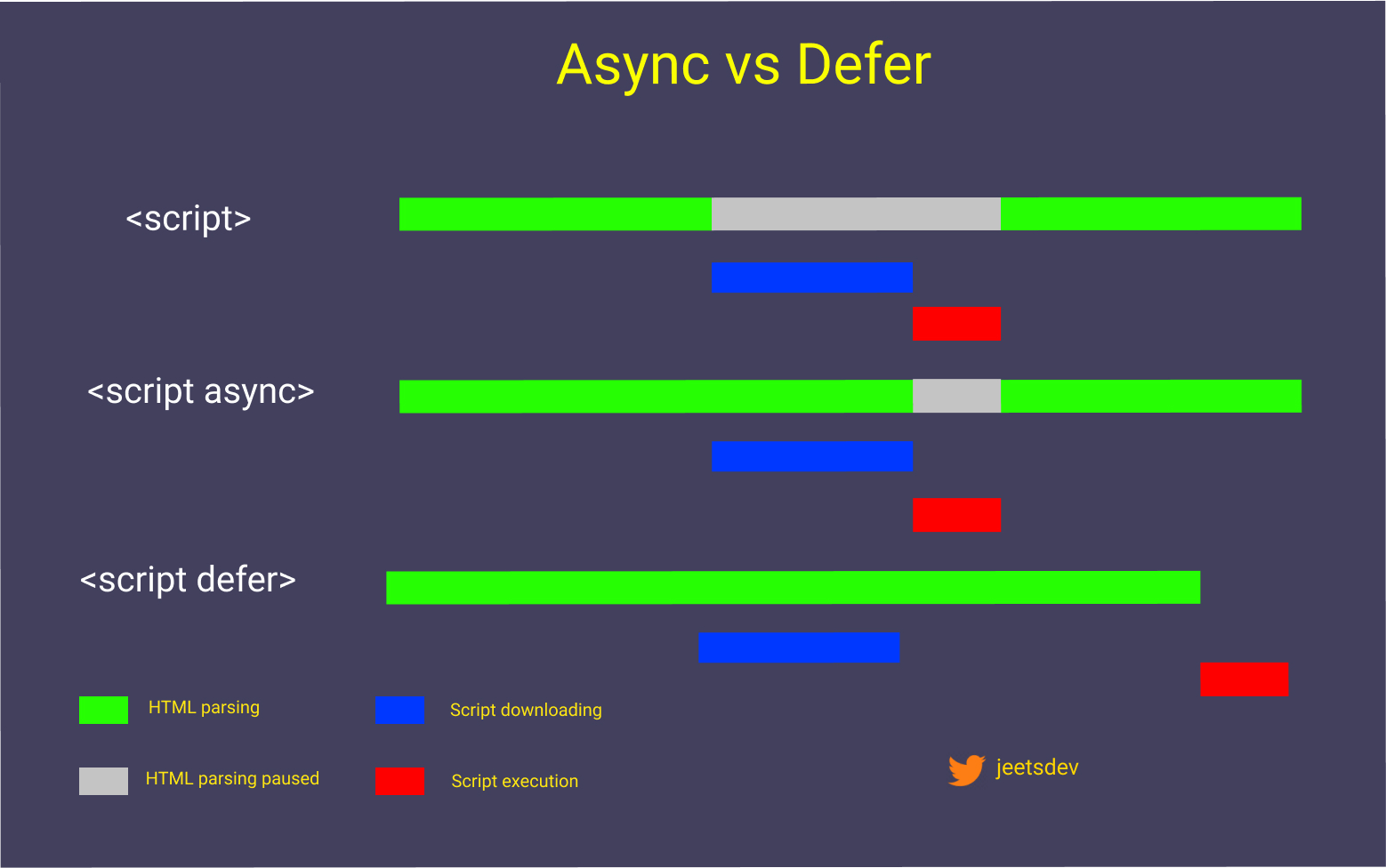
1. The browser reads the HTML from top to bottom. 

2. When it encounters the <script> tag, it pauses the HTML parsing. 

3. The browser fetches and executes the JavaScript file. 

4. Once done, it resumes parsing HTML. 

This means JavaScript files without async or defer can block the page from rendering, slowing down the initial load time. 

What Is the async Attribute? 

When you add the async attribute: 

Copy Code

<script src="script.js" async></script>

Here’s how it behaves: 

  • The browser starts downloading the JavaScript file in parallel while still parsing HTML. 
  • Once the file finishes downloading, HTML parsing is paused, and the script is executed immediately. 
  • After execution, HTML parsing resumes. 

Key point: async scripts do not wait for HTML parsing to finish, and they do not wait for other scripts. They execute as soon as they are ready. 

When to use async? 

  • When the script is independent and does not rely on the DOM being fully loaded. 
  • Ideal for analytics scripts, ads, or tracking pixels. 

What Is the defer Attribute? 

When you add the defer attribute: 

Copy Code

<script src="script.js" defer></script>

Here’s how it behaves: 

  • The browser downloads the script in parallel while parsing HTML. 
  • The script is executed only after the HTML is fully parsed
  • Scripts with defer execute in the same order as they appear in the document. 

Key point: defer ensures that scripts run only after the document is ready, without blocking HTML parsing. 

When to use defer? 

  • When the script interacts with DOM elements that need to be fully loaded. 
  • Perfect for large JavaScript files like frameworks or main application scripts. 

Async vs Defer: A Side-by-Side Comparison 

Feature async defer 
Download time Parallel with HTML parsing Parallel with HTML parsing 
Execution time Immediately after download completes After HTML parsing is finished 
Blocks HTML parsing Yes, when script executes No 
Execution order Unpredictable Order preserved 
Best use case Independent scripts (e.g., analytics) DOM-dependent scripts 


Code Example: Async 

Copy Code

<!DOCTYPE html> 

<html> 

<head> 

    <title>Async Example</title> 

    <script src="analytics.js" async></script> 

</head> 

<body> 

    <h1>Async Loading Example</h1> 

</body> 

</html>

Here, analytics.js will load in the background and execute as soon as it’s ready, without waiting for the HTML to be fully parsed. 

Code Example: Defer 

Copy Code

<!DOCTYPE html> 

<html> 

<head> 

    <title>Defer Example</title> 

    <script src="main.js" defer></script> 

</head> 

<body> 

    <h1>Defer Loading Example</h1> 

</body> 

</html>

Here, main.js will load in parallel but will only execute after the HTML is fully parsed. This ensures the script can safely manipulate DOM elements. 

Performance Considerations 

Modern websites often use multiple scripts, and improper loading can slow down page speed. Choosing between async and defer can help you: 

  • Reduce render-blocking JavaScript. 
  • Improve Time to Interactive (TTI). 
  • Enhance SEO performance (Google prefers faster-loading pages). 

For scripts that manipulate the DOM, prefer defer. For scripts that are independent of the page structure, async is the better choice. 

Best Practices 

1. Use defer for main scripts – It ensures DOM is ready before execution. 

2. Use async for third-party scripts – Prevents them from blocking your main content. 

3. Place scripts in the <head> with defer – Keeps HTML organized while maintaining speed. 

4. Combine and minify JavaScript files – Reduces the number of HTTP requests. 

Final Thoughts 

Both async and defer improve page performance by allowing JavaScript to load without blocking HTML parsing. The key difference lies in when the scripts are executed. Use them wisely to balance performance and functionality. 

If you want to master JavaScript and other web development skills with real-world projects, check out Uncodemy's Java full stack development course in pune , where you’ll learn how to optimize websites, work with modern frameworks, and build professional-grade applications. 

FAQs 

Q1. Which is faster: async or defer? 
Both load scripts in parallel, but async may execute earlier, making it faster for independent scripts. 

Q2. Can I use both async and defer together? 
No, browsers will ignore defer if async is present. 

Q3. Does defer work on inline scripts? 
No, it works only with external scripts. 

Q4. Does async affect SEO? 
It can help improve SEO indirectly by reducing page load time. 

Q5. Should I use defer for all scripts? 
Not always—use async for scripts that don’t depend on DOM elements. 

Placed Students

Our Clients

Partners

...

Uncodemy Learning Platform

Uncodemy Free Premium Features

Popular Courses