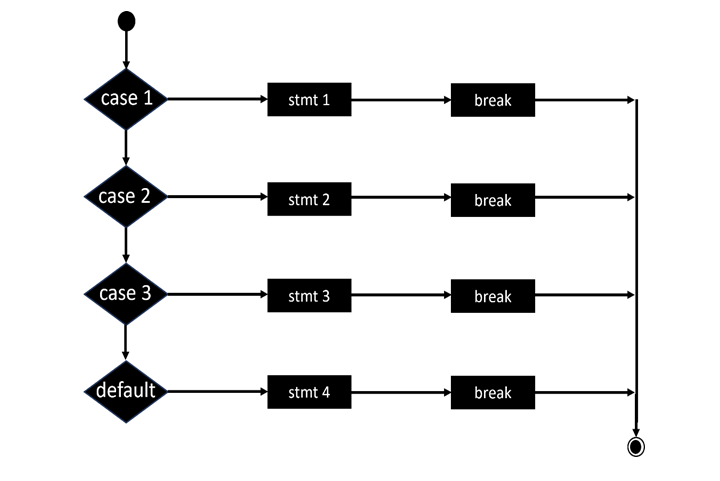
In the world of C programming, control flow is crucial for shaping how your program operates. Among the various tools available, the break statement in C stands out. It provides programmers with a way to exit loops or switch cases before they naturally finish, allowing for greater control over the execution of specific code segments.
In this blog, we’ll dive into the break statement in C, covering its syntax, practical applications, examples, benefits, and common pitfalls to watch out for. Whether you’re just starting out or brushing up on your C skills, this guide will clarify break statements and help you use them effectively in your coding projects.
What is the break statement in C?
Ms. Priyanka / 12 days
13
7 min read
The break statement in C is designed to end the execution of a loop or a switch statement ahead of schedule. When a break is encountered within a loop or switch, control jumps immediately to the statement that follows the loop or switch block.
This feature is particularly handy when certain conditions are met before a loop would normally finish or when a specific case is matched in a switch statement.
Syntax of Break Statement
break;
- For loops
- While loops
- Do-while loops
- Switch statements
Understanding the Use of Break in Loop Statements
1. Break in a For Loop
A break statement is often employed in loops to exit as soon as a certain condition is met, even if the loop hasn’t finished its usual number of iterations.
For example, think about searching for an item in an array and stopping the loop as soon as you find it.
2. Break in a While Loop
When we’re running a loop that could go on forever (like while(1)), the break statement gives us a way to stop the loop based on a specific condition.
This is particularly handy for creating adaptable loops where the criteria for stopping aren’t known ahead of time or can change.
3. Break in a Do-While Loop
Do-while loops are guaranteed to run at least once. Including a break within this structure allows for an early exit if certain internal conditions are satisfied.
This is especially useful when you want to give users the option to exit in menu-driven or interactive console applications.
Use of Break in Switch Statement
- One of the most frequent uses of a break statement is in a switch statement.
- Typically, each case is followed by a break to avoid fall-through, which would cause the execution to continue to the next case even if the current condition is met.
- If you skip the break, once a matching case is found, all the following cases (even those that don’t match) will execute unless you explicitly stop them.
Example: Using Break in Switch Statement
switch(choice) {
	case 1:
        printf("Option 1 selected.");
    	break;
	case 2:
        printf("Option 2 selected.");
    	break;
	default:
        printf("Invalid option.");
    	break;
}
Practical Examples of Break Statement in C
Example 1: Searching an Element Using Break
for(int i = 0; i < 10; i++) {
	if(arr[i] == target) {
        printf("Element found at index %d", i);
    	break;
	}
}
A lot of beginners tend to mix up break and continue.
- break is used to completely exit a loop or switch statement.
- continue, on the other hand, skips the current iteration and jumps to the next one.
Getting a grip on this difference is key for managing control flow effectively.
Using Break in Nested Loops
When you're dealing with nested loops, a break will only exit the innermost loop where it’s called. If you want to break out of multiple levels, you’ll need to either rethink your code structure or use flags.
Real-life example:
Imagine you’re searching through a matrix (a 2D array) for a specific value and want to stop as soon as you find it. In this case, break will only stop the inner loop. You’ll need an extra method to break out of the outer loop.
Benefits of Using the Break Statement
- Boosts efficiency: It halts unnecessary iterations.
- Simplifies logic: It helps avoid complicated nested conditions.
- Enhances flexibility: It’s great for unpredictable or dynamic situations.
- Cleaner code: It cuts down on the need for extra flags or variables.
Common Mistakes with the Break Statement
1. Forgetting to Use Break in Switch
If you forget to include a break in a switch statement, you might accidentally trigger the execution of subsequent cases, leading to what's known as fall-through.
2. Misplacing Break
Using break outside of a loop or switch block will throw a compile-time error, so make sure it’s in the right place!
3. Overusing Break
While break can be handy, using it too often can make your code logic confusing. It’s best to reserve it for situations where it’s truly needed.
When Not to Use Break
Even though break is a powerful tool, it shouldn’t be your first choice for managing control flow. If you can organize your logic with proper conditionals and loop conditions, that’s usually the better route.
Overusing break can result in what’s often called "spaghetti code," which refers to messy and hard-to-follow logic.
Real-Life Applications of Break in C Programming
- User Input Validation: Break out of loops once you’ve received valid input.
- Menu-driven Programs: Exit menu loops after a specific option is chosen.
- Search Operations: Stop searching once you find the data you need.
- Event-based Loops: Break when a specific event occurs, like a key press.
Best Practices for Using the Break Statement
- Always check meaningful conditions before breaking.
- Comment your break statements to enhance clarity.
- Avoid placing break where a simple condition in the loop could suffice.
- Make sure break doesn’t skip any important cleanup or operations.
Difference Between Break and Exit in C
Some people mix up break with exit().
- break only exits the loop or switch block.
- exit() immediately terminates the entire program.
So, if you want to stop a loop, go with break. If you need to end the program, use exit().
Enhancing Learning with Hands-on Practice
If you really want to get the hang of the break statement in C, dive into some real-world mini-projects. Create programs that manage menus, take user inputs, and perform search operations where break statements come into play. This hands-on approach will not only deepen your understanding but also help you use them effectively.
For those serious about mastering C programming in a structured and job-ready way, think about enrolling in a professional training program like the C Programming Course in Noida offered by Uncodemy. This course covers essential topics such as break and continue statements, loops, arrays, functions, pointers, and much more, all under the guidance of expert mentors, plus you’ll earn a certification.
Conclusion
The break statement in C is an essential control statement that allows you to exit loops and switch cases early. It gives you the flexibility and precision needed to manage the flow of your program. Knowing how and when to use it can greatly improve both the efficiency and readability of your C programs.
From simple loops to intricate nested conditions, the break statement helps developers navigate execution paths effectively. However, like any tool, it’s important to use it thoughtfully and sparingly to keep your code clean and maintainable.
As you continue on your programming journey, blending these fundamental concepts with structured learning can really speed up your progress. Elevate your skills with Uncodemy’s expert-led C Programming Course in Noida and lay a solid foundation in C programming.
FAQs on the Break Statement in C
Q1. What’s the main purpose of the break statement in C?
The break statement is mainly used to exit loops or switch cases when a certain condition is satisfied.
Q2. Can break be used outside of a loop or switch statement?
No, if you try to use break outside of loops or switch blocks, it will result in a compilation error.
Q3. Does break exit all loops in nested structures?
Nope! The break statement only exits the innermost loop where it’s placed.
Q4. What happens if I forget to use break in a switch case?
If you forget to include break, all the following cases will run, even if their conditions aren’t met, which leads to fall-through behavior.
Q5. Can I use break in an infinite loop?
Absolutely! Break is often used in infinite loops (like while(1)) to provide a way to exit based on a condition.
Q6. How does break differ from continue?
Break completely exits the loop, while continue skips the current iteration and moves on to the next one.
Q7. Is break required in switch statements?
It’s not syntactically required, but it’s crucial to prevent fall-through and ensure that only the matched case runs.
Q8. Can break be used in a do-while loop?
Yes, you can use break in do-while loops to terminate based on a specific condition.
Q9. What’s the difference between break and exit()?
Break stops the loop or switch case, while exit() halts the entire program execution.
Q10. Where can I learn more about C control statements and loops?
Check out the C Programming Course in Noida by Uncodemy to master control flow, loops, arrays, and more through expert-led sessions and hands-on practice!