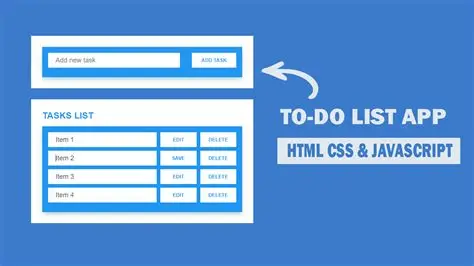
Understanding the Foundation of Modern Web Development
Before diving into the technical implementation, students must grasp the fundamental concepts that make modern web applications functional and user-friendly. The combination of HTML structure, CSS styling, and JavaScript interactivity forms the cornerstone of contemporary web development, creating experiences that engage users and provide meaningful functionality.
JavaScript serves as the programming language that brings static web pages to life, enabling dynamic content manipulation, user interaction handling, and data management. When students enroll in Uncodemy's comprehensive JavaScript programming courses, they discover how this versatile language transforms simple HTML documents into sophisticated web applications that respond intelligently to user input.
The localStorage API represents a crucial browser feature that allows web applications to store data persistently on the user's device. This client-side storage mechanism eliminates the need for server-side databases in simple applications, making it perfect for learning projects and lightweight web tools that prioritize user convenience and offline functionality.
Understanding these foundational technologies helps students appreciate how seemingly simple applications actually involve multiple layers of complexity working together seamlessly. The to-do list project serves as an excellent vehicle for exploring these concepts in a practical, hands-on manner that reinforces theoretical knowledge through real implementation.
Planning the Application Architecture
Successful software development always begins with careful planning and architectural consideration. Students learning through Uncodemy's structured web development programs understand that jumping directly into coding without proper planning often leads to convoluted, difficult-to-maintain applications that frustrate both developers and users.
The to-do list application requires several core functionalities that students must identify and organize before writing any code. Users should be able to add new tasks, mark existing tasks as completed, delete unwanted items, and have their data persist between browser sessions. These requirements drive the overall application design and determine the specific technical approaches needed for implementation.
The application architecture involves creating a clean HTML structure that provides semantic meaning to different interface elements, implementing CSS styles that create an intuitive and visually appealing user experience, and developing JavaScript functionality that handles user interactions and data management efficiently.
Students benefit from sketching out the user interface before beginning development, identifying which elements need dynamic behavior and how user actions should trigger specific application responses. This planning phase helps prevent common beginner mistakes and creates a roadmap that guides the entire development process.
Setting Up the HTML Foundation
The HTML structure serves as the skeleton upon which the entire application builds, providing semantic meaning and accessibility features that make the application usable by diverse audiences. Students working through Uncodemy's front-end development courses learn that well-structured HTML forms the foundation for maintainable, scalable web applications.
Creating the basic HTML structure involves defining a container element that holds the entire application, implementing an input field where users can type new tasks, adding a button that triggers task creation, and establishing a list container where completed tasks will appear dynamically. Each element should include appropriate semantic tags and accessibility attributes that support screen readers and other assistive technologies.
The HTML structure must also include proper form handling mechanisms that prevent default browser behavior and allow JavaScript to intercept user interactions. Students discover that understanding HTML forms and their default behaviors is crucial for creating applications that work predictably across different browsers and devices.
Proper HTML structure also involves organizing elements in a logical hierarchy that reflects their functional relationships. The input field and add button work together as a unit, while the task list represents a separate functional area that displays and manages existing tasks. This logical organization makes the application easier to style with CSS and manipulate with JavaScript.
Implementing Responsive CSS Styling
Visual presentation plays a crucial role in user experience, and students enrolled in Uncodemy's comprehensive web design courses understand that effective CSS styling transforms functional but unattractive applications into professional-looking tools that users enjoy using. The to-do list application provides an excellent opportunity to practice modern CSS techniques while creating an interface that works well across different devices and screen sizes.
The CSS implementation begins with establishing a consistent color scheme and typography that creates visual harmony throughout the application. Modern web design trends favor clean, minimalist approaches that prioritize readability and user focus over decorative elements that might distract from core functionality.
Responsive design principles ensure that the application works equally well on desktop computers, tablets, and mobile devices. This involves using flexible layout techniques like CSS Grid or Flexbox to create interfaces that adapt automatically to different screen sizes without requiring separate mobile versions or complex media query implementations.
Interactive elements like buttons and input fields require careful attention to hover states, focus indicators, and visual feedback that help users understand how to interact with the application effectively. Students learn that subtle animations and transitions can enhance user experience without overwhelming the interface with unnecessary visual complexity.
The completed tasks within the to-do list need distinct visual styling that clearly indicates their status while maintaining readability. This might involve using strikethrough text, reduced opacity, or different background colors that provide immediate visual feedback about task completion status.
JavaScript Functionality and Event Handling
The JavaScript implementation represents the heart of the application, transforming static HTML elements into a dynamic, interactive experience that responds intelligently to user actions. Students participating in Uncodemy's advanced JavaScript training programs discover how event-driven programming creates applications that feel responsive and intuitive to users.
Event handling forms the foundation of user interaction, with the application needing to respond appropriately when users type in the input field, click the add button, mark tasks as completed, or delete existing items. Each interaction requires specific JavaScript functions that modify the application state and update the visual interface accordingly.
The add task functionality involves capturing user input from the text field, validating that the input contains meaningful content, creating new HTML elements that represent the task visually, and updating the stored data to reflect the new task addition. This process demonstrates how JavaScript bridges user intentions with actual application functionality.
Task completion handling requires implementing click event listeners on individual task items, toggling their visual appearance to indicate completion status, and updating the underlying data structure to maintain consistency between what users see and what the application stores internally.
The delete functionality provides users with the ability to remove unwanted tasks, requiring confirmation mechanisms that prevent accidental deletions while keeping the interface streamlined and user-friendly. This involves attaching event listeners to delete buttons and implementing functions that remove both the visual representation and stored data for deleted tasks.
Understanding localStorage Implementation
The localStorage API provides persistent data storage that allows the to-do list to remember user tasks between browser sessions, creating a more practical and valuable user experience. Students exploring Uncodemy's web storage and browser API courses learn how client-side storage mechanisms eliminate the complexity of server-side databases for simple applications.
Implementing localStorage involves several key functions that handle reading existing data when the application loads, saving new data whenever users modify their task list, and managing data format consistency to prevent errors when parsing stored information. The browser's localStorage stores data as strings, requiring JSON serialization for complex data structures like arrays of task objects.
The application must gracefully handle cases where localStorage is not available, either because the user's browser doesn't support it or because they have disabled local storage for privacy reasons. This involves implementing fallback behaviors that allow the application to function even without persistent storage, though users would lose their data when closing the browser.
Error handling becomes particularly important when working with localStorage, as various conditions can cause storage operations to fail. Students learn to implement try-catch blocks that handle these exceptions gracefully, preventing application crashes while providing appropriate user feedback when storage operations encounter problems.
Data integrity considerations require implementing validation mechanisms that ensure stored data remains consistent and usable even if users modify it directly through browser developer tools or if application updates change the expected data format over time.
Building the Core Application Logic
The application's core logic orchestrates all the individual components, managing the flow of data between user interface elements and storage mechanisms while maintaining consistency and providing appropriate user feedback. Students working through Uncodemy's software engineering principles courses understand how well-organized application logic creates maintainable, debuggable code that can evolve over time.
The application initialization process involves checking for existing data in localStorage, parsing and validating that data, and populating the user interface with any previously saved tasks. This initialization must handle various edge cases, including corrupted data, version mismatches, and empty storage conditions.
Task management functions handle the core business logic of adding, updating, and removing tasks from both the visual interface and the persistent storage. These functions must maintain synchronization between what users see on screen and what gets saved to localStorage, preventing inconsistencies that could confuse users or cause data loss.
State management becomes increasingly important as applications grow in complexity, and even a simple to-do list benefits from organized approaches to tracking application state. Students learn to implement centralized state management patterns that make it easier to debug issues and add new features over time.
The application must also handle various user input validation scenarios, ensuring that empty tasks aren't added to the list, duplicate tasks are handled appropriately, and user inputs are sanitized to prevent potential security issues or display problems.
Advanced Features and User Experience Enhancements
Once the basic functionality works reliably, students can explore advanced features that demonstrate more sophisticated programming concepts while improving the overall user experience. These enhancements provide opportunities to practice additional JavaScript techniques and modern web development patterns.
Implementing task editing capabilities allows users to modify existing tasks without deleting and recreating them, requiring more complex event handling and state management. This feature involves toggling between display and edit modes, handling user input validation, and updating both the visual interface and stored data when users complete their edits.
Task prioritization and categorization features introduce data organization concepts that require more sophisticated data structures and filtering capabilities. Students learn to implement dropdown menus, radio buttons, and other form controls while managing the increased complexity in their data management functions.
Search and filtering functionality helps users find specific tasks in longer lists, demonstrating how to implement real-time text filtering, case-insensitive matching, and dynamic interface updates based on search criteria. These features require understanding string manipulation methods and array filtering techniques.
Drag and drop reordering capabilities introduce students to more advanced DOM manipulation and event handling concepts, showing how modern web applications can provide desktop-like user experiences through careful JavaScript implementation and CSS coordination.
Performance Optimization and Best Practices
As applications grow in complexity and handle larger amounts of data, performance considerations become increasingly important. Students enrolled in Uncodemy's advanced web development courses learn optimization techniques that keep applications running smoothly even as they scale to handle hundreds or thousands of tasks.
Efficient DOM manipulation practices minimize the performance impact of frequent interface updates, using techniques like document fragments and batch updates to reduce browser reflow and repaint operations. Students discover how seemingly innocent coding practices can significantly impact application responsiveness.
Memory management considerations become important when applications handle large amounts of data or run for extended periods. This involves understanding how JavaScript garbage collection works, avoiding memory leaks through proper event listener cleanup, and implementing efficient data structures that don't consume unnecessary resources.
Code organization and modularity principles help maintain application quality as functionality expands. Students learn to implement function separation, avoid global variable pollution, and structure their code in ways that make it easier to test, debug, and extend over time.
Testing and Debugging Strategies
Reliable applications require systematic testing and debugging approaches that help identify and resolve issues before they affect users. Students working through Uncodemy's quality assurance and testing courses understand how proper testing practices distinguish professional development from amateur coding.
Browser developer tools provide powerful debugging capabilities that help students understand how their applications behave in real-world conditions. Learning to use console logging effectively, set breakpoints, and inspect application state helps students develop crucial problem-solving skills.
Cross-browser testing ensures that applications work consistently across different browsers and devices, identifying compatibility issues that might affect user experience. Students learn to test their applications in multiple environments and implement solutions that work reliably across various platforms.
User acceptance testing involves having real users interact with the application and provide feedback about functionality, usability, and overall experience. This testing reveals issues that developers might miss and provides insights into how actual users approach the application.
Deployment and Distribution Considerations
Completed applications need deployment strategies that make them accessible to intended users while maintaining reliability and performance. Students exploring Uncodemy's web hosting and deployment courses learn various approaches to sharing their applications with the world.
Static web hosting platforms provide simple, cost-effective solutions for client-side applications that don't require server-side processing. Students learn to prepare their applications for deployment, optimize assets for production, and configure hosting environments appropriately.
Version control practices help manage application updates and collaborative development, using tools like Git to track changes, manage different feature branches, and coordinate work with other developers. These practices become increasingly important as students move toward professional development roles.
Documentation and user guide creation help other developers understand the codebase and help users get maximum value from the application. Students learn to write clear, comprehensive documentation that explains both technical implementation details and user-facing functionality.
Future Enhancement Opportunities
The to-do list application serves as a foundation for exploring more advanced web development concepts and technologies. Students can use their completed applications as starting points for investigating additional features and more sophisticated technical approaches.
Database integration could replace localStorage with more robust data storage solutions, introducing students to server-side development concepts and database management principles. This progression naturally leads toward full-stack development capabilities and more complex application architectures.
User authentication and multi-user support would transform the simple personal to-do list into a collaborative application that serves multiple users simultaneously. This enhancement introduces concepts like user management, data security, and session handling that are crucial for professional web applications.
Mobile application development using frameworks like React Native or Progressive Web App techniques could extend the to-do list concept to native mobile platforms, demonstrating how web development skills translate to mobile development opportunities.
Real-time synchronization using technologies like WebSockets could enable collaborative features where multiple users can share and edit task lists simultaneously, introducing concepts of real-time communication and conflict resolution that are valuable in many professional applications.
Professional Development and Career Applications
Building a polished to-do list application provides students with a portfolio piece that demonstrates practical programming skills to potential employers and clients. The project showcases proficiency in fundamental web technologies while providing a foundation for discussing more advanced development concepts during interviews.
The skills developed through this project directly transfer to more complex web development projects, providing students with confidence and practical experience that supports their continued learning journey. Students who complete comprehensive projects like this often find themselves better prepared for advanced coursework and professional development opportunities.
Understanding how to build complete applications from conception through deployment gives students realistic expectations about professional development work and helps them identify areas where they want to focus their continued learning efforts. This practical experience complements theoretical knowledge gained through formal coursework.
Conclusion
Creating a functional to-do list application using JavaScript and localStorage provides students with valuable hands-on experience that reinforces fundamental web development concepts while producing a practical, useful application. The project demonstrates how individual technologies work together to create seamless user experiences and introduces important concepts like data persistence, user interface design, and application architecture.
Students who complete this project gain confidence in their programming abilities while building portfolio pieces that showcase their skills to potential employers and collaborators. The combination of technical implementation and user experience considerations provides a well-rounded introduction to professional web development practices.
The skills and concepts explored through this project serve as stepping stones toward more advanced development topics and provide a solid foundation for students continuing their education through Uncodemy's advanced web development and software engineering programs. The practical experience gained through building complete applications proves invaluable as students progress toward professional development careers.
Most importantly, completing projects like this helps students understand that programming is ultimately about solving real-world problems and creating valuable tools that improve people's lives. This perspective transforms coding from an abstract academic exercise into a practical skill that can make meaningful differences in the world around them.