Build a Portfolio Website Using HTML and CSS
Mr. Bambam Kumar Yadav/ 3 days ago - 15
- 11 min read
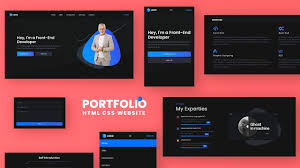
Having a personal website is super important these days. It's like your online resume, showing off what you can do and who you are. For anyone wanting to get into web stuff, learning HTML and CSS to build your own site is the easiest way to start. If you're trying to become a developer or just work in tech, making a portfolio site is a key thing to do for your career.
Why Build Your Portfolio Website?
Your own website, it's more than just a resume; it's your personal online space.
Build Trust: Potential employers and clients want to see what you can do firsthand.
Show Your Stuff: A live site proves you know your way around HTML, CSS, and responsive design, stuff you learn in Uncodemy’s Full Stack Developer course.
Do-It-All Tool: Link to projects, profiles, posts, and files all from one place.
You're in Charge: Unlike social media, you get to control everything about your site.
Planning: Lay the Foundations
A solid portfolio begins with a plan. Before you jump into HTML and CSS, be clear about your website's purpose:
1. Know Who You're Talking To and What You Want
Are you trying to get the attention of recruiters, find freelance gigs, or meet other people in your field? Your answers will affect your content and design.
2. Plan Your Site's Layout
You will probably want these main pages or sections (all covered in Uncodemy’s Full Stack Developer course projects):
- Home/Landing: A quick intro, a striking image, and what you have to offer.
- About: Your background, skills, and how you got here..
- Projects: Info on your best work, like images, results, and tech you used.
- Skills: Languages, tools, frameworks, and helpful soft skills.
- Resume/Experience: A resume you can download, plus a summary of your education and work history.
- Contact: your email, LinkedIn, a contact form, or other ways for people to reach you.
3. Get Your Stuff Together
- Pick good screenshots of your projects.
- Update your headshot, logos, or other personal branding stuff.
- Write clear, short project descriptions that focus on what you did and what happened as a result.
Building Structure: HTML Essentials
HTML is super important because it's what all websites are built on. At Uncodemy, our Full Stack Developer course teaches you how to write good, clean HTML. It's the way pros do it.
How to set up your stuff
- Use the right HTML tags: header tags for titles, nav tags for menus, section and article tags for content groups, and footer tags for things like contact info at the bottom.
- Put the most important stuff at the top of the page.
- Use headings to show what's important: one main header for your name or the site title, then smaller headings for each main section.
Make it accessible
- Add alt text to all your pics so people who can't see them know what they are.
- Make sure your site is easy to use for everyone, including people using screen readers. This is a key factor in inclusive web development.
Styling Your Portfolio: CSS Fundamentals
CSS makes your HTML look good. It's a big part of Uncodemy’s Full Stack Developer course, which covers everything from how stuff is laid out to what fonts to use.
Layout and Spacing
Keep your site neat by using the same amount of space around things.
Make project sections stand out with boxes or cards.
Fonts and Colors
Use a small set of colors that fit your style.
Match a font that's easy to read with one that stands out for titles.
Pick colors that look good and are easy to see for everyone.
Responsiveness
Make sure your site looks great on computers, tablets, and phones.
Use flexible grids, images, and special code to fit any screen.
Visual touches
Include small pictures for projects, icons for skills, and little effects when you move your mouse over things.
Separate sections with lines or colors.
Easy to Use
Make sure your site is easy to use and the same on every page.
Put important information where people can see it without problems, such as how to reach you.
Writing Compelling Content
Make sure your writing is as good as your design work.
- On your homepage or About page, quickly tell people who you are, what you care about, and what you're good at.
- When describing projects, talk about the problem you fixed, what you did, which tools you used, and what you learned along the way.
- Clearly list your skills and tools. Also, point out any certifications, awards, or shout-outs you've earned, like finishing the Uncodemy Full Stack Developer course.
- Use action verbs like built, designed, improved, and deployed.
- Keep your writing personal, friendly, but still professional.
Best Practices for Standout Portfolios
Focus on quality, not quantity: Only show your best work, not everything you've ever done.
Update often: Keep your site current with new stuff like projects, blog posts, or awards.
Make it look good: Use sharp images and keep the layout consistent.
Make it accessible: Ensure your site is easy to use for everyone, even with just a keyboard.
SEO tips: Use simple titles, descriptions, and alt text so recruiters and search engines know what your site is about.
Going Live: Hosting and Sharing
Uncodemy’s Full Stack Developer course covers how to put your site online:
- Try easy-to-use platforms such as GitHub Pages, Netlify, or Vercel for free hosting.
- Get your own domain name to give a more professional feel.
- Share your website link on LinkedIn, on your resume, and when you're job hunting.
Troubleshooting: Avoiding Common Pitfalls
| Mistake | Prevention / Solution |
|---|
| Broken links or images | Test every page and link before going live |
| Poor mobile usability | Preview your site on multiple devices and adapt |
| Slow page loading | Compress images, use minimal fonts and libraries |
| Typos or unclear messaging | Proofread, and ask friends or mentors for feedback |
| Overly complex navigation | Stick to 4–6 primary sections, use clear titles |
Real-World Skills You Demonstrate
Web Literacy: You really know your stuff when it comes to HTML, CSS, and how to put content together.
Problem Solving: Each project shows how you tackled problems and found solutions.
Attention to Detail: The design, how consistent it is, and no errors on the pages show you're a pro.
Communication: You write clear summaries of your projects, which means you can explain what you do to people who aren't developers.
Portfolio Evolution: Continuous Improvement
With Uncodemy's Full Stack Developer course, the idea is that learning never stops, and neither should your portfolio. As you get better:
- Replace old projects with fresh, improved ones.
- Include any skills, certificates, or workshops you've picked up.
- Show how you've grown by writing blog posts, case studies, or explaining your process.
- Try out fancier designs, interactivity, or new frameworks.
Launch Your Career With Confidence
Creating a portfolio website using HTML and CSS shows you're driven, disciplined, and have both creative and logical skills. If you're taking Uncodemy’s Full Stack Developer course, it's a key step to turn what you learn into real job stuff.
Your portfolio helps you get chances and tells *your* story online. Think about each part, add your own style along with your skills, and keep making your site better as you learn more. The faster your portfolio goes live, the quicker you’ll find opportunities.
Frequently Asked Questions (FAQs)
Q1: Do I need any backend or advanced coding to build a portfolio site?
No. For a starter portfolio, HTML and CSS are sufficient. As you advance, you can add JavaScript, hosting workflows, or backend features as desired.
Q2: How many projects should my portfolio include?
Three to five of your best or most relevant projects is ideal. Focus on depth of detail, clarity, and variety.
Q3: How do recruiters typically find portfolio sites?
Through resume links, LinkedIn profiles, and professional networks. Make sure your URL is short, memorable, and shared on every career touchpoint.
Q4: Does building a portfolio help with interviews?
Absolutely! Having a polished site showcases not just your technical ability but your commitment, professionalism, and ability to communicate complex work effectively.
Q5: How can I learn to build a portfolio step-by-step?
A structured course like Uncodemy’s Full Stack Developer course provides project guidance, feedback, and context, not just for HTML and CSS but for making the best real-world impression.




















