Understanding the Fundamentals of API Integration
The concept of Application Programming Interfaces has revolutionized how modern applications access and utilize external data sources. Weather APIs specifically provide real-time meteorological information that enables developers to create applications ranging from simple weather displays to sophisticated climate analysis tools. The OpenWeather API stands out among available weather services due to its comprehensive data coverage, reliable performance, and developer-friendly documentation that simplifies the integration process.
Technology companies have embraced API-driven development approaches because they enable rapid application development while maintaining high data accuracy and reliability. Rather than attempting to collect and maintain weather data independently, developers can leverage established services that specialize in meteorological information gathering and processing. This approach allows development teams to focus on creating exceptional user experiences rather than managing complex data infrastructure.
The most successful weather applications demonstrate sophisticated understanding of both technical implementation and user experience design principles. They seamlessly combine real-time data retrieval with intuitive interfaces that present complex meteorological information in easily digestible formats. This balance requires careful consideration of performance optimization, error handling, and responsive design principles that ensure consistent functionality across different devices and network conditions.
Technical Architecture for Weather Applications
Creating robust weather applications requires understanding both frontend and backend development principles that ensure reliable data retrieval and presentation. The foundational architecture typically involves JavaScript for dynamic user interactions, HTML for structural elements, and CSS for visual styling that creates appealing and functional interfaces.
API integration represents the core technical challenge in weather application development. Successful implementations require understanding HTTP request methods, asynchronous JavaScript operations, and proper error handling that maintains application stability when network conditions are less than optimal. The OpenWeather API provides multiple endpoints for different types of weather data, including current conditions, forecasts, and historical information that enable comprehensive weather applications.
Database considerations may include caching weather data to improve performance and reduce API calls, storing user preferences for location and display settings, and potentially implementing offline functionality that provides basic weather information even when internet connectivity is unavailable. These storage requirements must account for data freshness concerns and API usage limitations that affect application scalability.
Security implementation becomes crucial when handling API keys and user location data. Proper key management ensures that sensitive credentials remain protected while enabling seamless data access. Location privacy considerations require transparent communication with users about data collection and usage practices that build trust and comply with privacy regulations.
User Experience Design for Weather Applications
Modern weather applications must deliver exceptional user experiences across desktop computers, tablets, and mobile devices with varying screen sizes and interaction methods. Responsive design principles ensure that weather information remains easily accessible and visually appealing regardless of the device being used to access the application.
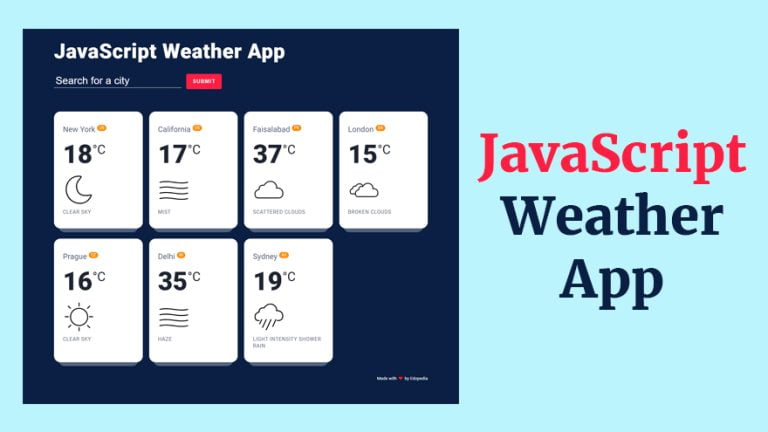
The visual presentation of weather data significantly impacts user satisfaction and application effectiveness. Clear typography, intuitive iconography, and logical information hierarchy help users quickly understand current conditions and forecast information without feeling overwhelmed by excessive detail. Color schemes should provide appropriate contrast while potentially reflecting current weather conditions through subtle visual cues.
Interactive elements such as location search, unit conversion, and forecast period selection enhance user control and personalization options. These features must be implemented with careful attention to accessibility standards that ensure all users can effectively interact with the application regardless of their abilities or assistive technologies.
Loading states and error messaging require thoughtful design that maintains user confidence when data retrieval takes time or encounters problems. Progressive enhancement approaches ensure that basic functionality remains available even when advanced features experience technical difficulties.
Uncodemy's JavaScript Full Stack Development Course: Mastering Modern Web Technologies
Recognizing the growing demand for developers who can create sophisticated web applications using modern JavaScript technologies, Uncodemy offers comprehensive Full Stack Development courses that equip students with the skills necessary to build professional weather applications and other complex web projects. Their curriculum covers essential frontend and backend development concepts, API integration techniques, and user experience design principles.
The program provides hands-on experience with contemporary JavaScript frameworks, asynchronous programming concepts, and external API integration that form the foundation of modern web application development. Students learn to implement real-time data retrieval, handle user interactions, and create responsive interfaces that deliver exceptional user experiences across different platforms and devices.
Uncodemy's experienced instructors bring practical knowledge from leading technology firms, sharing insights about best practices, performance optimization, and problem-solving approaches that distinguish professional applications from amateur implementations. This industry perspective helps students understand not only how to implement specific features but also why certain architectural decisions contribute to long-term project success.
The course structure emphasizes project-based learning where students progressively build more complex applications as they master new concepts and technologies. This approach ensures that graduates develop both technical proficiency and the analytical thinking skills necessary to tackle challenging development projects in professional environments.
Advanced Weather Application Features
Professional weather applications often incorporate features beyond basic current conditions display that enhance user value and demonstrate sophisticated development capabilities. Multi-location support enables users to monitor weather conditions in multiple areas simultaneously, creating personalized dashboards that serve diverse user needs.
Forecast visualization through charts and graphs provides users with intuitive ways to understand weather trends and plan activities accordingly. These visualizations require integration with charting libraries and careful consideration of data presentation that makes complex meteorological information accessible to general users.
Notification systems can alert users to significant weather changes, severe weather warnings, or conditions that meet user-defined criteria. These notifications might include browser push notifications, email alerts, or integration with mobile notification systems that extend application utility beyond active browser sessions.
Social sharing integration enables users to share interesting weather conditions or forecasts with their networks, creating viral marketing opportunities that extend application reach. These sharing features must include appropriate metadata and visual previews that maintain weather data accuracy across different social media platforms.
Performance Optimization and Scalability Strategies
Weather applications must handle potentially high user traffic while maintaining fast response times and minimal API usage that respects service limitations. Caching strategies can reduce API calls by storing recently retrieved weather data and serving cached results to multiple users when appropriate.
Image optimization becomes important for weather applications that include radar maps, satellite imagery, or custom weather icons. Proper image compression and format selection ensure that visual elements load quickly without sacrificing quality or user experience.
Progressive loading techniques enable applications to display basic weather information immediately while additional details load in the background. This approach improves perceived performance and user satisfaction even when complete data retrieval takes several seconds.
Content delivery network implementation ensures that weather application assets load quickly for users regardless of their geographic location. This global distribution becomes particularly important for applications targeting international audiences across multiple time zones.
Data Visualization and Interactive Elements
Effective weather data presentation requires understanding how users consume meteorological information and designing interfaces that facilitate quick comprehension and decision-making. Temperature trends, precipitation probability, and wind patterns each require different visualization approaches that highlight relevant information while minimizing cognitive load.
Interactive maps that display weather conditions across different geographic areas provide users with spatial context that enhances their understanding of weather systems and local variations. These maps require integration with mapping services and careful consideration of performance implications when displaying large amounts of geographic data.
Customizable display options enable users to personalize their weather application experience based on their specific needs and preferences. These options might include unit selection, forecast period preferences, and information priority settings that create tailored experiences for different user types.
Animation and transition effects can enhance weather data presentation while providing smooth user interface interactions that feel responsive and professional. However, these effects must be implemented carefully to avoid performance issues or accessibility problems for users with motion sensitivity.
Error Handling and Reliability Implementation
Weather applications must gracefully handle various error conditions including network connectivity issues, API service outages, and invalid location requests. Comprehensive error handling ensures that applications remain functional and informative even when optimal conditions are not available.
Fallback mechanisms can provide alternative data sources or cached information when primary APIs are unavailable. These backup systems require careful implementation to ensure data accuracy while maintaining user trust in application reliability.
User feedback systems enable applications to communicate status information clearly and provide helpful guidance when problems occur. Error messages should be written in plain language that explains the situation and suggests potential solutions without technical jargon that confuses general users.
Retry mechanisms with appropriate backoff strategies can automatically attempt to recover from temporary service disruptions while avoiding excessive API calls that might exceed usage limitations or contribute to service problems.
Testing and Quality Assurance Processes
Comprehensive testing procedures ensure weather applications function correctly across different browsers, devices, and network conditions that users might encounter. This testing must include edge cases such as extreme weather conditions, API service variations, and unusual location requests that might not occur during normal development testing.
Cross-browser compatibility testing verifies that weather applications render correctly and function properly across major web browsers and their various versions. This testing becomes particularly important for reaching diverse user bases that may use different browsers or operating systems.
Performance testing under various load conditions helps identify potential bottlenecks and scaling requirements before applications encounter high user traffic. These tests should simulate realistic usage patterns including peak usage times and concurrent user scenarios.
API integration testing ensures reliable communication with weather services under different conditions including slow network connections, partial data responses, and service timeouts that might affect application functionality.
Deployment and Maintenance Considerations
Successful weather application deployment requires careful planning of hosting infrastructure and ongoing maintenance procedures that ensure reliable service availability. Cloud hosting platforms provide scalability and reliability that accommodate varying user traffic patterns and geographic distribution requirements.
Monitoring systems enable proactive identification of performance issues, API problems, and user experience difficulties that require attention. These systems should provide real-time alerts for critical issues while collecting historical data for trend analysis and capacity planning.
Regular updates and feature enhancements keep weather applications competitive and responsive to user feedback and changing requirements. Update procedures should include testing protocols and rollback capabilities that minimize service disruption during deployment processes.
Future Trends and Innovation Opportunities
The weather application landscape continues evolving with new technologies and user expectations creating opportunities for innovative implementations. Machine learning integration can enable predictive features that anticipate user needs and provide proactive weather information based on historical usage patterns.
Voice user interface integration may become relevant as smart speakers and voice assistants gain popularity for quick information access. These interfaces could enable hands-free weather queries and verbal weather updates that extend application functionality beyond traditional visual displays.
Augmented reality technologies present opportunities for immersive weather visualization that overlays meteorological information onto real-world camera views. These implementations could include temperature overlays, precipitation visualization, or weather-related safety information that enhances environmental awareness.
Conclusion
Building professional weather applications using the OpenWeather API and JavaScript represents an excellent opportunity for developers to demonstrate comprehensive web development skills while creating practical tools that serve genuine user needs. The combination of API integration, user experience design, and technical optimization makes these projects ideal for showcasing modern development capabilities.
Success requires understanding both the technical requirements for reliable data integration and the user experience considerations that make weather applications genuinely useful and engaging. Educational programs like Uncodemy's JavaScript Full Stack Development course provide the comprehensive training necessary to master these complex requirements while building confidence to tackle ambitious development projects.
The technology landscape continues offering opportunities for innovative weather application implementations that serve specific user needs better than existing alternatives. Developers who combine technical expertise with user experience understanding position themselves to create successful applications that provide genuine value while building rewarding careers in the dynamic world of web development.