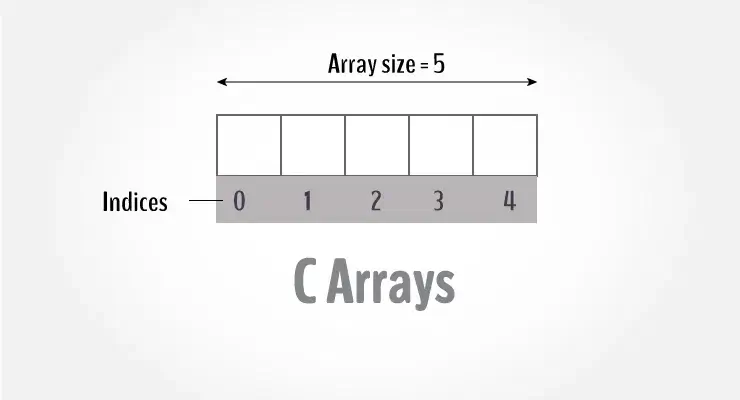
Understanding how to figure out the length of a C array is crucial for writing safe and efficient C programs. Unlike many higher-level languages, C doesn’t come with built-in methods to determine array length. Instead, you need to use techniques that depend on array properties, memory management, and careful coding practices. Accurately calculating the length of an array helps avoid out-of-bounds errors, boosts program reliability, and is key for solid C development.
- Methods to calculate length during compile time and runtime
- The advantages and disadvantages of each approach
- Common mistakes and best practices
- Advanced topics like dynamic arrays and pointer arithmetic
For a deeper understanding of C programming—including arrays, pointers, memory management, and more complex structures—check out the Advanced C Programming Course in Noida by Uncodemy, which provides hands-on training and real-world applications.
1. Understanding Arrays in C
Mr. Bambam Kumar Yadav / 13 days
18
17 min read
A C array is essentially a continuous block of memory where every element is of the same type (like int, char, or double). When you declare an array like:
int arr[10];
- The compiler sets aside enough consecutive memory to hold 10 integers.
- There’s no extra information (like length) stored with the array.
- When you pass it to functions, the array turns into a pointer to its first element (int *), which means it loses its size information.
- It’s up to the programmer to remember how many elements are in the array.
With that in mind, let’s dive into the ways to calculate the length of an array.
2. Compile-Time Length Calculation
If you have a statically declared array, you can determine its length at compile time by using the sizeof operator:
size_t length = sizeof(arr) / sizeof(arr[0]);
- The expression sizeof(arr) tells you the total number of bytes that have been allocated for the entire array.
- On the other hand, sizeof(arr[0]) gives you the size of just one element within that array.
- By dividing the total bytes by the size of one element, you can figure out how many elements are in the array.
Pros:
- It's straightforward and efficient.
- It's type-safe and gets evaluated at compile time.
- There's no extra overhead during runtime.
Cons:
- This method only works for arrays, not for pointers.
- You need to be careful not to let the array decay into a pointer.
3. Runtime Length Tracking
When you pass an array to a function, it turns into a pointer, which means the sizeof method won't work anymore. Instead, you'll need to keep track of the length with a separate variable.
void process(int *data, size_t length);
This pattern often pops up in functions that deal with dynamic input, command-line arguments, or adaptable buffers.
Pros:
- Works seamlessly with both static and dynamic arrays
- Clear and straightforward
Cons:
- Requires careful attention to ensure the length is passed correctly
- The length variable can become outdated if it doesn't match up
4. Sentinel Values
Some arrays use a sentinel value to indicate the end, much like strings do. For example, you might use -1 to signal the end of a list of positive integers:
int sequence[] = {10, 20, 30, -1};
This approach is commonly found in C APIs, especially when dealing with environment variables or lists of string tokens.
Pros:
- Offers flexible runtime usage
- Great for handling variable-length data without needing to track the length
Cons:
- The sentinel value must be unique and not something valid in the data
- It can be risky if the sentinel is missing or gets corrupted
5. Macros for Reusable Length Calculation
To save yourself from constantly typing sizeof(arr)/sizeof(arr[0]), you can create a macro:
If a pointer is passed incorrectly, it will return -1, indicating that something went wrong.
Pros:
- Acts as a safety net to catch misuse
- Promotes writing correct code
Cons:
- Can be complex and may not work well across different compilers
8. Using Pointer Arithmetic to Determine Length
When you have the starting and ending addresses of an array, you can find its length by simply subtracting the two.
int arr[10];
int *begin = arr;
int *end = arr + 10;
size_t len = end - begin;  // yields 10
This method works for both static and dynamically-allocated arrays, as long as you know the end address.
Pros:
- It’s compatible with pointers too
- No need for sizeof
Cons:
- You have to keep both pointers in sync
9. Common Pitfalls to Avoid
- Using sizeof on pointers – it gives you the size of the pointer, not the length of the array
- Passing arrays without their size – this can lead to buffer overruns
- Mixing different array types – sizes for char, int, and double vary; consistency is key
- Off-by-one errors – these often happen due to mismatches between index and length
10. Code Organization & Safety Tips
- Always declare static arrays with specific sizes
- Use macros for safety at compile time
- Pass the length along with arrays to prevent errors
- Opt for dynamic allocation when you’re unsure of sizes
- Make sure to free allocated memory properly to avoid leaks
Theoretical Point 1: Arrays vs Pointers
In C, when you mention an array name, it usually points to the address of its first element (think of int arr[] turning into int *). But here’s the catch: arrays and pointers are actually different types when it comes to compile time. If you want to calculate the length at compile time, using the array name directly lets sizeof do its job properly. However, once it turns into a pointer—like when you pass it to a function—you lose that length info, and you’ll need to track it separately. Grasping this difference is crucial to steer clear of runtime bugs and memory mishaps.
Theoretical Point 2: Memory Layout and Indexing
In C, arrays are laid out in memory one after the other. Understanding how elements correspond to memory addresses (where arr[i] is the same as *(arr + i)) opens the door to safe pointer arithmetic. This insight gives you the freedom to iterate using pointers instead of traditional indices, but it also means you lose those handy automatic boundary checks. C programmers need to be vigilant during iteration, ensuring that their indices or pointer increments stay within the allocated limits to dodge any undefined behavior.
Related Course
By mastering skills like array management, pointer arithmetic, dynamic memory, and compile-time safety, you can really boost your C programming abilities. Consider enrolling in the Advanced C Programming Course in Noida offered by Uncodemy for in-depth, hands-on training. You’ll tackle real-world projects involving arrays, strings, file I/O, and systems-level coding, all under the guidance of seasoned instructors and mentorship from industry experts.
Conclusion
When it comes to figuring out the length of a C array, it’s essential to grasp how arrays function behind the scenes. Whether you’re employing compile-time techniques with sizeof, keeping track of lengths manually, using sentinel values, or handling dynamic memory, each approach has its pros and cons. It’s best to mix in some solid practices—like using macros, ensuring pointer arithmetic is safe, and managing memory wisely—to create code that’s both clear and reliable.
Sharpening these skills will boost your confidence in systems-level programming and embedded software design. And if you’re eager to take your knowledge to the next level, check out the Advanced C Programming Course in Noida from Uncodemy. It offers hands-on experience and expert insights to help you thrive in real-world C development.
Frequently Asked Questions (FAQs)
Q1. Can I use sizeof to determine array length inside functions?
Nope! When you pass arrays to functions, they turn into pointers, so sizeof will just give you the size of the pointer, not the actual array length.
Q2. What if I use the ARRAY_LENGTH macro on a pointer?
That’ll give you the pointer size divided by the element size, which is not what you want. Keep an eye out for warnings or unexpected results.
Q3. How do sentinel values differ from tracking length?
Sentinels indicate the end of data (like -1 in integer arrays) and require you to scan until you hit that marker, while length tracking means you keep an explicit count.
Q4. Which method is the safest for dynamic arrays?
The safest approach is to use length tracking when you allocate memory (like malloc(n * sizeof *arr)) along with pointer arithmetic for clarity and safety.
Q5. Can _Generic macros prevent misuse?
Absolutely! They can trigger compiler errors or warnings if you try to use ARRAY_LENGTH on pointers, which boosts safety.
Q6. Is pointer arithmetic safe for calculating length?
Yes, as long as you keep your pointers correct. But be careful—wrong calculations can lead to undefined behavior.
Q7. What happens if I forget to free() a dynamically allocated array?
You’ll end up with memory leaks—unused memory stays allocated until the program ends, which can be a problem for long-running systems and embedded devices.
Q8. Should I always combine arrays with length variables?
Definitely! It’s a best practice for function interfaces and safety. This way, you avoid undefined behavior and make your intent clear.
Q9. Are arrays and pointers interchangeable in all cases?
Not quite. While array names often turn into pointers, they are different types and behave differently, especially when it comes to sizeof.
Q10. Where can I deepen my understanding of C array handling?
Check out the Advanced C Programming Course in Noida by Uncodemy. They offer in-depth modules on arrays, pointers, dynamic memory, and systems-level coding.