C++ Map Explained with Syntax and Real Life Use Cases
In the world of programming, efficient data management is key to writing clean, fast, and readable code.
One of the most useful tools in C++ for storing and accessing data pairs is the map container. If you're
currently enrolled in or considering joining a C++ Programming Course in Noida, understanding the C++
map will be a major milestone in your learning journey.
C++ Map Explained with Syntax and Real Life Use Cases
Sonal Rana / 1 week ago
22
13 min read
In this article, we’ll cover everything you need to know about C++ map, from its
basic syntax to advanced real-world applications, all explained in simple, beginner-friendly
language.
What is a C++ Map?
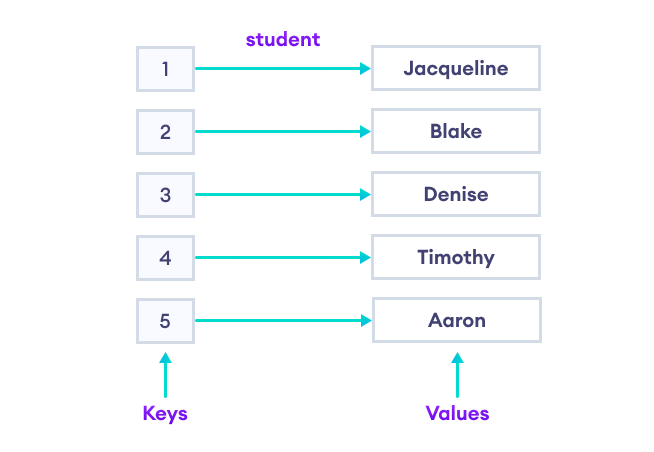
A map in C++ is an associative container that stores elements in key-value pairs.
Every element in the map is a combination of a unique key and a value associated with that key.
The map container is part of the Standard Template Library (STL) in C++. It uses
a balanced binary tree (usually Red-Black Tree) behind the scenes, ensuring logarithmic time
complexity for insertion, deletion, and lookup.
Key Properties:
Keys are unique.
Elements are stored in sorted order (by default using < operator).
Each key is associated with exactly one value.
Syntax of C++ Map
Here's how you declare a map in C++:
#include
#include
Output:
1 => John
2 => Alice
3 => Bob
Basic Operations on C++ Map
Let’s explore some common operations you’ll need while working with maps in C++.
These examples are widely used in project assignments and hands-on sessions in a
C++ Programming Course in Noida.
Comparison: Map vs Unordered_map
Feature
map
unordered_map
Underlying Structure
Red-Black Tree
Hash Table
Ordered
Yes
No
Time Complexity
O(log n)
O(1) average case
Duplicate Keys
Not Allowed
Not Allowed
Use Case
Need sorted keys
Fast lookup
Choose a map when you need keys in sorted order. Choose unordered_map for faster
access when order doesn't matter.
Tips While Using C++ Map
Avoid using [] to access keys unless you're sure the key exists;
otherwise, it inserts a default value.
Use .find() when checking for key existence.
Prefer using .insert() if you don’t want to overwrite an existing
key-value pair.
Use emplace() for efficiency (constructs in-place).
Deep Dive: Behind-the-Scenes of C++ Map
To truly understand how a C++ map operates, it's important to know what happens
behind the scenes. When you insert a key-value pair into a map, the container performs the
following:
Searches the correct position for the key using binary search logic.
Maintains sorted order based on the key.
Inserts the value at the identified location.
This internal balancing is handled by a Red-Black Tree, which is a self-balancing
binary search tree (BST). This structure ensures that even as more elements are added, the depth
of the tree remains logarithmic, preserving the performance. Students learning through a C++
Programming Course in Noida are often given assignments that test the behavior of maps under
large datasets. This helps them understand why certain containers like maps or unordered_maps
are preferred in certain scenarios.
Advanced Map Functions in C++
Here are some advanced yet highly useful functions of map that are commonly used
in competitive programming and real-world applications.
1. count() Function
Checks if a key exists in the map. Returns 1 if present, 0 if not.
if (m.count("Alice")) {
    cout << "Alice found!";
}
2. lower_bound() and upper_bound()
These functions return iterators pointing to positions based on key
comparison.
auto it = m.lower_bound("Bob"); // returns >= Bob
auto it2 = m.upper_bound("Bob"); // returns > Bob
3. emplace()
Faster and more efficient than insert() in some cases, as it constructs
in-place.
m.emplace("David", 35);
Real-Life Use Case: Leaderboard System
Let’s say you are building a Leaderboard for an online game. You need to store
player scores, retrieve top scores, and update existing ones. Using map> allows you to store scores in descending order:
In a practical C++ Programming Course in Noida, this kind of project may be used
to help students apply what they’ve learned in a real application scenario.
Understanding Map with Custom Data Types
Did you know you can use user-defined data types as keys in a map? Example:
struct Point {
    int x, y;
    bool operator<(const point& p) const { return x < p.x || (x="=" && y p.y); } }; map pointLabels;
pointLabels[{1, 2}] = "A";
pointLabels[{3, 4}] = "B";
Here, we’ve used a custom Point structure as the key in a map by overloading the
< operator to maintain order. This feature is frequently explored in intermediate to advanced
levels of a C++ Programming Course in Noida.
Project Use Case: E-Commerce Coupon System
Let’s consider an e-commerce website that offers discount coupons to
users. Each coupon has a unique code and an associated discount value.
This is a practical application of map where key-value pairing provides
real-time benefits.
When NOT to Use C++ Map
While the C++ map is versatile, it’s not always the ideal choice. Avoid
using map in the following situations:
When duplicate keys are needed – Use multimap.
When you need constant time lookup – Use unordered_map.
When insertion order matters – Use vectors or lists.
A common mistake beginners make (often discussed in beginner modules of a
C++ Programming Course in Noida) is misusing maps for data that does not require sorting
or uniqueness.
Summary Table: C++ Map At A Glance
Feature
C++ Map
Container Type
Associative (Sorted)
Internal Structure
Red-Black Tree
Key Uniqueness
Yes
Default Order
Ascending by key
Duplicate Keys Allowed
No
Time Complexity
O(log n)
Best For
Fast search, sorted data
C++ STL Header
<map>
FAQs on C++ Map
Q1. What is a map in C++?
Answer: A map is a container that stores key-value pairs in sorted
order. Keys are unique and mapped to specific values.
Q2. How is a C++ map different from an array?
Answer: Arrays use integer indices, while maps allow keys of any data
type and store them in sorted order.
Q3. Is C++ map faster than array or vector?
Answer: Not necessarily. Maps offer better search for non-indexed
data, but arrays/vectors are faster for indexed data and simpler use cases.
Q4. What if I try to insert a duplicate key in a
map?
Answer: The value of the existing key will be updated; duplicate keys
are not allowed in maps.
Q5. Can I sort a map in descending order?
Answer: Yes, you can use a custom comparator using
greater<keyType>.
map> descendingMap;
Q6. What is the default sorting in maps?
Answer: Maps sort elements based on the ascending order of keys using
the < operator.
Final Thoughts
Learning about the C++ std::map is a crucial step in mastering the STL and writing optimized C++ code, whether you are solving competitive programming problems, designing databases, or developing real-world applications. If you're looking to strengthen your programming fundamentals and master key concepts like associative containers, enrolling in Uncodemy's Data Structure and Algorithm Course in Delhi or a specialized C++ Programming Course in Noida is a great decision. Through structured training, you get hands-on experience with core STL containers such as map, set, and vector, alongside industry-relevant projects and interview-level problem-solving. Practice std::map and implement it in your mini-projects to gain practical expertise—the more you build with it, the more intuitive writing high-performance C++ code becomes!