In the world of C programming, there are many tools and tricks that help developers write clean and efficient code. One of the simplest yet most powerful concepts is the idea of a constant. While variables allow you to change and update values, constants are the exact opposite. They are fixed values that stay the same throughout the life of the program.
So let’s get started with the basics.
What Are Constants in C?
To put it simply, a constant is a value that cannot be changed while the program is running. Once you define a constant, you are locking that value for the entire duration of the program. If you try to change it, the compiler will throw an error.
Think about something like the value of Pi which is 3.14159. No matter how many times you use it in your program, that value is not going to change. Instead of typing 3.14159 again and again in your code, you can define it once as a constant and use the name Pi wherever needed. It not only makes your code more readable but also helps avoid mistakes and saves time.
Why Should You Use Constants?
The primary reason developers use constants is to avoid hardcoding values repeatedly in their programs. Imagine you are working on a project where a certain number, say 100, represents the maximum number of users. Now instead of typing 100 every time, you could define a constant called MAX_USERS and use that name throughout your code. This way, if that number ever needs to change, you only need to update it in one place.
Constants also make your program safer. Since they cannot be changed, there is no risk of someone accidentally modifying an important value. It’s a great way to protect your logic and make sure your program behaves as expected.
Moreover, constants improve the overall readability of your code. Names like TAX_RATE or TIMEOUT make much more sense than mysterious numbers like 0.18 or 5000.
Different Types of Constants in C
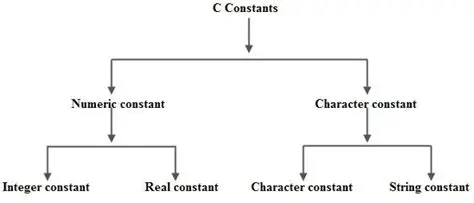
Constants come in many forms and can represent different types of values. These include numbers, characters, strings, and floating-point values.
First, there are integer constants. These are whole numbers like 10, 50, or 1000. You can use them wherever an integer is required in the program.
Then, you have floating-point constants. These include decimal values such as 3.14 or 9.81. They are often used in mathematical calculations or formulas.
Character constants are another type and they consist of a single character enclosed within single quotes. For example, 'A', 'x', or '1' are all character constants.
Next are string constants. These are sequences of characters enclosed in double quotes, like "Hello World" or "Welcome to C Programming".
While these are the primary types, there are also more complex or secondary constants such as array constants or enum constants. These are more advanced and come into play as you dive deeper into C programming.
How to Define Constants in C
Now that we understand what constants are and why they are useful, let’s look at how you can define them in your C programs. There are two popular ways to do this.
The first method is by using the preprocessor directive called define. It’s written using the hash symbol followed by the word define, then the name of the constant, and finally the value. For example:
Copy Code
c

CopyEdit

#define PI 3.14159
This means that wherever you write PI in your code, the compiler will replace it with 3.14159 before the actual compilation starts.
Another example would be:
Copy Code
c

CopyEdit

#define MAX_USERS 100
This method is easy and fast, but it has some limitations. Since the compiler replaces the name with the value during preprocessing, there is no type checking involved. That means you could accidentally use the constant in the wrong context and not realize it until something goes wrong.
That brings us to the second and safer method of declaring constants, which is by using the const keyword. This approach allows you to define constants in a type-safe manner, meaning the compiler knows what type of value you are working with and can catch errors.
For example:
Copy Code
c

CopyEdit

const float pi = 3.14159;


Or

c

CopyEdit

const int maxUsers = 100;
With this method, if you try to change the value of the constant later in your code, the compiler will not allow it and will show an error.
Difference Between define and const
At this point, you might be wondering which method you should use. Both have their advantages, but they work differently behind the scenes.
The define method is handled by the preprocessor before the compilation starts. It is simple but doesn’t offer type checking, and the constant has a global scope across the file.
The const method, on the other hand, is handled by the compiler itself. It offers type safety, supports scope management, and works well with debuggers. It’s a more modern and safer approach, especially in larger projects.
Examples to Understand Constants Better
Let’s take a look at a few simple examples to see how constants work in real programs.
Imagine you are writing a program to calculate the area of a circle. You can define Pi as a constant and use it in your formula.
Copy Code
c

CopyEdit

#include <stdio.h>

#define PI 3.14159


int main() {

    float radius = 5.0;

    float area = PI * radius * radius;

    printf("The area of the circle is %.2f", area);

    return 0;

}
Here, PI is defined using the define method. You can also do the same using the const method:
Copy Code
c

CopyEdit

#include <stdio.h>


int main() {

    const float pi = 3.14159;

    float radius = 5.0;

    float area = pi * radius * radius;

    printf("The area of the circle is %.2f", area);

    return 0;

}
Both approaches will give you the same result, but the second method provides more safety and better code clarity.
Scope of Constants
Constants declared using define are global in nature. This means they can be accessed from anywhere within the file after they are defined.
Constants declared using the const keyword can be local or global depending on where you define them. If you define them inside a function, they are only available within that function. If you define them outside all functions, they are available throughout the file.
This flexibility is one of the reasons many developers prefer using const, especially when writing modular code.
Mistakes to Avoid When Using Constants
While using constants is fairly straightforward, there are a few common mistakes beginners make.
One common mistake is trying to change the value of a constant after it is defined. Remember, constants are meant to be fixed. Trying to assign a new value will always result in a compilation error.
Another mistake is confusing characters and strings. For instance, 'A' is a character constant, while "A" is a string constant. They are not the same and are treated differently in C.
Also, be cautious with the scope of constants. If you define a constant using define, it affects the entire file, which may not always be desirable.
Where Are Constants Used in Real Programs?
You’ll find constants used in almost every C program out there. Whether it is setting the maximum length of an array, defining return codes for functions, specifying configuration values, or setting limits and thresholds, constants help bring structure and safety to your code.
For example, if you are building a login system, you might define a constant for the maximum number of login attempts. Or if you are dealing with currency conversion, you could define exchange rates as constants.
Final Thoughts and Where to Learn More
Understanding constants in C may seem like a small detail, but it has a big impact on the quality of your programs. Using them wisely helps make your code more readable, easier to maintain, and less prone to bugs.
If you want to take your learning further and master not just constants but every key aspect of C programming, then Uncodemy’s C Programming course is a great place to start. The course is designed for both beginners and those looking to revise core concepts. It walks you through theory, examples, and projects that help you apply what you learn.
By learning how to use constants effectively and combining them with other C programming principles, you’ll be well on your way to writing professional-grade code.