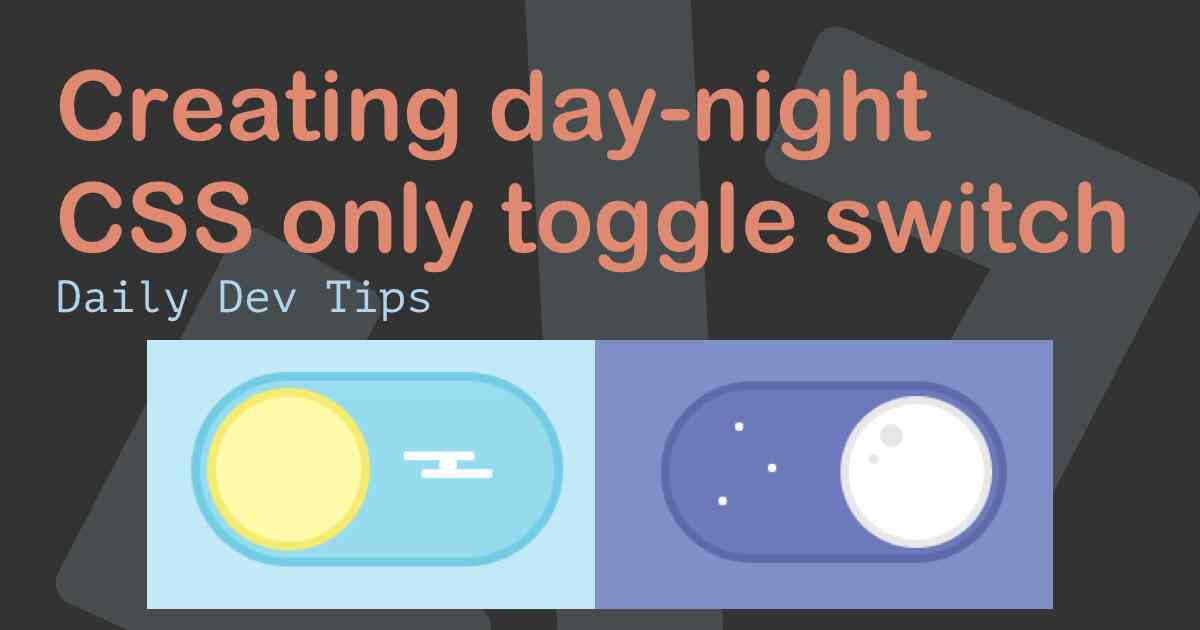
Understanding how to create elegant CSS-only toggle switches with smooth transitions has become an indispensable skill for aspiring web developers and seasoned professionals alike.
In today's competitive technology market, developers who master advanced CSS techniques stand out significantly from their peers. The ability to create sophisticated user interface components without relying on external JavaScript libraries demonstrates both technical expertise and understanding of performance optimization principles. This comprehensive guide explores the intricate process of building professional-grade toggle switches using pure CSS, complete with seamless transitions that captivate users and enhance overall interface aesthetics.
The Evolution of Toggle Switch Design
Toggle switches have evolved dramatically from their humble beginnings as simple checkboxes to sophisticated interface elements that provide immediate visual feedback. The transformation reflects the broader evolution of web development practices, where user experience has become paramount in determining application success. Modern toggle switches incorporate smooth animations, accessibility features, and responsive design principles that cater to diverse user needs across different devices and platforms.
The demand for interactive components has driven developers to explore innovative CSS techniques that push the boundaries of what's possible without JavaScript intervention. This shift towards CSS-only solutions offers numerous advantages, including improved performance, reduced dependencies, and enhanced maintainability. Companies across the technology sector increasingly value developers who can create these advanced components efficiently and effectively.
For students pursuing careers in web development, mastering CSS-only toggle switches represents a significant milestone in their learning journey. Uncodemy's comprehensive CSS and frontend development courses provide structured learning paths that guide students through these advanced techniques, ensuring they develop the practical skills needed for professional success. The curriculum emphasizes hands-on experience with real-world projects that mirror industry standards and expectations.
Understanding the Technical Foundation
Creating effective toggle switches requires deep understanding of several CSS concepts working in harmony. The foundation relies heavily on advanced selectors, pseudo-elements, and transform properties that enable smooth visual transitions. Developers must grasp how these elements interact to create the illusion of physical movement within digital interfaces.
The HTML structure for CSS-only toggle switches typically involves strategic use of input elements combined with label tags to maintain accessibility standards. This approach ensures that the components remain functional for users with assistive technologies while providing visual appeal for standard interactions. The semantic structure plays a vital role in both functionality and search engine optimization.
CSS custom properties have revolutionized how developers approach toggle switch creation, allowing for dynamic theming and easy customization across different design systems. These variables enable developers to maintain consistency while providing flexibility for various use cases and brand requirements. The modular approach facilitated by custom properties aligns perfectly with modern development practices and component-based architectures.
Transform properties, particularly translateX and scale, form the core of smooth toggle animations. Understanding how these properties affect element positioning and sizing enables developers to create natural-feeling movements that enhance user experience. The mathematical precision required for perfect alignment and timing demonstrates the sophisticated nature of modern CSS development.
Building the HTML Structure
The HTML foundation for toggle switches demands careful consideration of semantic markup and accessibility requirements. The structure should maintain functionality across different browsers while providing clear interaction patterns for users. Proper labeling ensures that screen readers and other assistive technologies can interpret the component correctly, making the interface inclusive for all users.
Input elements serve as the functional core of CSS-only toggle switches, leveraging the browser's native state management capabilities. The hidden checkbox input provides the toggle functionality while remaining invisible to users, creating a seamless visual experience. This approach eliminates the need for JavaScript state management while maintaining full accessibility compliance.
Label elements create the visual interface that users interact with, styled to resemble physical toggle switches found in real-world applications. The association between labels and inputs through proper ID attributes ensures that clicking anywhere on the visual component triggers the underlying functionality. This relationship forms the foundation of user-friendly interface design.
Container elements provide structural organization and enable complex styling possibilities through nested selectors. The hierarchy allows developers to create sophisticated visual effects while maintaining clean, maintainable code. Proper nesting also facilitates responsive design implementation and theming capabilities that modern applications require.
Advanced CSS Styling Techniques
The visual appeal of toggle switches depends heavily on sophisticated CSS styling that creates realistic representations of physical switches. Border-radius properties enable the creation of smooth, rounded edges that mimic real-world toggle switches found in various applications and devices. The mathematical precision required for perfect curves demonstrates the artistic aspects of technical development.
Box-shadow properties add depth and dimension to flat interface elements, creating visual hierarchy that guides user attention effectively. Multiple shadows can simulate lighting effects that make digital components feel more tangible and interactive. The layering technique provides opportunities for creative expression while maintaining functional clarity.
Background gradients contribute significantly to the three-dimensional appearance of toggle switches, creating subtle lighting effects that enhance visual appeal. Linear and radial gradients can simulate various materials and textures, allowing developers to match specific design requirements or brand guidelines. The combination of gradients with other properties creates sophisticated visual effects.
Pseudo-elements serve as powerful tools for creating additional visual components without cluttering the HTML structure. The ::before and ::after pseudo-elements enable developers to add decorative elements, indicators, and interactive feedback mechanisms. This technique maintains clean markup while providing rich visual experiences that users expect from modern applications.
Implementing Smooth Transitions
Transition properties transform static interface elements into dynamic, engaging components that respond naturally to user interactions. The timing functions available in CSS provide precise control over animation curves, enabling developers to create movements that feel organic and intuitive. Understanding easing functions becomes crucial for professional-quality implementations.
Duration settings significantly impact user perception of interface responsiveness and quality. Too fast transitions can feel jarring and unnatural, while overly slow animations frustrate users and impede workflow efficiency. Finding the optimal balance requires understanding user psychology and interface design principles that govern successful digital experiences.
Transform-origin properties enable developers to control the pivot points of toggle animations, creating more sophisticated movement patterns. This control allows for creative interpretations of toggle behavior while maintaining functional clarity. The mathematical understanding required demonstrates the technical depth involved in modern CSS development.
Property-specific transitions allow fine-tuned control over different aspects of toggle switch animations. Developers can create complex choreography where different properties change at different rates and timing, resulting in more natural and visually appealing effects. This level of control requires deep understanding of CSS animation principles and user experience design.
Students enrolled in Uncodemy's advanced CSS courses learn these sophisticated animation techniques through practical projects that simulate real-world development scenarios. The curriculum covers not only technical implementation but also design theory that guides effective animation choices in professional environments.
Accessibility and Inclusive Design
Modern toggle switch implementations must consider accessibility requirements from the initial design phase rather than treating them as afterthoughts. Screen reader compatibility ensures that visually impaired users can understand and interact with toggle switches effectively. Proper ARIA attributes and semantic markup create inclusive experiences that serve diverse user populations.
Keyboard navigation support enables users who cannot use pointing devices to interact with toggle switches through standard keyboard commands. The focus states must provide clear visual feedback that indicates the current selection and available actions. This requirement demonstrates the intersection between technical implementation and inclusive design principles.
Color contrast requirements ensure that toggle switches remain usable for users with various visual impairments and in different lighting conditions. The WCAG guidelines provide specific standards that developers must meet to create truly accessible interfaces. Meeting these standards often requires creative solutions that challenge developers to think beyond conventional design approaches.
High contrast mode compatibility ensures that toggle switches remain functional when users enable operating system accessibility features. The implementation must gracefully degrade or adapt to different display modes without losing essential functionality. This requirement showcases the complexity involved in creating truly universal design solutions.
Performance Optimization Strategies
CSS-only toggle switches offer significant performance advantages over JavaScript-based alternatives, particularly in resource-constrained environments. The browser's native rendering optimizations handle CSS animations more efficiently than script-based solutions, resulting in smoother performance across different devices and platforms. Understanding these performance characteristics enables developers to make informed architectural decisions.
Hardware acceleration through CSS transforms utilizes the device's GPU for smoother animations, particularly beneficial for mobile devices and lower-powered systems. The will-change property can hint to browsers about upcoming animations, enabling proactive optimization. These techniques demonstrate the sophisticated understanding required for high-performance web development.
Rendering optimization involves understanding how different CSS properties affect browser painting and layout processes. Properties that trigger layout recalculation can significantly impact performance, while transform and opacity changes typically perform better. This knowledge enables developers to create smooth animations even on less powerful devices.
Memory usage considerations become important when implementing multiple toggle switches on complex interfaces. Efficient CSS architecture prevents unnecessary recalculation and memory allocation, maintaining responsive user experiences. The scalability requirements of modern applications demand this level of technical understanding from professional developers.
Browser Compatibility and Cross-Platform Considerations
Modern CSS features used in advanced toggle switches enjoy broad browser support, but understanding compatibility nuances remains essential for professional development. Progressive enhancement principles ensure that basic functionality remains available even when advanced features aren't supported. This approach demonstrates mature development practices that prioritize user experience across diverse environments.
Vendor prefixes may still be necessary for cutting-edge CSS features, requiring developers to understand browser-specific implementations and update cycles. Automated tools can manage prefix requirements, but understanding the underlying principles enables more informed decision-making. The evolving nature of web standards requires continuous learning and adaptation.
Mobile browser considerations involve touch interaction patterns, performance constraints, and viewport handling that affect toggle switch implementation. The differences between mobile and desktop interaction paradigms require thoughtful design decisions that account for various user contexts. This complexity showcases the multifaceted nature of modern web development.
Testing strategies must cover different browsers, devices, and accessibility tools to ensure comprehensive compatibility. Automated testing tools can validate basic functionality, but manual testing remains essential for user experience validation. The quality assurance process demonstrates the professional standards required in contemporary development environments.
Advanced Customization and Theming
Modern applications require toggle switches that integrate seamlessly with diverse design systems and branding requirements. CSS custom properties enable dynamic theming capabilities that allow runtime customization without code changes. This flexibility demonstrates the sophisticated architecture required for scalable web applications.
Design system integration involves creating toggle switches that maintain visual consistency with other interface components while providing necessary functionality. The component-based approach requires understanding modular design principles and reusable code architecture. These concepts align with modern development frameworks and industry best practices.
Brand customisation requirements often involve specific color schemes, sizing, and animation behaviors that reflect corporate identity. The implementation must remain flexible enough to accommodate these requirements while maintaining accessibility and performance standards. This balance requires both technical skill and design sensitivity.
Responsive design considerations ensure that toggle switches maintain functionality and visual appeal across different screen sizes and device types. The implementation must adapt gracefully to various viewport constraints while preserving usability. This requirement demonstrates the comprehensive understanding needed for professional web development.
For students pursuing careers in frontend development, Uncodemy's comprehensive web design and development courses provide the foundation needed to master these advanced techniques. The curriculum covers not only technical implementation but also design theory, user experience principles, and industry best practices that guide successful professional careers.
Integration with Modern Development Workflows
Contemporary development environments require toggle switch implementations that integrate smoothly with build tools, preprocessing systems, and component architectures. The CSS must compile correctly through various transformation pipelines while maintaining performance and functionality. Understanding these workflows is essential for professional development success.
Component-based frameworks like React, Vue, and Angular require specific approaches to CSS-only toggle switches that respect framework conventions and optimization strategies. The implementation must work within framework constraints while leveraging framework capabilities for enhanced functionality. This integration showcases the evolving nature of frontend development.
Version control considerations involve organizing CSS code for maintainability and collaboration within development teams. Proper file structure, naming conventions, and documentation enable effective teamwork and long-term maintainability. These practices reflect professional development standards that employers expect from qualified candidates.
Deployment and optimization processes may involve CSS minification, tree shaking, and performance monitoring that affect toggle switch implementation. Understanding how these processes impact the final code enables developers to write CSS that performs optimally in production environments. This end-to-end understanding distinguishes professional developers from beginners.
The comprehensive nature of modern web development requires continuous learning and adaptation to emerging technologies and best practices. Developers who master CSS-only toggle switches gain valuable skills that translate to many other aspects of frontend development, creating a strong foundation for successful careers in the technology industry. Through structured learning programs like those offered by Uncodemy, students can develop these essential skills while building the portfolio projects that demonstrate their capabilities to potential employers.