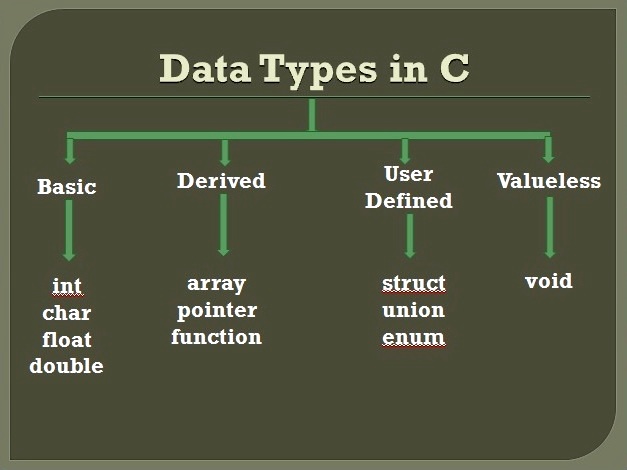
Data Types in C – A Beginner’s Guide with Simple Examples
Ever wondered how your computer knows the difference between a number and a word? That’s where data types in C come in. In simple words, data types help your program understand what kind of data it's working with, such as age, name, temperature, etc.
Whether you're building a calculator or a game, data types in C play a key role. In this article, you’ll learn about the types of data types in C, how they work, when to use which, and how to avoid common mistakes. By the end, you'll be writing clean and bug-free code like a pro!
Data Types in C – A Beginner’s Guide with Simple Examples
Mr. Bambam Kumar Yadav2 days ago
15 comments
11 min read
Table of Contents
What Are Data Types in C?
Why Data Types Matter in Programming
4 Primary Data Types in C (With Simple Examples)
int – Whole Numbers
float – Decimal Numbers
char – Single Characters
void – No Data
Data Type Modifiers in C (With Examples)
Comparison Table
3 Powerful Derived Data Types in C You Must Know
Arrays
Pointers
Functions
What Are User-Defined Data Types in C? (With Fun Examples)
struct
union
enum
Size and Range of Data Types in C
What Happens When Values Go Out of Range?
Pro Tips to Choose the Right Data Type
Practice Time! Test What You’ve Learned
Snippet Box for SEO
Conclusion
FAQs
What Are Data Types in C?
Imagine you're in a kitchen. You don’t pour soup into a plate or chop veggies in a glass, right? You use different containers based on what you're handling. That’s exactly how data types in C work. They’re like containers for your data.
Data types help with:
Telling the compiler what kind of data to expect
Controlling memory usage
Avoiding bugs and crashes
So, when you declare a variable in C, you're telling your program what you’ll store and how much space it needs.
Why Data Types Matter in Programming
Understanding data types in C is like getting a superpower because it helps you code faster, smarter, and with fewer errors.
Whether you're storing:
A student’s name (use char)
Their marks (use float)
Their roll number (use int)
Choosing the right type ensures your program runs smoothly. It’s a small step that makes a huge difference in real-world coding projects.
4 Primary Data Types in C (With Simple Examples)
Let’s now explore the basic data types in C. These are your must-know types if you're just starting.
1. int – Whole Numbers
Used for counting things like age, score, or number of apples.
Copy Code
#include <stdio.h>

int main() {

    int age = 15;

    printf("Age: %d", age);

    return 0;

}

Output:

Age: 15
✔ Great for: roll numbers, total items, scores
2. float – Decimal Numbers
Used for values with decimal points, like price or temperature.
Copy Code
#include <stdio.h>

int main() {

    float temperature = 36.5;

    printf("Temperature: %.1f", temperature);

    return 0;

}

Output:

Temperature: 36.5
✔ Great for: height, temperature, percentages
3. char – Single Characters
Store one character, such as the first letter of your name.
Copy Code
#include <stdio.h>

int main() {

    char grade = 'A';

    printf("Grade: %c", grade);

    return 0;

}

Output:

Grade: A
✔ Use when different types of data belong together.
2. union – Save Space, Like Shared Lockers
A union is similar to a struct, but it saves memory by storing only one value at a time.
Copy Code
#include <stdio.h>

union Data {

    int i;

    float f;

};

int main() {

    union Data d;

    d.i = 10;

    printf("Int: %d", d.i);

    return 0;

}

Output:

Int: 10
✔ Use when you want to save space and only need one value at a time.
3. enum – For Days, Months, Etc.
Use enum when you have a list of related constants.
Copy Code
#include <stdio.h>

enum Days { MON, TUE, WED };

int main() {

    enum Days today = TUE;

    printf("Today is day number: %d", today);

    return 0;

}

Output:

Today is day number: 1
✔ Use for categories like colors, days, directions
Size and Range of Data Types in C
Each data type uses some memory and can only store values within a certain range. This matters a lot when you're working with big or small numbers.
You can use the sizeof operator in C to find out how much memory your variable is using.
Copy Code
#include <stdio.h>

int main() {

    printf("Size of int: %lu bytes", sizeof(int));

    return 0;

}
Table: Size and Range of Common Data Types
Data Type
Size (Bytes)
Range
char
1
-128 to 127
unsigned char
1
0 to 255
int
4
-2,147,483,648 to 2,147,483,647
unsigned int
4
0 to 4,294,967,295
float
4
~±3.4E-38 to ±3.4E+38
double
8
~±1.7E-308 to ±1.7E+308
➔ Always check this before picking a data type!
What Happens When Values Go Out of Range?
Let’s say you put 500 in a char variable. It’s like trying to pour 2 liters into a 1-liter bottle. This causes overflow.
Copy Code
#include <stdio.h>

int main() {

    char x = 150;

    printf("x = %d", x);

    return 0;

}

Output: May show unexpected or wrong value
⚠︎ Be careful! Giving a value too big for its container can crash your code or give wrong results. In some cases, this even causes Segmentation Faults, which means your program tries to access memory it shouldn’t.
Pro Tips to Choose the Right Data Type
Here are some quick rules to help you avoid mistakes:
Use int for counting whole numbers (like score or age)
Use float for decimals (like price or temperature)
Use char for characters (like grade or initials)
Always check the range of values you’ll be storing
Use unsigned when you’re sure values won’t be negative
Making smart choices keeps your code fast, safe, and memory-efficient.
Practice Time! Test What You’ve Learned
Let’s check how much you remember. Try these in your C compiler:
Declare a variable to store a price (decimal) Hint: Use float
Create a struct for a student with name and marks Hint: Use char for name and int for marks
🛠️ The more you practice, the better you get!
Snippet Box for SEO
In C programming, data types define the kind of data a variable can store. The four main data types in C are int, float, char, and void. Choosing the right data type helps optimize memory and avoid errors. Advanced types like struct, array, and enum make code cleaner and more powerful.
Conclusion
You’ve now explored all the major data types in C, from basic to advanced. You’ve learned how to use them, when to use them, and what mistakes to avoid.
Want to become a better coder? Mastering data types is your first big step.
Now open your compiler and start practicing. Because practice turns knowledge into skill.
You're all set to take your first real step into the world of C programming. Your journey to becoming a confident coder starts now!
FAQs
Q1. What are the 4 basic data types in C?
int, float, char, and void are the four basic data types.
Q2. What happens if I assign a big number to a short variable?
It causes overflow. The value may wrap around or give unexpected results.
Q3. What’s the difference between float and double in C?
Both store decimal numbers, but double has more precision and range than float.
Q4. Can I change the data type after declaring a variable?
No. Once declared, a variable keeps its data type. You need to declare a new one if needed.
Q5. What is the void data type used for in C?
void means no data. It’s used when a function doesn’t return anything.
Practice small programs every day using different data types. Save this guide so you can come back to it anytime. And always remember, choosing the right data type makes your code smarter!