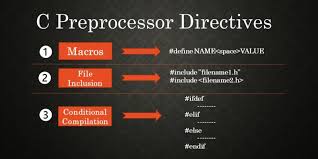
The define directive is one of the most powerful but often misunderstood features in C
programming. Whether you're a beginner just starting out or trying to enhance your understanding through
structured learning, like Uncodemy's C programming course in Noida, mastering this preprocessor
directive is crucial for writing efficient and maintainable code.
Understanding the define directive helps create more readable programs, use
constants effectively, and build complex macro systems. This directive is a key element in many
advanced C programming techniques, making it essential for anyone serious about mastering the
language.
The beauty of the define directive is in its simplicity and flexibility. It lets
programmers create symbolic names for values, build function-like macros, and use conditional
compilation. These features make it a vital tool for professional C development and a basic
concept that every programmer should master.
Understanding the Basics of Define Directive
The define directive is a preprocessor command that creates symbolic constants
and macros in C programming. Unlike variables, definitions made with the define directive are
processed before compilation starts. This means they are part of the preprocessing stage rather
than the actual program execution.
When you use the define directive, you are telling the preprocessor to replace
every instance of a specific identifier with its defined value or expression. This text
replacement occurs before the compiler sees your code, allowing the define directive to create
both simple constants and complex macro functions.
The basic syntax of the define directive follows this pattern:
                        #define IDENTIFIER replacement_text
                        #define PI 3.14159
                        #define MAX_SIZE 100
Students enrolled in programs like Uncodemy's C programming course in Noida often
appreciate how this define directive simplifies code maintenance and improves readability. When
you need to change a constant value used throughout your program, you only have to update the
define directive once.
Syntax and Structure
The define directive follows specific syntax rules that determine how it
processes your code. Understanding these rules is crucial for using this definite directive
effectively in your programs.
The most basic form requires the hash symbol (#) at the beginning of the line,
followed by the keyword "define," then the identifier you want to create, and finally the
replacement text. No semicolon is needed at the end, as the define directive is a preprocessor
command, not a C statement.
The define directive can also create function-like macros by including parameters
in parentheses immediately after the identifier name. This powerful feature allows you to create
reusable code snippets that accept arguments:
                    c
                    #define SQUARE(x) ((x) * (x))
                    #define MAX(a, b) ((a) > (b) ? (a) : (b))
Notice how parentheses are used extensively in these examples. This practice
prevents operator precedence issues that could cause unexpected behavior in your programs.
Types of Define Directives
The define directive comes in several forms, each serving different purposes in C
programming. Understanding these variations helps you choose the right approach for your
specific programming needs.
Simple Object-like Macros represent the most basic use of the
define directive. These create symbolic names for constants, making your code more readable and
maintainable:
                    c
                    #define TRUE 1
                    #define FALSE 0
                    #define EOF -1
Function-like Macros extend the define directive's capabilities
by accepting parameters and performing operations on them. These macros can replace simple
functions while potentially offering performance benefits:
                    c
                    #define ABS(x) ((x) < 0 ? -(x) : (x))
                    #define MIN(a, b) ((a) < (b) ? (a) : (b))
Conditional Compilation Macros use the define directive to
control which parts of your code get compiled. This technique is particularly useful for
creating debug builds or platform-specific code:
Students learning through structured programs like Uncodemy's C programming
course in Noida often find that understanding these different types of define directives helps
them write more sophisticated and maintainable programs.
Practical Applications and Examples
The define directive finds applications in virtually every aspect of C
programming. From simple constant definitions to complex macro systems, this definite directive
proves its worth in real-world programming scenarios.
Configuration Management represents one of the most common uses
of the define directive. By defining configuration values at the top of your program, you can
easily modify behavior without hunting through hundreds of lines of code:
                    c
                    #define MAX_USERS 1000
                    #define DEFAULT_TIMEOUT 30
                    #define VERSION "2.1.0"
Mathematical Operations benefit greatly from the define
directive, especially when dealing with common calculations or mathematical constants:
c #define PI 3.14159265359 #define CIRCLE_AREA(r) (PI * (r) * (r)) #define
FAHRENHEIT_TO_CELSIUS(f) (((f) - 32) * 5 / 9)
Memory Management often uses the define directive to create
consistent allocation patterns and size definitions throughout a program:
                    c
                    #define MALLOC_CHECK(ptr) do { \
                        if ((ptr) == NULL) { \
                            fprintf(stderr, "Memory allocation failed\n"); \
                            exit(1); \
                        } \
                    } while(0)
These practical applications demonstrate how the define directive can simplify
complex programming tasks and improve code reliability.
Advanced Macro Techniques
As your understanding of the define directive grows, you'll discover advanced
techniques that leverage this definite directive for sophisticated programming solutions. These
techniques often separate novice programmers from experienced developers.
Multi-line Macros extend the define directive's capabilities by
allowing complex operations to be encapsulated in a single macro call. The backslash character
enables line continuation:
                            c
                    #define SWAP(a, b, type) do { \
                        type temp = (a); \
                        (a) = (b); \
                        (b) = temp; \
                    } while(0)
Stringification and Token Pasting provide advanced text
manipulation capabilities within the define directive. The hash operator (#) converts macro
arguments to strings, while the double hash (##) concatenates tokens:
                    c
                    #define STRINGIFY(x) #x
                    #define CONCAT(a, b) a##b
                    #define DECLARE_GETTER(type, name) \
                        type get_##name(void) { return name; }
Variadic Macros allow the define directive to accept variable
numbers of arguments, making it possible to create flexible debugging and logging systems:
These advanced techniques demonstrate the power and flexibility of the define
directive when used creatively and appropriately.
Integration with Modern C Development
As C programming evolves, the define directive remains important and adapts to
current development practices. Developers need to understand how this directive fits into modern
programming.
Header File Organization often relies on the define directive to create reusable
constants and macros across various source files. Proper organization helps prevent naming
conflicts and makes maintenance easier.
Build System Integration often uses the define directive to pass configuration
details from build scripts to source code. This method allows for flexible build setups without
making changes to the source files.
Cross-platform Development heavily relies on the define directive to manage
platform-specific code and detect features. This strategy allows developers to write portable
code that functions across different operating systems and architectures.
Modern development environments and tools have improved to better support the
define directive. They make it simpler to work with macros and avoid common mistakes.
Learning Path and Skill Development
Mastering the define directive requires a step-by-step method that progresses
from basic concepts to more complex techniques. This approach helps ensure a solid understanding
while avoiding common mistakes that often affect new programmers.
Building a foundation starts with learning about basic constant definitions and
simple object-like macros. This groundwork creates a framework for the more advanced uses of the
define directive. Students generally begin with basic symbolic constants before moving on to
more complicated function-like macros.
Practical application includes using common programming patterns with the define
directive. This hands-on experience builds intuition about when and how to use macros
effectively in real programming situations. Working on real projects helps reinforce theoretical
knowledge.
Advanced exploration involves more sophisticated macro techniques, debugging
methods, and integration with larger programming projects. This level of understanding allows
you to take full advantage of the define directive while keeping code quality and readability in
check.
Students who study the define directive in a structured way often find that it
becomes one of their most useful tools for writing efficient and maintainable C programs.
Conclusion
The define directive is a key part of C programming that every serious developer
should know. It ranges from simple constant definitions to more complex macro systems. This
directive helps improve code readability, maintainability, and efficiency across different
programming projects.
Knowing when and how to use the define directive effectively sets skilled C
programmers apart from beginners. The concepts discussed here build a solid base for using this
useful feature while avoiding common mistakes that can lead to bugs or make code harder to
maintain and debug.
As you keep developing your C programming skills, remember that the define
directive is just one tool in your programming toolkit. Success comes from understanding its
strengths and limits, then using it carefully to tackle real programming challenges while
keeping your code clean and readable.
Whether you are working on simple programs or complex systems, the define
directive will be essential for creating clean, efficient, and maintainable code. Taking the
time to understand this directive will benefit you throughout your programming career and help
you write more professional and reliable applications.
Frequently Asked Questions (FAQs)
What is the define directive in C programming?
A: The define directive is a preprocessor command that creates symbolic constants
and macros by replacing identifiers with specified text before compilation begins.
How does the define directive differ from variables?
A: Unlike variables, the define directive creates compile-time replacements that
are processed before compilation, offering no memory allocation but providing faster execution
for constants.
When should I use function-like macros instead of regular
functions?
A: Use function-like macros when you need type-generic operations, want to avoid
function call overhead, or require compile-time evaluation of expressions.
What are the common mistakes when using the define directive?
A: Common mistakes include forgetting parentheses around macro parameters,
creating macros with side effects, and not considering operator precedence in macro definitions.
Can the define directive be used for conditional compilation?
A: Yes, the define directive works with conditional compilation directives like
#ifdef and #ifndef to control which code sections get compiled based on defined symbols.