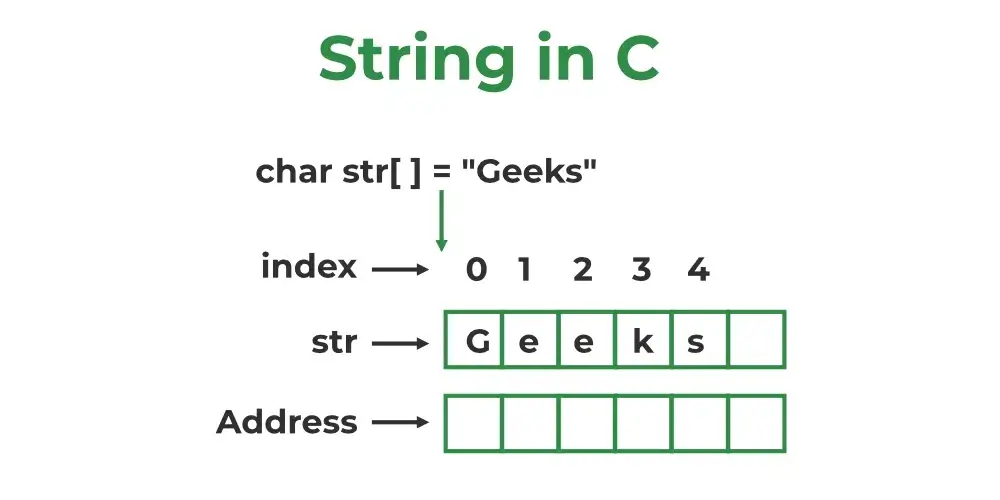
In C programming, strings—essentially sequences of characters—play a crucial role in managing text. Unlike some higher-level languages that have built-in string types, in C, a string is simply an array of characters that ends with a special null character ('\0'). Grasping how to define strings in C, manage memory properly, and manipulate text data is vital for crafting effective C programs.
- Practical examples that demonstrate string manipulation
- Best practices for working with strings
If you're eager to build a strong foundation in C—including string handling, memory management, pointers, and file I/O—the C Programming Course in Noida by Uncodemy comes highly recommended. This thorough course walks you through real-world applications and reinforces essential concepts.
What Is a String in C?
Mr. Kunal Arora / 12 days
10
15 min read
A string in C is fundamentally an array of characters that concludes with the null terminator ('\0'). This special value indicates where the sequence ends. Without it, the compiler can't figure out where the string stops in memory.
Key properties:
- Stored as char[] or char *
- The reserved space must account for an extra byte for '\0'
- Common string functions depend on the null terminator to process strings
Declaring and Initializing Strings
Here are a few ways to define and initialize strings in C:
1. Fixed-Size Character Array
char name[10];
2. Initialization with String Literal
char greeting[] = "Hello";
3. Pointer to a String Literal
char *msg = "Welcome";
4. Explicit Null-Terminated Array
char code[] = {'C', 'S', 'E', '\0'};
Handling String Length and Memory
When it comes to handling string length and memory, there are a couple of key points to keep in mind:
1. Buffer sizes are crucial
Make sure your declared arrays are big enough to hold all incoming data, plus that all-important null terminator.
2. Beware of overflow
Using functions like scanf or gets without setting size limits can lead to memory issues. It's always a good idea to restrict input.
Example:
char buffer[20];
scanf("%19s", buffer);
Core String Manipulation Functions
The C standard library, found in, offers some really handy tools:
- strlen() – gives you the length of a string, not counting the null terminator
- strcpy() / strncpy() – allows you to copy strings safely
- strcat() / strncat() – lets you append one string to another
- strcmp() / strncmp() – helps you compare strings in a lexicographical order
- strchr() / strstr() – enables you to search for specific characters or substrings within strings
These functions pretty much cover all the basic string operations you'll need in C.
#include
#include

int main() {
	if (strcmp("abc", "Abc") < 0)
        printf("Lower\n");
	return 0;
}
Example 4: Searching Substrings
#include
#include

int main() {
	char sentence[] = "Search this string";
	char *found = strstr(sentence, "this");
	if (found)
        printf("Found at position %ld\n", found - sentence);
	return 0;
}
- Buffer overruns: make sure your arrays are big enough
- Unsafe input functions: steer clear of gets; opt for fgets or bounded scanf instead
- Modifying string literals: stick to using arrays
- Missing null terminator: uninitialized buffers can lead to problems
- Unchecked return values: always check that your string functions work and stay within bounds
Best Practices for C Strings
Practice
Explanation
Always allocate enough space
One extra byte for '\0' mandatory
Use sizeof array over literals
Ensures accurate capacity when copying/appending
Prefer fgets()/safe scanf
Prevents reads past array bounds
Validate input strings
Prevent overflow and logic errors
Stick to library functions
Less error-prone than manual traversal
Use dynamic memory when needed
For variable-sized strings, allocate with malloc()
Advanced Concepts
- Dynamic strings: utilize malloc, realloc, and free for added flexibility
- Wide-character strings: employ wchar_t andto support Unicode
- Interfacing with other APIs: convert between different representations as necessary
- Create your own functions: for instance, reverse a string or tokenize your input
Strings and Memory Allocation in C
When it comes to C, grasping how memory is managed for strings is essential. Unlike many modern languages that take care of memory for you, C puts you in the driver’s seat, meaning you have to handle memory allocation and deallocation yourself when working with dynamic strings.
For instance, when you declare a string as a character array (char str[100];), the memory is allocated statically on the stack. But what if you don’t know the size of the string ahead of time—like when you’re reading input from a user or a file? That’s where dynamic memory allocation comes into play, using functions like malloc() or calloc() from the < stdlib.h > library.
If you overlook proper memory allocation, you could run into undefined behavior, such as segmentation faults or data corruption. Plus, if you forget to free up dynamically allocated memory with free(), you might end up with memory leaks, which can be a real headache in larger applications, especially in embedded systems or operating system components.
Null-Terminator and String Safety
The '\0' null terminator may be a tiny character, but it plays a huge role. Every string-handling function in the C standard library—like strlen, strcpy, strcat, and strcmp—relies on this null character to know where the string ends.
If you forget to add this null character at the end of a character array, you could face buffer overreads, where functions keep reading memory beyond the array’s boundaries. This can lead to exposing sensitive information, crashing your program, or even creating security vulnerabilities, particularly in systems-level programming.
Since C doesn’t do bounds checking, it’s up to developers to make sure that every character array intended to represent a string is properly null-terminated. Using safer string-handling functions like strncpy (instead of strcpy) can help reduce some of these risks by limiting the number of characters copied, but you still need to manually ensure that the last character is '\0'.
Related Course
If you're keen to expand your knowledge beyond the basics of strings—delving into pointers, arrays, memory allocation, and structured I/O—check out the C Programming Course in Noida offered by Uncodemy. With hands-on training led by instructors and project-based learning, it equips you to tackle real-world C programming challenges with confidence.
Conclusion
Understanding and manipulating strings in C is an essential skill for any C programmer. Strings are formed from character arrays, depend on null terminators, and need careful management to prevent memory and security issues. While standard library functions can simplify many tasks, being mindful of buffer sizes and memory safety is crucial.
In this guide, we've explored declaration patterns, provided examples, discussed library functions, highlighted common pitfalls, and shared best practices. Grasping the intricacies of string handling will enhance your ability to write robust and secure C code. To continue your C programming journey—covering advanced memory management, data structures, and file operations—consider the C Programming Course in Noida from Uncodemy.
Frequently Asked Questions (FAQs)
Q1. What is a string in C?
In C, a string is essentially an array of characters (char[]) that ends with a special character called a null terminator, represented as '\0'.
Q2. How do I declare a string in C?
You can declare a string in a few different ways:
- `char s[10];`
- `char s[] = "Hello";`
- `char *s = "World";`
Q3. Why is '\0' important?
The '\0' character is crucial because it indicates where the string ends. Many functions depend on this to determine the string's endpoint in memory.
Q4. How can I safely read a string?
To read a string safely, use bounded input functions like `scanf("%19s", s)` or `fgets(s, sizeof(s), stdin)` to prevent overflow.
Q5. Can I modify a string literal?
No, you shouldn't modify a string literal. For example, if you try `char *p = "text"; p[0] = 'T';`, it leads to undefined behavior. Instead, use mutable arrays.
Q6. How do I find string length?
You can find the length of a string using the standard function: `size_t len = strlen(s);`
Q7. How do I concatenate two strings?
Ensure that the destination string has enough space, then use `strcat(dest, src);` to concatenate.
Q8. How do I compare strings?
To compare two strings, use `strcmp(s1, s2)`. It will return a negative, zero, or positive value based on their lexicographical order.
Q9. How can I search within a string?
You can use `strchr` to find a specific character or `strstr` to search for substrings.
Q10. Where can I improve my C string skills?
The best way to enhance your skills is through hands-on projects and in-depth study. The C Programming Course in Noida by Uncodemy provides structured guidance and plenty of practical exercises.