Key Takeaways
- Interfaces define what a class should do. Think of it as a contract.
- Abstract classes define how some things should work, but not everything.
- Use an interface when you want to support multiple inheritance.
- Use an abstract class when you want to reuse some code or logic.
- Interfaces have only method names (signatures), while abstract classes can also have working code.
- In simple words: Interface = Promise, Abstract Class = Blueprint.
What is an Interface in Java?
An interface in Java is like a set of rules or a list of tasks. It tells a class, “If you want to be part of this, you must do these tasks.”
Let’s say you’re building a game. You might have an interface called Playable that says:
- Every object that "can be played" must have play() and pause() methods.
That’s it. The interface doesn’t care how the object does it — just that it must.
Key Points:
- Defined using the keyword interface
- Can only have abstract methods (until Java 8)
- Java 8+ allows default and static methods
- No constructors allowed
- No object creation from an interface
- A class implements an interface
- One class can implement multiple interfaces
“Interfaces allow for multiple inheritance, making your design more flexible.” — Oracle Java Docs
What is an Abstract Class in Java?
An abstract class is like a half-built house. Some parts are complete, others are left for the builder to finish.
For example, you might have an abstract class called Animal. It has a method eat() that works, but makeSound() is left empty — for the child class (like Dog or Cat) to define.
Key Points:
- Uses the keyword abstract
- Can have both abstract and concrete methods
- Can include constructors
- Cannot be directly instantiated
- A class extends an abstract class
- Only one class can be extended at a time (single inheritance)
“Use abstract classes when you want to share code among similar classes, while still keeping flexibility.” — GeeksforGeeks
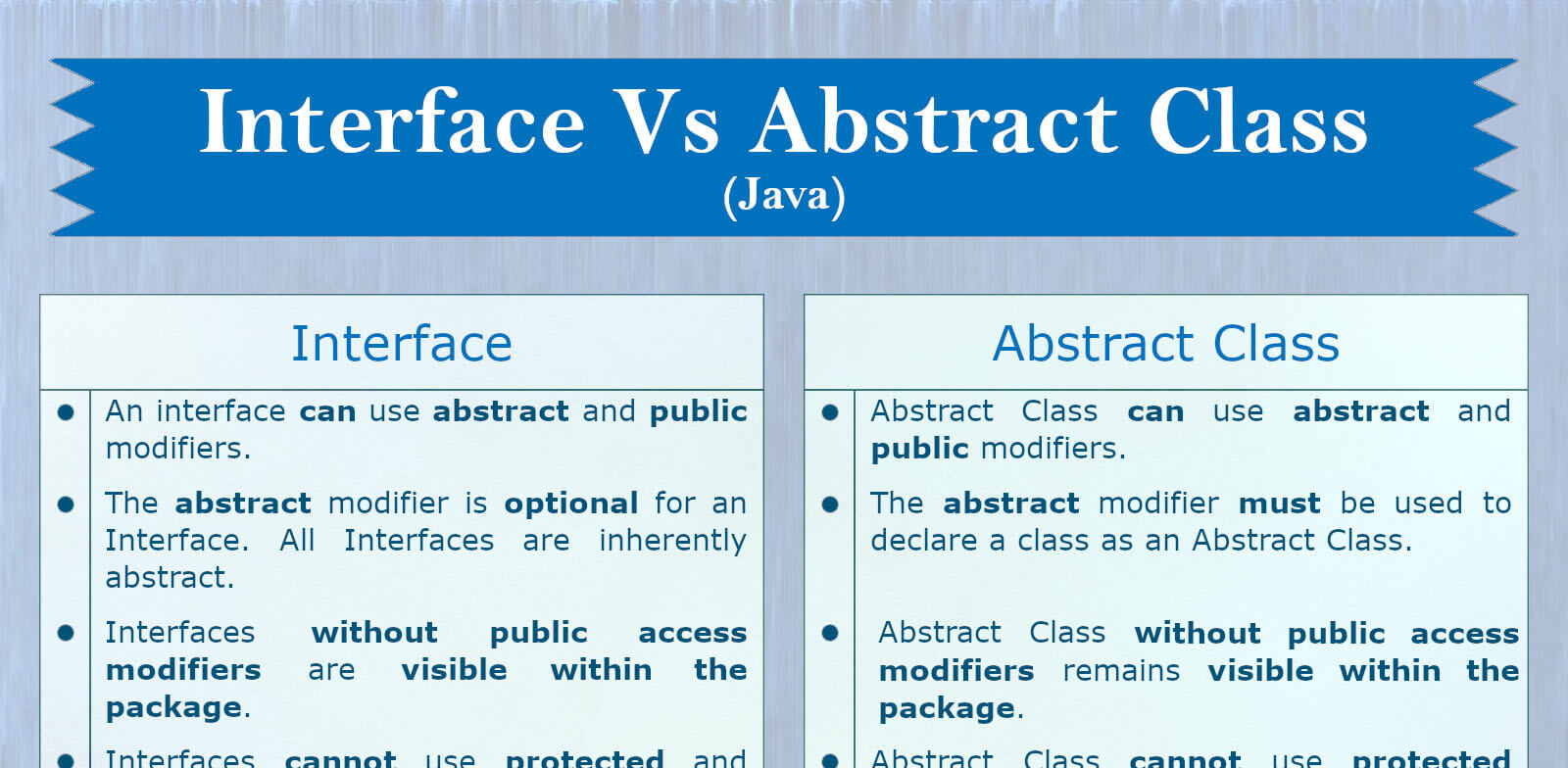
Core Differences Between Interface and Abstract Class
Let’s walk through the main differences between interface and abstract class, using easy language and without drowning in code.
1. Syntax and Keywords
- Interface: Uses interface, and methods don’t have bodies (unless using default)
- Abstract Class: Uses abstract, and methods can be both abstract and concrete
2. Object Creation
- Interface: Can’t create an object
- Abstract Class: Can’t create directly, but helps child classes
3. Constructors
- Interface: No constructors allowed
- Abstract Class: Constructors allowed
4. Multiple Inheritance
- Interface: Supports it — a class can implement many interfaces
- Abstract Class: Only one abstract class can be extended
5. Fields and Constants
- Interface: Only allows public static final constants
- Abstract Class: Can have instance variables
6. Implementation Style
- Interface: You must define all methods in the class that implements it (unless using default methods)
- Abstract Class: You can define some, leave some abstract
7. Java Version Compatibility
- Interface: Java 8 introduced default and static methods
- Abstract Class: Always had method definitions
8. Method Visibility
- Interface: Methods are public by default
- Abstract Class: Methods can have any visibility (private, protected, public)
9. Performance and Design
- Speed is similar.
- Choose based on design: Use interface for roles, abstract class for base structure.
“If your class needs to share default behavior, go with abstract class. If it’s just about structure, choose interface.” — JavaTPoint
When to Use Interface vs Abstract Class
Many beginners ask, “Which one should I use?” Here's a simple way to decide:
Use an interface when:
- You want to add roles or behaviors (like Flyable, Drivable)
- You need multiple inheritance
- You don’t want to include any default implementation
- You want loose coupling (i.e., one part of your code doesn’t tightly depend on another)
Use an abstract class when:
- You want to share default code with child classes
- You need to define both abstract and concrete methods
- You don’t need multiple inheritance
- Your classes are closely related
💡 Analogy: Think of an interface like a TV remote manual — it only says what buttons should exist. An abstract class is like a remote with some working buttons already — but you can still customize others.
Real-World Examples
Let’s make this real and easy to remember.
Example 1: Using Interfaces
Copy Code
interface Flyable {

    void fly();

}

class Bird implements Flyable {

    public void fly() {

        System.out.println("Bird flies using wings.");

    }

}
Here, Flyable is a promise — “any class that can fly must have a fly() method.”
Example 2: Using Abstract Classes
Copy Code
abstract class Animal {

    void eat() {

        System.out.println("This animal eats food.");

    }

    abstract void makeSound();

}

class Dog extends Animal {

    void makeSound() {

        System.out.println("Dog barks.");

    }

}
Here, Animal is a base — it already knows how to eat, but lets child classes decide how to make sounds.
✈️ Interface = “Agreement to fly”,
🐦 Abstract class = “Birds with some built-in flying skills”
Common Mistakes to Avoid
Even smart learners fall into common traps. Don’t be one of them.
- ❌ Mixing implements and extends incorrectly
Remember: You implement interfaces, but extend abstract classes.
- ❌ Using abstract class when an interface is enough
Don’t overcomplicate your design — interfaces are lightweight and cleaner.
- ❌ Forgetting @Override
Always use @Override when implementing methods from interfaces.
- ❌ Thinking interfaces can have constructors
They can’t. Because you can’t create an object from an interface.
Pro Tip: When in doubt, start with an interface. It’s more flexible.
Interface vs Abstract Class in Java – What's the Real Difference?
Understanding the difference between interface and abstract class in Java can save you from design confusion. Both help you build clean, reusable, and scalable code — but they solve different problems.
Use an interface when you want a class to guarantee behavior — like saying, “Hey class, if you implement me, you must do this.” Interfaces support multiple inheritance and loose coupling, which makes your code more flexible.
On the other hand, use an abstract class when you want to share some default behavior or logic among multiple classes. Abstract classes are useful when your classes share a common structure but still need to define specific implementations of some methods.
Think of it like this:
- Interface = Rulebook (no code, only rules)
- Abstract class = Template (some ready logic + some rules)
Java now allows interfaces to have default and static methods (from Java 8), but they still can’t have constructors. Abstract classes can have constructors, fields, and even implemented methods — but they only allow single inheritance.
To choose the right one, ask yourself:
- Do I want only a contract? → Use interface
- Do I want a partial implementation + contract? → Use abstract class
Mastering the difference between interface and abstract class is key to becoming a better Java developer.
FAQs
Can an interface have a constructor?
No. Interfaces can’t have constructors because they can’t be instantiated.
Can abstract classes implement interfaces?
Yes. It’s a common practice to combine both, especially in large-scale design.
Which is faster – interface or abstract class?
Speed is usually the same. Choose based on design need, not performance.
Can I use both interface and abstract class together?
Yes! A class can extend an abstract class and implement multiple interfaces.
Are interfaces better than abstract classes?
Not really. They serve different purposes. Use based on what your code needs — structure or behavior.
Conclusion
So, what did we learn?
An interface tells your class what to do, but not how. It’s perfect for flexible design, multiple inheritance, and adding new behaviors.
An abstract class gives a partial structure — some ready-made code, some yet to be built. It’s great for reusability and shared logic.
Now that you finally get the difference between interface and abstract class, don’t just read — code it.
Try building your own example, see what fits where, and become a pro at Java OOP!
Want to master Java OOP concepts step by step? Join our Java Mastery Course by Uncodemy and start building real-world projects today.