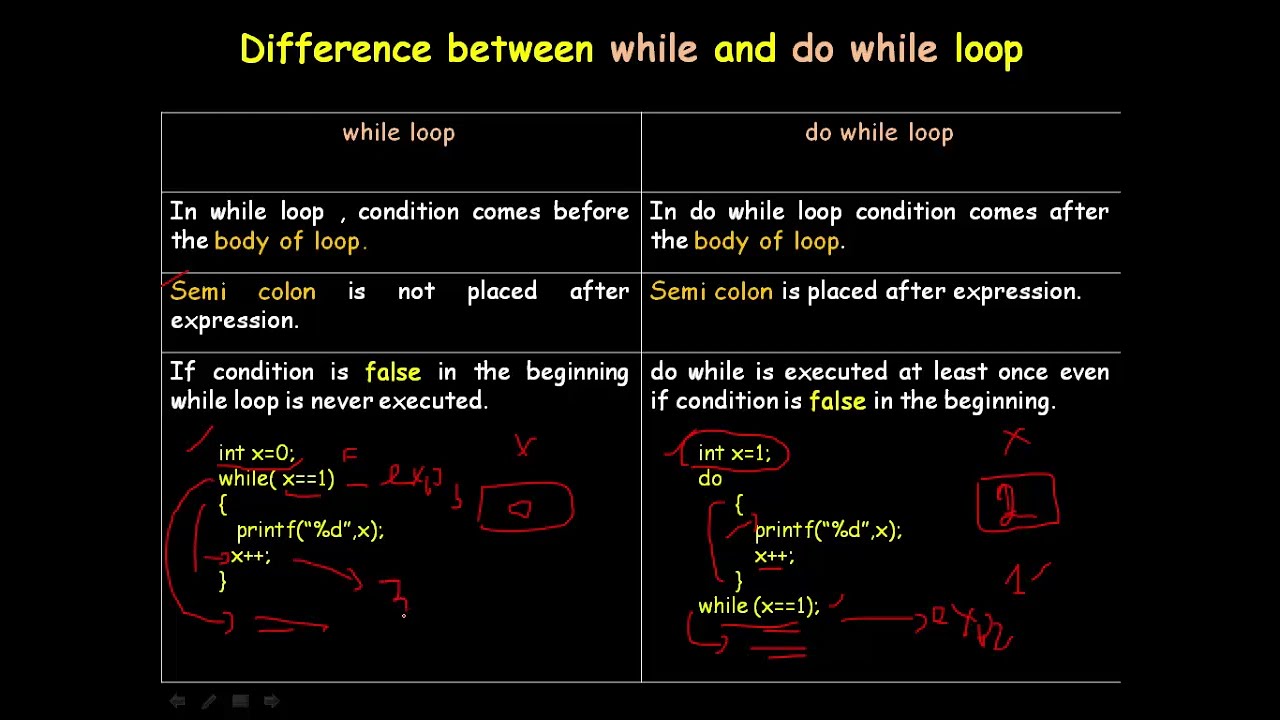
In the world of C programming, loops are essential for controlling the flow of execution and managing repetitive tasks efficiently. Among the most widely used loop constructs are the while and do while loops. Although they might seem similar at first glance—both are used to execute a block of code repeatedly based on a condition—they differ in subtle yet crucial ways.
This article explores the difference between while and do while loop in C, highlighting syntax, execution flow, practical usage, advantages, disadvantages, and when to prefer one over the other. Whether you're a beginner learning C or a coding enthusiast looking to polish your fundamentals, understanding these loops will strengthen your problem-solving and logic-building skills.
Before we break down the differences, it’s important to understand what loops are. In C, loops allow a block of code to be executed repeatedly as long as a specified condition remains true. They help eliminate redundant code and are particularly useful in scenarios involving iterations, such as traversing arrays, running counters, or repeatedly accepting user input.
C supports three main types of loops:
for loop
while loop
do while loop
Here, we’ll focus on the while loop and do while loop, two constructs often compared but used in different contexts.
While Loop in C
The while loop is an entry-controlled loop, which means the condition is evaluated before the loop body is executed. If the condition is true, the block of code inside the loop runs. Otherwise, the loop doesn't run at all.
Syntax:
Copy Code
c

CopyEdit

while(condition) {

    // Code to execute

}
Example:
Copy Code
c

CopyEdit

int i = 1;

while(i <= 5) {

    printf("%d\n", i);

    i++;

}
Output:
Copy Code
CopyEdit

1

2

3

4

5
In this example, the loop starts by checking whether i is less than or equal to 5. If true, it executes the printf statement and increments i.
Do While Loop in C
The do while loop, on the other hand, is a exit-controlled loop. This means the loop body is executed at least once, and then the condition is checked. If the condition remains true, the loop continues to run.
Syntax:
Copy Code
c

CopyEdit

do {

    // Code to execute

} while(condition);
Example:
Copy Code
c

CopyEdit

int i = 1;

do {

    printf("%d\n", i);

    i++;

} while(i <= 5);


Output:

CopyEdit

1

2

3

4

5
Here, even if the condition is false initially, the loop body executes once before the condition is evaluated.
Key Difference Between While and Do While Loop
Let’s now break down the difference between while and do while loop in C in various dimensions:
1. Execution of Loop Body
while loop: Checks condition first; loop body may not execute at all.
do while loop: Executes loop body once before checking condition.
Example:
Copy Code
c

CopyEdit

int x = 6;

while(x < 5) {

    printf("While Loop\n");

}


Output: (Nothing, since x < 5 is false)
Copy Code
c

CopyEdit

int x = 6;

do {

    printf("Do While Loop\n");

} while(x < 5);


Output:

vbnet

CopyEdit

Do While Loop
2. Syntax Difference
while loop ends with a closing brace.
do while loop ends with a semicolon after the condition.
3. Minimum Number of Executions
while loop may not execute at all.
do while loop always executes at least once.
4. Use Cases
Use while loop when you need to check condition first.
Use do while loop when you want to run code at least once regardless of the condition.
Comparative Table
Feature
while loop
do while loop
Control Type
Entry-controlled
Exit-controlled
Condition Evaluation
Before loop body
After loop body
Guaranteed Execution
Not guaranteed
Executes at least once
Syntax End
No semicolon after condition
Semicolon required after condition
Use Case
When condition may not be initially true
When at least one execution is needed
Common Mistake
Infinite loop if condition not updated
Semicolon placement error
When to Use Which?
Let’s consider some real-world scenarios.
Scenario 1: Taking User Input Until Valid
You can use a do while loop if you want to take input at least once, like:
Copy Code
c

CopyEdit

int number;

do {

    printf("Enter a number between 1 and 10: ");

    scanf("%d", &number);

} while(number < 1 || number > 10);
Even if the user enters an invalid number, the loop will prompt again. This is an ideal use case for a do while loop.
Scenario 2: Polling Until a Condition is Met
Suppose you're checking sensor data and don't want to act until a valid signal comes. Here, a while loop works better:
Copy Code
c

CopyEdit

while(!isValidSignal()) {

    waitForNextSignal();

}

processSignal();
In such cases, the loop shouldn’t run at all unless a certain condition is met first.
Pros and Cons
While Loop
Pros:
Clean and straightforward.
Great when condition might not be true at first.
Avoids unnecessary execution.
Cons:
May never execute.
Sometimes requires initialization before the loop.
Do While Loop
Pros:
Guarantees at least one execution.
Useful for menus, input prompts, retries.
Cons:
May run unnecessarily if condition is false.
Commonly misused due to the semicolon.
Common Pitfalls
1. Semicolon Misplacement in Do While
Wrong:
Copy Code
c

CopyEdit

do {

    // statements

} while(condition)   // Missing semicolon
Correct:
Copy Code
c

CopyEdit

do {

    // statements

} while(condition);
2. Infinite Loop Due to Missing Update
Both loops can go infinite if the condition never becomes false.
Copy Code
c

CopyEdit

int i = 1;

while(i <= 5) {

    printf("%d", i);

    // Missing i++

}
Always ensure the loop variable updates inside the loop body.
Real-World Applications
Understanding these loops helps with:
Building game loops (do while for menus)
Data validation in user interfaces
Sensor and event polling in embedded systems
Repetitive calculations until threshold met
Practice Makes Perfect
To master the difference between while and do while loop, try solving problems like:
Create a calculator that takes inputs until the user wants to exit.
Accept user marks until they type -1, then calculate the average.
Simulate a basic login attempt system with 3 chances.
These scenarios will help you understand the strength of each loop.
Final Thoughts
The difference between while and do while loop lies primarily in the timing of condition checking. If you need a loop that might not run at all, go for a while loop. If at least one execution is essential regardless of the condition, a do while loop is the better choice.
Mastering these concepts is vital for clean, efficient C programming. They not only optimize your code logic but also sharpen your understanding of flow control mechanisms.
Want to Learn More?
If you’re eager to take your C programming skills to the next level, check out theC Programming Course by Uncodemy. It’s designed for beginners and intermediates, covering loops, functions, pointers, data structures, and more with real-world projects. Learn from industry experts, get hands-on coding exercises, and build a strong foundation for a career in tech.
In summary, while both while and do while loops serve the purpose of repetition, their execution behavior makes them suitable for different scenarios. Choose wisely based on whether your code should run before checking the condition or not—and your programs will be more logical and robust.