When you're learning C programming, loops are among the most fundamental building blocks you'll use. The do‑while loop in C stands out because it guarantees the loop body executes at least once, regardless of the condition. This makes it perfect for menus, user input validation, and other scenarios where you must run the logic upfront before checking a stopping condition.
If you're based in Noida and aiming to solidify your understanding through structured, hands-on training, a C Programming Course in Noida can help you not just cover syntax but also master logic through real coding practice—just like exploring the do‑while loop in depth.
Unlike the traditional while loop, which performs a condition check before executing its body, the do‑while loop executes its body first, then checks the condition. This distinction ensures the body runs at least once, making it ideal for situations where you need to perform an action before you can evaluate whether to continue or stop.
Imagine a vending machine prompt: "Press 'q' to quit or any key to continue" displayed first, then reacting based on the entered input. That’s a classic use case for a do‑while loop—it ensures prompts aren’t skipped.
The typical structure follows:
                            do {
                                // loop body
                            } while (condition);
Notice the semicolon after the while—it’s mandatory and marks the end of the loop structure.
Understanding the Flow: Early vs Exit Checked
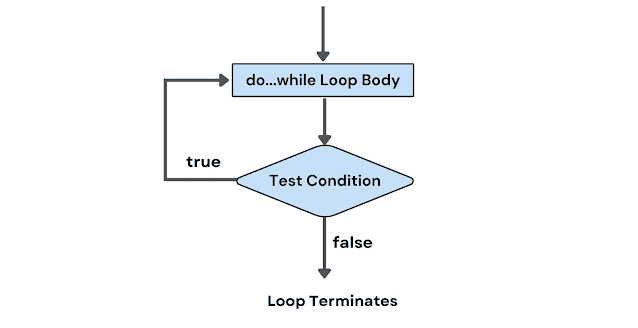
Using a conventional while loop means the condition is evaluated before the loop body executes. If the condition is false at the outset, the loop isn’t entered at all. In contrast, the do‑while loop initiates with at least one full execution of its body, only then testing the condition afterward. This difference is crucial. In flowchart form, it looks like this:
Enter loop body
Execute statements
Check condition
If true, repeat; if false, exit to next block
This clear separation makes the do‑while loop an “exit-controlled” loop, ensuring the main operation always runs before any check.
Basic Example: Counting from 0 to 4
                            #include

                            int main() {
                                :contentReference[oaicite:11]{index=11}

                                do {
                                    printf("%d\n", i);
                                    i++;
                                } while (i < 5);

                                return 0;
                            }
Here, i starts at 0. The loop prints i, increments it, and checks if it’s still under 5. That cycle ensures the numbers 0 through 4 are printed, demonstrating a counted use case with a guaranteed first execution.
Edge Case: Condition Initially False
                           #include

                            int main() {
                                :contentReference[oaicite:12]{index=12}

                                do {
                                    printf("i is %d\n", i);
                                    i++;
                                } while (i < 5);

                                return 0;
                            }
Even though i starts at 10—clearly not less than 5—the loop executes once, printing the value, and then exits. This illustrates the core advantage of the do‑while loop: the body always runs at least once. You’ll see this pattern throughout programs requiring an initial operation.
Example: Prompting User Until Cancellation
                           #include

                            int main() {
                                int number;

                                do {
                                    printf("Enter a positive number (0 or negative to quit): ");
                                    scanf("%d", &number);
                                    if (number > 0) {
                                        printf("You entered %d\n", number);
                                    }
                                } while (number > 0);

                                printf("Exited loop.\n");
                                return 0;
                            }
This is a common scenario in interactive programs—like menu-driven tools or data-entry prompts. Here, the do‑while loop ensures the prompt displays at least once, and continues based on user input. It’s exactly the kind of pattern you'll master in a C Programming Course in Noida.
Nested Do‑While Loops: Working with Matrices
Nested loops often appear in grid operations, such as printing matrices:
                           #include

                            int main() {
                                :contentReference[oaicite:16]{index=16}

                                do {
                                    j = 0;
                                    do {
                                        printf("%d  ", count++);
                                        j++;
                                    } while (j < 3);
                                    printf("\n");
                                    i++;
                                } while (i < 3);

                                return 0;
                            }
This prints a 3×3 matrix with incrementing numbers. The outer and inner loops work in tandem, each enforcing at least one execution, carefully controlled with proper checks. Avoiding mistakes in nested loops also gives great practice in initializing and resetting counters—skills taught in structured courses as part of mastering control flow.
Dry Run Walkthrough
Consider the prior matrix example. A dry run helps you understand exactly how the values change.
j is 3 (not<3), exit inner loop. print newline.< li>
Increment i → 1. Since i < 3, outer loop continues.
Repeat similar steps for i = 1 and 2, producing three lines of numbers from 0 to 8. This dry-run technique, often taught as part of classic coding exercises, helps reveal program behavior at each step.
Comparison: Do‑While vs While Loop
The key difference lies in when the loop test occurs. A while loop checks before entry; a do‑while checks after executing the body. This makes do‑while ideal for scenarios where initial actions must run regardless of the condition, whereas while is better suited when you may not need the body at all unless the condition is met.
Another distinction is syntax: do { ... } while(...) requires a semicolon after the condition, which can sometimes trip up new learners. Semantically, though, there's no substantial difference beyond the timing of the test.
Practical Use Case: Simple Calculator Menu
                           #include

                            int main() {
                                int choice;
                                :contentReference[oaicite:30]{index=30}

                                do {
                                    printf("\nMenu:\n1: Add\n2: Subtract\n3: Multiply\n4: Divide\n0: Exit\n");
                                    scanf("%d", &choice);

                                    if (choice >= 1 && choice <= 4) { printf("enter two numbers: "); scanf("%lf %lf", &num1, &num2); switch (choice) case 1: result="num1" + num2; printf("result: %.2f\n", result); break; 2: - 3: * 4: if (num2 !="0)" else printf("cannot divide by zero.\n"); continue; } (choice printf("invalid choice. try again.\n"); while printf("exiting...\n"); return 0; < pre>
In this classic example, the loop ensures the menu always displays at least once and continues until the user chooses to exit. Each cycle processes the input, performs calculation if needed, and repeats—perfect alignment with post‑test logic patterns taught in entry‑level C modules.
Handling Infinite Loops and Exit Conditions
You can create looping logic that depends on user interaction or program state rather than counters. An infinite do‑while pattern may be:
                          do {
                                // do something
                                if (exitCondition) break;
                            } while (1);
While this works, using while (true) in C99 or newer requires additional headers—so most C programmers either use explicit 1 or prefer break logic inside a do‑while. However, overusing infinite loops can lead to hard-to-debug code, so condition-driven loops are generally safer and clearer.
Real‑World Scenarios: When to Choose Do‑While
You’ll find do‑while loops handy in situations such as:
Menu-driven applications ensuring the menu always shows at least once.
User input validation where you must first get the input, then check its validity.
Confirmations where you want to try an action, ask if you should repeat, and possibly exit.
Embedded systems where initial polling happens first, followed by condition checks for next cycle.
Error-check loops, such as retrying readings from sensors.
You’ll explore these in a C Programming Course in Noida, where instructors break down logic flows and help you implement and debug such patterns.
Common Mistakes and How to Avoid Them
One common pitfall is forgetting the semicolon after the while(condition);. This causes syntax errors or unintended behavior. Another is setting up a condition that never becomes false, resulting in infinite loops. Beginners often also mishandle nested loops—forgetting to reset inner counters or mixing loop control variables. Careful initialization, testing, and using dry-run diagrams are taught to avoid such issues and improve reliability.
Debugging Strategies and Dry‑Running Tips
Dry-running helps uncover boundary issues. Track the variables each pass, verify loop entry and exit conditions, and ensure counters adjust properly. Displaying logs within loops can quickly reveal control flow bugs, especially in nested structures. These debugging techniques are core lessons in environments like a C Programming Course in Noida, building habits that reduce errors in larger programs.
Frequently Asked Questions (FAQs)
Q1. What is a do-while loop in C?
A do-while loop in C is a type of loop that always executes its body at least once before checking a condition. This makes it different from the regular while loop, which checks the condition before entering the loop.
Q2. How does a do-while loop differ from a while loop in C?
The main difference is whenthe condition is evaluated:
In a while loop, the condition is checked before the body executes.
In a do-while loop, the body runs first, and then the condition is checked.
This means the do-while loop guarantees one execution, even if the condition is false from the start.
Q3. What are some real-life use cases for do-while loops in C?
Some practical use cases include:
Menu-driven programs (display menu, wait for user choice).
Input validation (keep asking until valid input is given).
Retry logic (e.g., trying to connect to a device or file).
These examples are frequently explored in a goodC Programming Course in Noida.
Q4. Is the semicolon after the while condition necessary in a do-while loop?
Yes, it is absolutely necessary. The syntax of a do-while loop in C requires a semicolon after the closing while (condition) line. Forgetting it will lead to a compilation error.
Q5. Can a do-while loop cause an infinite loop?
Yes. If the condition never becomes false, or if there's no logic to eventually exit the loop, it can result in an infinite loop. Always ensure your loop has a valid exit condition.
Q6. Is a do-while loop better than a while loop?
Not necessarily better—just better suitedfor specific scenarios. Use:
while when you may not need the loop at all.
do-while when you must run the loop at least once, such as displaying a prompt or initializing input.
Q7. Can we use break in a do-while loop in C?
Yes, the break statement can be used toexita do-while loop early, before the condition is evaluated. This is useful in menu programs or loops where a specific input should terminate the cycle.
Q8. Is it possible to nest do-while loops in C?
Absolutely. You can nest a do-while loop inside another do-while, or even inside a for or while loop. Just be sure to manage variables and conditions carefully to avoid logical errors.
Q9. Is do-while supported in other programming languages too?
Yes. Languages like C++, Java, JavaScript, and others also support do-while or repeat-until loops with similar behavior. Once you understand the logic in C, it's easy to adapt in other languages too.
Q10. Where can I learn more about control structures like loops in C?
If you're located in Noida or prefer a structured learning path, enrolling in a C Programming Course in Noida can help you gain hands-on experience with all loop types, including do-while loops in C, through real-world projects and expert guidance.
Summary
The do‑while loop in Cis a simpler yet powerful tool for situations where you need at least one pass through the loop body before checking whether to continue. From user menus and validation routines to robust nested iterations handling grids or sensor data, this loop structure fits many real-world use cases. Learning it in context—such as during a C Programming Course in Noida—equips you with essential logic-building skills for software development.
Mastering do‑while loops isn’t just about memorizing syntax; it’s about learning when to use it, how to avoid common pitfalls, and how to integrate dry-run thinking into debugging and design. With consistent practice and structured guidance, you'll find these constructs becoming second nature, laying the groundwork for more advanced topics like data structures, file I/O, and system programming.