In the vast world of programming, loops play a fundamental role in automating repetitive tasks. Among these, the "do while" loop stands out for its unique characteristic: it guarantees that the loop's body will execute at least once, regardless of the condition. Understanding how this loop functions, both conceptually and in practice, is essential for any beginner delving into programming logic or undertaking an Algorithms Course in Noida. This article presents an in-depth explanation of the "do while" loop, supported by a detailed flowchart and structured in a way that is beginner-friendly and educational.
In programming, loops are used to execute a block of code multiple times. There are several types of loops, including the "for" loop, the "while" loop, and the "do while" loop. Each of these loops has its use cases and syntactical distinctions. The choice of loop depends on when and how many times you want the code block to execute.
The "do while" loop is particularly useful when you want the loop to run at least once before any condition is tested. This is often required in situations where input from a user is necessary before determining whether the loop should continue.
What is a Do While Loop?
A "do while" loop is a control flow statement that executes a block of code once, and then repeatedly executes it as long as a specified condition remains true. Unlike the regular "while" loop, which checks the condition before the first execution, the "do while" loop performs the action first and checks the condition afterward.
The basic structure of a "do while" loop is:
                           do {
                                // Code to execute
                            } while (condition);
Here, the code inside the do block will execute first. Then, the condition is evaluated. If the condition is true, the loop runs again. If false, the loop ends.
This structure is particularly helpful in programs that require at least one execution, such as menu-driven programs or data-entry validations.
Importance of Understanding Do While Loops
Students who aspire to excel in computer science, especially those enrolled in an Algorithms Course in Noida, should grasp the mechanics of each loop type. While "for" and "while" loops are common, the "do while" loop serves specific use cases that others do not. For example, when designing an algorithm that must prompt for user input before making any decision, a "do while" loop can prevent logic errors and streamline code clarity.
Real-Life Analogy
To better understand how a "do while" loop functions, consider the following analogy:
Imagine a vending machine that must display a welcome message every time someone interacts with it. It then asks the user to make a selection. Even if the selection is invalid, the machine must still greet the user again and ask for input. This repetitive interaction continues until a valid choice is made.
This scenario mirrors the logic of a "do while" loop—the greeting message is shown (the code block is executed) before checking the condition (valid input).
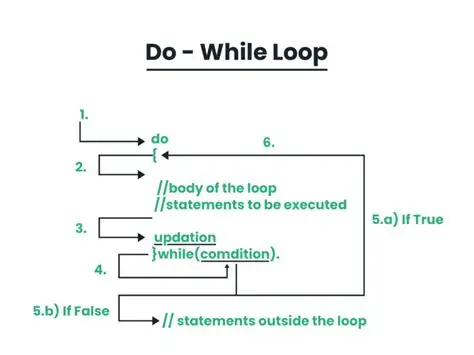
Do While Loop Flowchart
To further simplify understanding, let us consider a flowchart that represents the flow of control in a "do while" loop:
Start:Begin the execution.
Execute Code Block:The loop body runs first, without checking the condition.
Evaluate Condition:After execution, the loop checks the condition.
True Condition: If the condition is true, go back to Step 2.
False Condition: If the condition is false, exit the loop.
End:The program continues beyond the loop.
                            +-----------+
                            |  Start    |
                            +-----------+
                                |
                                v
                        +-----------------+
                        | Execute Code    |
                        | Block           |
                        +-----------------+
                                |
                                v
                        +-----------------+
                        | Evaluate         |
                        | Condition        |
                        +-----------------+
                            |     |
                        True   False
                            |       |
                            v       v
                    +-------------------+   +----------+
                    | Execute Code      |   |   End    |
                    | Block Again       |   +----------+
                    +-------------------+
This flowchart provides a visual understanding of how the loop functions. As observed, the key difference lies in executing the loop body before the condition check.
Syntax Explained Step-by-Step
Let us break down a basic example using the "do while" loop:
                            #include

                            int main() {
                                int i = 1;
                                do {
                                    printf("%d\n", i);
                                    i++;
                                } while (i <= 5); return 0; } < pre>
Explanation:
int i = 1; initializes the loop variable.
The do block prints the value of i and increments it.
The condition (i<= 5) is then checked.< li>
As long as the condition is true, the loop continues.
In this case, the numbers 1 to 5 will be printed.
Practical Use Cases
Understanding the "do while" loop is beneficial in real-world programming scenarios. Here are some practical applications:
Menu-Driven Programs: When a user is repeatedly prompted to choose from a list of options until they choose to exit.
Data Validation: When inputs must be validated, and the prompt must appear at least once.
Game Loops: In simple games, the main game logic runs continuously until the player quits.
Authentication Systems:To continuously prompt users to enter correct credentials.
In these examples, skipping the first execution would break the user experience, making the "do while" loop ideal.
Common Mistakes and How to Avoid Them
While learning the "do while" loop, beginners often make some typical mistakes. Understanding these can help prevent logic errors:
Infinite Loops:If the condition always evaluates to true, the loop will never exit.
Misplaced Semicolons: A semicolon after while (condition); is valid, but placing one after do is incorrect.
Condition Logic Errors: Ensure that the condition eventually becomes false, or you might enter an infinite loop unintentionally.
By consistently practicing code, students can avoid these pitfalls.
Comparison with Other Loops
To further understand the uniqueness of the "do while" loop, let us compare it with the "while" loop:
While Loop:
                           int i = 1;
                            while (i <= 5) { printf("%d\n", i); i++; } < pre>
Do While Loop:
                           int i = 1;
                            do {
                                printf("%d\n", i);
                                i++;
                            } while (i <= 5); < pre>
If i is initialized to a value greater than 5, the "while" loop will never run. But the "do while" loop will execute once, printing the value of i before the condition fails. This highlights the importance of using the correct loop for the correct situation.
Integration in Algorithm Development
In algorithmic logic, especially during the prototyping and development stages, a "do while" loop allows for an intuitive flow of control. Students pursuing an Algorithms Course in Noidabenefit immensely from this clarity. As algorithms often need to simulate real-world processes where actions occur before evaluations, the "do while" loop fits well into such needs.
For example, when designing a password reset system, the prompt to enter a new password must appear at least once. The system can then check for compliance (e.g., minimum character length, inclusion of numbers, etc.). This approach closely follows a "do while" loop structure.
Nested Do While Loops
More complex programming scenarios often involve nesting one loop inside another. A nested "do while" loop can be used to create tables, patterns, or repeat tasks with multiple conditions.
Example:
                           int i = 1, j;
                            do {
                                j = 1;
                                do {
                                    printf("%d ", j);
                                    j++;
                                } while (j <= i); printf("\n"); i++; } while (i <="5);" pre>
This nested loop prints a simple triangle pattern. Understanding nested loops broadens the problem-solving capability of a programmer.
Importance in Educational Curriculum
The inclusion of "do while" loops in programming syllabi is not incidental. It fosters a solid understanding of flow control. As students build increasingly complex programs, they realize that even a small concept like this can influence program behavior significantly.
Institutes offering anAlgorithms Course in Noidaemphasize these concepts early, so students develop clear logical reasoning. By combining theoretical knowledge with hands-on practice, learners retain concepts better and use them correctly in future applications.
Conclusion
Mastering the "do while" loop is a step forward in becoming a proficient programmer. Its ability to execute a block of code at least once before checking a condition makes it indispensable in certain programming scenarios. Students enrolled in an Algorithms Course in Noidawill find that understanding this loop not only enhances their technical skills but also enables them to write efficient, error-free code. The addition of flowcharts and real-world analogies, as discussed in this article, makes the learning process intuitive and memorable.
By building a strong foundation in control structures like the "do while" loop, aspiring programmers set themselves up for success in both academic and professional programming environments. When learned and implemented correctly, such loops can significantly improve the logical structure and readability of code, forming the backbone of robust algorithmic solutions.