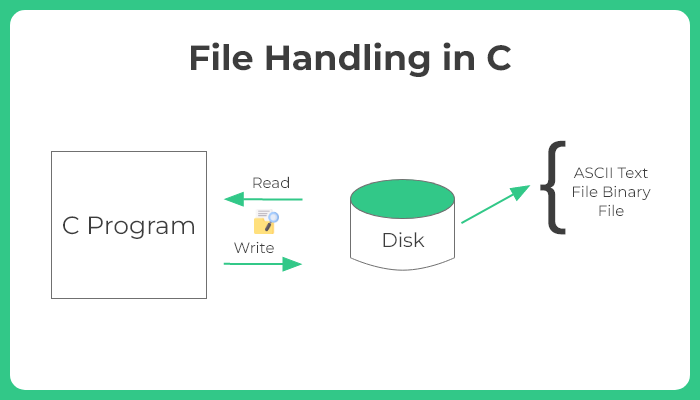
File handling in the C programming language is an essential skill that enables learners
to understand how to manage input and output (I/O) operations more effectively. C treats files as a
series of bytes and provides standard library functions to perform reading, writing, and modifying files
stored on the disk. This article explores the concept of file handling in C, offering explanations, code
examples, and real-world applications. For students enrolled in a C Programming Course in Noida,
mastering file handling is crucial to working with persistent data and building foundational skills for
systems programming.
In many applications, data needs to be stored permanently and retrieved at a
later stage. For this, file management is an indispensable component. Unlike temporary data
stored in variables, files allow data to be written and preserved across sessions. File handling
in C facilitates this functionality by offering a rich set of operations such as opening a file,
reading or writing data, and closing it securely.
This article serves as a complete tutorial on file handling in C. Readers will be
introduced to file pointers, the various file modes, standard library functions like fopen(),
fprintf(), fscanf(), fgets(), and fclose(), along with examples and outputs to solidify their
understanding.
Understanding the Basics of File Handling in C
The C language uses the FILE type to represent a file. It is defined in the
stdio.h header file, and most file-related operations involve a pointer of this type.
File Operations
There are five basic operations associated with file handling in C:
Creating or opening a file using fopen()
Reading data from the fileusing functions like fscanf() or fgets()
Writing data into the file using fprintf() or fputs()
Closing the file using fclose()
Checking the end-of-fileusing feof()
These operations are fundamental and form the basis for more advanced topics like
file buffers and binary file handling.
File Opening Modes in C
When a file is opened using fopen(), a file mode must be specified. The most
common file modes include:
"r" – Opens a file for reading. The file must exist.
"w" – Opens a file for writing. Creates a new file or truncates an
existing file.
"a" – Opens a file for appending. Data is added to the end.
"r+" – Opens a file for both reading and writing. The file must exist.
"w+" – Opens a file for both reading and writing. Overwrites existing
file.
"a+" – Opens a file for reading and appending.
Understanding these modes is vital for students pursuing a C Programming Course
in Noida, as they help manage file behavior precisely.
Syntax and Functionality
1. Opening a File
                            FILE *fp;
                            fp = fopen("data.txt", "r");
Here, fp is a file pointer, and data.txt is the name of the file to open. If the
file does not exist or cannot be opened, fopen() returns NULL.
2. Writing to a File
                            FILE *fp;
                            fp = fopen("data.txt", "w");
                            if (fp != NULL) {
                                fprintf(fp, "This is a file handling example.\n");
                                fclose(fp);
                            }
The fprintf() function works like printf(), except it writes to a file instead of
the console.
The fgets() function reads a line of text from a file and stores it in the
character array buffer.
Error Handling in File Operations
One of the most overlooked aspects of file handling in C is error
checking. A robust program must validate whether a file was opened successfully
before proceeding. Failing to check NULL returns from fopen() can result in undefined behavior
and crashes.
                           FILE *fp = fopen("data.txt", "r");
                            if (fp == NULL) {
                                printf("Error: Could not open file.\n");
                                return 1;
                            }
This check helps avoid situations where the file path is incorrect or the user
does not have the necessary permissions.
Use Case: Creating and Reading a Student Record
A simple student record application can be an excellent example of file handling
in C.
Writing Data
                            #include

                            int main() {
                                FILE *fp = fopen("students.txt", "w");
                                if (fp != NULL) {
                                    fprintf(fp, "Name: Ankit\nRoll No: 101\nMarks: 87\n");
                                    fclose(fp);
                                } else {
                                    printf("Unable to open file for writing.\n");
                                }
                                return 0;
                            }
Reading Data
                                #include

                                int main() {
                                    char data[100];
                                    FILE *fp = fopen("students.txt", "r");
                                    if (fp != NULL) {
                                        while (fgets(data, 100, fp) != NULL) {
                                            printf("%s", data);
                                        }
                                        fclose(fp);
                                    } else {
                                        printf("File not found.\n");
                                    }
                                    return 0;
                                }
This simple project illustrates how to persist structured data using files, which
is a critical learning component in a C Programming Course in Noida.
Binary File Handling in C
Text files store data in a human-readable format, but sometimes storing binary
data is more efficient. Binary files are processed using fread() and fwrite() functions.
Binary file handling is often used in data-intensive applications such as
inventory management or employee record systems.
Common Pitfalls and Best Practices
Students often make several mistakes when learning file handling for the first
time:
Not checking for NULL file pointers
Forgetting to close files using fclose()
Incorrect file modes
Mixing file operations (e.g., writing and reading) without using
appropriate modes like r+ or w+
Best practices include:
Always close the file after operations to free system resources.
Always check for errors using return values.
Use binary files for storing complex data structures for better
performance.
These practices are emphasized in a structured C Programming Course in Noida,
ensuring learners build strong foundational habits.
Real-World Applications of File Handling
File handling is not just a theoretical topic—it has countless practical
applications:
Log File Management: Programs maintain logs of
activities using file I/O.
Database Systems:Simple databases use binary files to
store records.
User Authentication:Storing usernames and passwords in
configuration files.
Game Development:Saving high scores or player progress
using files.
Scientific Computing:Handling large datasets in text or
binary form.
Proficiency in file handling equips learners to work on both academic and
industrial-scale projects.
Conclusion
Mastering file handling in C is a crucial step for anyone pursuing a programming
career, particularly students enrolled in a C Programming Course in Noida. Whether dealing with
plain text or complex binary data, understanding how to open, read, write, and close files is a
foundational skill that underpins many real-world applications. By exploring the syntax,
functionality, and common use cases, learners gain not only theoretical knowledge but also
practical insight into how file systems interact with C programs. Moreover, a thorough
understanding of file operations prepares learners for more advanced topics like data
serialization, system-level programming, and even embedded systems.
For any programming enthusiast looking to make the most of their learning
journey, especially within structured and industry-aligned programs, file handling is not just
another chapter—it is a vital tool that bridges memory and long-term data storage.