So, you're getting into C, huh? One thing that can mess with your head at first is how variables act in different areas of your code. Ever had a variable just vanish or not show up where you expect it? That's the scope for you. We're going to talk about global variables in C. They're strong, but they can also cause trouble if you're not careful.
Imagine a global variable as that super-friendly person at a party who knows everyone. You can talk to them from any spot in the room. Unlike local variables that stick to one function, global variables can be used all over your program. This makes them really handy in some situations, but you need to know how to handle them.
A global variable in C is a variable that's declared outside of any function, typically at the top of your source file. These variables have what we call "global scope," meaning they can be accessed and modified from any function within the same source file. When you declare a global variable in C, you're essentially creating a piece of data that lives for the entire duration of your program's execution.
Let's look at a simple example to illustrate this concept:
                    c
                    #include

                    int counter = 0;  // This is a global variable in C

                    void increment() {
                        counter++;  // We can access the global variable here
                    }

                    void display() {
                        printf("Counter value: %d\n", counter);  // And here too
                    }

                    int main() {
                        increment();
                        display();
                        return 0;
                    }
In this example, counter is our global variable in C. Notice how both the increment() and display() functions can access and modify this variable without any special syntax or parameter passing.
Understanding Scope: The Territory of Variables
In C, a variable's scope is all about figuring out where you can actually use it in your code. A global variable in C can be used pretty much anywhere in a single file. It's way different than a local variable, which only works inside the function where you made it.
A global variable in C is usable from where you declare it until the end of that file. So, if you put a global variable at the top of your file, all the functions after that point can use it. But, functions that come before the global variable can't see it.
Here's a thing that comes up a lot. People on the C programming course often ask: If you have a global variable and a local variable with the same name, what happens? Well, the local variable wins inside its function. It's like it's hiding the global variable.
                    c
                    #include

                    int value = 100;  // Global variable in C

                    void demonstrate_scope() {
                        int value = 50;  // Local variable with same name
                        printf("Local value: %d\n", value);  // Prints 50
                    }

                    int main() {
                        printf("Global value: %d\n", value);  // Prints 100
                        demonstrate_scope();
                        printf("Global value after function: %d\n", value);  // Still 100
                        return 0;
                    }
The Lifecycle of Global Variables
Knowing when a global variable in C is created and destroyed is really important for good coding. Unlike local variables, which pop into existence when a function starts and disappear when it ends, global variables stick around much longer.
A global variable in C comes to life when your program starts running and stays alive until the program shuts down. This can be good and bad. It's good because you can keep data available for different functions to use over time. But it's also bad because these variables use up memory the whole time your program is running.
How you set up a global variable in C also has its own rules. If you don't set a starting value for a global variable, the C compiler automatically sets it to zero (for numbers) or null (for pointers). This auto-setting is not the same as with local variables, which have random, junk values if you don't give them a starting value.
Storage Classes and Global Variables
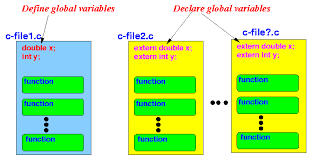
When working with global variables in C, it's important to understand storage classes. The most common storage class for global variables is extern, which allows you to declare a global variable in one file and use it in another.
                     c
                    // File: globals.c
                    int shared_data = 42;  // Definition of global variable

                    // File: main.c
                    extern int shared_data;  // Declaration of global variable defined elsewhere

                    int main() {
                        printf("Shared data: %d\n", shared_data);
                        return 0;
                    }
This mechanism is particularly useful in larger programs where you might need to share data across multiple source files. However, it's crucial to understand the difference between declaration and definition when dealing with global variables in C.
Best Practices for Using Global Variables
Okay, so global variables in C can be super handy, but don't go overboard with them. Here's what the C gurus at Uncodemy in Noida say:
First off, try not to use too many global variables. They can mess up your code and make it a pain to fix later. Since any function can change them, it's tough to figure out where things go wrong. Try passing data through function parameters if you can.
If you must use a global variable in C, make sure it has a name that says exactly what it's for. Don't use vague names like temp or data.
Think about using the static keyword with global variables when you only need them in one file. A static global variable in C can only be used in the file where it's defined, which keeps things separate.
                    c
                    static int file_counter = 0;  // Only accessible within this file
Initialize your global variables explicitly, even though C provides automatic initialization. This makes your code more readable and your intentions clearer.
Common Pitfalls and How to Avoid Them
A typical mistake with global variables in C is accidentally making functions depend on each other. If lots of functions use the same global variable, changing one function can mess up the others without you expecting it.
Another issue is name mix-ups, like we said before. Always know what global variables you have and pick different names for your local variables, so things don't get confusing.
If you're writing code that uses multiple threads, global variables can cause problems if you don't sync them correctly. They can lead to race conditions.
Practical Applications
Okay, so global variables in C can be useful, even though they have some downsides. If you've got settings that your whole program needs to get to, globals are a decent choice. Also, things like error codes, what your program is doing right now, and stuff that different parts of the program need to share can work well as globals.
When you're coding for small computers, globals often come in handy for talking to the actual hardware or remembering stuff even when the normal program flow gets interrupted.
Memory Management Considerations
Okay, so when it comes to how C handles memory, global variables hang out in the data segment of your program's memory. That's not the same as local variables, which live on the stack. Knowing this helps you pick the right type of variable for the job.
The data segment has two parts: one for global variables you've already given a value to, and another (called BSS) for those you haven't.
Wrapping Up: The Global Variable Journey
Using global variables in C is like driving a fast car – it's cool, but be careful! They give you lots of flexibility and can fix tricky problems, but think before you use them.
To use global variables well, get how they work and what they affect. If you're a beginner or want to learn more with a class like Uncodemy's C course, remember to use global variables carefully.
As you code more, you'll figure out when to use global variables and when not to. You'll learn this by doing and by knowing the basics we talked about.
C programming is great because it's simple but strong. Global variables show this well – they're easy to learn but can really change how your program acts. Learn them, and you'll have a helpful tool for coding.
Frequently Asked Questions (FAQs)
Q: Can I use a global variable before declaring it?
A: No, you must declare a global variable in C before using it. The compiler reads your code from top to bottom, so the declaration must appear before any usage.
Q: What happens if I don't initialize a global variable?
A: C automatically initializes global variables to zero (for numbers) or null (for pointers) if you don't provide an initial value.
Q: Can global variables be accessed from other files?
A: Yes, by using the extern keyword to declare the variable in other files where you want to use it.
Q: Are global variables stored differently in memory?
A: Yes, global variables are stored in the data segment, while local variables are stored on the stack.
Q: How do I make a global variable accessible only within one file?
A: Use the static keyword when declaring the global variable to limit its scope to the current file.
Q: Can I have multiple global variables with the same name?
A: No, within the same scope, you cannot have multiple global variables with identical names. This will result in a compilation error.