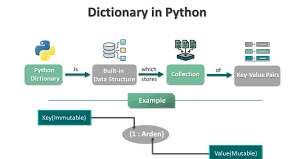
Python dictionaries are super useful. They let you store info using pairs of keys and values, instead of just listing stuff like in lists or tuples. They're great when you want to keep track of things like someone's details, match commands to actions, or find info quickly using unique keys. They're adaptable, quick, and easy to use.
Learning how to use dictionaries is a big deal if you want to make real programs, tackle coding challenges, and get ready for tech interviews. This guide will show you the basics of Python dictionaries, how they're written, what you can do with them, some tricks, and sample code to help you become a pro.
If you're just starting out with Python or trying to get better, this article will take you through Python dictionaries step by step, explaining things clearly and showing you how to use them.
What Is a Dictionary in Python?
A dictionary is just a bunch of key-value pairs, kind of like a list, but instead of using numbers to find stuff, you use keys. These keys can be words, numbers, or other unchanging things, which makes getting to your data way easier.
Think of it like an address book. You don't find someone by how far down they are on the list; you find them by their name (the key) to get their number or address (the value).
Key Characteristics
They're not really in order (but Python 3.7+ remembers the order you put them in).
Each key has to be one-of-a-kind and can't be changed (like text, numbers, or tuples).
You can change them by adding, deleting, or swapping out key-value pairs.
Finding stuff is quick—it pretty much takes the same amount of time, no matter how big the dictionary is.
Values can be anything—numbers, text, lists, or even other dictionaries.
Creating Dictionaries: Basic Syntax and Examples
Creating an Empty Dictionary
You can start with an empty dictionary and add items later:
                        python
                        my_dict = {}
Creating a Dictionary with Initial Key-Value Pairs
You define keys and values inside curly braces:
                    python
                    person = {
                        "name": "Alice",
                        "age": 30,
                        "city": "New York"
                    }
Here, the keys are "name", "age", and "city", which map to respective values 'Alice', 30, and 'New York'.
Accessing and Modifying Dictionary Elements
Accessing by Key
Use the key inside square brackets or the .get() method.
Square brackets: Raises an error if key doesn’t exist.
.get(): Returns None or a default value if key not found.
Example:
person["name"] returns 'Alice'
person.get("job", "Not specified") returns 'Not specified' if "job" is missing.
Adding or Updating Items
Assign a value to a new or existing key:
person["job"] = "Engineer" adds new key "job".
person["age"] = 31 updates existing "age".
Deleting Items
Remove a key-value pair using:
del person["city"] removes "city".
pop("key") removes and returns the value.
Iterating Through Dictionaries
Dictionaries can be looped through in three main ways:
Keys: Iterate over all keys.
Values: Iterate over all values.
Key-Value Pairs: Iterate over both keys and values using .items().
Example:
for key in person: or for key in person.keys():
for value in person.values():
for key, value in person.items():
These iterations let you process data effectively in tasks like filtering, transforming, or displaying information.
Dictionary Methods You Need to Know
Method
Description
.clear()
Removes all items
.copy()
Returns a shallow copy
.fromkeys(iterable, value=None)
Creates a new dict with keys from an iterable and a given value
.get(key, default=None)
Returns value for key, or default if missing
.items()
Returns a list of key-value pairs
.keys()
Returns a list of keys
.pop(key, default=None)
Removes key and returns value; returns default if key not found
.popitem()
Removes and returns the last inserted key-value pair
.setdefault(key, default=None)
Returns value if key exists; else inserts key with default value
.update(other)
Updates dict with key-value pairs from another dict or iterable
Practical Examples with Expected Output
Example 1: Store and Access User Profile Data
Store user information and print their city:
Create a dictionary with name, email, and city.
Access and print the city.
Expected Output:
                    text
                   User lives in New York
Example 2: Update and Add New Details to Profile
Update age and add phone number.
Print both fields.
Expected Output:
                    text
                    User is 32 years old
                    Phone: 123-456-7890
Example 3: Iterate Over User Attributes for Display
Print all keys and values as “key: value”.
Expected Output:
                    text
                    name: Alice
                    age: 32
                    city: New York
                    phone: 123-456-7890
Example 4: Using .get() to Handle Missing Keys Safely
Try retrieving a key "job" that might not exist, and provide a default if not.
Expected Output:
                    text
                    Job: Not Specified
Example 5: Removing an Entry
Remove "phone" and confirm its removal.
Expected Output:
                    text
                    Removed phone number.
                    phone key present: False
Nested Dictionaries and Complex Structures
You can put dictionaries inside dictionaries, or even inside lists! This lets you set up some really complex ways to sort your information.
Like, let's say you're dealing with a project. You could have:
languages: a list of all the programming languages
deadline: the date it has to be done by
team: who's working on it and what they do
This kind of nesting is super important for a lot of stuff online, especially with web apps, how different programs talk to each other (APIs), and how data is organized.
Use Case: Counting Word Frequencies Using Dictionaries
One super useful thing you can do with dictionaries is count how often words pop up. Just go through a bunch of words, and keep track of how many times each one shows up in a dictionary.
If it's a new word, add it to the dictionary and set the count to 1.
If you've seen the word before, just add one to its count.
You see this a lot when you're looking at data, messing with text, or doing stuff with language. They teach it in the Python course at Uncodemy, too.
Dictionaries and Performance Insights
Dictionaries in programming? Okay, here's the deal: looking stuff up, adding stuff, or taking stuff out of a dictionary, it's all super quick, pretty much the same amount of time, no matter how much data you have. Computer people call that O(1).
If you're grabbing info using a specific key instead of its place in line, dictionaries are way better than lists.
Python has a special trick inside that makes finding stuff fast; it's based on a hash function. Just remember your keys can’t be changed after you make them.
Knowing how fast dictionaries work is super important if you want to make your code run faster and handle tons of info.
Dictionary Comprehensions
Like list comprehensions, dictionary comprehensions are a neat way to make dictionaries using short, easy-to-read code.
Here are some examples of how you can use them:
Make a dictionary from a list.
Switch the keys and values in a dictionary you already have.
Pick out specific entries based on certain rules.
Real-World Applications of Python Dictionaries
Think of dictionaries as your go-to for several things:
App Settings: They store and grab your app's settings.
Database Stuff: They match field names to values in a database record.
Speed Boost: Storing computed results means you don't have to redo the work each time.
User Info: Keeping track of logged-in users' details in web apps.
Data Crunching: They help analyze big data, group, and organize it.
JSON Made Easy: They work smoothly with APIs that send JSON data.
Since data-focused apps and APIs are very common, knowing how to use dictionaries lets you deal with modern data like an expert.
Common Mistakes and How to Fix Them
Mistake
How to Fix
Using a mutable or non-hashable key (like a list)
Use immutable keys such as strings or tuples
Accessing missing keys with square bracket syntax
Use .get() with a default to avoid errors
Forgetting to initialize keys before incrementing
Use .setdefault() or collections.defaultdict
Modifying dictionaries while iterating
Iterate over .items() copy or list of keys
How Uncodemy’s Python Programming Course Builds Dictionary Expertise
We'll take you from the basics all the way to complex stuff like nested structures.
You'll learn by doing real projects, like working with text, user data, and info from APIs.
Get ready for hands-on practice, including fixing tricky dictionary bugs.
We'll prep you for interviews with common dictionary questions.
I'll personally review your code to help you write better.
Conclusion
Python dictionaries are super useful! They let you store data in a simple way with keys and values, making your code quick and easy to read. If you get good at using them, you can write really great programs for all sorts of stuff, like websites or analyzing data.
At Uncodemy's Python course, we teach you all about dictionaries, from the basics to more advanced tricks. You'll get plenty of hands-on practice and learn how to use them in actual coding situations.
Keep practicing how to make, change, and organize dictionaries. Play around with dictionary comprehensions and how they perform. Before you know it, dictionaries will feel like second nature and be one of your favorite coding tools.
Frequently Asked Questions (FAQs)
Q1: Can dictionary keys be changed after creation?
No. Dictionary keys must be immutable. You can add or remove keys but an existing key's identifier cannot be altered.
Q2: Can dictionaries be nested?
Yes, dictionaries can contain other dictionaries, lists, or any Python objects, allowing complex data modeling.
Q3: Are Python dictionaries ordered?
As of Python 3.7+, dictionaries maintain insertion order by design, which can be useful for predictable iteration.
Q4: What is the difference between .get() and direct key access?
.get() returns a default value instead of raising an error if the key does not exist, making the code more robust.
Q5: Is dictionary comprehension better than a for-loop?
For creating new dictionaries succinctly and clearly, yes. However, use whichever method maximizes code readability.