How to Use Dictionaries in Python with Code Beginners Guide
Mr. Irshad3 days ago
23 comments
20 min read
How to use dictionaries in Python with code is easier than you think, even if you're just starting out. In this guide, we’ll make Python dictionaries so simple that even a 12-year-old can use them confidently. No scary terms. Just a step-by-step path to help you learn faster.
Whether you want to save student marks, store names with roll numbers, or track your own mini projects, dictionaries can do it all. So let’s jump in!
Table of Contents
Introduction
What Is a Dictionary in Python? (With Simple Example)
5 Beginner Steps to Use Dictionaries in Python 3.1 Create a Dictionary 3.2 Access Data Using Keys 3.3 Update Values in a Dictionary 3.4 Add New Key-Value Pairs 3.5 Remove Items from a Dictionary
Why Dictionaries Matter in Real Projects
Essential Dictionary Methods for Beginners 5.1 .get() – Access Without Errors 5.2 .keys() – See All Keys 5.3 .values() – See All Data 5.4 .items() – View Full Dictionary
Loops and Dictionaries: The Perfect Combo
What Are Nested Dictionaries? (With Real-Life Analogy)
Quick Tips for Beginners Before You Code
Snippet Recap: What Did You Learn About Python Dictionaries?
Conclusion: Python Dictionaries Made Simple and Fun
FAQ
Key Takeaways
Learn what Python dictionaries are and how they work
Understand how to add, access, update, and delete data
See real-world beginner-friendly examples
Stay clear of confusing code. We keep it light.
Perfect for school kids, college beginners, or self-learners
What Is a Dictionary in Python?
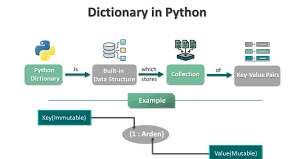
A Python dictionary is like a mini locker with labels on each compartment.
Let’s say you have a school bag with three zipped pockets. One has your name tag, one your age, and one your grade. In Python, that’s:
"name", "age", and "grade" are called keys

"Riya", 14, and "A" are their matching values
You can think of a dictionary as a key-value pair container, just like a real notebook that stores information under headings.
5 Simple Steps to Use Dictionaries in Python
Let’s break down how to use dictionaries in Python with code in 5 simple beginner steps.
1. Create a Dictionary
Making a dictionary is like making your own custom bag of data.
book = {"title": "Harry Potter", "pages": 340}
This one stores a book's title and number of pages.
Analogy: Think of this as labeling drawers in a cupboard. Each drawer (key) holds one type of info (value).
2. Access Data from a Dictionary
To read data, you ask the dictionary using a key.
print(book["title"]) # Output: Harry Potter
It’s like asking, “What’s the book title?” and Python gives you the value.
Here’s a quick table to understand:
Key
Value
"title"
"Harry Potter"
"pages"
360
3. Update Values
Want to change your grade or update your pet’s name?
student["grade"] = "A+"
This updates the value for the "grade" key. Simple and clean.
4. Add New Items
Need to add a new subject score or a hobby?
student["hobby"] = "Reading"
Python adds "hobby": "Reading" to the dictionary, like adding a new page in your notebook.
5. Remove Items
To remove something, you can use del or pop():
del student["age"]
Or if you want to keep the value while removing:
score = student.pop("grade")
Friendly tip: Use pop() when you need to use the value later.
Why Dictionaries Matter in Python
Let’s get real. Why should you even learn this?
Because dictionaries save time, effort, and stress. Especially in school projects or coding apps.
Here’s where they shine:
Store student details like roll, name, and marks
Build a quiz app with questions and correct answers
Track tasks with labels like "completed" or "pending"
Let’s say you’re building a library app. You can use a dictionary to store book titles, authors, and availability. It keeps your data clean and easy to update — no messy lists or confusing indexes.
Unlike lists, dictionaries don’t need numbers to search. Just use the label, and done!
So next time someone says, “Python’s hard,” you can say, “Not when I use dictionaries.”
Dictionary Methods Made Easy
Python dictionaries come with built-in tools (called methods) to help you work faster. Here are the ones beginners must know:
➔ .get()
Use .get() to safely access a value without crashing your code.
Copy Code
student.get("name") # Riya
This works even if the key doesn't exist; it just returns None.
➔ .keys()
Want to see all the keys?
Copy Code
student.keys() # dict_keys(['name', 'hobby'])
It shows all the labels (keys) in your dictionary.
These are the basic tools you'll use again and again.
Loops + Dictionaries = Magic
Once you know how to create and use dictionaries, looping makes them even more powerful.
Let’s say you want to print all the key-value pairs in a dictionary. Here’s a simple way:
for key in student:
print(key, student[key])
This loop goes through each key and prints the value attached to it.
You can also do it using .items():
for key, value in student.items():
print(key, value)
Real-life use case:
Imagine you're making a quiz app. You want to show all questions and correct answers stored in a dictionary. Loops help you go through everything, one by one, without writing long code.
What Are Nested Dictionaries?
A nested dictionary means one dictionary inside another. It’s like having folders inside folders, each holding related information. You use nested dictionaries when you want to group data under a larger label, like storing details of many students in one class. This helps you stay organized and manage complex data easily, even in beginner projects.
Analogy:
Think of it as a classroom with student files. Each student file has name, age, and grade, and all files are inside a big folder called class10.
You’ll use this when storing grouped data, like employees in a company or scores of different players.
Quick Tips for Beginners
Before you start using dictionaries in your code, here are some smart tips to help you avoid mistakes:
Keep your keys unique – Duplicate keys will overwrite previous ones
Use short, clear key names – Like "name" or "score"
Start with small dictionaries – Don’t try to store everything at once
Practice by making small examples – Like favorite movies or your daily tasks
You don’t need to memorize everything – Try things out and learn by doing
Quick Recap
A dictionary in Python is a collection of data stored in key-value pairs. You can use dictionaries to store information like names, scores, or any related data. They are flexible, easy to use, and great for beginners. You can add, update, or access data using just a few lines of simple Python code.
Conclusion: Dictionaries Made Simple
Now you know what Python dictionaries are, how to use them, and where to apply them. From school reports to fun mini projects, dictionaries are your smart tool to keep things organized.
This makes your Python projects easier to manage.
And the best part? You didn’t need long, boring code to learn it.
So, what’s next? You can start by creating your own dictionary about your pet, a game you like, or your weekly tasks. If you’re feeling curious, you can even explore how dictionaries work with functions or files in Python.
This is just the beginning. Keep practicing, keep coding, and you will master Python one small step at a time. And if you ever want hands-on help with real-world projects, Uncodemy’s beginner-friendly Python course is a great place to start.
Start learning today and build your Python skills with confidence.
FAQs on Python Dictionaries
What is a dictionary in Python for kids?
A dictionary is like a label box. Each label (called a key) holds a value. It helps you store and find data easily, like a digital notebook.
How do I create a dictionary in Python?
Use curly brackets with key-value pairs inside. Example:
student = {"name": "Riya"}
Can I change values in a dictionary?
Yes! You can update any value by using its key.
student["name"] = "Isha"
Are dictionaries better than lists?
Depends on the task.
Use lists when order matters.
Use dictionaries when you want labeled data.
What’s the easiest way to remember dictionary syntax?
Just remember this format: {key: value} Like writing "subject": "Math" or "name": "Amit"