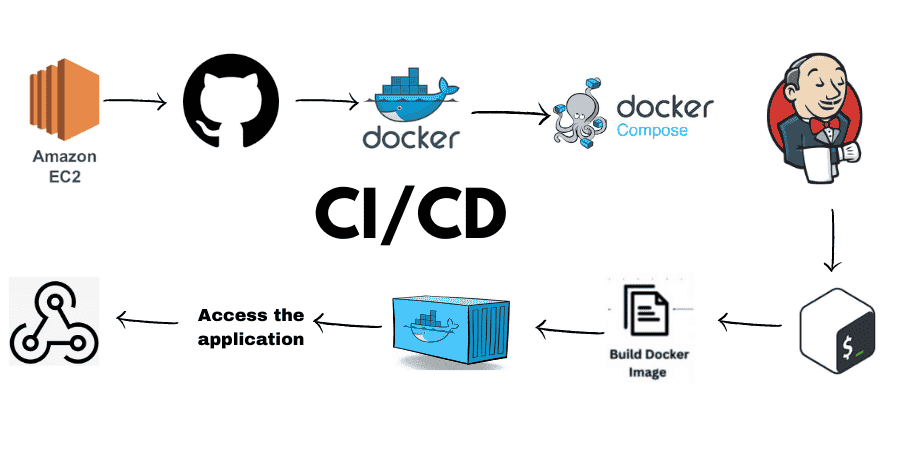
If you are new to DevOps or simply want to understand how to set up CI/CD pipelines with Jenkins, this guide will walk you through the basics in a simple, beginner-friendly way.
What is Jenkins?
Jenkins is an open-source automation server that helps developers build, test, and deploy applications automatically. It is mainly used for Continuous Integration (CI) and Continuous Deployment/Delivery (CD).
In simple words, Jenkins makes sure your code is always tested and ready for release with minimum manual effort.
- Continuous Integration (CI): Developers frequently merge code into a shared repository. Jenkins automatically builds and tests it.
- Continuous Deployment (CD): After successful testing, Jenkins deploys the code to staging or production environments.
Why Use Jenkins for CI/CD?
Here are some strong reasons why Jenkins is considered the backbone of CI/CD:
1. Automation – Removes repetitive manual work by automating build, test, and deployment.
2. Integration – Works with almost every DevOps tool (Git, Docker, Kubernetes, Maven, etc.).
3. Flexibility – Thousands of plugins allow Jenkins to adapt to different environments.
4. Open-source – Free to use and widely supported by the DevOps community.
5. Scalability – Can run pipelines on multiple servers (master-agent architecture).
Key Jenkins Concepts for Beginners
1. Job
A job in Jenkins defines a task (for example, build and test an app).
2. Pipeline
A pipeline is a series of steps (build → test → deploy) written in a script.
3. Plugin
Plugins extend Jenkins’ functionality (e.g., Git plugin, Docker plugin, Kubernetes plugin).
4. Master-Agent Architecture
Jenkins can distribute work across multiple machines for efficiency.
Installing Jenkins
You can install Jenkins on Windows, Linux, or Docker.
On Ubuntu/Linux
sudo apt update
sudo apt install openjdk-11-jdk
wget -q -O - https://pkg.jenkins.io/debian-stable/jenkins.io.key | sudo apt-key add -
sudo sh -c 'echo deb http://pkg.jenkins.io/debian-stable binary/ > \
/etc/apt/sources.list.d/jenkins.list'
sudo apt update
sudo apt install jenkins
On Docker
docker run -p 8080:8080 -p 50000:50000 jenkins/jenkins:lts
Once installed, Jenkins runs on http://localhost:8080.
Setting Up Jenkins for CI/CD
Step 1: Install Required Plugins
- Go to Manage Jenkins > Manage Plugins.
- Install plugins like:
- Git Plugin
- Maven Plugin
- Docker Plugin
- Pipeline Plugin
Step 2: Connect Jenkins with GitHub
- Create a new job.
- Select “Source Code Management” → Git.
- Add your GitHub repository URL.
Step 3: Configure Build Triggers
- Use Poll SCM or GitHub Webhooks so Jenkins automatically runs when new code is pushed.
Step 4: Add Build Steps
Example: Compile code with Maven
mvn clean install
Step 5: Run Tests
Configure Jenkins to run test commands (JUnit, PyTest, etc.).
Step 6: Deploy Application
After successful build and tests, add deployment steps (to Tomcat server, Docker container, or Kubernetes cluster).
Jenkins Pipeline Example
You can create pipelines using Jenkinsfile written in Groovy syntax.
Copy Code
pipeline {

    agent any

    stages {

        stage('Build') {

            steps {

                echo 'Building the application...'

                sh 'mvn clean install'

            }

        }

        stage('Test') {

            steps {

                echo 'Running tests...'

                sh 'mvn test'

            }

        }

        stage('Deploy') {

            steps {

                echo 'Deploying application...'

                sh 'scp target/myapp.war user@server:/var/www/apps/'

            }

        }

    }

                        }
This pipeline builds the project, runs tests, and deploys it automatically.
Advantages of Using Jenkins for CI/CD
1. Error Detection – Bugs are caught early during integration.
2. Faster Delivery – Reduces time to release new features.
3. Stable Software – Every change is tested automatically.
4. Better Collaboration – Developers, testers, and ops work together smoothly.
5. Community Support – Huge community with active plugin development.
Real-World Use Cases of Jenkins
- E-commerce Applications – Automating frequent updates without downtime.
- Banking Systems – Ensuring secure deployment pipelines.
- Startups – Faster release cycles to stay competitive.
- Enterprises – Managing large-scale microservices deployments.
Learn Jenkins and DevOps with Uncodemy
If you want hands-on experience with Jenkins, Docker, Kubernetes, Terraform, and CI/CD pipelines, you can join Uncodemy’s DevOps Training Course in Faridabad. The course covers practical projects that make you job-ready in the DevOps field.
Conclusion
Jenkins is one of the most powerful tools for CI/CD pipelines. By automating builds, tests, and deployments, it reduces human errors and accelerates software delivery.
For beginners, start small: install Jenkins, connect it with GitHub, and automate a simple build. Slowly, move toward pipelines with Docker and Kubernetes. With consistent practice, you’ll be ready to implement real-world CI/CD workflows.
FAQs
Q1. What is Jenkins used for?
Jenkins is mainly used for automating builds, tests, and deployments in CI/CD pipelines.
Q2. Is Jenkins free?
Yes, Jenkins is completely open-source and free to use.
Q3. What language does Jenkins pipeline use?
Jenkins pipelines are written in Groovy-based DSL.
Q4. Can Jenkins work with Docker and Kubernetes?
Yes, Jenkins has plugins for Docker and Kubernetes, making it ideal for modern DevOps workflows.
Q5. Do I need coding skills to use Jenkins?
Basic scripting knowledge (Shell, Groovy, or Python) helps, but Jenkins is more about automation and configuration.