1. Nail the Basics, Then Move On
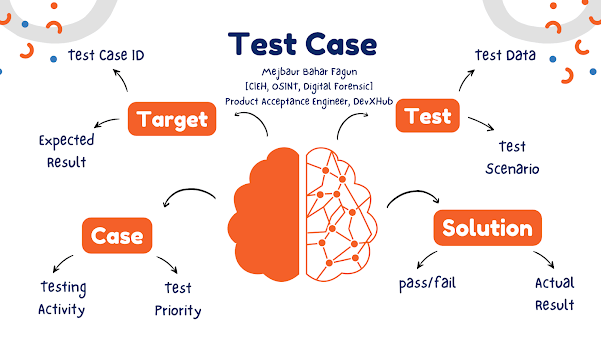
Yes, every test case needs structure. But structure isn't the goal—clarity is. A solid test case still includes:
- ID or reference number
-
- Clear title or objective
-
- Preconditions (what needs to be true before you start)
-
- Steps (what exactly you're doing)
-
- Expected result
-
- Actual result (filled in later)
-
- Status
-
- Notes or evidence if needed
-
Uncodemy's QA training starts here. Their Manual Testing and Advanced Testing courses have you write actual test cases from real user stories. You don’t just fill out a template—you learn what every field is for, and why clarity saves time later.
But once you know the format, drop the templates. Focus on writing test cases that help someone find answers fast.
2. Start With Behavior, Not Button Clicks
Bad test cases read like click-by-click scripts. Good ones describe what you're testing and why.
Let’s say you’re testing login. A weak case says:
- Open app
-
- Enter username
-
- Enter password
-
- Click Login
-
A better one says:
- Validate that a user with valid credentials can log in successfully
-
This frees your test case from brittle UI steps and makes it more reusable. UI changes? No problem. The core behavior being tested still stands.
Uncodemy drives this mindset home in their test writing workshops. You’re trained to think like a user, not a machine.
3. Think Like a Breaker, Not a Follower
The point of a test case isn’t to confirm a feature works. It’s to reveal how and when it doesn’t. That means getting into edge cases, weird inputs, and user habits devs might not have anticipated.
Examples:
- What happens if the user pastes a 10,000-character bio?
-
- What if the same action is triggered twice in a row?
-
- What if the server returns a 504 mid-flow?
-
If your test cases don’t explore these, you’re only half testing. Uncodemy’s QA strategy module challenges you to think about what might break, not just what should work.
4. Tie Test Cases to Requirements, But Don’t Stop There
Every test case should map to a user story or requirement. That’s basic coverage. But don’t let a requirements doc limit your thinking. Some bugs aren’t the result of broken features—they’re the result of missing questions.
Here’s the real test: once you've written test cases from the requirements, ask yourself, “What’s not covered here?” Uncodemy builds this habit into their live projects. You don’t just test the features—you analyze the gaps.
5. Use Data That Actually Tells You Something
Filling in inputs like "JohnDoe" and "Password123" is a waste of a test case. If your test passes with that, it tells you almost nothing.
Better:
- Use special characters, emojis, SQL keywords
-
- Use long strings, nulls, and zeroes
-
- Use invalid but realistic formats (like an email without a TLD)
-
Good test cases combine data boundaries with behavior validation. Uncodemy’s data-driven testing lessons focus on this. You’ll write test cases where inputs change and the logic stays sharp.
6. Keep Things Modular
Here’s what bloats test suites: repeating the same setup steps over and over. Good test cases are modular. That means splitting shared flows into reusable chunks.
Instead of embedding a login step in every test case, isolate it:
- TC01: Validate login with valid credentials
-
- TC02: Access dashboard (prereq: logged in)
-
When login changes, you fix one test case, not fifty. Uncodemy teaches you this from day one, especially when building automation frameworks where reusability matters even more.
7. Don’t Just Write Manual Test Cases—Write Like You’ll Automate
Even if you’re not automating today, assume someone will tomorrow. That person might be you.
So when writing test cases, make sure:
- Steps are clear and unambiguous
-
- Expected results are testable, not vague
-
- Inputs are parameterized where possible
-
Think: could this test be turned into a script without guesswork? Uncodemy’s automation modules build directly on manual test cases. You’ll take what you wrote manually and automate it using Selenium or REST Assured, so you see the downstream impact.
8. Prioritize Tests That Actually Matter
You don’t need 300 test cases for a login feature. You need 15 that catch what might break, plus a few more to cover edge cases.
Smart test writing means:
- Testing high-impact areas more deeply
-
- Skipping redundant scenarios
-
- Focusing on what could go wrong, not what looks shiny
-
Uncodemy teaches test case triage. You learn how to estimate risk, evaluate coverage, and justify your decisions to a lead or product manager.
9. Use Tools That Document While You Test
Nobody reads 15-page test case docs anymore. That’s just dead weight. Modern QA tools let you:
- Record sessions
-
- Auto-capture logs or screenshots
-
- Link bugs directly to failed cases
-
Tools like TestRail, Zephyr, Xray, and even Notion get the job done. It’s about speed, clarity, and traceability. Uncodemy walks you through how to actually use these tools—not just click around, but plug them into your workflow.
10. Collaborate From the Start
You shouldn’t be writing test cases in a vacuum. Sync with devs. Run flows past designers. Ask PMs what’s high-risk.
Test case reviews should be like code reviews: fast, useful, and focused. Uncodemy simulates this in group projects. You’ll pair up, review each other’s tests, and argue over priorities. It’s the best way to learn how QA really works.
Sample Test Case Breakdown
Let’s write one out for a real feature: password reset via email.
Title: Password reset via email - valid flow Preconditions: User exists with email user@example.com Steps:
- Go to login page
- Click "Forgot Password"
- Enter email: user@example.com
- Click "Submit"
- Open inbox
- Click reset link
- Enter new password and confirm
- Submit
Expected Result:
- Email is received within 1 minute
-
- Link opens password reset screen
-
- Password is updated and login works with new password
-
Test Data:
Edge Case Variants:
- Email entered does not exist
-
- Reset link clicked twice
-
- Reset link expired (after 15 min)
-
- New password too short
-
You can build 5–10 strong test cases just from this one flow. Uncodemy’s project tracks take you through exercises like this repeatedly. You get practice writing, reviewing, and optimizing your own tests.
Tools Worth Knowing
Test case writing and management gets better when you’ve got the right stack. A few worth learning:
- TestRail – Solid structure, good integration
-
- Xray for Jira – Works well if your team lives in Jira
-
- Zephyr – Lightweight, easy to use
-
- Allure Reports – Makes automated test results easy to read
-
- Notion – Surprisingly effective for fast test suites
-
Uncodemy lets you use these in context. Not just theory—actual hands-on testing using these tools as part of your workflow.
How to Think About It All
Writing test cases isn’t grunt work. It’s design. You’re deciding how software should behave, and what counts as broken.
You need to:
- See the big picture
-
- Get the details right
-
- Stay curious
-
- Think like a user
-
- Communicate clearly
-
If you can do that, your test cases won’t just find bugs. They’ll raise the bar for how your team thinks about quality.
Uncodemy gives you the space to build those skills. Their QA and SDET programs walk you through every phase—manual testing, automation, API, CI/CD, and strategy. You won’t just learn how to write a test case. You’ll learn how to write one that matters.
Want to level up how you write test cases? Start with real scenarios. Practice with feedback. And don’t settle for memorizing templates. Build the habits that make test writing a strategic skill, not just a task on your list.