In this blog, we’ll explore what HTML, CSS, and JS are all about, why they’re so important, how they work together, and how you can kick off your journey. Plus, we’ll share a clear roadmap to help you master these vital tools of web development.
If you’re truly committed to becoming a professional developer, consider diving into structured learning opportunities like the Web Development Course in Noida (uncodemy.com). This can provide you with hands-on experience, expert guidance, and exposure to real-world projects.
Why Start with HTML, CSS, and JS?
Before you jump into frameworks like React or Angular, or backend technologies like Node.js, it’s essential to get a solid grasp of the basics. Here’s why:
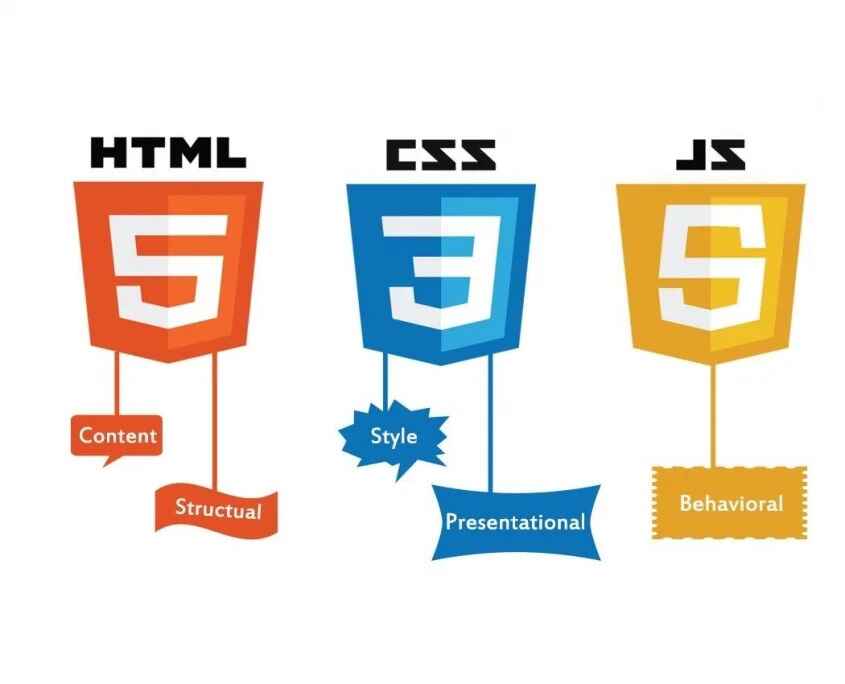
- HTML (Hyper Text Markup Language) gives your content its structure. Think of it as the skeleton of a webpage.
- CSS (Cascading Style Sheets) adds the flair and layout. This is where you get to play with colours, fonts, and overall design.
- JavaScript (JS) injects interactivity and dynamic features. Without JS, a website is just a static page with no engagement.
Together, they create the holy trinity of front-end development. Every advanced technology you learn later will build on this solid foundation.
What is HTML?
HTML is the language that defines the content and structure of a webpage. It uses “tags” to identify elements like headings, paragraphs, links, images, and forms.
Key Features of HTML:
- It serves as the backbone of every web page.
- It defines headings, text, and multimedia content.
- It employs semantic elements (like <header>, <footer>, <article>) for improved readability and SEO.
- It’s straightforward to learn and implement.
Example of HTML Code:
Copy Code
<!DOCTYPE html>

<html>

  <head>

    <title>My First Web Page</title>

  </head>

  <body>

    <h1>Hello World!</h1>

    <p>This is my first step in web development.</p>

  </body>

</html>
What is CSS?
CSS, or Cascading Style Sheets, is all about giving your HTML elements a stylish makeover. While HTML lays down the structure, CSS steps in to enhance the visual appeal by managing colors, fonts, spacing, alignment, and how everything responds on different devices.
Key Features of CSS:
- Shapes the design and layout of web pages.
- Offers flexibility with selectors and classes.
- Embraces responsive design for a mobile-first approach.
- Boasts modern features like Flexbox and Grid for creating layouts.
Example of CSS Code:
Copy Code
body {

  font-family: Arial, sans-serif;

  background-color: #f0f0f0;

}

h1 {

  color: #007BFF;

  text-align: center;

}

p {

  font-size: 16px;

  color: #333;

}
What is JavaScript?
JavaScript is the magic that brings logic and interactivity to your webpage. With JS, you can validate forms, add cool animations, create dynamic content, and even build full-fledged applications.
Key Features of JavaScript:
- Transforms websites into interactive and dynamic experiences.
- Executes directly in the browser.
- Integrates smoothly with HTML and CSS.
- Offers a variety of libraries and frameworks like React, Vue, and Angular.
Example of JavaScript Code:
Copy Code
document.getElementById("btn").addEventListener("click", function() {

  alert("Welcome to Web Development!");

});
How HTML, CSS, and JS Work Together
Building a website is a lot like putting together a house. Here’s how the pieces fit:
- HTML serves as the walls, rooms, and overall structure of your house.
- CSS adds the paint, decorations, and furniture that make it inviting.
- JavaScript brings in the electricity, appliances, and systems that give it life.
Without HTML, you have no content. Without CSS, that content looks bland and unappealing. And without JavaScript, the site feels static and lifeless. When these three come together, they create stunning, interactive web experiences.
Step-by-Step Roadmap to Learn HTML, CSS, and JS
Here’s a step-by-step guide for beginners eager to learn HTML, CSS, and JS:
Step 1: Get the Hang of HTML Basics
- Familiarize yourself with document structure (<!DOCTYPE html>).
- Learn the most common tags like <h1>, <p>, <a>, <img>, and <form>.
- Dive into semantic HTML to enhance accessibility and SEO.
Step 2: Style It Up with CSS
- Understand CSS syntax and how selectors work.
- Play around with properties such as colors, fonts, margins, and padding.
- Master layouts using Flexbox and CSS Grid.
- Make your designs responsive with media queries.
Step 3: Bring It to Life with JavaScript
- Get to know variables, data types, and functions.
- Work with the DOM (Document Object Model).
- Add event listeners to respond to user actions.
- Explore ES6+ features like arrow functions and promises.
Step 4: Create Mini Projects
- Build an HTML-only portfolio page.
- Design a CSS-styled landing page.
- Develop a JavaScript-powered calculator or to-do app.
Step 5: Understand Version Control (Git & GitHub)
- Keep track of changes in your projects.
- Share your code and collaborate with others.
Step 6: Explore Frameworks (Optional for Now)
- Once you feel comfortable with HTML, CSS, and JS, consider diving into frameworks like React, Vue, or Angular.
Common Mistakes Beginners Should Avoid
- Skipping the Basics: It’s tempting to dive straight into frameworks, but mastering the core concepts first is crucial.
- Ignoring Semantic HTML: This can really hurt your SEO and accessibility efforts.
- Not Practicing Enough: Web development is all about hands-on experience; theory alone won’t cut it.
- Overusing Inline Styles: Stick to external CSS for cleaner, more maintainable code.
- Forgetting Mobile Responsiveness: Always prioritize mobile users in your designs.
Career Opportunities After Learning HTML, CSS, and JS
Once you’ve got a handle on these three technologies, a world of career opportunities opens up, such as:
- Frontend Developer – Focusing on UI/UX design and creating engaging web interfaces.
- Full-Stack Developer – Merging your frontend and backend skills.
- UI/UX Designer – Leveraging HTML and CSS for design prototypes.
- Freelancer – Crafting custom websites tailored to client needs.
- Web Application Developer – Building dynamic and scalable applications.
By signing up for structured training programs like the Web Development Course in Noida (uncodemy.com), you can solidify your foundation with hands-on projects and expert guidance.
Tips for Mastering HTML, CSS, and JS
- Make it a habit to practice daily by working on small projects.
- Utilize platforms like CodePen and JSFiddle for quick experimentation.
- Regularly follow documentation and tutorials to stay updated.
- Analyze real-world websites to grasp best practices.
- Engage with developer communities and take part in coding challenges.
Conclusion
Starting your web development journey with HTML, CSS, and JavaScript is a smart move. These three technologies form the essential foundation every web developer needs before tackling advanced frameworks or backend technologies. By learning them step by step, practicing through projects, and building your portfolio, you’ll be well-prepared for exciting opportunities in the tech industry.
For guided learning and professional mentorship, the Web Development Course in Noida (uncodemy.com) can help you master these concepts more quickly and set you up for a successful career.
Frequently Asked Questions (FAQs)
Q1. Do I need to learn HTML, CSS, and JS before diving into frameworks like React?
Absolutely! These frameworks are built on the foundation of these core technologies. If you skip them, you might find it tough to grasp how the frameworks actually work.
Q2. How long does it take to get a handle on HTML, CSS, and JS?
If you practice regularly, you can pick up the basics in about 3 to 6 months. But really mastering them? That could take a bit longer, depending on how much effort you put in.
Q3. Can I become a web developer by just knowing HTML and CSS?
You can definitely create static websites, but if you want to build dynamic and interactive applications, you’ll need to learn JavaScript too.
Q4. What kind of projects can I tackle as a beginner?
You might want to start with a personal portfolio, a simple landing page, or even a to-do list app. These projects are great for putting your new skills into practice.
Q5. Is a formal degree necessary to become a web developer?
Not at all! Many successful developers are self-taught. That said, structured courses like the Web Development Course in Noida (uncodemy.com) can really help speed up your learning journey.