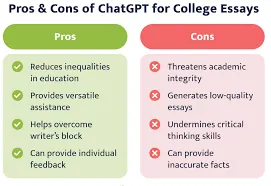
Pros and cons at a glance
| Pros | Cons |
|---|
| Available any time, for as many practice questions as you want | Cannot see your body language, hear your tone or judge nerves |
| Generates questions for a specific role, level and tech stack | Feedback is often generic ("add more detail") unless you give it a clear rubric |
| Helps structure answers (STAR for behavioural, clarify-approach-code-test for coding) | Encourages rehearsed, over-polished answers that sound scripted |
| Explains concepts in several ways until one makes sense | Can state wrong facts or buggy code confidently |
| Reviews your resume bullets and project descriptions | Does not know a specific company's current interview format |
| No judgement, so you can practise weak areas without embarrassment | Pasting resumes, offer letters or company code raises privacy issues |
Where ChatGPT genuinely helps
1. Building a study plan
Give it your real constraints and ask for a weekly plan:
I am a final-year B.Tech CSE student. Interviews for SDE roles start in 6 weeks.
I know Python and basic arrays/strings, weak in trees, graphs and DP.
I can study 2 hours on weekdays and 5 hours on weekends.
Make a week-by-week plan with topics, number of practice problems and one revision day per week.
Then check it against a trusted topic list such as this DSA roadmap for interviews; the plan is only as good as the information you gave it.
2. Learning DSA concepts
Ask for an explanation, then make it prove it with a dry run: "Explain inorder, preorder and postorder traversal, then show each on the tree 4, 2, 6, 1, 3." Ask follow-ups until you can explain it back without help: "What is the difference between a binary tree and a binary search tree?"
3. Reviewing your code
Solve the problem yourself first, then paste your solution and ask: "What is the time and space complexity? Which edge cases does it miss? Do not rewrite it, just point out issues." Asking it not to rewrite keeps the learning with you. Run any code it suggests; do not trust it until the tests pass.
4. Mock interviews
Act as an interviewer for a junior backend developer role (Java, Spring Boot, SQL).
Ask me one question at a time. Wait for my answer.
After each answer, ask one follow-up question the way a real interviewer would.
After 5 questions, score me 1-5 on correctness, clarity and depth, with one concrete improvement each.
The "one question at a time" and follow-up instructions matter. Without them, it dumps ten questions at once, which is nothing like a real interview.
5. System design and low-level design
For system design rounds, ask it to act as the interviewer while you lead: "I will design a URL shortener. Ask clarifying questions back to me, challenge my choices on storage and scaling, and point out what I missed." For low-level design, ask for one pattern at a time with code ("Explain the Observer pattern with a small Java example") and comparisons ("Factory vs Builder: when would you choose each?").
6. Behavioural answers
Write your own story first, then ask it to check the STAR structure (Situation, Task, Action, Result) and point out where the result is vague. Keep your own words; just tighten the structure.
7. Resume and project explanations
Ask: "Here is my project description. What five questions would an interviewer ask about it?" Then answer them out loud. This is one of the most useful exercises, because interviewers dig into your own projects. Guidance on the resume itself is in using ChatGPT for resume writing.
Where it misleads you, and how to guard against it
- Wrong technical details. It may give an incorrect complexity, outdated library behaviour or a subtly buggy solution. Verify with official documentation and by running code.
- Soft feedback. It tends to be encouraging. Ask for a strict rubric and a score, and ask "What would make an interviewer reject this answer?"
- Memorised answers. If you memorise its polished version, the first follow-up exposes it. Practise answering out loud, from bullet points, not scripts.
- Company-specific claims. It may describe a company's interview rounds confidently but inaccurately. Use the company's own careers pages and recent candidate reports instead.
- No real-time pressure. Typing to a chatbot is not the same as speaking to a person with a timer running. Do at least a few mock interviews with friends, seniors or mentors. Why that matters is covered in why mock interviews matter.
- Privacy. Remove phone numbers, addresses and any employer-confidential information before pasting anything.
A four-week plan that uses ChatGPT well
| Week | Focus | How to use ChatGPT | What to do without it |
|---|
| 1 | Plan and fundamentals | Build the study plan; explain weak topics | Solve easy problems on a coding platform |
| 2 | Core DSA and your tech stack | Code review of your solutions; concept quizzes | Timed problem solving, 45 minutes per problem |
| 3 | Projects, system design, behavioural | Questions about your projects; design role-play; STAR checks | Explain projects out loud; record yourself once |
| 4 | Mock interviews | Text mock interviews with follow-ups and scoring | Two or three live mocks with people; review mistakes |
More prompt ideas are in ChatGPT tips for tech interviews, and the broader non-AI checklist is in best practices to crack technical interviews in MNCs.
FAQs
Can ChatGPT replace mock interviews with real people?
No. It is useful for volume and for structure, but it cannot judge spoken communication or recreate the pressure of a live interviewer. Use both.
Is it all right to say in an interview that I used ChatGPT to prepare?
Yes, if it comes up. Interviewers care that you understand the material. Saying you used it to practise and then verified the answers yourself is a reasonable thing to mention.
Should I use ChatGPT during an online interview or test?
No, unless the company explicitly allows it. Using AI tools during an assessment against the rules can lead to disqualification.