Have you ever wondered how your favorite Java applications run so seamlessly on your computer or mobile device? Behind the scenes, a powerful platform ensures your code doesn't just exist — it runs. That invisible yet essential hero is the JRE, short for Java Runtime Environment. Whether you're a beginner trying to understand how Java works or a professional brushing up your core concepts, understanding the JRE is absolutely crucial.
In this article, we'll explore the full form of JRE, how it works, why it's important, and how it fits into the bigger Java ecosystem. We’ll also point you to trusted resources, including Uncodemy’s industry-relevant Java courses, to deepen your skills.
What Is JRE Full Form?
Let’s start with the basics: JRE full form is Java Runtime Environment.
But what does that really mean?
Think of JRE as the engine that runs Java programs. You can write all the code you want, but without JRE, your system won’t know how to execute it. JRE bridges the gap between your code (usually in the form of .class files compiled from Java) and your computer's operating system.
Why Is JRE Important?
Imagine buying a high-tech gadget but not having the right charger. You have the device (your Java program), but you can’t power it (run it) without the charger (the JRE). It is essential because:
It ensures platform independence, one of Java’s most powerful features.
It acts as an interpreter for your compiled Java code.
It allows Java-based software to run seamlessly across Windows, macOS, and Linux without changes.
So when someone says, “You need JRE to run this program,” they mean it quite literally — it’s non-negotiable.
What Does JRE Contain?
To truly appreciate the JRE, you need to understand its key components. Let’s break it down:
1. Java Virtual Machine (JVM)
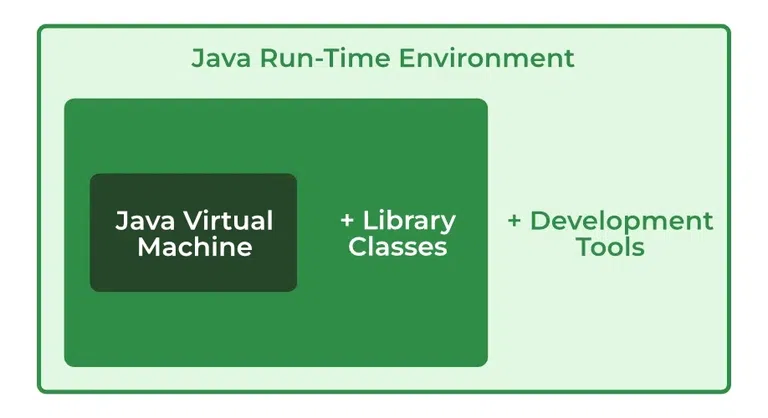
This is perhaps the most critical component. The JVM is responsible for interpreting your Java bytecode into machine code that your system understands. Without JVM, Java’s "Write Once, Run Anywhere" philosophy wouldn’t be possible.
2. Set of Libraries
JRE also includes an extensive set of pre-built libraries (think of them as tools or mini-programs) that provide common functionalities — like data structures, networking, file I/O, and much more.
3. Class Loaders
This is the part of the JRE that loads classes into the memory when needed. It ensures that the right class files are found, read, and loaded efficiently.
4. Java Plug-in and Java Web Start
These components allow Java applications to run in a browser or through the web. Though these are less commonly used now, they’ve historically been a key part of Java’s flexibility.
Difference Between JDK, JRE, and JVM
If you’re learning Java, it’s easy to get confused between JDK, JRE, and JVM. Let’s untangle the wires:
Component
Full Form
What It Does
JVM
Java Virtual Machine
Executes Java bytecode
JRE
Java Runtime Environment
Contains JVM + libraries needed to run code
JDK
Java Development Kit
Contains JRE + tools needed to write/compile code
So in simple terms:
JVM runs the code.
JRE lets you run the code.
JDK lets you write and run the code.
If you’re only interested in running Java programs, JRE is enough. But if you want to develop applications, you'll need the JDK.
How Does JRE Work?
Here’s how JRE fits into the lifecycle of a Java program:
You write your code in .java files.
JDK compiles that into .class files containing bytecode.
JRE’s JVM reads that bytecode and executes it, using the libraries and resources it provides.
The magic lies in how JVM dynamically converts bytecode into native machine code — enabling it to work across devices and platforms.
Real-World Analogy: JRE as a Translator
Still confused? Let’s put it in simpler terms.
Imagine you wrote a beautiful poem — in French. But your audience only speaks English.
Here’s how Java works:
You (the developer) are the Java Programmer.
Your poem (Java code) is compiled into bytecode (like writing it in French).
The JRE acts like a French-to-English translator, allowing your English-speaking audience (computer system) to understand your poem.
Without the translator (JRE), your poem can’t be appreciated, no matter how good it is.
Is JRE Still Relevant in 2026?
Absolutely. Even though modern tools like the JDK now bundle the JRE by default, and some newer frameworks work differently, millions of Java applications still depend on the JRE.
In enterprise environments, legacy systems, Android applications, and even in test environments — JRE is still a cornerstone.
How to Download and Install JRE?
Installing the JRE is fairly straightforward. Here’s a quick walkthrough:
Go to the official Oracle Java website or use OpenJDK (for open-source needs).
Download the JRE for your operating system (Windows/macOS/Linux).
Follow the installation wizard.
Set the JAVA_HOME environment variable (optional but helpful).
Verify installation using the terminal:
bash CopyEdit java -version
Note: If you’re installing the JDK, it includes the JRE by default — so you may not need a separate installation.
Why JRE Matters for Java Developers and Testers
Even if you aren’t writing code every day, understanding how JRE works will help you:
Troubleshoot runtime errors more effectively.
Configure environments better.
Understand platform compatibility issues.
Use tools like JUnit, Selenium, or Jenkins that often rely on JRE.
If you’re aiming for a career in QA, DevOps, or Java development, JRE knowledge is absolutely vital.
Learn Java the Right Way with Uncodemy
If you're serious about mastering Java — not just memorizing terms but understanding the "why" behind the code, you need expert mentorship.
That's where Uncodemy’s Java Programming Course comes in.
Here’s what you’ll learn:
Complete Java Development from beginner to advanced.
Deep dive into JDK, JRE, JVM architecture.
Real-world projects and use cases.
Mentorship by industry experts with 10+ years of experience.
Interview prep and placement support.
Whether you're a student, a fresher, or an IT professional looking to upskill — Uncodemy’s course will prepare you for real-world Java development with clarity and confidence.
Final Thoughts: Why You Should Know About JRE
Understanding the JRE full form — Java Runtime Environment — is more than just a textbook requirement. It’s the foundation that ensures your code doesn’t just exist, but runs, performs, and delivers impact.
In a world where Java powers banking systems, mobile apps, web platforms, and even scientific research, understanding the runtime environment gives you an edge — whether you're writing code or running it.
So next time you hit java MyProgram, take a second to appreciate the silent power of the JRE working behind the scenes.
FAQs
Q1. Is JRE open-source?
Yes! You can download the open-source version via OpenJDK, or go with Oracle’s official JRE depending on your use case.
Q2. Can I uninstall JRE if I have JDK installed?
In most modern setups, JDK includes JRE, so a separate JRE isn’t needed. But uninstall only if you’re sure other applications don’t rely on it.
Q3. Is JRE needed for Android development?
Android uses a different runtime (ART/Dalvik), but understanding JRE helps you grasp the core Java logic behind Android development.
Want to become Java-ready in the real world? 👉 Enroll in Uncodemy’s Java Course and master the JRE, JDK, JVM, and beyond.