Learn to Implement Multi-Factor Login Authentication

Why passwords alone aren’t enough

Let’s be honest: most of us recycle passwords. One for Gmail, another for Instagram, maybe a simple one for some old forum. And hackers? They know this. Password leaks happen constantly. That’s why multi-factor authentication, or MFA, is a game-changer.

Learn to Implement Multi-Factor Login Authentication

  • Instead of just relying on something you know (your password), it adds a second layer—something you have, like your phone, or something you are, like your fingerprint. Suddenly, even if your password gets stolen, your account isn’t automatically compromised.
  • Understanding the second factor

  • Think of it like this: your password is a key. MFA is like a guard at the door asking, “Do you really belong here?”
  • Common second factors include:
  • SMS codes: You get a text with a one-time code.
     
  • Authenticator apps: Google Authenticator or Authy generate time-sensitive codes.
     
  • Email verification: A link or code sent to your registered email.
     
  • Biometrics: Fingerprint, face scan, or retina scan.
     
  • Each adds a layer of security, and the more convenient you make it, the more likely users are to actually use it.
  • How MFA could work in an app

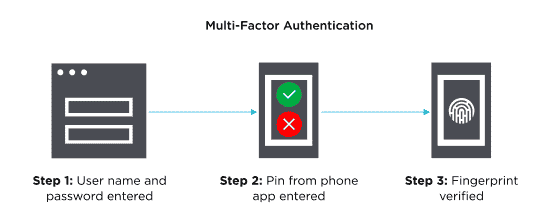
  • Here’s a simple flow:
  • User logs in with username and password.
     
  • Prompt for a second factor—maybe a code from an authenticator app.
     
  • Verify the second factor. If correct, access is granted.
     
  • Optional “remember this device” feature to avoid repeated prompts on trusted devices.
     
  • It sounds simple, but getting the balance right—security versus convenience—is key.
  • Real-world story from Uncodemy

  • One of our students, let’s call him Sameer, was building a small social networking app for his campus. Initially, he only had password-based login.
  • One day, a friend’s account got hacked because of a reused password. Sameer realized he needed MFA. At Uncodemy, he implemented SMS-based verification and an optional authenticator app.
  • The first time users tried it, they groaned: “Extra step? Really?” But within a few days, people got used to it—and everyone felt safer. Sameer said, “The extra security wasn’t a burden once users saw it actually protected them. It’s like locking your door at night—you barely think about it, but you’re grateful it’s there.”
  • Why this matters

  • Here’s the thing: MFA isn’t just a technical feature. It’s about trust. Users need to feel safe using your app. And in today’s world, where data breaches make headlines almost weekly, MFA is a standard, not an option.
  • Implementing MFA at Uncodemy teaches you more than code. It teaches you how to think about user experience, security trade-offs, and real-world application.
  • Tips for a smooth implementation

  • Keep it optional at first for less tech-savvy users, with clear instructions.
     
  • Offer multiple second-factor options—some like SMS, others prefer authenticator apps.
     
  • Think about recovery if a user loses access to their second factor.
     
  • Balance convenience and security—remember trusted devices to avoid annoying repeated prompts.
  • Wrapping it up

  • MFA is one of those small changes with a huge impact. It turns a simple login screen into a secure gateway, protecting users and their data.
  • At Uncodemy, projects like this aren’t just about learning frameworks or libraries—they’re about building confidence in designing apps people can trust. Implementing MFA shows you how to think like a developer and like someone who cares about the real people using your product.
  • Because at the end of the day, security isn’t optional. And making it easy and human-friendly is just as important as making it strong.

Placed Students

Our Clients

Partners

...

Uncodemy Learning Platform

Uncodemy Free Premium Features

Popular Courses