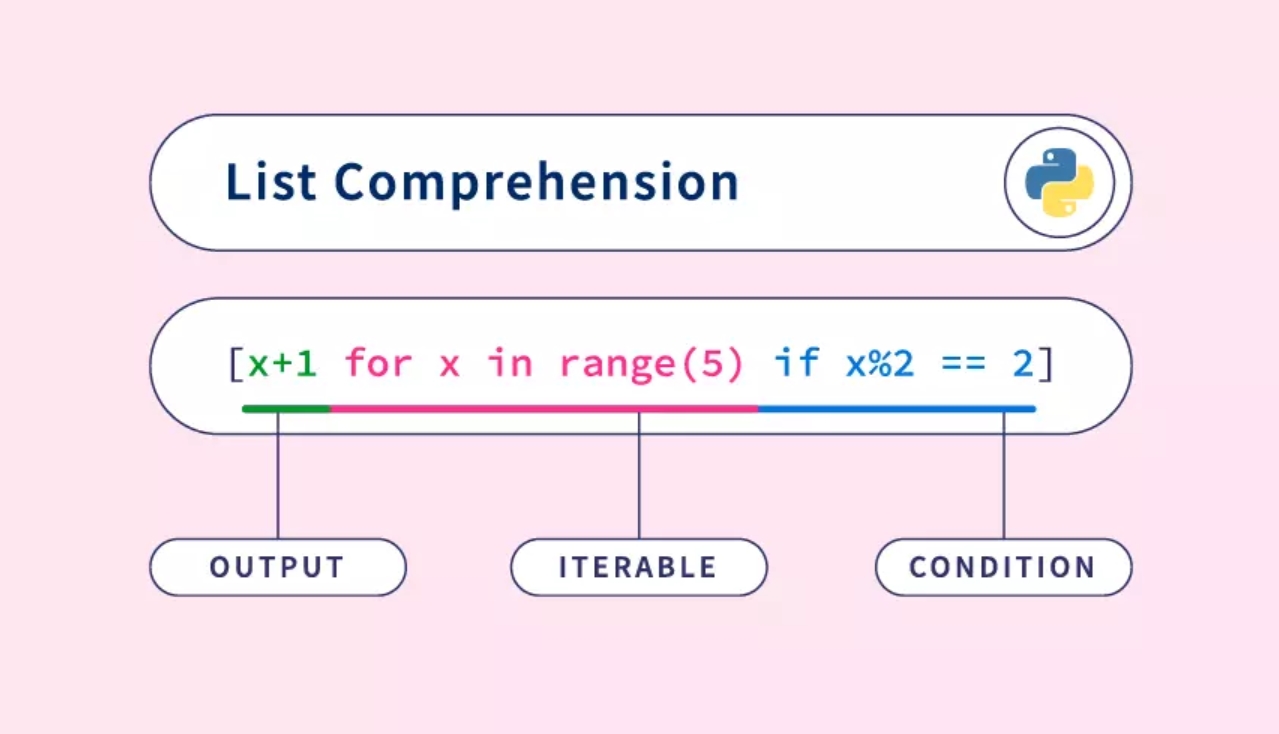
Tired of writing long loops just to build a simple list in Python? Let’s talk about list comprehension in Python with examples. It’s a shortcut to create new lists quickly, and it’s actually way simpler than it sounds.
In this guide, you’ll learn what it is, how it works, and see lots of fun, beginner-friendly examples. By the end, you’ll be using list comprehension like a coding pro, even if you’re just getting started.
List comprehension is a faster, simpler way to build new lists in Python
You can use it with loops, conditions, and even inside other loops
It looks tricky at first, but once you understand the pattern, it’s easy
Fun examples like grades, shopping lists, and letters make it clearer
You’ll write cleaner and smarter code, and save time too!
What Is List Comprehension in Python?
Let’s start super simple.
List comprehension in Python means writing a one-liner to create a list. That’s it!
Instead of writing 3 or 4 lines with a loop and .append(), you can do the same thing in just one clean line.
Quick Before and After:
Copy Code
# Traditional for loop

squares = []

for i in range(5):

    squares.append(i * i)


# List comprehension way

squares = [i * i for i in range(5)]
Both give you: [0, 1, 4, 9, 16]
So you’re not learning something brand new, just a shortcut to do what you already know.
Basic Syntax of List Comprehension
Here’s the simple format:
[expression for item in iterable]
Let’s break it into baby steps:
expression – What do you want to do with each item? (Like square it, convert it, filter it)
item – This is each value you're grabbing from the loop (like i, x, or letter)
iterable – The thing you’re looping through (like a list, range, or string)
Example:
Copy Code
nums = [1, 2, 3]

squares = [n * n for n in nums]
This reads like: “For each n in nums, take n * n and store it.”
Simple, clean, and makes sense.
5 Simple Examples of List Comprehension in Python
Let’s try fun and useful tasks you can relate to:
Copy Code
Squares of numbers
[x * x for x in range(5)] → [0, 1, 4, 9, 16]


Filter even numbers from a list
[x for x in range(10) if x % 2 == 0] → [0, 2, 4, 6, 8]


Change letters to uppercase
[ch.upper() for ch in "python"] → ['P', 'Y', 'T', 'H', 'O', 'N']


Convert Celsius to Fahrenheit
[c * 9/5 + 32 for c in [0, 25, 30]] → [32.0, 77.0, 86.0]


Clean a messy shopping list
[item for item in ["apple", "", "banana", " "] if item.strip()] → ['apple', 'banana']
These show how you can loop through lists, modify items, or even filter data, all with one-liner code.
List Comprehension vs For Loop in Python
So when should you use list comprehension? And when should you stick with a for loop?
Let’s compare them quickly:
Feature
List Comprehension
For Loop
Code Length
Short and clean
Longer and more detailed
Readability
Great for small tasks
Better for complex tasks
Speed
Slightly faster
Slightly slower
List comprehension is perfect for simple, quick jobs. For loops are better when you need more control or multiple steps inside the loop.
Now here’s something really cool: you can add if-else logic to your list comprehension!
This means you can choose what to include or even modify items based on a condition.
Syntax:
Copy Code
[output_if_true if condition else output_if_false for item in iterable]
Example:
Let’s say you have marks of students, and you want to return "Pass" if they scored above 50, else "Fail".
Copy Code
marks = [70, 40, 90, 30]

results = ["Pass" if m >= 50 else "Fail" for m in marks]

# Output: ['Pass', 'Fail', 'Pass', 'Fail']
Common Beginner Mistake
A lot of people try this:
Copy Code
["Pass" for m in marks if m >= 50 else "Fail"] # ❌ This gives an error!
That’s wrong. The if-else part should come before the for loop.
Just remember: condition first, then for — not the other way around.
Nested List Comprehension in Python
Ready for something a little more advanced?
Let’s say you have a list of lists (also called a matrix), and you want to flatten it, make it one single list.
You can do this with nested list comprehension.
Example:
Copy Code
matrix = [[1, 2], [3, 4], [5, 6]]
flat = [num for row in matrix for num in row]
# Output: [1, 2, 3, 4, 5, 6]}
Here’s what it’s doing:
Loop through each row
Then loop through each number in that row
Add each number to the new list
This might feel confusing at first, that’s totally okay! It takes a little practice.
Real-Life Examples for Students
Now let’s see how list comprehension can help with real-world stuff, school tasks, lists, or fun projects.
These examples are beginner-friendly and easy to relate to:
1. Filtering Passing Grades
Copy Code
scores = [55, 42, 89, 33, 76]

passed = [score for score in scores if score >= 50]

# Output: [55, 89, 76]
You loop through the list and keep only the ones where the score is 50 or more.
2. Cleaning a Shopping List
Sometimes you get messy data like this:
Copy Code
shopping = ["milk", "", "eggs", "  ", "bread"]

clean_list = [item for item in shopping if item.strip()]

# Output: ['milk', 'eggs', 'bread']
Here, we’re using .strip() to ignore empty or blank items.
3. Making a List of Favorite Books (Uppercase)
Copy Code
books = ["harry potter", "percy jackson", "hunger games"]

upper_books = [b.upper() for b in books]

# Output: ['HARRY POTTER', 'PERCY JACKSON', 'HUNGER GAMES']
You get a new list in capital letters, great for headings or formatting.
4. Getting Initials from Full Names
Copy Code
names = ["John Doe", "Alice Smith", "Bob Lee"]

initials = [name[0] for name in names]

# Output: ['J', 'A', 'B']
Common Mistakes with List Comprehension
It’s okay! Everyone makes mistakes when learning. The key is to spot them early and fix them fast.
Here are the top ones beginners struggle with:
➔ Forgetting the brackets
Example:
x = x * 2 for x in range(5) # ❌No brackets = error
Fix:
x = [x * 2 for x in range(5)]
➔ Mixing up the order of if and for
Wrong:
[x for x in range(10) if x % 2 == 0 else 0] # ❌ Wrong logic
Correct:
[x if x % 2 == 0 else 0 for x in range(10)]
➔ Overusing list comprehension
Not every task needs a one-liner.
If your logic has multiple steps, it’s okay to use a normal for loop.
Pro Tip: If you read your code and don’t understand it in 3 seconds, it’s probably too complicated. Keep it clean!
Why You Should Use List Comprehension
Here’s why many Python developers, even the pros, love using list comprehension:
Cleaner code You get neat, readable one-liners that are easier to manage.
Faster execution Python runs them slightly faster because it’s optimized under the hood.
Perfect for beginners Once you practice a few examples, it becomes second nature.
Makes your code look pro People reading your code will be like: “Whoa, you really know your stuff!”
Python List Comprehension – Quick Summary
List comprehension in Python helps you write shorter, cleaner code to create or modify lists. It’s fast, simple, and perfect for beginners. With just a few examples, you’ll be ready to use it in real projects and make your code look professional.
Conclusion
Now that you’ve learned the what, how, and why of list comprehension, it’s time to try it on your own. You don’t need to know everything. Just start small. Practice 2 to 3 examples today, and tomorrow you’ll be using it without even thinking about it. Try rewriting one of your old for loops using list comprehension now!