Mastering Playwright: The Future of Web Automation
Let’s be real: automation itself isn’t new, and it’s definitely not “sexy” anymore. But web automation in
2026? That’s a whole different game. We’re not just checking if a login form works or if a button turns
blue when you click it.
Today’s apps are dynamic, stateful, and interactive as hell. Think: real-time dashboards, drag-and-drop
interfaces, SPAs layered with modals inside modals, and components that rerender based on who’s logged
in or what just happened via WebSocket. And we’re testing all this across Chrome, Firefox, Safari,
mobile devices, and CI pipelines that can’t afford to flake.
Mastering Playwright: The Future of Web Automation
Mr. RishiRaj / 5 days
ago
9
8 min read
Most traditional testing tools weren’t built for this kind of chaos. They crack
under pressure or require layers of plugins just to handle the basics.
That’s exactly where Playwright changes the game. It’s fast, smart, and
unapologetically built for the modern web.
And if you’re serious about learning it right, skip the documentation rabbit
holes and scattered YouTube videos. Uncodemy’s “Mastering Playwright” course gives you the full
picture—from writing your first test, to scaling full suites in a team environment, to
integrating with CI/CD and debugging like a pro. It’s built for real developers working on real
applications.
If you want to stop fighting your test suite and start building something
reliable, Playwright is the tool—and Uncodemy gives you the roadmap.
Web Testing in 2026: What Changed
Remember Selenium? Of course you do. It’s been the go-to for over a decade. But
its architecture, based on the WebDriver protocol, hasn’t aged well. It’s slow. It’s brittle.
Every interaction is a network call. Every test run feels like a negotiation.
Then came Cypress. Faster, developer-friendly, and tightly coupled with the
browser. But it brought its own set of limits — single-tab execution, limited browser support,
weird iframe issues, and no native Safari support.
Now we’re seeing a shift. Teams want modern tooling that can:
Work across all modern browsers
Run fast and reliably in CI
Handle async and flaky UI like it’s not a big deal
Be easy to write, debug, and maintain
Playwright does all of that. And it does it better than anything else out there
right now.
Why Playwright Deserves Your Attention
Let’s break this down. Here’s what makes Playwright more than just a trendy tool:
1. It Works Across All Major Browsers
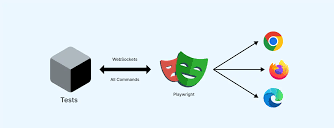
Chromium, Firefox, WebKit — with one API. That means your tests actually run in
Safari without a Mac. Huge for CI pipelines. Huge for mobile parity. And no third-party cloud
dependencies unless you want them.
2. It Understands Modern Web Apps
Playwright is built around how web apps behave today. It doesn’t just click and
type — it waits. Automatically. For DOM elements, animations, network responses, transitions,
and more. This cuts out 90% of the flakiness people have come to expect from E2E tests.
3. Multiple Browser Contexts
Simulate multiple users without spinning up new browsers. Each context is a fresh
profile. Want to test user A sending a message to user B? Do it in one test, two contexts, zero
hacks.
4. Selectors That Make Sense
Forget brittle XPath or overcomplicated CSS selectors. Playwright lets you target
elements by role, label, placeholder text, and visible text. You can even chain locators
together for super-specific targeting. It’s like querySelector, but finally grown up.
5. Trace Viewer = God Mode
Every failed test can be debugged visually. You get a trace file that shows
exactly what happened, step-by-step, with DOM snapshots, network logs, console output, and more.
It’s like rewinding time on your test.
6. First-Class Developer Experience
Playwright’s tooling is excellent. You get a test generator. You get rich CLI
output. You get built-in parallelism. You don’t need plugins or workarounds just to do basic
things like mocking or file uploads.
7. CI-Ready by Default
Installing Playwright also installs the browsers. No need to configure Selenium
Grid or third-party services. Your CI config is just a few lines. And yes, it supports GitHub
Actions, GitLab CI, Jenkins, Circle, Azure — all of it.
Who’s Using It?
Microsoft built it, sure. But it’s being used at Adobe, Mozilla, LinkedIn,
Netflix, and hundreds of other teams that care about test coverage without pain. It’s not just
for testing engineers either. Frontend devs are writing their own Playwright specs because the
barrier to entry is so low.
Why Should You Care?
If you’re still relying on Selenium for UI testing in 2026, you’re behind. If
you’re using Cypress and hitting its limitations, Playwright is the obvious next step. And if
you haven’t picked a tool yet, this is the one that’ll save you the most time, headache, and CI
minutes.
This isn’t hype. It’s a cleaner, faster, more reliable way to do end-to-end
testing — built for how the web works now.
Setting Up and Getting Serious with Playwright
If you’ve ever spent half a day configuring Selenium Grid, or fought with flaky
Cypress plugins, Playwright will feel like a breath of fresh air. It’s lean, fast, and made for
people who want to get working tests written in less time than it takes to brew coffee.
Installation That Just Works
Run this in your terminal:
npm init playwright@latest
Done. That one command:
Installs Playwright and the test runner
Scaffolds your project with useful defaults
Downloads all necessary browsers (Chromium, Firefox, WebKit)
Sets up example tests to show you how it works
If you’re on Python or .NET, same story. Just swap the CLI and follow the
quickstart. It’s that universal.
Your First Working Test
Here’s what one actually looks like:
                    test('homepage has title and get started link', async ({ page }) => {
                    await page.goto('https://playwright.dev');
                    await expect(page).toHaveTitle(/Playwright/);
                    await page.click('text=Get Started');
                    await expect(page).toHaveURL(/.*intro/);
                    });
No setup boilerplate. No driver.init() . No magic waits. It just
runs.
Real-World Interactions Without Headaches
Let’s say your app has login, file upload, some API interaction, and needs
multiple user flows. Playwright handles all of that in a way that’s both intuitive and scalable.
Login without Redoing It Every Time
                // Save logged-in state
                await page.context().storageState({ path: 'state.json' });


                // Reuse it in future tests
                use: { storageState: 'state.json' }
Want fast tests in GitHub Actions, GitLab, CircleCI, Jenkins? Playwright’s made for that.
                # GitHub Actions example
                test:
                runs-on: ubuntu-latest
                steps:
                    - uses: actions/checkout@v3
                    - uses: actions/setup-node@v3
                    - run: npm ci
                    - run: npx playwright install
                    - run: npx playwright test
That’s all. And yes, Playwright parallelizes tests by default. No add-ons, no
configuration nightmare.
Visual Debugging With Traces
This is Playwright’s secret weapon. Every failed test can generate a .zip file
with a trace:
Step-by-step screenshots
Clicks, keystrokes, assertions, console logs
Interactive UI to scrub through the test like a video
It’s like having a surveillance camera on your tests. Once you use it, you won’t
want to go back.
You’ve got working tests. You’ve got CI running. You’ve got debugging tools that
aren’t a nightmare. And you didn’t have to pay for third-party dashboards or spend all day
wiring together plugins.
This is what getting serious with Playwright looks like. Fast feedback. Scalable
code. Fewer bugs.
Where Playwright Really Shines (And Where It Doesn’t)
So you’ve got Playwright up and running, you’ve written a few tests, maybe
integrated it into CI. Cool. But that’s just the beginning. Let’s talk about what actually
happens when you scale — hundreds of tests, dozens of team members, flaky UIs, and weird edge
cases that no demo app ever prepared you for.
This is where Playwright earns its keep.
How It Holds Up at Scale
Anyone can spin up a few tests in a day. But when your app grows, your test suite
grows with it — and not always in a nice, linear way. That’s when you start seeing performance
bottlenecks, race conditions, and test environments that feel like haunted houses.
Playwright’s architecture is built for this.
Multiple Contexts = Multiple Users Without the Overhead
Need to test a messaging app where Alice sends a message and Bob replies? You
don’t need two browser windows. You don’t even need to log them in twice. Just spawn two
contexts in the same browser instance — boom, isolated sessions with shared performance
benefits.
const userA = await browser.newContext();
const userB = await browser.newContext();
Each gets its own cookies, local storage, and everything. This is ridiculously
helpful for role-based apps, collaborative features, or anything involving multiple people on
the same screen.
Test Fixtures That Aren’t a Hot Mess
Playwright’s test.describe and test.use
patterns make it easy to organize, reuse, and isolate setup logic. You can define what runs
before and after each test without creating a tower of config spaghetti.
test.use({ storageState: 'loggedInUser.json' });
Instead of logging in for every single test, save the storage state and reuse it.
It’s cleaner, faster, and far less annoying.
Tag, Filter, Shard
Playwright understands that not all tests are equal. Smoke tests? Mark 'em.
Regression tests? Filter 'em. Need to split your suite across 10 CI machines? Shard it.
npx playwright test --project=firefox --grep @critical
Scalability without scripting gymnastics. This stuff is built-in, and it’s
flexible.
Flaky UI? Let’s Talk
The phrase "flaky tests" sends shivers down most developers’ spines. They waste
time, erode trust, and make you second-guess every pull request.
Playwright isn’t a magic wand, but it handles flakiness better than most.
Auto-Waiting: Not Just a Buzzword
This is core to Playwright’s reliability. It doesn’t move to the next step until
the current one is actually done. If an element is animating, hidden, or waiting on a network
call, it waits. Intelligently.
You don’t have to litter your code with waitForTimeout() or
guess how long a spinner will last. It handles DOM stability out of the box.
Retry Logic That Makes Sense
You can set up retries on a per-test or global basis. When a test fails, it tries
again — but it also logs every retry and gives you a trace so you can figure out what’s wrong.
No silent failures. No guessing.
Dynamic UIs? Shadow DOM? iframes?
Playwright can handle:
Shadow DOMs (with direct locator access)
Nested iframes (without needing to switch contexts manually)
Infinite scrolling and delayed rendering
All of it. These are usually nightmare scenarios in other frameworks.
We’ve all asked it. Let’s do the real comparison, no fluff.
Feature
Playwright
Cypress
Selenium
Multi-browser support
✅ (Chromium, Firefox,
WebKit)
⚠️ (No Safari)
✅ (All major
browsers)
Multi-tab /
multi-context
✅ Native support
❌ Not supported
⚠️ Possible but messy
Cross-origin
✅ Works cleanly
❌ Very limited
✅
Speed
🟢 Fast (parallel by
default)
🟡 Fast local, slow CI
🔴 Slower (WebDriver)
Language support
JS, TS, Python, .NET,
Java
JS only
JS, Java, C#, Ruby,
etc.
Debugging
Trace Viewer, CLI,
headed mode
Time-travel GUI
Logs only
Component testing
✅ Native
✅ Native
❌
Network mocking
✅ Built-in
✅ Built-in
⚠️ Plugin-dependent
Cypress is awesome for quick feedback during development — but
chokes on multi-tab flows, cross-domain stuff, and anything browser-diverse.
Selenium is still a good choice for legacy environments or
language flexibility. But its age shows.
Playwright? It checks almost all the boxes with modern
architecture and real-world speed.
When Playwright Doesn’t Work (Yes, It Has Limits)
Let’s not pretend it’s perfect.
No Real Device Testing: You can simulate mobile
viewports, but not actual iOS/Android behavior. You’ll still need Appium or BrowserStack for
that.
Legacy Browser Support: No IE. No ancient versions of
Edge. If that’s part of your test matrix, you’ll need Selenium.
Extension Testing: Doable, but the setup’s a pain. You
have to launch with a custom context and inject the extension manually.
For 90% of modern web testing, it’s excellent. But edge cases exist.
Debugging That Doesn’t Make You Cry
Let’s be honest. Most of your time in test frameworks is spent debugging. When a
test fails, how long does it take you to figure out why?
Playwright gives you:
Full trace recordings with step-by-step playback
Screenshots, console logs, network requests all in one place
The ability to pause tests mid-run and inspect live
await page.pause();
You’ll actually enjoy debugging. Or at least not dread it.
Part 4: Best Practices & Long-Term Playwright Sanity
Alright, you’ve seen what Playwright can do. You’ve tasted the power, automated
some gnarly workflows, and maybe even showed it off in your team’s Slack channel. But here’s the
real question: how do you keep it all from turning into a giant mess over time?
Test automation is like cooking. It starts fun, gets chaotic, and if you don’t
clean up as you go, suddenly your kitchen (or repo) is on fire.
Let’s talk about how to avoid that.
Structuring Large Test Suites Without Losing Your Mind
When you’ve got a handful of tests, structure doesn’t feel important. You name
your files whatever, throw a few helpers in a utils folder, and call it a day.
Fast-forward six months: now you’ve got 300 tests, half your team writes slightly
different patterns, and you don’t remember if authHelper.ts is the one with login logic or the
one that mocks tokens.
Keep tests scoped by feature or area. Put fixtures and test data into their own
home. And write utilities as if someone else (with no sleep and a deadline) has to read them
next week.
Data Management: Keep It Real, but Reusable
Your app needs test data. But where’s that data coming from?
Creating it manually in each test?
Seeding a database before every run?
Reusing hardcoded user objects from 2022?
Here’s the move: write API helpers that set up only what each test needs. That
way, tests stay independent, data stays clean, and debugging gets way easier.
await api.createUser({ role: 'admin' });
Don’t log in through the UI unless you’re testing login. Otherwise, inject
session state and move on. Speed matters.
Use Fixtures Like a Pro
Playwright’s test.use() and test.describe() aren’t just for decoration. They let
you compose behavior in a clean, layered way.
Let’s say you want to test with a logged-in admin user:
test.use({ storageState: 'adminSession.json' });
You can even define your own fixtures with setup/teardown logic:
Now, every test that uses adminPage gets a fresh, clean browser instance with
admin access.
Keep Your Locators Tight (and Future-Proof)
Sloppy locators are like duct tape: fine for now, awful later.
                   Bad:
                await page.click('div:nth-child(3) > span:nth-child(2)');
                Better:
                await page.getByRole('button', { name: 'Submit' });
                Or use test IDs:
                await page.locator('[data-testid="submit-button"]');
Pick a strategy and stick to it. Your future self will thank you when the UI
changes and half your tests don’t explode.
Run Locally, Run in CI, Run in Parallel
Don’t just run tests in your editor and hope for the best. Add them to your CI.
Use npx playwright show-report to share results. And split them across machines
with the --shard flag when things scale up.
npx playwright test --shard=1/3
You can even parallelize across browsers and devices. Modern tooling should move
fast. So should your tests.
Don’t Skip Docs — Write Your Own
You’ve written the tests, sure. But does anyone else know how to run them?
Contribute? Debug them when they fail?
Create a README for your test suite. Include:
How to install dependencies
How to run locally
How to run in CI
How to debug failures
Even better: document test conventions and naming. You’ll avoid a lot of team
debates down the road.
Regular Maintenance: Test Code Needs Refactoring Too
Set aside time each sprint or month to:
Kill unused tests
Rename sloppy helpers
Merge duplicate logic
Refactor tests that always seem to break
Tests aren’t “write once, forget forever” — they’re code. Treat them like it.
Conclusion: Why Playwright Isn’t Just a Tool — It’s a Power Move
Here’s the thing. You can write tests with anything—Selenium, Cypress, heck even
jQuery and setTimeout if you really wanted to suffer. But if you're serious
about modern web development, fast feedback loops, clean APIs, and test reliability at scale,
Playwright is the one that actually feels like it was built for 2026, not 2012.
It’s fast. It’s reliable. It scales with your team. And once you’ve worked with
features like smart waits, isolated browser contexts, and full trace debugging, going back feels
like switching from Spotify to cassette tapes.
But don’t just take the theory. The real power is in knowing how to use it
right—and that’s where training makes the difference.
If you’re looking to master Playwright from the ground up—with hands-on projects,
expert mentorship, and real-world workflows—Uncodemy’s Playwright Automation Course in Delhi course is designed exactly for that. Whether you're a QA engineer
leveling up, a frontend dev tired of flake-filled tests, or part of a team moving off Selenium,
this course will take you from zero to deployment-ready suites.
Playwright isn’t the future because it’s shiny. It’s the future because it solves
problems the way modern devs actually need them solved. Learn it right. Build it well.
And leave the flaky test circus behind.