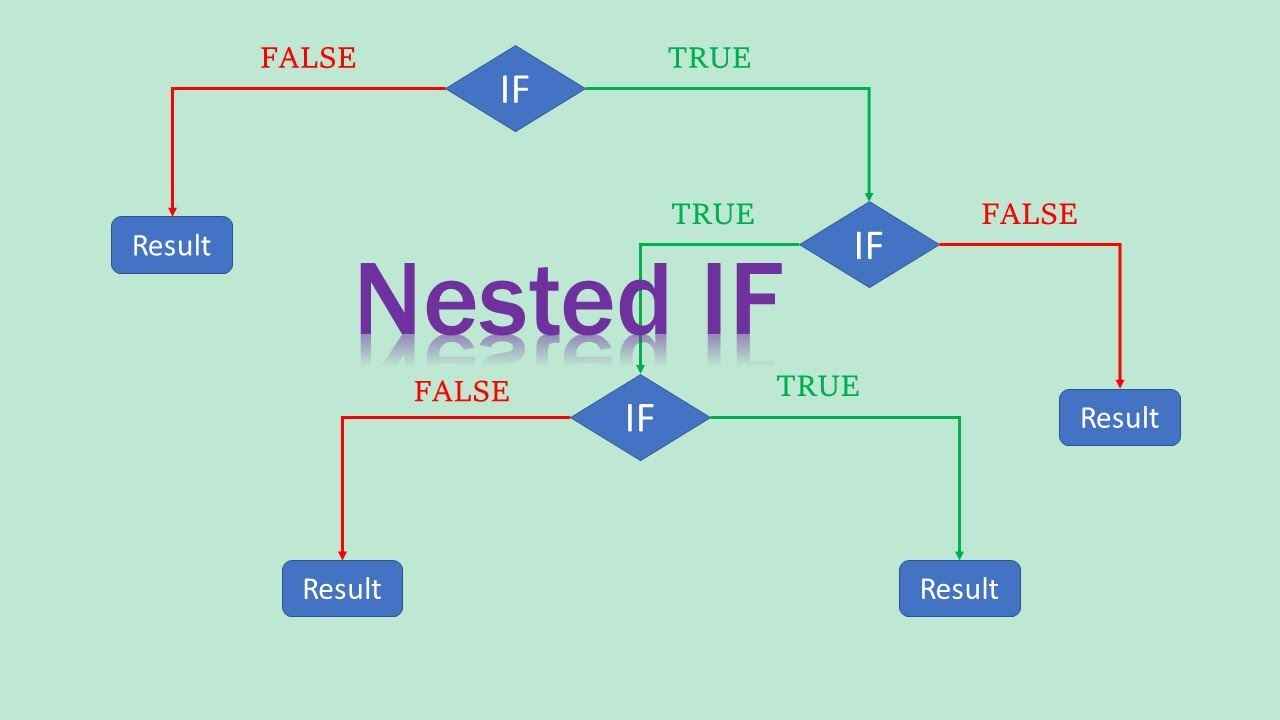
Among them, nested if-else statements are one of the most commonly used structures. In this blog post, we'll explore what nested if-else statements are, how they work, when to use them, and how to avoid common mistakes, all explained in easy-to-understand language for complete beginners.
🌱 What Does “Nested If-Else” Mean?
The word “nested” simply means something placed inside another. So, a nested if-else statement is an if-else block that exists inside another if-else block.
In simple terms, it's like saying:
If condition A is true,
then check condition B.
If B is true, do this.
Otherwise, do something else.
Otherwise, do something completely different.
This kind of structure is very useful when your second decision depends on the result of the first one. It helps you write clean, organized, and step-by-step decision-making code.
🧠 Why Do We Use Nested If-Else?
Nested if-else is used in programming when we want to make decisions based on another decision. It allows the program to follow a logical path and choose different actions depending on what conditions are met.
Here’s a real-life example: Imagine you're planning your weekend.
If it's Saturday,
If it's sunny, you'll go for a picnic.
Else, you'll watch a movie at home.
Else (it's not Saturday),
You’ll just rest or study.
This decision-making process is what we do every day without thinking. Programming just puts that logic into code.
🧾 Basic Syntax of Nested If-Else (Using C Language)
Let’s take a look at how the syntax looks in C:
Copy Code
if (condition1) {

    // Code runs if condition1 is true

    if (condition2) {

        // Code runs if both condition1 and condition2 are true

    } else {

        // Code runs if condition1 is true but condition2 is false

    }

} else {

    // Code runs if condition1 is false

}
The same logic can be used in other languages like Python, Java, and JavaScript-only the syntax changes slightly.
📌 Example 1: Student Grade Checker
Let’s say you want to assign grades based on the marks a student scored:
Copy Code
int marks = 78;


if (marks >= 50) {

    if (marks >= 90) {

        printf("Excellent - Grade A\n");

    } else {

        printf("Good - Grade B\n");

    }

} else {

    printf("Fail - Grade F\n");

}
Explanation:
First, we check if the student passed (marks ≥ 50).
If they passed, we check if their score is 90 or more.
If yes, they get Grade A. If not, they get Grade B.
If they didn’t even pass (less than 50), they get Grade F.
This example is simple but shows how useful nested if-else can be for layered decisions.
📌 Example 2: Age Category Checker
Let’s categorize people based on their age:
Copy Code
int age = 65;

if (age >= 18) {

    if (age >= 60) {

        printf("You are a senior citizen.\n");

    } else {

        printf("You are an adult.\n");

    }

} else {

    printf("You are a minor.\n");

}
Here:
If someone is 18 or older, we go inside the first if.
Inside that, if their age is 60 or more, they are labeled as senior citizens.
If not, they are adults.
If they are less than 18, they are minors.
📌 Example 3: ATM Access Flow
Let’s say you’re building logic for an ATM machine:
Copy Code
bool cardInserted = true;

bool correctPIN = true;

int balance = 8000;

if (cardInserted) {

    if (correctPIN) {

        if (balance >= 500) {

            printf("You may proceed with the withdrawal.\n");

        } else {

            printf("Insufficient balance.\n");

        }

    } else {

        printf("Incorrect PIN.\n");

    }

} else {

    printf("Insert your card to continue.\n");

}
In this example:
We first check if the card is inserted.
If yes, then we check if the PIN is correct.
If both are true, we check whether the balance is enough.
You can clearly see how one condition depends on the previous one.
🔁Nested If-Else in Other Languages
Although the example above is in C, the logic of nested if-else remains the same in other languages.
In Python:
Copy Code
age = 70

if age >= 18:

    if age >= 60:

        print("Senior citizen")

    else:

        print("Adult")

else:

    print("Minor")
In JavaScript:
Copy Code
let age = 16;

if (age >= 18) {

    if (age >= 60) {

        console.log("Senior citizen");

    } else {

        console.log("Adult");

    }

} else {

    console.log("Minor");

}
Whether it's C, JavaScript, Python, or Java, the core idea is the same.
🧩 Best Practices for Using Nested If-Else
Nested if-else is very powerful, but if you don’t use it properly, your code can get messy. Here are some tips:
Keep it clean: Use proper indentation. This makes it easier to understand where each block starts and ends.
Limit the levels: Avoid nesting too deeply. More than 2 or 3 levels of nesting can become hard to read.
Use comments: If your conditions are complex, add comments to explain what’s happening.
Use else-if when suitable: Sometimes using else if instead of multiple nestedif blocks can make your code look cleaner
🛑Common Mistakes and How to Avoid Them
1. Missing curly braces
Always use {} even if there’s only one line. It avoids confusion.
2. Misplacing else
Make sure the else corresponds to the correct if. Proper indentation helps with this.
3. Over-nesting
If you have too many layers, consider splitting the logic into smaller functions.
4. Repetitive conditions
Don’t check the same condition more than necessary. It adds clutter.
🎯 When Should You Use Nested If-Else?
Nested if-else should be used when:
You need to make a decision only if another condition is true.
You want to create a hierarchy of decisions.
The logic is naturally step-by-step.
It is not ideal when:
You have multiple independent conditions. In such cases, use else if or switch-case statements.
🧪 Try It Yourself: Practice Problem
Write a program that checks if a user is eligible for a loan. Use the following logic:
If the user is over 21,
If their salary is more than 30,000,
If they have no pending loans, print “Eligible for loan.”
Else, print “Clear previous loans first.”
Else, print “Salary too low.”
Else, print “Age below minimum limit.”
Try implementing this on your own using nested if-else!
🧵Final Thoughts
Nested if-else might sound complicated at first, but it’s just a way to check one condition inside another. We do this kind of decision-making in our day-to-day lives without even realizing it. The more you practice, the more confident you’ll become at using this structure in your programs.
Just remember:
Keep your code neat.
Don’t go too deep into nesting.
Think logically.
Once you’ve mastered this, you’ll be able to handle more advanced conditions and build smarter, more interactive programs. So keep practicing, keep experimenting, and enjoy your programming journey! 💻✨