Do you remember your first "Hello, World!" program? You know, that moment when you typed a few characters and suddenly a string of text appears on your screen? That was the Python print function. Your first conversation with the computer! It was like learning to articulate your first word. This was your first "Hello, World!" and it opened up a universe of programming possibilities.
The Python print function may seem pretty basic, but hey, never underestimate the power of the print function, especially if you're a Python programmer. The print function is actually one of the amazing features that every Python programmer has and needs when it comes to programming in Python. Whether you are debugging a wicked algorithm, displaying some messages to your user in a pretty, friendly way, or formatting data into reports, the Python print function is your path to developing excellence in programming with Python!
Moving now from developers to your audience, your audience should think of the Python print function as the voice of your program, representing how your code communicates to the rest of the world. Your program communicates output in several different ways: from simple, static text output at the display to complicated visual output at the display. The humble print function has been the north star of all programming endeavors and continues to be important even to veteran developers alike.
What is the Python Print Function?
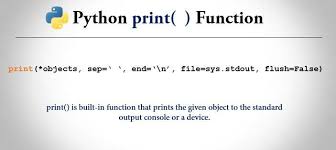
The Python print function is a built-in function that provides output of requested messages or values to a screen or other output streams. Simply stated, you pass something to print, and it gets formatted for you to view. However, do not be misled, there is a lot to this built-in Python print function - it can handle everything from text to complex structures.
As previously stated, the Python print function is at the center of the interface, both externally (i.e, human users) and from the internal workings of your program. Thus, if something was calculated, processed, or even an error report from your program, you are likely seeing the results via the Python print function.
The reason print is so versatile is that you can print a string, a number, a variable, a list, a dictionary, both built-in and user-defined classes, and just about any Python object. Further still, print will convert types for you automatically, which is nice for programmers at all levels!
Basic Syntax of Python Print
Understanding the syntax of the Python print function is straightforward, but knowing all its options opens up powerful possibilities:
Values:What you want to print (can be multiple items)
sep:Separator between multiple values (default is space)
end:What to print at the end (default is newline)
file:Where to send output (default is screen)
flush:Whether to force output immediately
Here are some basic examples of the Python print function:
                            python
                    # Simple text output
                    print("Hello, World!")

                    # Printing variables
                    name = "Alice"
                    age = 25
                    print("Name:", name, "Age:", age)

                    # Printing different data types
                    print("String:", "Python", "Number:", 42, "Boolean:", True)
Advanced Python Print Techniques
Once you're comfortable with basic usage, the Python print function offers several advanced features that can significantly improve your code's output quality and debugging capabilities.
                    python
                    print("Loading", end="...")
                    print("Done!")
                    # Output: Loading...Done!

                    print("Enter your choice: ", end="")
                    # Keeps cursor on same line for input
Formatted String Literals (f-strings) Modern Python programming heavily relies on f-strings with the python print function:
                    python
                    name = "Alice"
                    age = 28
                    salary = 75000.50

                    print(f"Employee: {name}")
                    print(f"Age: {age} years old")
                    print(f"Salary: ${salary:,.2f}")
                    # Output: Salary: $75,000.50

                    # Advanced formatting
                    pi = 3.14159265359
                    print(f"Pi rounded to 3 decimals: {pi:.3f}")
                    # Output: Pi rounded to 3 decimals: 3.142
String Formatting Methods
                    python
                    # Using .format() method
                    template = "Hello, {}! You have {} new messages."
                    print(template.format("John", 5))

                    # Named placeholders
                    print("Hello, {name}! Your score is {score}".format(name="Sarah", score=95))

                    # Old-style formatting (still useful sometimes)
                    print("Pi is approximately %.2f" % 3.14159)
Mastering Python with Uncodemy's Python Programming Course in Noida
Exploring the Python print function for yourself is important, but structured learning is going to make you a better Python programmer so much faster. Uncodemy's Python programming course in Noida provides in-depth training, going beyond syntax learning to include proper practice to use print functions in applications to handle real, professional projects, alongside advanced techniques.
Uncodemy's Python programming course in Noida has hands-on applications, meaning that you don't just learn what the Python print function is, but also when to use the different printing practices, and how to use the print function correctly. The instructors have experience with the Print function application and real-world usage, alongside practical project work designed to give you confidence in using the Python print function and Python features.
For example, students in Uncodemy's Python programming course in Noida work on real-world projects with practical applications of the Python print function, and for user interaction, debugging, and data presentation. This actual experience with Python and the print function role is important for students to be productive in their studies and build job-ready Python programming skills.
Practical Applications
User Interfaces:Create menus, display options, and show results in organized formats.
Debugging:Track variable values, monitor program flow, and identify issues during development.
Data Presentation:Format reports, display calculations, and present information clearly.
Progress Tracking:Show completion status, loading indicators, and step-by-step processes.
Best Practices
Descriptive Messages:Always include context with your output rather than just displaying raw values.
Consistent Formatting:Use similar styles throughout your program for professional appearance.
Error Communication:Provide clear, helpful messages when things go wrong.
Production Considerations:Use logging instead of print for production applications.
Common Patterns
Status Updates:Inform users about what your program is doing.
Results Display:Show calculations, analysis results, and processed data.
Interactive Prompts: Guide users through input processes and menu selections.
Error Handling:Communicate problems and suggest solutions clearly.
Building Your Python Foundation
The Python print function has so much importance beyond just being a way to display text. The print function is the primary means of communication for any Python program, whether debugging, presenting information to users, or deciding program flow.
You will no doubt find that your ability to use the Python print function was well worth it when you do your projects and can debug or communicate with users with ease and clarity.
It will not matter how complex your application is if you can't use the tools available to leverage and build upon the knowledge in program development, like the Python print function.
Your first step in establish your Python base and continue to the next best challenge you want to embark upon.
Consider taking the plunge, if you are serious about establishing your path in Python learning, by joining a structured learning or educational program to get up to date with the best practices in programming using Python, like Uncodemy's Python programming course in Noida. Their wealth of knowledge and experience, along with practice and real-time project-based learning, will give anyone a substantial knowledge base to draw on when utilizing the Python print function and other Python programming features for professional-type application development.
We'll end with this one last thought to keep in mind whenever you think back to your journey towards becoming an expert - everyone starts small, which is similar across all domains, including programming. You can start by practicing with the Python print function using various formatting options, experimenting with all of the data types the Python programming language has at its disposal, and never shy away from using the Python print function throughout your debugging process. Future you will appreciate the solid foundation you are building today.
Frequently Asked Questions (FAQs)
Q: What's the difference between print() in Python 2 and Python 3?
A: In Python 2, print was a statement (print "hello"), while Python 3 made it a function (print("hello")). Python 3's approach is more flexible and consistent with other functions.
Q: How can I print without a newline using python print?
A: Use the end parameter: print("Hello", end="") or print("Hello", end=" ") to end with a space instead of a newline.
Q: Can I print colored text with the python print function?
A: Yes, using ANSI escape codes or libraries like colorama: print("\033[91mRed text\033[0m") or with colorama: print(Fore.RED + "Red text").
Q: How do I print to a file instead of the screen?
A: Use the file parameter: print("Hello", file=open("output.txt", "w")) or better yet, use a context manager with the with statement.
Q: What's the best way to format numbers in python print statements?
A: Use f-strings for modern Python: print(f"Price: ${price:.2f}") for decimal places, or print(f"Number: {num:,}") for thousand separators.
Q: How does Uncodemy's Python programming course in Noida help with print function mastery?
A: Uncodemy's Python programming course in Noida provides hands-on practice with python print through real projects, expert guidance, and comprehensive coverage of formatting, debugging, and professional output techniques.
Q: Should I use print() for debugging in production code?
A: No, use logging instead of print for production debugging. Print statements should be removed or replaced with proper logging for production applications.
Q: Can I print multiple variables with custom formatting in one statement?
A: Yes, using f-strings: print(f"Name: {name}, Age: {age}, Score: {score:.1f}") or the format method: print("Name: {}, Age: {}, Score: {:.1f}".format(name, age, score)).