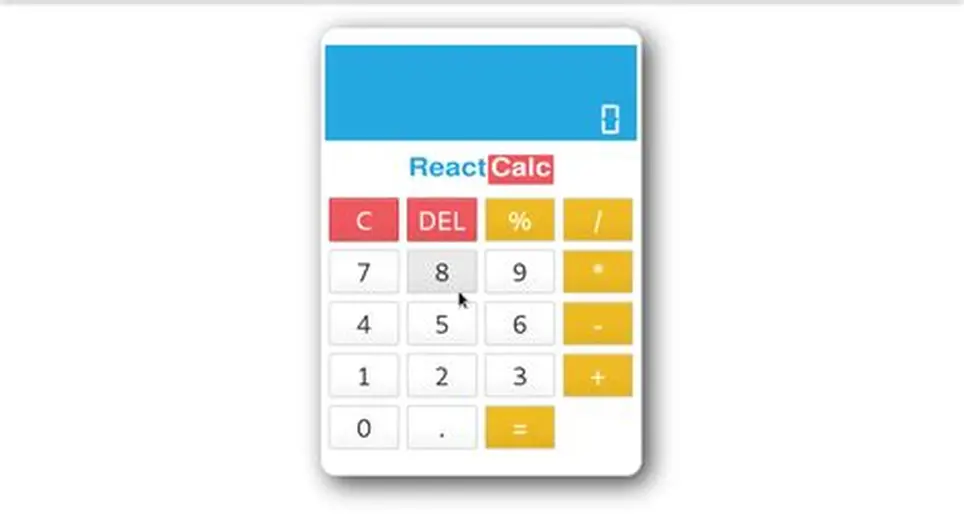
This comprehensive guide explores the process of building a functional calculator application, demonstrating how modern web development technologies can be leveraged to create practical, real-world applications. The project not only showcases technical proficiency but also provides valuable insights into industry-standard development practices that leading technology firms consistently seek in their development teams.
Understanding the Foundation: Why React for Calculator Development
React, developed by Facebook's engineering team, has revolutionized the way developers approach user interface creation. The library's component-based architecture makes it particularly suitable for projects like calculator applications, where different elements need to interact seamlessly with one another. Students pursuing web development courses often find React to be an ideal starting point for understanding modern JavaScript frameworks.
The calculator project serves multiple educational purposes. First, it introduces developers to state management concepts, which are fundamental in any React application. Second, it demonstrates how CSS can be effectively combined with React components to create visually appealing interfaces. Third, it provides practical experience with event handling and mathematical operations in a web environment.
Technology companies across the globe consistently rank React among their preferred development tools. This preference stems from React's ability to create maintainable, scalable applications that can handle complex user interactions. By mastering React through projects like calculator development, students position themselves favorably for opportunities in leading IT companies and technology firms.
Essential Technologies and Tools
Before diving into the development process, understanding the technology stack is crucial. The calculator application relies on several key technologies that form the backbone of modern web development.
React serves as the primary framework, providing the structure and functionality for the application. The library's virtual DOM implementation ensures optimal performance, while its component-based architecture promotes code reusability and maintainability. Students enrolled in comprehensive web development courses learn that React's declarative programming model significantly simplifies the development process compared to traditional imperative approaches.
CSS plays an equally important role in the project, handling all visual aspects of the calculator interface. Modern CSS techniques, including Flexbox and Grid layouts, enable developers to create responsive, aesthetically pleasing designs that work across various devices and screen sizes. The styling component of the project introduces students to concepts like hover effects, transitions, and responsive design principles.
JavaScript ES6+ features form the foundation of the application's logic. Arrow functions, destructuring, template literals, and other modern JavaScript constructs are extensively used throughout the development process. These features represent industry standards that professional developers utilize daily in their work for technology companies.
Node.js and npm (Node Package Manager) provide the development environment and package management capabilities. These tools are essential for any modern web development workflow, allowing developers to manage dependencies, run development servers, and build production-ready applications.
Setting Up the Development Environment
The development journey begins with establishing a proper working environment. Professional developers in leading IT companies follow specific procedures to ensure consistent, reliable development setups.
The first step involves installing Node.js, which provides the runtime environment for React applications. Students should download the latest stable version from the official Node.js website, ensuring compatibility with current React versions. The installation process automatically includes npm, which serves as the primary package manager for the project.
Creating a new React application is streamlined through Create React App, a tool that sets up a modern web development environment with zero configuration. The command-line interface generates all necessary files, folder structures, and build configurations, allowing developers to focus on application logic rather than setup complexities.
Once the project structure is established, developers can explore the generated files to understand the React application architecture. The src folder contains the main application code, while the public folder houses static assets. Understanding this structure is fundamental for students pursuing advanced web development courses.
The development server, initiated through npm start, provides live reload functionality, automatically refreshing the browser when code changes are detected. This feature significantly enhances the development experience and is standard practice in professional development environments.
Designing the Calculator Interface
User interface design forms a critical component of any successful application. The calculator project provides an excellent opportunity to apply modern CSS techniques while considering user experience principles that guide development decisions in top technology firms.
The calculator interface typically consists of a display screen and a button grid. The display shows current numbers, operations, and results, while the button grid provides input mechanisms for numbers, operators, and special functions. This layout requires careful consideration of spacing, proportions, and visual hierarchy.
CSS Grid proves invaluable for creating the button layout. The grid system allows developers to define rows and columns precisely, ensuring consistent spacing and alignment across all calculator buttons. Students learn to leverage grid-template-areas for intuitive layout definitions, making the CSS more readable and maintainable.
Responsive design principles ensure the calculator functions effectively across various devices. Media queries enable different styling rules for different screen sizes, while flexible units like rem and em provide scalability. These techniques are essential skills that professional developers in leading IT companies apply daily.
Color schemes and typography choices significantly impact user experience. Modern design trends favor clean, minimalist interfaces with subtle shadows and smooth transitions. The calculator project allows students to experiment with these concepts while maintaining functional clarity.
Button hover states and active states provide visual feedback, enhancing user interaction. CSS transitions create smooth animations between states, adding polish to the interface. These details distinguish professional-quality applications from basic implementations.
Implementing Core Functionality
The calculator's functionality revolves around state management, a fundamental concept in React development. The application must track current numbers, selected operations, and calculation history while providing real-time updates to the user interface.
React's useState hook manages the calculator's state variables. These include the current display value, the previous operand, the selected operator, and flags for various application states. Understanding state management is crucial for students pursuing comprehensive web development courses, as it forms the foundation of interactive application development.
Event handling manages user interactions with calculator buttons. Each button triggers specific functions that update the application state appropriately. Number buttons append digits to the current value, operator buttons store the selected operation, and the equals button performs calculations and displays results.
Mathematical operations require careful implementation to handle edge cases and ensure accuracy. The calculator must manage decimal numbers, prevent division by zero, and handle very large or very small results. These considerations reflect the attention to detail required in professional development environments.
Error handling provides graceful responses to invalid operations or unexpected inputs. Professional applications in leading technology companies implement comprehensive error handling to maintain stability and provide meaningful feedback to users.
The calculation logic utilizes JavaScript's built-in mathematical functions while implementing additional safeguards for edge cases. Floating-point arithmetic requires special attention due to JavaScript's number representation, teaching students important lessons about numerical precision in programming.
Advanced Features and Enhancements
Beyond basic arithmetic operations, the calculator can incorporate advanced features that demonstrate sophisticated programming concepts and align with industry standards followed by top IT companies.
Memory functions, including memory store, recall, and clear operations, introduce students to more complex state management scenarios. These features require additional state variables and demonstrate how applications can maintain persistent data across user interactions.
Keyboard support enhances user experience by allowing input through physical keyboard keys in addition to on-screen buttons. Implementing keyboard event listeners provides insight into event handling beyond simple click events, showcasing the comprehensive input management required in professional applications.
Operation history functionality maintains a record of previous calculations, demonstrating array manipulation and data persistence concepts. This feature requires careful state management and provides opportunities to explore React's useEffect hook for side effects and data synchronization.
Scientific calculator functions, such as trigonometric operations, logarithms, and exponential functions, introduce students to JavaScript's Math object capabilities. These advanced features showcase the depth of functionality possible in web applications and align with the sophisticated requirements often found in enterprise applications developed by leading technology firms.
Themes and customization options demonstrate CSS variable usage and dynamic styling. Students learn to implement multiple visual themes while maintaining consistent functionality, a skill highly valued in professional development environments.
Testing and Quality Assurance
Quality assurance practices distinguish professional applications from academic projects. The calculator development process provides an ideal opportunity to explore testing methodologies used by top technology companies.
Unit testing focuses on individual functions and components, ensuring each piece of functionality works correctly in isolation. Jest, React's default testing framework, provides tools for creating comprehensive test suites that validate calculation accuracy, state management, and component rendering.
Integration testing verifies that different application components work together correctly. These tests simulate user interactions and validate that the calculator responds appropriately to various input sequences and edge cases.
End-to-end testing utilizes tools like Cypress or Selenium to automate complete user workflows. These tests validate the entire application stack, from user interface interactions to final result display, ensuring the calculator functions correctly in real-world usage scenarios.
Code review processes, standard practice in professional development environments, involve systematic examination of implementation details, code organization, and adherence to best practices. Students learn to evaluate code quality, identify potential improvements, and maintain consistency across the project.
Performance optimization ensures the calculator responds quickly to user inputs and renders efficiently across various devices. React's built-in optimization features, combined with careful CSS implementation, create smooth, responsive user experiences that meet professional standards.
Deployment and Production Considerations
Transitioning from development to production involves several important considerations that reflect practices used by leading IT companies when deploying web applications.
Build optimization compiles the React application into production-ready files, minimizing file sizes and optimizing load times. The build process removes development-specific code, compresses assets, and generates efficient bundle files suitable for web deployment.
Deployment platforms like Netlify, Vercel, or GitHub Pages provide accessible options for hosting the calculator application. These platforms offer continuous integration features that automatically deploy updates when code changes are pushed to version control repositories.
Version control, typically implemented through Git, maintains project history and enables collaboration. Professional development teams in technology companies rely heavily on version control systems for coordinating work and maintaining code quality.
Documentation creation ensures the project remains maintainable and accessible to other developers. Comprehensive documentation includes setup instructions, feature descriptions, and code explanations that facilitate future development and collaboration.
Performance monitoring tools provide insights into application behavior in production environments. These tools help identify optimization opportunities and ensure the calculator maintains responsive performance across various usage scenarios.
Learning Pathways and Career Development
The calculator project serves as a gateway to advanced web development concepts and career opportunities in the technology sector. Students who master these fundamental skills position themselves favorably for positions in leading IT companies.
Uncodemy's comprehensive web development courses provide structured learning pathways that build upon projects like the calculator application. These courses cover advanced React concepts, state management libraries, and industry-standard development practices that prepare students for professional development roles.
The curriculum includes hands-on projects that progressively increase in complexity, allowing students to develop expertise gradually while building impressive portfolios. Each project reinforces previously learned concepts while introducing new technologies and methodologies used by top technology firms.
Industry connections and placement assistance help students transition from learning environments to professional roles. Uncodemy's partnerships with technology companies provide direct pathways to internships and full-time positions in the web development field.
Continuous learning opportunities ensure students stay current with evolving technologies and industry trends. The technology sector's rapid pace requires ongoing skill development, and comprehensive educational programs provide the foundation for lifelong learning in web development.
Conclusion
Building a calculator application using React and CSS represents a significant milestone in any developer's learning journey. The project combines fundamental programming concepts with modern web development technologies, creating a practical application that demonstrates technical proficiency and problem-solving abilities.
The skills developed through this project directly align with requirements in the technology industry. Leading IT companies seek developers who understand component-based architecture, state management, responsive design, and quality assurance practices. The calculator project provides hands-on experience with all these essential concepts.
Students pursuing web development education benefit significantly from project-based learning approaches. The calculator application serves as both a learning exercise and a portfolio piece that showcases technical capabilities to potential employers in the technology sector.
Uncodemy's comprehensive web development courses provide the structured guidance and industry insights necessary for success in today's competitive technology landscape. Through projects like the calculator application and advanced curriculum components, students develop the expertise required for rewarding careers in web development.
The journey from basic programming concepts to professional web development capabilities requires dedication, practice, and quality education. The calculator project represents just the beginning of a comprehensive learning pathway that prepares students for success in the dynamic, ever-evolving world of technology and software development.