What Is SDLC and Why Should You Care?
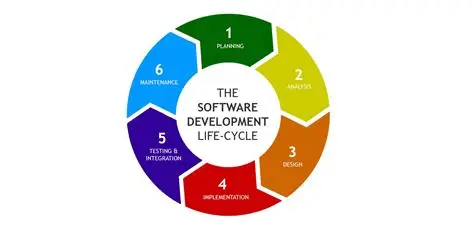
SDLC stands for Software Development Life Cycle. It’s the process that takes an idea from napkin sketch to working product. Every decent software team follows some version of it. Sometimes it’s formal and fully documented. Sometimes it’s chaos with a few steps. Either way, it’s happening.
Here’s the basic structure:
- Requirements
- Planning
- Design
- Development
- Testing
- Deployment
- Maintenance
A lot of QA folks make the mistake of thinking step five is the only one that matters to them. That’s wrong. Testing should start way earlier. If you’re just popping in after the code’s written, you’ve missed your shot to influence quality where it really counts.
Let’s go through it phase by phase—with a QA lens.
1. Requirements: What Are We Even Building?
This is where business, product, and tech leads hash out what they want the software to do. It might be a new feature, an update, or a brand-new product.
If you’re in QA, this is your time to ask annoying (but useful) questions.
- What happens if the user enters bad data?
-
- What’s the expected output?
-
- Are we covering all use cases or just the happy path?
-
If you catch ambiguous or incomplete requirements now, you save hours of debugging later. It’s also a chance to start thinking about test cases.
Uncodemy tip: Their QA courses teach you how to review requirements critically and contribute from day one—not wait until the devs are “done.”
2. Planning: How Are We Going To Do It?
At this stage, timelines are drawn, sprints are scoped, resources assigned. Tools get picked, and high-level strategies get mapped.
What QA should be doing here:
- Estimating test time
-
- Choosing testing types (manual, automation, performance, etc.)
-
- Planning test data and environment needs
-
If you wait until code arrives to think about test environments, you’ll be playing catch-up for weeks.
3. Design: Now It Starts to Get Real
Dev teams are building architecture diagrams. UI/UX teams are sketching screens. This is where the product starts to take shape on paper.
Your job: Start drafting your test plan.
You’ve got enough info to begin writing high-level test cases. You can start building automation frameworks. You can talk to developers about tricky features that might need more testing love.
A strong QA engineer is already working while most of the code is still just wireframes.
4. Development: It’s Getting Built
Dev teams are writing code now. You’re not just watching. You’re preparing.
Here’s what you should be doing:
- Finalize and review test cases
-
- Set up your automation test bed
-
- Confirm your test environments are ready
-
- Prep your test data
-
If you’re working in Agile or DevOps, you’re ideally testing incrementally with every code push (think shift-left testing). If not, you’re still preparing everything so that once you get the build, you’re not scrambling.
Also, this is the time to partner with devs. Ask questions, clarify assumptions, and validate features as they’re being built.
Real talk: The faster you find bugs, the cheaper they are to fix. Make that your mantra.
5. Testing: The Spotlight’s on You
Now it’s your show. But let’s be clear—testing is not just running test cases and logging bugs.
It’s asking:
- Does this product do what it’s supposed to do?
-
- Is it stable? Usable? Secure?
-
- What’s missing that no one thought to check?
-
Good QA work includes:
- Exploratory testing (because users don’t follow scripts)
-
- Regression testing (old stuff should still work)
-
- Smoke and sanity tests
-
- Edge case checks
-
- Testing the testers (your automation scripts should be reliable too)
-
Pro tip from Uncodemy: Their automation testing courses teach you how to write maintainable, modular scripts that won’t collapse every time a dev changes a button label.
6. Deployment: Here We Go
The product’s going live. Sometimes it’s a big release. Sometimes it’s a silent push to prod. Either way, QA needs to do final sanity checks.
Here’s what you do:
- Run final validations in staging
-
- Double-check configs, flags, and environment variables
-
- Keep your rollback plan in mind (things can and do go sideways)
-
You don’t want the team hearing from users that the login screen is broken. That’s your catch.
If your team is using CI/CD, your automation suite should already be hooked into the pipeline. If not, you should be pushing for that. Uncodemy’s DevOps-aligned testing modules teach you how to hook up your scripts so tests run automatically with each deployment.
7. Maintenance: It Never Really Ends
The product is live. Users are clicking around. Bugs are popping up. Features are evolving.
Your job here is just as critical:
- Log and triage bugs from users or support tickets
-
- Update your test suite as features change
-
- Make sure new builds don’t break old functionality (regression tests again)
-
- Track test coverage. Don’t assume you’re testing everything just because you have a big suite.
-
Great QA teams evolve with the product. They improve their own processes, tools, and scripts over time.
SDLC Models and Where QA Fits
Waterfall: Everything happens in sequence. QA comes in late. Not ideal, but still manageable if you plan well.
Agile: Short sprints, frequent releases. QA is integrated from day one. You’re testing alongside development.
V-Model: Testing is planned alongside development. Each dev phase maps to a test phase. Lots of structure. Great for regulated industries.
DevOps/CI/CD: QA is deeply embedded in the release process. You build automated gates that stop bad code from ever reaching production.
Uncodemy’s QA curriculum walks you through each of these in hands-on labs. You won’t just memorize theory—you’ll actually work through them using real tools.
Tools That Make Life Easier
You don’t need to know everything, but you do need to be comfortable with the basics. Here are a few categories and examples:
- Test management: TestRail, Zephyr
-
- Automation: Selenium, Cypress, Playwright
-
- CI/CD: Jenkins, GitHub Actions
-
- Bug tracking: Jira, Bugzilla
-
- API testing: Postman, RestAssured
-
Uncodemy doesn’t just name-drop these tools—they teach you how to use them in realistic project settings. You’ll build your portfolio with actual tests, not just screenshots.
How to Actually Get Good at This
You can’t learn SDLC from a diagram. You have to work through it.
That’s what makes Uncodemy’s approach useful. They don’t just show you what SDLC looks like. They drop you into it—mock projects, live exercises, industry tools. You finish with real project experience.
By the time you're done, you’ll know:
- How to ask the right questions at the right time
-
- What kind of test makes sense for which stage
-
- How to write clear, useful bug reports
-
- How to automate smartly (not everything needs a script)
-
And most importantly, how to be the kind of QA engineer that people want on their team.
Final Takeaway
SDLC isn’t just a process. It’s the backbone of how software is made—and QA is part of every stage. The earlier you get involved, the more impact you have. Testing isn’t just about finding bugs. It’s about making sure the right thing gets built, and that it actually works.
You don’t need to know everything on day one. But you do need to care about quality, ask questions, and keep learning.
If you’re serious about becoming a QA engineer who can hold their own in any dev team, Uncodemy’s courses are worth checking out. They won’t waste your time with buzzwords. Just the stuff that actually matters when it’s time to ship.