When working with databases, it’s very rare that all the information you need is sitting neatly in one single table. In real-world applications, data is usually spread across multiple tables that are related to each other in some way. That’s where SQL Joins come into play.
If you’ve ever wondered how to fetch data from multiple tables in a single query, Joins are the answer. They allow you to combine rows from two or more tables based on a related column.
In this blog, we’ll break down SQL Joins in simple terms with clear real-world examples so you’ll never feel lost again.
What Are SQL Joins?
A Join in SQL is used to combine data from two or more tables based on a condition. The condition is usually that one column in one table matches a column in another table (for example, customer_id in the customers table and customer_id in the orders table).
Instead of writing multiple queries and trying to stitch results together, SQL Joins let you retrieve everything in one go.
Types of SQL Joins
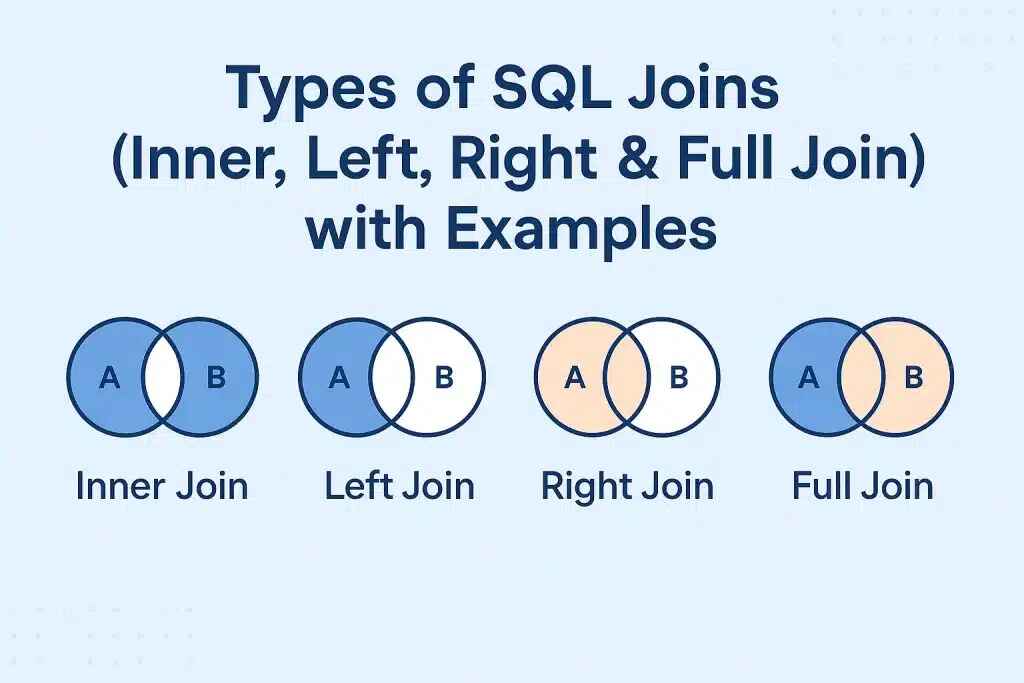
There are four main types of SQL Joins:
1. INNER JOIN – returns records that have matching values in both tables.
2. LEFT JOIN (or LEFT OUTER JOIN) – returns all records from the left table, and the matched records from the right table.
3. RIGHT JOIN (or RIGHT OUTER JOIN) – returns all records from the right table, and the matched records from the left table.
4. FULL JOIN (or FULL OUTER JOIN) – returns all records when there is a match in either left or right table.
Let’s understand each with real examples.
Example Setup: Tables We’ll Use
To make things simple, imagine we are working with two tables:
Customers Table
customer_id
customer_name
city
1
Rahul Sharma
Delhi
2
Neha Verma
Mumbai
3
Amit Singh
Bangalore
4
Priya Gupta
Chennai
Orders Table
order_id
customer_id
product
101
1
Laptop
102
3
Smartphone
103
1
Headphones
104
2
Keyboard
105
5
Monitor
Notice how customer_id links both tables. Orders table has one customer_id (5) that doesn’t exist in the Customers table, making things interesting.
INNER JOIN
An INNER JOIN only returns rows where there is a match in both tables.
Query:
SELECT Customers.customer_name, Orders.product
FROM Customers
INNER JOIN Orders
ON Customers.customer_id = Orders.customer_id;
Result:
customer_name
product
Rahul Sharma
Laptop
Amit Singh
Smartphone
Rahul Sharma
Headphones
Neha Verma
Keyboard
Here, only customers who placed orders are displayed. Priya Gupta is excluded because she has no order. Also, the Monitor order (customer_id 5) is excluded because there’s no matching customer.
LEFT JOIN
A LEFT JOIN returns all rows from the left table (Customers), and the matched rows from the right table (Orders). If there is no match, NULL is returned for right table fields.
Query:
SELECT Customers.customer_name, Orders.product
FROM Customers
LEFT JOIN Orders
ON Customers.customer_id = Orders.customer_id;
Result:
customer_name
product
Rahul Sharma
Laptop
Rahul Sharma
Headphones
Neha Verma
Keyboard
Amit Singh
Smartphone
Priya Gupta
NULL
This time, Priya Gupta shows up even though she hasn’t placed any orders.
RIGHT JOIN
A RIGHT JOIN returns all rows from the right table (Orders), and the matched rows from the left table (Customers). If no match exists, NULL appears for left table columns.
Query:
SELECT Customers.customer_name, Orders.product
FROM Customers
RIGHT JOIN Orders
ON Customers.customer_id = Orders.customer_id;
Result:
customer_name
product
Rahul Sharma
Laptop
Amit Singh
Smartphone
Rahul Sharma
Headphones
Neha Verma
Keyboard
NULL
Monitor
Here, we also see the Monitor order even though there’s no matching customer.
FULL JOIN
A FULL JOIN returns all records when there is a match in either table. If there’s no match, NULL fills the gaps.
Query:
SELECT Customers.customer_name, Orders.product
FROM Customers
FULL OUTER JOIN Orders
ON Customers.customer_id = Orders.customer_id;
Result:
customer_name
product
Rahul Sharma
Laptop
Amit Singh
Smartphone
Rahul Sharma
Headphones
Neha Verma
Keyboard
Priya Gupta
NULL
NULL
Monitor
This query gives you the most complete picture, combining both tables even where no match exists.
Why Are Joins Important?
Simplify data retrieval: Instead of running multiple queries, Joins allow you to fetch all the needed information in one go.
Reflect real-world relationships: Data in real applications is normalized across multiple tables. Joins let you use those relationships effectively.
Flexibility: Whether you want all data, only matched data, or unmatched data, Joins give you control.
Real-Life Analogy
Think of a Customer Directory (like your phone contacts) and an Order Book (like your Amazon orders). If you want to see:
Which customers placed orders → INNER JOIN
All customers, whether or not they ordered → LEFT JOIN
All orders, whether or not they have a valid customer → RIGHT JOIN
Everything together, even mismatches → FULL JOIN
That’s the essence of Joins!
Best Practices for Using Joins
1. Index your join columns – This improves query performance significantly.
2. Use explicit JOIN syntax – Instead of old-school comma-separated tables, use clear INNER JOIN, LEFT JOIN, etc., for readability.
3. Select only what you need – Avoid SELECT * in complex joins to reduce unnecessary data load.
4. Test with sample data – Always validate your JOIN queries on small data sets before applying them to large production databases.
FAQs on SQL Joins
Q1: Which Join should I use most often? Most use cases involve INNER JOIN because you usually want only matching records. But depending on your needs, LEFT and RIGHT joins are also common.
Q2: Is FULL JOIN supported in all databases? No, some databases like MySQL don’t support FULL OUTER JOIN directly. You can simulate it using UNION of LEFT JOIN and RIGHT JOIN.
Q3: Do Joins slow down queries? On very large datasets, Joins can slow down queries if indexes aren’t used properly. Optimizing queries and indexing is key.
Q4: Can we join more than two tables? Yes, you can join multiple tables by chaining JOIN statements. For example, joining Customers, Orders, and Products.
Q5: Are Joins the same as Relationships? No, Joins are SQL operations to fetch related data. Relationships are database design concepts (like foreign keys) that define how tables are connected.
Conclusion
SQL Joins are the backbone of relational database queries. They allow you to combine related data across multiple tables and make your queries more powerful and meaningful.
By mastering INNER JOIN, LEFT JOIN, RIGHT JOIN, and FULL JOIN, you can handle almost any data retrieval task in SQL with confidence.
If you’re just starting your SQL journey, keep practicing Joins with small datasets like the customer and order tables we used here. Once you get the hang of it, you’ll realize Joins aren’t scary at all—they’re actually one of the most elegant parts of SQL.
Want to learn SQL hands-on with real-world projects? Check out the SQL and Database Management course at Uncodemy to strengthen your skills.