The switch statement in the C programming language is a powerful decision-making tool
that simplifies the handling of multiple conditions. This is quite useful when you are required to
compare a single variable against a multiple set of values.
Not like a lengthy if-else statement, this switch statement in C provides a clean and
organised way to execute specific code blocks based on the value of a variable.
From creating this menu-driven program to processing inputs switch statement is
just a common and most used tool in programming. So let's learn how this switch statement works,
syntax, and also switch use cases in C with simple programming examples.
What is Switch Case in C?
This case is a switch statement in C programming that acts like a control
structure used mostly to execute one block of code. One can do this with multiple options, just
based on the value of the expression. The Expression's value is compared against a predefined
constant set of cases, and the matching block is executed.
If one finds no match, then in such a case default block, if by chance provided,
will be executed to get a particular output. Your input. Each button just corresponds to a
different set of outputs.
Syntax of Switch Statement in C
Below is the syntax of the switch statement in the C programming language
Program code:
                            switch (expression) {
                            case constant1:
                                // Code to execute if expression matches constant1
                                break;
                            case constant2:
                                // Code to execute if expression matches constant2
                                break;
                            ...
                            Default:
                                // Code to execute if no case matches
                        }
Component Explanation :
Component
Explanation
switch (expression)
So this expression is
evaluated just once and later compared against constants in each of the cases. It must
simply result in an integer or character value.
case constant
Just represents a
specific value to compare with the expression. Each of the case labels needs to have a
unique constant value.
Statements
This is simply code to
execute when the case meets the expression. This often can include multiple lines of
code.
break
Will end the execution
of the current ongoing process and exit the switch block. Without applying a break
program will continue to execute subsequent stages. We also call it a fall-through
behaviour.
default
One of the options
blocks is often executed when no case matches the expression. It simply acts as a catch
for all unmatched expressions.
Some of the practical examples to understand the switch case
statement
Program code :
                            #include
                    int main() {
                        int day;
                        printf("Enter a number (1-7): ");
                        scanf("%d", &day);

                        switch (day) {
                            Case 1:
                                printf("Monday\n");
                                break;
                            Case 2:
                                printf("Tuesday\n");
                                break;
                            Case 3:
                                printf("Wednesday\n");
                                break;
                            Case 4:
                                printf("Thursday\n");
                                break;
                            Case 5:
                                printf("Friday\n");
                                break;
                            Case 6:
                                printf("Saturday\n");
                                break;
                            Case 7:
                                printf("Sunday\n");
                                break;
                            Default:
                                printf("Invalid day\n");
                        }

                        return 0;
                    }

                    Output.:

                    Input: 3 → Output: Wednesday
                    Input: 8 → Output: Invalid day
Explanation of the above example
Expression - This is the day when the variable is evaluated in the switch
statement.
Case Matching - If input is 3, then it will match case 3 and also print
“Wednesday”.
Break - Will stop execution of matching case to prevent any kind of
fall-through.
Default - If the input is not between 1 and 7, then the default block
will print “invalid day”.
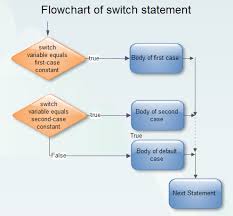
How Switch Case in C Works?
Below is by step-by-step guide on how switch case in C works :
Evaluate the Expression required - Firstly expression inside the switch statement is
evaluated first. It must simply result in an integer or character value.
Compare with Case Constants - The program will just compare the value of a particular
expression with each of the case constants in the switch block. If this match is found, then
the program will execute the code under that case.
Execute Matching Case - Whenever a match is found, then the code under that corresponding
case will be executed until a break statement is encountered or even end of the switch
statement block is reached.
Break Statement - This break statement in C will end execution of the current ongoing
process and exit the switch block. Without a break program will simply continue to execute
subsequent cases.
Default Case - If no case matches the execution, then the default optional block will be
executed. If by chance the default block is not present, then the program will skip the
switch block entirely.
Continue Program Execution - After executing this matching case or even the default case,
the program will move to the next statement outside the switch block.
C Switch Case Examples
Below are some of the common examples of a switch in C programming :
1. Perform Basic Arithmetic Operations
Program code :
                          #include
                         int main() {
                        int num1, num2, result;
                        char operator;
                        printf("Enter two numbers: ");
                        scanf("%d %d", &num1, &num2);
                        printf("Enter an operator (+, -, *, /): ");
                        scanf(" %c", &operator);

                        switch (operator) {
                            case '+':
                                result = num1 + num2;
                                printf("Result: %d\n", result);
                                break;
                            Case '-':
                                result = num1 - num2;
                                printf("Result: %d\n", result);
                                break;
                            case '*':
                                result = num1 * num2;
                                printf("Result: %d\n", result);
                                break;
                            Case '/':
                                if (num2 != 0) {
                                    result = num1 / num2;
                                    printf("Result: %d\n", result);
                                } else {
                                    printf("Error: Division by zero is not allowed.\n");
                                }
                                break;
                            default:
                                printf("Invalid operator\n");
                        }

                        return 0;
                    }

                    Output :

                    Enter two numbers: 5 10
                    Enter an operator (+, -, *, /): +
                    Result: 15
2. Check Vowel Consonant
Program code :
                        #include
                        int main() {
                            char ch;
                            printf("Enter a character: ");
                            scanf(" %c", &ch);

                            switch (ch) {
                                case 'a': case 'e': case 'i': case 'o': case 'u':
                                case 'A': case 'E': case 'I': case 'O: case 'U':
                                    printf("The character is a vowel.\n");
                                    break;
                                Default:
                                    printf("The character is a consonant.\n");
                            }

                            return 0;
                        }

                        Output :

                        Enter a character: u
                        The character is a vowel
3. Simple Calculator Menu
Program code :
                            #include
                    int main() {
                        int choice, a, b;

                        printf("Menu:\n");
                        printf("1. Add\n2. Subtract\n3. Multiply\n4. Divide\n");
                        printf("Enter your choice: ");
                        scanf("%d", &choice);

                        printf("Enter two numbers: ");
                        scanf("%d %d", &a, &b);

                        switch (choice) {
                            Case 1:
                                printf("Sum: %d\n", a + b);
                                break;
                            Case 2:
                                printf("Difference: %d\n", a - b);
                                break;
                            Case 3:
                                printf("Product: %d\n", a * b);
                                break;
                            Case 4:
                                if (b != 0) {
                                    printf("Quotient: %d\n", a / b);
                                } else {
                                    printf("Error: Division by zero.\n");
                                }
                                break;
                            default:
                                printf("Invalid choice\n");
                        }

                        return 0;
                    }

                    Output :

                    Menu:
                    1. Add
                    2. Subtract
                    3. Multiply
                    4. Divide
                    Enter your choice: 1
                    Enter two numbers: 92929 48
                    Sum: 92977
4. Check Student Grade
Program code :
                            #include
                    int main() {
                        int marks;
                        printf("Enter your marks: ");
                        scanf("%d", &marks);

                        switch (marks / 10) {  // Integer division to group marks
                            case 10: case 9:
                                printf("Grade: A\n");
                                break;
                            Case 8:
                                printf("Grade: B\n");
                                break;
                            Case 7:
                                printf("Grade: C\n");
                                break;
                            Case 6:
                                printf("Grade: D\n");
                                break;
                            Default:
                                printf("Grade: F\n");
                        }

                        return 0;
                    }

                    Output :

                    Enter your marks: 6
                    Grade: F
5. Determine the Type of Triangle
Program code :
                            #include
                    int main() {
                        int a, b, c;
                        printf("Enter three sides of the triangle: ");
                        scanf("%d %d %d", &a, &b, &c);

                        switch ((a == b) + (b == c) + (c == a)) {
                            Case 3:
                                printf("The triangle is equilateral.\n");
                                break;
                            Case 1:
                                printf("The triangle is isosceles.\n");
                                break;
                            Default:
                                printf("The triangle is scalene.\n");
                        }

                        return 0;
                    }

                    Output:

                    Enter three sides of the triangle: 4 5, 3
                    The triangle is scalene.
Nested Switch Statement in C
A nested switch statement just refers to one switch statement inside another
switch statement. This often allows for handling complex decision-making scenarios. Here,
frequently, one condition depends on the result of another. The outer switch statement will
evaluate the expression first, and based on the matching case inner switch will execute the code
block.
Real-Life Example:
Outer decision ( Outer Switch ) - Choose the type of meal first ( like
vegetarian or non-vegetarian ).
Inner Decision (Inner Switch) - Based on this meal type, one can choose
specific dishes ( vegetarian → paneer or dal, non-vegetarian → chicken or fish)
Syntax for this kind of nested switch statement :
                            switch (expression1) {
                            case constant1:
                                // Code for constant1
                                switch (expression2) {
                                    case constant2_1:
                                        // Code for constant2_1
                                        break;
                                    case constant2_2:
                                        // Code for constant2_2
                                        break;
                                    Default:
                                        // Default code for inner switch
                                }
                                break;
                            case constant2:
                                // Code for constant2
                                break;
                            Default:
                                // Default code for outer switch
                        }
Example of nested switch in the C programming language
Meal selection based on type as well as dish
Program code :
                            #include
                    int main() {
                        int mealType, dish;

                        printf("Select meal type (1 for Vegetarian, 2 for Non-Vegetarian): ");
                        scanf("%d", &mealType);

                        switch (mealType) {
                            case 1: // Vegetarian
                                printf("Select dish (1 for Paneer, 2 for Dal): ");
                                scanf("%d", &dish);

                                switch (dish) {
                                    Case 1:
                                        printf("You selected Paneer.\n");
                                        break;
                                    Case 2:
                                        printf("You selected Dal.\n");
                                        break;
                                    Default:
                                        printf("Invalid dish selection for Vegetarian meal.\n");
                                }
                                break;

                            case 2: // Non-Vegetarian
                                printf("Select dish (1 for Chicken, 2 for Fish): ");
                                scanf("%d", &dish);

                                switch (dish) {
                                    Case 1:
                                        printf("You selected Chicken.\n");
                                        break;
                                    Case 2:
                                        printf("You selected Fish.\n");
                                        break;
                                    Default:
                                        printf("Invalid dish selection for Non-Vegetarian meal.\n");
                                }
                                break;

                            Default:
                                printf("Invalid meal type.\n");
                        }

                        return 0;
                    }

                    Output :

                    Select meal type (1 for Vegetarian, 2 for Non-Vegetarian): 1
                    Select dish (1 for Paneer, 2 for Dal): 1
                    You selected Paneer.
Conclusion :
Switch cases are quite essential for learning, as they are useful in many cases.
So, enrolling in a C
programming course in Noida will be of great help for you and stay relevant
as per industry demands.