What Is a Matrix?
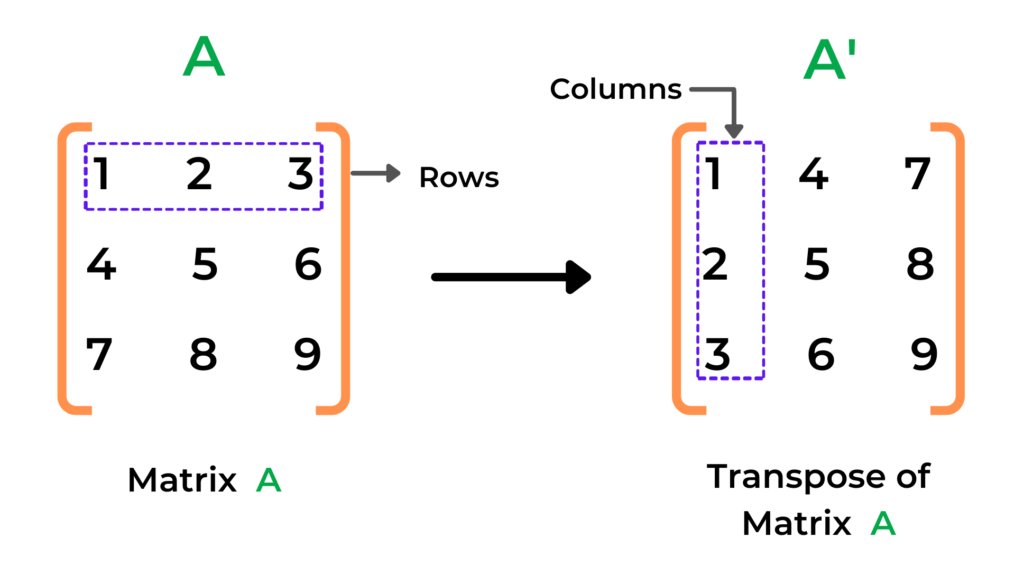
A matrix is simply a two-dimensional data structure. Think of it as a list of lists in Python. Each element of the outer list represents a row, and each element within the inner list represents a column.
Here is a simple 3 by 2 matrix:
Copy Code
python

CopyEdit

matrix = [

    [1, 2],

    [3, 4],

    [5, 6]

]
This matrix has 3 rows and 2 columns. The idea of a transpose is to make it 2 rows and 3 columns, with elements flipped across the diagonal.
The transpose of the above matrix would be:
Copy Code
python

CopyEdit

[

    [1, 3, 5],

    [2, 4, 6]

]
Now let’s explore how you can achieve this in Python using various methods.
Method 1: Transpose Using Nested Loops
The first method you learn as a beginner is how to use nested loops to manually transpose a matrix. This approach helps you understand what’s happening under the hood.
Copy Code
python

CopyEdit

def transpose_matrix(matrix):

    rows = len(matrix)

    cols = len(matrix[0])

    result = []

    for i in range(cols):

        new_row = []

        for j in range(rows):

            new_row.append(matrix[j][i])

        result.append(new_row)

    return result

original = [

    [1, 2],

    [3, 4],

    [5, 6]

]

transposed = transpose_matrix(original)

print("Transpose:", transposed)
This function first calculates the number of rows and columns. Then it uses a nested loop: the outer loop iterates through columns, and the inner loop fetches elements from each row to construct the new rows for the transposed matrix.
Method 2: Transpose Using List Comprehension
Python offers a more compact and readable syntax known as list comprehension. You can transpose a matrix in just one line.
Copy Code
python

CopyEdit

matrix = [

    [1, 2],

    [3, 4],

    [5, 6]

]

transpose = [[row[i] for row in matrix] for i in range(len(matrix[0]))]

print("Transpose:", transpose)
This one-liner does exactly what the nested loop does, but in a more Pythonic way. It is a favorite among developers for its simplicity and efficiency.
Method 3: Transpose Using zip() Function
The most elegant method involves Python’s built-in zip() function. This function pairs up elements from multiple iterables. If you pass unpacked rows of a matrix to zip(), it will return the transposed result.
Copy Code
python

CopyEdit

matrix = [

    [1, 2],

    [3, 4],

    [5, 6]

]

transpose = list(map(list, zip(*matrix)))

print("Transpose:", transpose)
Using *matrix unpacks the matrix into individual rows. The zip() function then pairs elements by index, essentially flipping rows into columns. map(list, ...) converts the tuples returned by zip into lists.
Method 4: Transpose Using NumPy Library
If you are dealing with large datasets or scientific computing, you will often work with NumPy. This powerful library makes matrix operations extremely simple and fast.
Copy Code
python

CopyEdit

import numpy as np

matrix = np.array([

    [1, 2],

    [3, 4],

    [5, 6]

])

transpose = matrix.T

print("Transpose:\n", transpose)
Here, .T is an attribute of NumPy arrays that returns the transpose of the matrix in a single step. It is incredibly efficient and widely used in data science applications.
Taking Matrix Input from Users
In many real-world applications, matrix data comes from users or external sources like files and databases. Here’s how you can take matrix input dynamically:
Copy Code
python

CopyEdit

rows = int(input("Enter number of rows: "))

cols = int(input("Enter number of columns: "))

matrix = []

print("Enter the matrix row by row:")

for _ in range(rows):

    row = list(map(int, input().split()))

    if len(row) != cols:

        raise ValueError("Each row must have exactly {} elements.".format(cols))

    matrix.append(row)

transpose = [[matrix[j][i] for j in range(rows)] for i in range(cols)]

print("Transpose of matrix:")

for row in transpose:

    print(row)
This example covers taking input from users, validating the input, and then computing the transpose. It’s a practical example that you may face in interviews or project work.
Real-World Applications of Transposing
Understanding the transpose of matrix in Python is not just academic. It has serious real-world applications.
- Data Science – In pandas or NumPy, transposing helps reshape datasets for analysis
- Machine Learning – Matrix algebra is everywhere, especially during training and optimization
- Image Processing – Images are matrices of pixels, and transposition is useful in rotation and filtering
- Graphs and Networks – Adjacency matrices for graphs are often transposed for traversal algorithms
Error Handling and Common Pitfalls
Beginners often face certain errors while transposing matrices. Here are a few to watch out for:
- Jagged Arrays: If the matrix has inconsistent row lengths, the transpose operation will fail
- Index Errors: When writing nested loops, mixing up indices leads to out-of-range errors
- Empty Lists: Ensure the matrix is not empty before performing operations
- Assuming Square Matrix: Transposition is possible for any rectangular matrix, not just square ones
Always validate your input and use error handling techniques like try-except blocks to manage unexpected cases.
Bonus: Transpose a Square Matrix In-Place
Transposing a square matrix (same number of rows and columns) can be done in-place to save memory.
Copy Code
python

CopyEdit

def transpose_in_place(matrix):

    size = len(matrix)

    for i in range(size):

        for j in range(i + 1, size):

            matrix[i][j], matrix[j][i] = matrix[j][i], matrix[i][j]

    return matrix

square_matrix = [

    [1, 2, 3],

    [4, 5, 6],

    [7, 8, 9]

]

print("Original:", square_matrix)

print("Transpose In-Place:", transpose_in_place(square_matrix))
This method is memory-efficient and used in performance-critical applications like game development and graphics rendering.
Interview Insights and Quick Tips
Many Python coding interviews include questions about matrix operations. Here’s how you can shine:
- Explain both manual and Pythonic methods
- Show how zip and list comprehensions make your code cleaner
- Discuss how matrix transposition helps in real-world applications
- Mention libraries like NumPy and pandas to demonstrate your depth
Preparing a short explanation and writing the function from memory can give you a big edge.
Quiz for Practice
Test your knowledge with these quick questions:
- What will be the shape of a 2 by 3 matrix after transpose?
- Can you transpose a one-dimensional list?
- Which method is the fastest for large matrices?
- What happens when you use zip on an empty matrix?
Answering these correctly will ensure you are ready to implement transpose operations in any scenario.
Learn Python the Right Way with Uncodemy
If you are eager to build a strong foundation in Python and dive into real-world projects involving data, automation, and machine learning, we highly recommend enrolling in the Python Programming Course by Uncodemy.
This comprehensive course covers everything from the basics to advanced topics like matrix operations, data visualization, file handling, and more. Whether you are a beginner or a career switcher, Uncodemy offers hands-on training, mentorship, and industry-relevant content to boost your programming journey.
Final Thoughts
The transpose of matrix in Python is a core concept that opens the door to many advanced applications. Whether you are analyzing data, manipulating images, or designing machine learning models, mastering matrix transposition gives you a powerful tool in your programming toolkit.
You have now seen how to implement it using loops, list comprehension, zip function, and with the help of NumPy. You also learned how to handle user inputs, prevent errors, and even do in-place transposition.
So what are you waiting for? Start practicing, build some cool projects, and keep exploring the wonderful world of Python.