Traversing a Linked List: Techniques Explained
-
Mr. Kunal Kumar/ 3
days ago
- 17
- 13 min read
This guide will explain how to traverse a linked list in simple terms. It will go
over different ways to do it, talk about when to use them, and give you tips that will assist
you in school, at work, and when interviewing.
What Is Traversing in a Linked List?
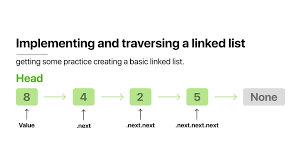
Going through a linked list means hitting every spot in it at least once.
Usually, you kick things off at the head (the first spot) and move down the line until you hit
the end (where there's nothing left to point to). This lets you get to all the stuff in the
list, so you can read it, change it, search it, or do things like add it all up or count how
many items there are.
Why Traverse a Linked List?
- Reading: Print or display all values.
- Searching: Find if a value exists.
- Updating: Modify nodes based on conditions.
- Counting: Determine the number of elements.
- Building New Structures: Copying or reversing lists.
- Algorithmic Operations: Foundation for insertions, deletions, and more.
Anatomy of a Linked List
Okay, so before we talk about going through a linked list, let's remember what it
is:
It's basically a bunch of boxes (we call them nodes), where each box has some
stuff in it (that's the data) and also an arrow pointing to the next box.
The first box is called the head, and the last box has an arrow that points to
nothing, to tell you that's the end of the line.
There are different kinds:
Singly Linked List: each box only points to the next one.
Doubly Linked List: each box points to the next one, *and* to the box behind it.
Circular Linked List: the last box points back to the first one, making a circle.
The Basics: How Traversal Works
To go through a linked list, you begin at the first item and keep going to the
next one until you get to the end.
Here's the basic way it works:
1. Begin with the initial item.
2. Do something with the info there.
3. Go to the next item.
4. Keep doing this until you reach the end.
This easy method is the base for more complex things.
Techniques for Traversing Linked Lists
Okay, here's a rewrite of that text, making it sound more like a person wrote it
and dodging all those banned words:
1. Going Through a List Step-by-Step
This is the way most people do it. You grab a temporary placeholder (like a
pointer) and use it to go down the list, one item at a time.
How it works:
- Start at the beginning.
- Do something with each thing in the list (like show it, or add it to a
total).
- Move your placeholder to the next thing.
- Keep going until you hit the end.
What it's good for:
- Showing everything in the list.
- Adding stuff up.
- Finding something specific.
The good stuff:
- It's easy and quick.
- Doesn't need much extra memory.
2. Going Through a List Using a Trick
You can use a trick where a function calls itself over and over. With each call,
the function handles the next item until it gets to the end.
How it works:
- The function stops when it hits the end of the list.
- If it's not the end, it does something with the item and then calls
itself to handle the next one.
When to use it:
- It can make some code simpler (like printing things in reverse).
- Good for showing off how recursion works in interviews.
Things to keep in mind:
- Not great for really long lists – you might run out of memory.
- Each call takes up some memory.
3. A Special Kind of Trick
This is when the function calls itself at the very end. Some languages are able
to make this trick run really well without using up tons of memory, but most languages need some
special instructions to make that happen.
Why bother?
- It can make simple things look nicer in the code.
- Some compilers can make it run faster.
4. Going Both Ways (If You Can)
With some lists, you can go forward and backward.
Going forward: Start at the beginning and go to the next thing until you hit the
end.
Going backward: Start at the tail and go to the thing or node before until you
hit the beginning.
What is it for?
- Things where you need to go both ways (like undo buttons or browser
history).
- Getting to things at the end of the list quickly.
5. Going in Circles
Some lists loop back to the beginning. To stop from going forever, you stop when
you get back to where you started.
How to do it:
- Start at the beginning.
- Go to the next thing, doing something with each one.
- Stop when you get back to the beginning.
What is it for?
- Scheduling tasks in a loop.
- Sharing access in a circle.
Advanced Traversal Patterns and Uses
Sliding Window and Two-Pointer Techniques
In certain algorithms, you use two or more pointers to traverse the list
simultaneously, often for problems like detecting cycles, finding the kth node from the end, or
segment-based analysis.
Examples:
- Cycle Detection: Floyd’s Tortoise and Hare algorithm (fast and slow
pointers).
- Finding Middle Element: Advance one pointer twice as fast as the other.
Searching and Conditional Traversal
Often, you only want to visit until a certain value is found, or you’re looking
for a node based on a condition.
Pattern:
- Start at the head.
- At each node, check if it meets the condition.
- Stop when found or when the list ends.
Traversal for Deletion and Insertion
Operations like deleting a node by value require careful traversal:
- Visit nodes while keeping track of the previous node (to adjust
pointers).
- Stop when the node to delete or the insertion point is found.
This is extensively covered, both theoretically and practically, in Uncodemy’s
Data Structure course, empowering learners with practical coding assignments.
Real-World Applications of Linked List Traversal
- Memory allocation finds the right spots by checking available blocks.
- Operating systems use lists (queues, stacks) that need quick checks for
jobs and tasks.
- Undo buttons work by going back through your history.
- Web browsers remember where you've been with lists that go both ways, so
the back and forward buttons work.
- Media players let you skip songs and rearrange playlists.
- Networks find the best routes using lists, keeping everything up-to-date.
In short, if you want systems to work well, they need to move through these lists
quickly and without mistakes.
Traversal in Doubly and Circular Linked Lists: Practical Insights
In Uncodemy's Data Structure course, you'll learn how to move through singly
linked lists, and you'll also learn about:
- Doubly Linked List Movement: This lets you go forward and backward, which
makes things like printing in reverse or searching in both directions way simpler.
- Circular List Movement: Here, you figure out how to stop endless loops by
keeping track of where you started. This is important for things like scheduling and token
ring networks.
- Basic Ideas: How you move around is pretty much the same no matter what,
but the way the nodes are set up (like next/prev points) changes depending on the kind of
list.
Comparing Traversal in Arrays vs. Linked Lists
| Aspect |
Arrays |
Linked Lists |
| Access Pattern |
Directly, any index |
Sequential, must start from the head |
| Traversal Speed |
Fast (random access) |
Slower, must follow pointers |
| Flexibility |
Less (fixed size) |
High (dynamic size) |
| Memory Usage |
Continuous block |
Dynamic, can be fragmented |
| Real-World Use |
Fixed-size data, numeric tasks |
Dynamic data, frequent insert/delete |
Conclusion: Navigate Your Way to Data Structure Mastery
Going through a linked list isn't just something beginners do; it's a skill you
need for a lot of jobs and interviews. If you get the basics and the more advanced stuff down,
like what's taught in Uncodemy’s Data Structure course, you’ll develop the know-how to solve
stuff fast, fix errors without worry, and get better at coding.
Like anything in coding, you get good by doing, not just reading. Write code,
mess around, and really play with each idea. So, get into list traversals. Loop, repeat, change,
and study them. Become the kind of programmer who can use basic knowledge to get work done.
Frequently Asked Questions (FAQs)
Q1: Why should I master linked list traversal?
A: Traversal is essential for searching, updating, and managing data structures
efficiently. It forms the foundation for learning more advanced data manipulation techniques and
excelling in coding interviews.
Q2: Is traversal always done from head to tail?
A: In singly linked lists, yes. However, in doubly linked lists, you can traverse
forward and backward depending on requirements.
Q3: Can traversal cause errors or crashes?
A: Yes. Common mistakes include infinite loops (not ending traversal), null
pointer dereferencing, and losing node references during manipulation. Practice and attention to
pointer logic help avoid these errors.
Q4: How is recursive traversal different from iterative?
A: Recursion leverages the call stack to process nodes; it can be less memory
efficient for large lists, but can result in simpler code for certain operations. Iteration is
recommended for most practical, large-scale applications.
Q5: Does Uncodemy’s Data Structure course teach linked list traversal
practically?
A: Absolutely. The course blends theory and coding practice so you learn to
write, debug, and optimize traversal logic in multiple real-world scenarios












