Use Canva AI Tools for Better Designs
Mr. Bambam Kumar Yadav/ 3 days ago - 15
- 11 min read
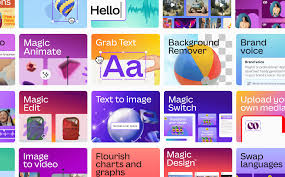
Drawing from the best practices project-based learning can provide (see Uncodemy Digital Marketing Course), this guide looks at how to incorporate using Canva’s AI-powered features into your workflow. It gives you tangible ways to elevate your designs to stand out smarter, quicker, and more professionally than the rest.
What Makes Canva AI Tools Unique?
AI isn’t just about automation - it’s also about democratizing quality design. Canva has integrated numerous technology-driven capabilities to improve the design experience, enhance creativity, and lessen technical barriers. They largely deliver on this solution with features like content suggestion, automatic layout recommendations, eliminating background, Magic Write (for copywriting), and more.
Why use Canva AI tools?
- Enhance productivity by automating repetitive or complex tasks.
- Quickly generate design and content ideas for any purpose.
- Achieve professional-quality results, regardless of your creative expertise.
- Align with the latest trends in digital content creation—an emphasis of Uncodemy’s Digital Marketing Course.
Getting Started With Canva’s AI Features
1. Magic Design: Instant Layout and Theme Suggestion
The Magic Design function allows you to upload an image or place content and immediately recommends pre-made design templates & color palettes that suit your needs. This is an AI-powered too
How to use Magic Design:
- Upload your main asset (image or logo).
- Let Canva suggest a variety of templates.
- Pick your favorite and customize to your liking.
Having a basic understanding of color theory and brand consistency discussed in Uncodemy’s Digital Marketing Course, will help you fully take advantage of these automated design recommendations.
2. Magic Write: AI Content Generation
Magic Write is the copywriting tool powered by AI in Canva. It creates brilliant headlines, blocks of text, and summaries based on as little as a few words to get you started. It can be used to create a social caption, product descriptions, or just the key slides for a business pitch, or be used simply as inspiration or to help complete the message.
Benefits:
- It saves time and is valuable to fight writer's block.
- It helps maintain tone and clarity across all materials.
- You are able to create engaging text for blogs, ads, and social media etc.
3. AI-Powered Background Remover
Canva's AI background removal feature allows you to quickly separate any subject from the images you want to work with in one click. This is great for product images (or shots), headshots (profile images), and focus elements in presentations—all without technical editing software.
Steps:
- Choose your image.
- Select "Edit Image" then "Background Remover."
- AI picks your subject and removes your background—refine the subject if necessary.
Such quick and impactful editing is often recommended in Uncodemy's Digital Marketing Course while talking about a social media brand and marketing images and product shots.
4. Text to Image: AI-Generated Illustrations and Photos
With generative AI, you simply articulate what you want, let's say “a futuristic city skyline at sunset,” and Canva's Text to Image completes your prompt and creates custom photos or illustrations. This is a game-changer when stock images do not fully align with your brand vision or if you are after something truly unique.
Some tips to keep in mind:
- Be as clear and specific as possible in your prompt.
- Select from different art styles (photo, drawing, 3D).
- Combine generated images with your branding assets or templates.
AI-generated images fit perfectly with differentiation strategies for organic content, as discussed in the various modules on Uncodemy.
5. Magic Eraser and Magic Edit: Smart Image Manipulation
Use the Magic Eraser and Magic Edit to remove unwanted objects or make changes to parts of your photo. With powerful AI to back up both tools, it has never been easier to clean up photos, change branding on marketing images, or reformat designs. You won't need any Photoshop skills.
Common use cases:
- Removing unwanted objects in product images.
- Changing out backgrounds or parts of the sky
- Changing clothing, accessories, or layouts for A/B testing.
Best Practices for Leveraging Canva AI Tools
Being able to leverage AI effectively works in tandem with a foundation in design principles. The following suggestions, also suggested in Uncodemy's Digital Marketing Course on using AI, will help you use these capabilities to their fullest:
Clearly Define Your Design Goals: Before running AI tools, ensure you understand your audience and the objective of your design! This helps make sure that the technology supports your creative endeavour and does not overwhelm it.
Refine and Customize: Always treat AI output as a starting point. You should adjust colors, fonts, and composition to be self-evident and fit your organizational branding guidelines
Combine AI with Authentic Design Assets: Mix and match AI-generated designs with your own images and fonts to create a distinctive visual identity.
Maintain Consistency: Use Magic Design and AI-informed templates so you use the same/consistent colors, icons, layout styles, etc, for each of your marketing materials.
Collaborate and iterate: Sharing your drafts with your teams (something we learned to do in digital marketing) will allow you to gain valuable feedback and continually improve.
Real-World Applications for Businesses and Creators
Canva AI tools are not just for hobbyists anymore; businesses, agencies, and content creators are now harnessing these great tools, ultimately maximizing the quality of their work while being time-efficient.
For Small Businesses
1. Turbo Charged Branding: Create logos, flyers, and social graphics quickly. Easily change the layout and designs as the business grows.
2. Consistent Messaging: We can standardize messaging on all platforms, just by using AI copywriting tools.
For Marketing Agencies
1. Bulk Content Creation: Easily make variations of ads, banners, infographics, etc in minutes for A/B testing purposes.
2. Client Presentations: When developing layouts and ultimately putting together copy for pitches in client proposals, AI can be leveraged to make the work flawless.
For Influencers / Content Creators
1. Original Visuals: Use Text to Image to create unique art, visual representations, and storyboards.
2. Engagement Boost: Utilize AI-powered animation and design suggestions to enhance and differentiate social posts.
Digital marketing training, like what you will find on Uncodemy’s course, will ensure that students are positioned to define and strategically deploy these tools across their organization's channels, achieving maximum reach and engagement.
Unlocking the Next Level: Integrating Canva AI With Your Workflow
Today's designers are successful because they leverage the harmony between smart automation and being human. Here's the best way to create a workflow:
A Clear Brief: The better the prompt/concept you start with, the more meaningful Canva's AI suggestions will be.
Batch Activities: Select and make 3-5 drafts simultaneously using AI, and pick your favorites to refine.
Regularly Change Templates: Because AI-driven designs are adaptable, they are currently on trend as campaigns for seasons change every 3 months. So, how many new templates or layouts will you use next season?
Have good habits and shape them through a Digital Marketing Course, and soon you will never forget about the functionality of technology and the relevant principles of design.
Keep Evolving: Embrace Lifelong Learning
Canva is always updating its platform, introducing new AI tools as design trends, and trends in the industry change. Make a commitment to continuous learning - Follow Canva's educational materials, take part in their webinars, and ask your peers for input. Creating a habit of exploring and iterating will allow you to be ahead of the game during your design journey.
Programs that are built with a structure put forward this mindset. Uncodemy's Digital Marketing Course, trains students to have knowledge that is accurate, as the digital design space continues to expand.
Conclusion: Design Smarter, Not Harder
Embracing Canva's AI tools can revolutionize your design journey, making even your wildest visions easier to complete and refine. As a student, business owner, or experienced marketer, incorporating smart tools into your overall process, no matter where you are in your journey, will allow you to create professional-quality design faster and with less effort. When combined with ideas from an industry course such as Uncodemy's Digital Marketing Course, where you can learn to innovate, pivot, and make every visual valuable, you are in a great position to succeed. Start experimenting with Canva AI tools and see how they can make a difference to your next creation!
Frequently Asked Questions (FAQs)
Q1: Can I use Canva AI tools for free designs?
A: Yes, many AI features in Canva are available on free plans, though some advanced tools may require a Canva Pro subscription.
Q2: Are AI-generated images from Canva copyright safe?
A: Canva’s generated visuals are generally safe for commercial use, but always review specific licenses or terms before publishing.
Q3: Is design experience necessary to use Canva AI tools effectively?
A: No! While experience helps, AI tools make quality design accessible to beginners and pros alike, making them a focus in digital marketing courses.
Q4: How do Canva AI tools contribute to branding?
A: They help maintain consistency in colors, fonts, and layouts, streamlining your branding across various materials.
Q5: Will learning Canva AI tools give me an edge in digital marketing jobs?
A: Absolutely. Mastery of AI-powered design tools is a valuable skill highlighted in Uncodemy’s Digital Marketing Course and is sought after by employers.












