Programming beginners who start learning C discover that the language offers various standard functions, which include printf(), scanf() and strlen(). The language reveals its true potential through function creation, which enables developers to build custom procedures that address the specific needs of their programs. User-defined functions in C function as personalized workshop tools that worker developers create for specific tasks.
Think about it this way: if you were building a house, you wouldn't want to explain every single step of "how to hang a door" every time you needed to install one. When you need to install a door, you would make a method called "hang door" that you could then use whenever required. The user defined functions in C provide developers the ability to decompose complicated code into smaller sections that are both manageable and reusable.
The ability to define functions in C represents a fundamental skill that all programmers need, whether they start with Uncodemy's Noida C programming courses or pursue professional development. The foundation of writing clean, maintainable, and efficient C programs requires user defined functions as they establish the base structure of code development.
What Makes User-Defined Functions So Special?
All C programs operate through multiple functions that collaborate to perform their tasks. The main function serves as your program's starting point since your initial "Hello, World!" program, but it represents only a small part of the entire structure. Through user defined functions in C, you gain the power to expand language features that direct your program toward its desired outcomes.
The main advantage of creating your own functions comes from their ability to be reused and their organizational structure. You eliminate the need to duplicate code blocks because you write them as functions that you can call whenever necessary. The technique of writing functions helps you produce code that requires less time to debug and modify while remaining easier to understand. The process of defining your own functions allows you to teach the computer new C language "words".
Functions operate as black boxes that accept input data before performing useful operations and sometimes producing output results. The level of abstraction enables programmers to develop sophisticated programs, which prevent them from being overwhelmed by basic operational details.
The Anatomy of User-Defined Functions in C
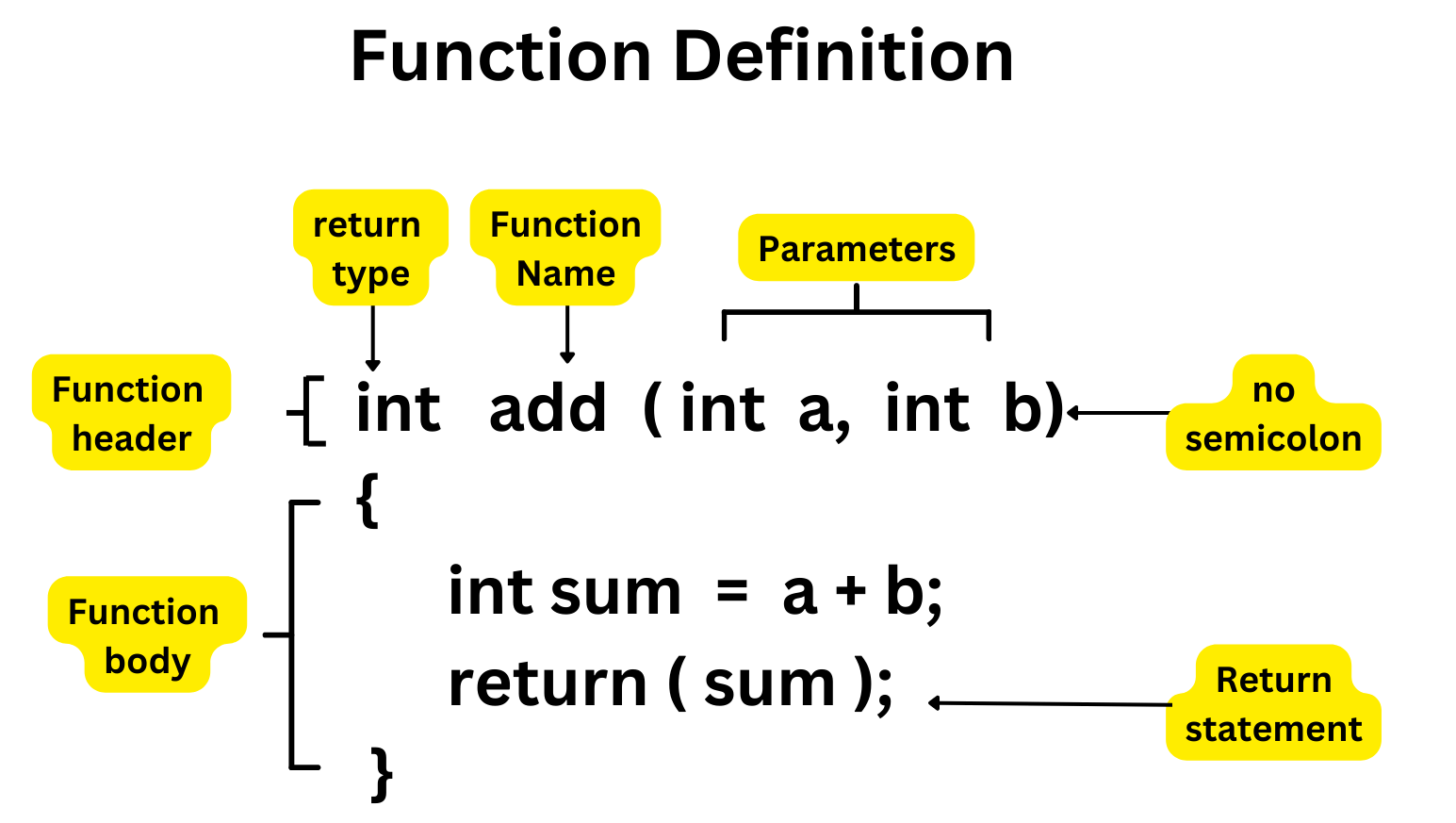
The structure that makes user defined functions in C work will become clear before we look at specific examples. Every function has four main components: the return type, the function name, the parameter list, and the function body. The form-like system guides the compiler to understand what your function performs, together with its usage instructions.
The return type tells the compiler what kind of data your function will send back when it's done working. This could be an integer, a floating-point number, a character, or even nothing at all (using the void keyword). The function name is what you'll use to call your function later – choose something descriptive that makes your code self-documenting.
Parameters are the input values your function needs to do its job. The raw materials that enter its workshop are what parameters represent. Finally, the function body contains the actual instructions that make your function useful. This is where the real work happens, where your function transforms inputs into outputs.
Here's a simple example to illustrate these concepts:
                            c
                    int addTwoNumbers(int first, int second) {
                        int sum = first + second;
                        return sum;
                    }
In this user-defined function, int is the return type, addTwoNumbers is the function name, int first, int second are the parameters, and everything between the curly braces is the function body.
Building Your First User-Defined Functions
Let's start with something practical. Imagine you're writing a program that needs to calculate the area of rectangles in several different places. Instead of repeating the multiplication every time, you can create a dedicated function:
This example shows how user-defined functions in C can make your code more readable and maintainable. If you later decide to change how area calculation works – maybe you want to add input validation or handle different units – you only need to modify the function once.
Now let's look at a function that doesn't return a value but performs an action:
                            c
                    void printWelcomeMessage(char name[]) {
                        printf("Welcome to our program, %s!\n", name);
                        printf("We hope you enjoy learning C programming.\n");
                    }
This function uses the void return type because it doesn't send any value back to the calling code. Instead, it performs an action – printing a personalized welcome message. Functions like this are incredibly useful for tasks like displaying menus, formatting output, or performing initialization routines.
Advanced Examples: Functions That Solve Real Problems
Let's explore some more sophisticated user defined functions in C that demonstrate their true power. Here's a function that checks whether a number is prime:
                    c
                    int isPrime(int number) {
                        if (number <= 1) { return 0; not prime } for (int i="2;" * <="number;" i++) if (number % 0) 1; pre>
This function encapsulates the entire algorithm for prime checking. You can use it anywhere in your program by simply calling isPrime(17) or isPrime(25)), and it will return 1 for prime numbers and 0 for non-prime numbers.
Here's another example that demonstrates how user-defined functions can work with arrays:
                    c
                    float calculateAverage(int numbers[], int size) {
                        int sum = 0;

                        for (int i = 0; i < size; i++) {
                            sum += numbers[i];
                        }

                        return (float)sum / size;
                    }

                    int findMaximum(int numbers[], int size) {
                        int max = numbers[0];

                        for (int i = 1; i < size; i++) {
                            if (numbers[i] > max) {
                                max = numbers[i];
                            }
                        }

                        return max;
                    }
These functions show how you can create reusable tools for common array operations. Whether you're analyzing test scores, processing sensor data, or working with any collection of numbers, functions like these become invaluable building blocks.
Best Practices for Writing User Defined Functions
Developing efficient user defined functions in C demands both technical knowledge and artistic ability. These principles will assist you in making functions that work correctly and stay maintainable and efficient. The first rule is to direct all your functions toward accomplishing just one thing. Functions need to focus on one specific operation and deliver excellent results in that area. Functions that combine multiple tasks need to be divided into smaller functions that each concentrate on specific operations. Select function names that communicate their purpose clearly. The function name calc() provides zero information about its functionality, while calculateCompoundInterest() clearly explains its function.
Good function names make your code self-documenting and easier to understand. The number of parameters used in your functions should be kept at a reasonable level. When a function requires more than five or six parameters it probably needs either reduction of its functionality or grouping of related parameters into structures.
Functions need to validate their inputs in cases when it is necessary. Make sure to verify if your function needs positive numerical values. Before using pointers in your function make sure they are not null. The implementation of defensive programming within your custom functions will prevent many future debugging problems.
Common Mistakes and How to Avoid Them
Most programmers with experience face challenges when they create user-defined functions in C. The most typical mistake involves failing to provide declarations before function usage. Functions need to be declared before the program calls them and this declaration can occur through either full function definitions or function prototypes placed earlier in the file.
A frequent mistake occurs when programmers confuse parameter order in function calls. The expected order of parameters for calculateRectangleArea(length, width)must be followed during the function call because calculating it as calculateRectangleArea(width, length) produces wrong results and the compiler does not generate any alerts.
Memory-related errors are also common, especially when functions work with arrays or dynamically allocated memory. The responsibility to free memory must be clearly defined between the function which performs the allocation and the code that makes the call.
Bringing It All Together: Your Path Forward
User defined functions in C provide a Swiss Army knife approach to programming because understanding each tool enables you to solve problems which previously seemed impossible. The examples we've covered here are just the beginning. As you continue practicing and building more complex programs, you'll discover new patterns and techniques that make your functions even more powerful and efficient. Remember that becoming proficient with user defined functions takes practice.
Start with simple functions and gradually work your way up to more complex ones. Don't be afraid to experiment, make mistakes, and learn from them. Every error is an opportunity to deepen your understanding of how C functions work. The time you spend mastering user defined functions will generate ongoing benefits across all your programming work from embedded systems to system programming and every other area where C language finds application.
Frequently Asked Questions (FAQs)
Q: Do I always need to specify a return type for user defined functions in C?
A: Yes, every function must have a return type specified. If your function doesn't return a value, use the void keyword as the return type.
Q: Can a function call itself?
A: Yes, this is called recursion. The function must have a base case to prevent infinite recursion, and each recursive call should move closer to that base case.
Q: What's the difference between parameters and arguments?
A: Parameters are the variables listed in the function definition, while arguments are the actual values passed to the function when it's called.
Q: Can I have multiple functions with the same name?
A: No, C doesn't support function overloading. Each function must have a unique name within the same scope.
Q: How many parameters can a function have?
A: Technically, there's no strict limit, but practically, functions with more than 5-6 parameters become difficult to manage and understand. Consider using structures for functions that need many inputs.