Variable in C Language: Declaration, Types, and Examples
When you begin your journey with C programming, one of the first and most fundamental concepts you'll
encounter is the variable in C language. Variables act like containers for storing data that can be
modified and used throughout your program. Understanding variables deeply is crucial for writing
efficient and meaningful C programs.
Variable in C Language: Declaration, Types, and Examples
Bambam Kumar Yadav / 1 weeks ago
6
9 min read
Whether you're a beginner or someone revisiting programming after a while,
grasping how variables work can set the tone for your learning. This article, part of the
recommended C Programming Course in Noida, will help you understand what variables are, how to
declare them, the types available, best practices, and frequently asked questions all in a
beginner-friendly tone.
What is a Variable in C Language?
A variable in C language is a named memory location that holds a value which can
be modified during program execution. Think of it as a label attached to a data value. Instead
of remembering the actual memory address, you use the variable name to refer to the data.
Example:
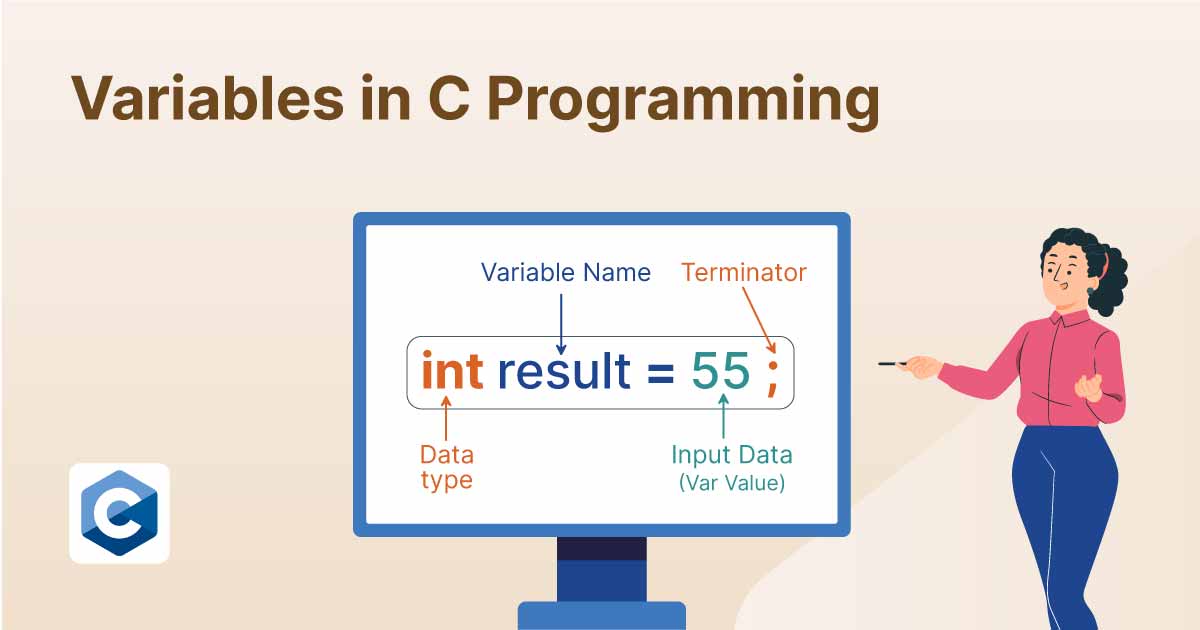
int age = 25;
Here:
int is the data type.
age is the variable name.
25 is the value assigned.
Rules for Naming Variables in C
Before you start declaring variables, it's important to know some naming
conventions:
The variable name must begin with a letter (A-Z or a-z) or an underscore _.
Subsequent characters can be letters, digits (0-9), or underscores.
Reserved keywords (like int, float, return) cannot be used as variable names.
Variable names are case-sensitive (score and Score are different).
Syntax for Declaring a Variable
data_type variable_name;
You can also initialize it while declaring:
data_type variable_name = value;
Example:
int number;         // declaration
float price = 99.9; 	// declaration with initialization
Types of Variables in C
There are various ways to classify variables in C, depending on scope, lifetime,
and storage class.
Let’s look at the five major types of variables:
Local Variable
Declared inside a function or block.
Accessible only within the block or function.
Memory is allocated when the function is called and deallocated when the
function exits.
void display() {
    int localVar = 10;
    printf("%d", localVar);
}
Global Variable
Declared outside all functions.
Accessible from any function in the program.
Retains value throughout the program execution.
int globalVar = 50;

void show() {
    printf("%d", globalVar);
}
Static Variable
Retains its value between multiple function calls.
Created at the time of function call and destroyed after function ends.
Declared using auto keyword (optional, as it is default).
void test() {
    auto int value = 5;
    printf("%d", value);
}
External Variable
Declared in one file and used in another.
Declared using the extern keyword.
File1.c:
int shared = 100;

File2.c:
extern int shared;
printf("%d", shared);
Data Types of Variables
Each variable in C needs a data type. The data type determines how much memory is
allocated and what kind of data can be stored.
Primary Data Types:
Data Type
Description
Size (in bytes)
int
Integer values
2 or 4
float
Decimal numbers
4
char
Character
1
double
Double-precision float
8
Example:
int age = 30;
float height = 5.9;
char grade = 'A';
Multiple Variable Declaration
You can declare multiple variables of the same type in a single line:
int x = 10, y = 20, z = 30;
This saves space and increases readability in many cases.
Constants vs Variables
Variables can change during execution, whereas constants cannot.
const float PI = 3.14;
You cannot do: PI = 3.15; → this will throw an error.
Input and Output of Variables
Using scanf() for input and printf() for output:
#include

int main() {
    int age;
    printf("Enter your age: ");
    scanf("%d", &age);
    printf("Your age is %d", age);
    return 0;
}
Scope and Lifetime of Variables
Type
Scope
Lifetime
Local
Function/block
During function call
Global
Whole program
Till program ends
Static
Function/block
Till program ends
External
Across files
Till program ends
Understanding this table helps you manage memory and logic in large programs
efficiently.
Storage Classes in C: A Deeper Look
In C programming, storage classes define four key properties of a variable:
Scope – Where the variable can be accessed.
Lifetime – How long the variable exists in memory.
Default Initial Value – What value it holds if not explicitly initialized.
Storage Location – Where in memory the variable is stored.
Let’s explore the four storage classes in detail:
auto (Automatic Storage Class)
Default storage class for local variables.
Allocated in stack memory.
Lifetime is limited to the function/block scope.
void func() {
    auto int x = 10;
    printf("%d", x);
}
Even though auto is rarely used explicitly (because it’s the default), it
helps in understanding how C handles memory automatically for local variables.
register
Suggests that the variable be stored in a CPU register instead of RAM.
Access is faster, but it's not guaranteed—depends on compiler
availability.
You cannot use & (address-of) operator with register variables.
void speedTest() {
    register int i;
    for (i = 0; i < 100; i++) {
        // Fast access loop counter
    }
}
Calling counter() multiple times will print incremented values instead of
resetting count.
extern
Declares a global variable defined elsewhere, possibly in another file.
Enables multi-file programming in large projects.
// File1.c
int maxUsers = 100;

// File2.c
extern int maxUsers;
printf("%d", maxUsers);
Understanding storage classes is a key milestone in mastering the variable in C
language and will make you a more efficient and confident developer. These are usually covered
in advanced modules of a C Programming Course in Noida, especially those designed with
project-based learning in mind.
Memory Allocation for Variables
Variables in C can reside in different memory areas depending on their type and
declaration:
Stack: Local variables and function parameters.
Heap: Dynamically allocated variables using malloc, calloc, etc.
Data Segment: Global and static variables.
Text Segment: Where code instructions reside.
Understanding this memory architecture helps prevent common errors like
segmentation faults and memory leaks concepts you'll explore in any well-structured C
Programming Course in Noida.
Common Mistakes Beginners Make with Variables
Here are some of the most common pitfalls beginners face while working with
variable in C language:
Using Uninitialized Variables
int a;
printf("%d", a); // Outputs garbage value
Confusing Global and Local Scope
int x = 10;
void demo() {
    int x = 5;
    printf("%d", x); // Prints 5, not 10
}
This happens because the local variable shadows the global one.
Wrong Format Specifiers in scanf or printf
float price = 10.5;
printf("%d", price); // Wrong! Should be %f
Re-declaring Variables in the Same Scope
int num = 1;
int num = 2; // Error: redefinition of 'num'
Forgetting the Address-of Operator in scanf
int age;
scanf("%d", age); // Wrong
scanf("%d", &age); // Correct
These small mistakes can cause bugs that are hard to track down, especially in
large projects.
Practical Assignments to Try
If you're enrolled in a C Programming Course in Noida or practicing
independently, here are some beginner-friendly assignments to strengthen your grip on variables:
Create a Calculator using different types of variables (int, float, etc.)
Write a Program that tracks login attempts using static variables.
Simulate a Bank System where global variables track the total balance.
Use extern Variables to link two different C files.
These small projects help cement your understanding of variables in C language
and reinforce theoretical knowledge through practical applications.
Best Practices for Using Variables
Use meaningful names – Instead of x, y, use salary, marks.
Initialize your variables – Uninitialized variables contain garbage values.
Use constants where appropriate – Prevent unintended modification.
Keep scope limited – Avoid using global variables unless absolutely necessary.
Comment your code – Clarifies the use of each variable.
Real-Life Use Case
Suppose you're developing a student result system. Here’s how different variables
play a role:
C does not assign default values to variables. They contain garbage values if not
initialized.
2. What is the difference between local and global variables?
Local variables are accessible only inside the function/block where declared,
whereas global variables are accessible throughout the program.
3. Can we use the same variable name in different functions?
Yes, you can. Variables in different functions have separate memory unless
declared global.
4. What happens if I declare a variable but don’t use it?
The compiler may give a warning, but the program will compile. It's a good
practice to remove unused variables.
5. What is variable shadowing?
When a local variable has the same name as a global variable, the local one
"shadows" or overrides the global one in that scope.
6. Why is variable initialization important?
Uninitialized variables hold unpredictable values (garbage) which may lead to
bugs.
7. What are storage classes in C?
Storage classes (auto, register, static, extern) define the scope, lifetime, and
visibility of a variable.
Conclusion
Understanding the variable in C language is foundational to becoming a skilled C
programmer. From declaring and initializing to mastering types and scopes, variables are the
lifeline of any C program. Practicing with real examples, like in a structured C Programming
Course in Noida, will strengthen your command over variables and overall C syntax.
Keep practicing, build logic, and keep experimenting with different types of
variables in your C programs. That’s the real way to master programming.