What Are Events in JavaScript? Explained Simply
Mr. Bambam Kumar Yadav/ 3 days ago - 15
- 11 min read
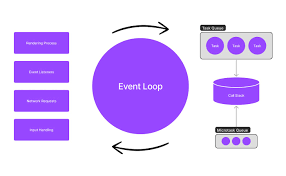
What Are Events in JavaScript
Events are like signals saying, Hey, something happened! to your code.
These things happen when someone does something, like clicking, moving their mouse, or typing. They also happen when the browser or the webpage does something, such as finishing loading, submitting a form, or when a window is resized.
Basically, an event is just a heads-up that something important has just gone down in your web app.
Why Do Events Matter?
Without event listeners, web pages would just sit there doing nothing. But with them, things get interesting:
- Clickable buttons
- Typing suggestions in input fields
- Menus that show more options when you hover over them
- Forms that check what you type as you go, not just when you submit
Knowing how to handle these things is what turns coders into real web developers. You can learn this in Uncodemy’s Java programming course in Noida.
Common Types of JavaScript Events
Here’s a friendly table to help you see when and why different events occur:
| Event Name | When It Happens | Common Use |
|---|
click | User clicks on any clickable element | Buttons, links, icons |
mouseover | The user moves the mouse over an element | Tooltips, popups |
keydown | The user presses any keyboard key | Shortcuts, validation |
load | Page or content finishes loading | Hiding loaders, fetching data |
input / change | User types or alters the form data | Instant validation, live search |
submit | A form is submitted | Custom validation, AJAX sending |
focus / blur | Field gains or loses focus | Highlighting inputs, helper messages |
How Does JavaScript React to Events?
Think about being at a party with your phone. Each time it rings, you choose what to do, answer, ignore it, or text back.
In JavaScript, listening for something to happen is like waiting for that call. You tell the script:
When this thing happens to this part of the page, do this other thing.
The event listener is waiting for the event, like someone with their phone in hand.
The event handler is your reaction, like answering the call, opening a pop-up, or checking a form.
Ways to Use Events in JavaScript
Devs have a few ways to hear events and do something about them:
HTML (Only for tiny things):
For the basic pages, you can tell an HTML element to take action when it’s clicked or something changes.
JavaScript Listeners (The way to go):
Pick an element (like a button) and tell JavaScript to watch for a certain event.
You can have different watchers for the same event. It also keeps your HTML tidy.
If you are coding, keeping event handling separate is the way to go.
The “Event Object”
So, when something happens, JavaScript tells you all about it:
- What kind of event was it (like a click, key press, or when you hover over something)
- What part of the page caused the event
- Anything else useful (such as which mouse button or key was used)
That’s how programmers make web pages smart, such as if they should open a right-click menu, make something stand out, or only react to specific keys.
Taking Charge of What Happens When Stuff Occurs
Controlling Event Behavior
Stuff like links and forms already do things on their own, like taking you to a page or sending info. But with JavaScript, you can stop them from doing that and decide what you want to happen instead.
Like, if someone doesn't fill out all the boxes in a form, you can stop it from sending and just show an error right away. That way, it's easier for the user.
How Events Spread: Bubbling and Capturing
When something happens inside another thing on a page, it doesn't just stay there. It can spread out to all the things around it, all the way to the top of the page. This is called propagation. It comes in two types:
- Bubbling: The event starts where it happened and spreads outwards, like when you drop a pebble in water.
- Capturing: Usually not applied a lot, the event is handled from the outside in.
Knowing how this works lets you do fancier things, like handle lots of similar items (like menus or lists) with fewer instructions.
Event Delegation: Efficient Event Handling for Dynamic Webpages
Event delegation in JavaScript is a cool trick that uses something called event bubbling to handle events in a smart way, especially when you have lots of items or content that changes. Instead of adding event watchers to every single thing, you just add one to their parent container. When someone does something with a child's item, the event goes up, and the parent can catch it and deal with it.
This is helpful for lists, galleries, or tables where things get added or taken away after the page shows up. With event delegation, you don't have to keep adding or removing watchers for stuff that appears later on—the parent's event watcher takes care of it all. Programmers figure out exactly which item caused the event by looking at the event's target bit, which allows different actions for different items within the same parent.
Event delegation makes things run faster by using less memory (since there are fewer watchers) and makes your code cleaner and easier to manage. It's seen as a great method and is taught in Uncodemy’s Java programming course in Noida, to get students ready to create big, fast web apps.
Real-World Use Cases
Here's how events make websites interactive:
- Buttons: They can make pop-ups appear, send info, or start animations when you click them.
- Forms: They can tell you right away if an email address looks right while you type.
- Navigation Menus: They can show you which section you're hovering over.
- Galleries: Click a small picture, and the big picture changes.
- Infinite Scroll: As you scroll down, more stuff loads automatically.
- Games: They react instantly when you press keys or move the mouse.
Basically, events are what link your actions to what the page does.
Best Practices for Using JavaScript Events
- Always use modern event listeners for clarity and flexibility.
- Keep your event functions organized: Name them clearly and separate their logic from the markup.
- Clean up unused listeners: Especially in dynamic or single-page apps, remove event listeners from elements you delete to prevent bugs or memory leaks.
- Leverage the event object: Use details from the event itself to build more robust and user-friendly features.
- Know the difference between bubbling and capturing: This helps you choose the right strategy for complex user interfaces.
These habits, drilled into every Uncodemy Java programming course in the Noida project, lead to better, bug-free, and scalable code.
Events: The Core of Interactive Web Pages
Grasping how events work in JavaScript is key to transforming static webpages into cool, interactive apps. Think of events as bridges that link what a user does to what your code does, making web pages react right away. Whether it’s a simple form or a huge app, knowing event-driven programming is a must. That's why the Java programming course at Uncodemy in Noida covers them inside and out, setting you up for today's fast-moving web.
Really learn events, and you're on your way to becoming a web developer who's ready to create and nail that job.
Frequently Asked Questions (FAQs)
Q1: Are events only a JavaScript thing?
Nope. JavaScript uses them to make web pages respond when you click or do stuff in the browser. But lots of programming languages have the same basic idea.
Q2: Can one event do more than one thing?
Yep! Now you can have a bunch of different functions all react when the same thing happens on a single part of a page.
Q3: Can I make up my own events in JavaScript?
Totally. If you're an advanced coder, you can make your own events. This can help you organize your code better.
Q4: Why do folks not like putting event handlers right in the HTML?
Because it's hard to keep track of, fix, and expand. It's simpler to keep your code separate from the HTML for cleaner projects.
Q5: How does Uncodemy’s Java programming course in Noida teach events?
You’ll learn with hands-on labs, small projects like you’d see in the real world, and exercises. All this helps you get good at dealing with both browser and enterprise JavaScript apps.












