Want to master database optimization and backend development? Check out Uncodemy’s Full Stack Development Course to learn practical skills with MySQL, MongoDB, and more.
What Is a Database Index?
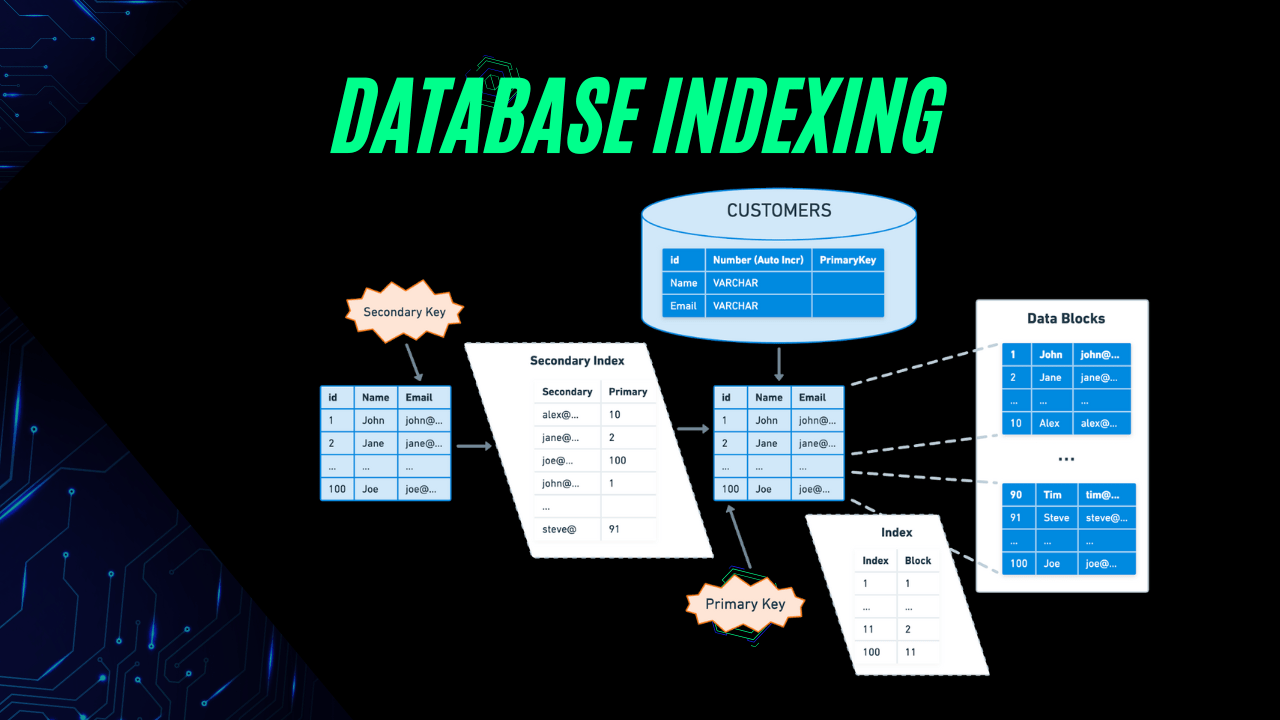
A database index is a data structure that improves the speed of data retrieval operations on a database table. It works like a quick lookup table for finding rows efficiently without scanning every record.
Indexes store a sorted version of the indexed columns along with pointers to the actual rows in the table. While they make read operations faster, they can slow down write operations slightly, because the index also needs updating whenever the data changes.
How Does It Work?
When you run a query, the database checks if there’s an index on the column you’re searching. If there is, it uses the index to directly access the location of the needed data instead of scanning the whole table.
For example:
Copy Code
CREATE INDEX idx_customer_name

ON customers (customer_name);
Now, any query using customer_name in a search or filter will be much faster.
Types of Database Indexes
1. Primary Index
Automatically created when a primary key is defined. Ensures uniqueness and fast lookups.
2. Unique Index
Ensures all values in the indexed column are unique. Similar to a primary index but can be created on non-primary key columns.
3. Clustered Index
Sorts and stores the rows of data based on the index key. A table can have only one clustered index because the data rows can only be sorted in one order.
4. Non-Clustered Index
Creates a separate structure from the table, storing pointers to the data. You can have multiple non-clustered indexes per table.
5. Composite Index
An index on multiple columns. Useful when queries often filter or sort by more than one column.
6. Full-Text Index
Used for searching large blocks of text quickly. Ideal for search engines and content-heavy applications.
Advantages of Using Indexes
- Faster Data Retrieval: Queries execute much faster with indexing.
- Better Sorting and Filtering: Especially useful for ORDER BY and WHERE clauses.
- Efficient Joins: Improves the performance of join operations between large tables.
Disadvantages of Using Indexes
- Slower Write Operations: Inserts, updates, and deletes require updating the index as well.
- Extra Storage Space: Indexes consume disk space.
- Maintenance Overhead: Poorly managed indexes can harm performance.
When Should You Use Indexes?
- Columns frequently used in WHERE, JOIN, or ORDER BY clauses
- Large tables with frequent read queries
- Columns requiring uniqueness constraints
-
Avoid indexing:
- Small tables (overhead isn’t worth it)
- Columns frequently updated (slows write performance)
Example
Without Index:
SELECT * FROM orders WHERE customer_id = 101;
The database checks every row until it finds all rows with customer_id = 101.
With Index:
CREATE INDEX idx_customer_id ON orders (customer_id);
The query directly finds rows without scanning the entire table.
Best Practices
- Index only the columns you need
- Avoid excessive indexing
- Regularly monitor and optimize indexes
- Use composite indexes for multi-column queries
Frequently Asked Questions (FAQ)
Q1: What is the main purpose of a database index?
A database index speeds up data retrieval operations by providing a quick lookup mechanism instead of scanning the entire table.
Q2: Does indexing always improve performance?
Not always. While it boosts read speed, it can slow down write operations like INSERT, UPDATE, and DELETE.
Q3: How many indexes can I create on a table?
There’s no strict limit in most databases, but too many indexes can negatively affect performance and storage.
Q4: What’s the difference between clustered and non-clustered indexes?
A clustered index defines the physical order of data in the table, while a non-clustered index is a separate structure that stores pointers to the actual data.
Q5: Should small tables have indexes?
Usually, no. The performance gain is negligible for small tables, and indexing may add unnecessary overhead.
Final Thoughts
Indexes are one of the most powerful tools for database performance optimization, but they must be used wisely. While they significantly speed up read operations, they can slow down writes and consume storage space if overused.
Want to become an expert in database design and performance tuning? Enroll in Uncodemy’s Full Stack Web Development Course to get hands-on experience with SQL optimization techniques.