What Is a Pointer in C++? Basics and Usage
Mr. Bambam Kumar Yadav/ 3 days ago - 15
- 11 min read
If you're new to C++ or getting ready for interviews, you definitely need to learn about pointers. That's why Uncodemy’s C programming course in Noida gives you clear, hands-on help with pointers. They mix exercises, real examples, and ways to fix problems so you can really understand them.
This article will give you the lowdown without getting too technical. We'll talk about what pointers are, why they're important, how to use them in C++, the different kinds, good ways to use them, common errors, and answers to questions beginners usually have.
What Is a Pointer?
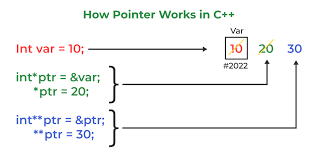
Okay, so a pointer is like a special variable. Instead of holding a number or letter, it holds a spot in the computer's memory.
Imagine it's like having someone's address in your address book. The address tells you where your friend lives, but the address itself isn't your friend. A pointer is kind of the same thing. It doesn't hold the actual info, but it tells you where to find it in the computer's memory.
Why Are Pointers Important in C++?
Okay, pointers can seem tricky at first, but they're key in coding:
Direct Memory Stuff: Pointers let you mess with memory spots directly, not just variables. This is super important for system-level coding, and when speed is a must.
Memory on the Fly: Pointers are how you grab and release memory while your program runs. This means you can make arrays or objects that can change size.
Quick Data Handling: Pointers help you work with big chunks of info or structures fast because you don't have to keep copying everything.
Cool Data Setups: Things like linked lists and trees use pointers to hook up all their parts.
Functions Changing Variables: If you need a function to change a variable for real, pointers let you pass the variable's location so the function can tweak the original.
You can learn about all this in Uncodemy's C course in Noida. You'll get hands-on experience, not just book smarts.
Understanding Pointer Basics: Memory and Addresses
Each variable in a program gets its own spot in the computer's memory. Think of memory like a bunch of mailboxes in a row, each with its own number (that's the address). Normal variables store values, but a pointer stores an address—basically, a mailbox number that shows you where a value is.
With pointers, you can:
- Find out where the data is located (the memory address)
- Get to or change data indirectly (using the address instead of the variable's name)
- Handle memory in a flexible way (making, linking, and freeing up space when you need to)
How to Use Pointers in C++
Here's how to use pointers:
First, say what kind of data the pointer will point to, like a number or a letter.
Next, give the pointer a real memory spot (address) of something, not just a random spot.
Then, to get to the real data, just follow the address the pointer has. You can then read or change the data.
Finally, be careful with memory! If you're using pointers with dynamic memory, create it and then release it when you're done. This will stop program errors (leaks).
Practical Usage: Pointers in Everyday Tasks
Dynamic Arrays
If you're not sure how many things your program needs to handle, pointers let you grab memory as it goes. This way, your data can grow or shrink when you need it to, which is super useful for today's apps.
Linked Lists and Trees
Those nodes in linked lists or branches in trees? They use pointers to link stuff together. Pointers let you move things around in your data whenever you want.
How Functions Talk
If you need a function to change something outside of it, use pointers. Instead of just giving a function a value, you give it the data's address. This helps different parts of your program work together better, especially helpful for big projects or modular setups.
Taking Care of Memory
To keep things efficient, C++ lets you ask for and free up memory when needed. Pointers are how you do this, so your program can handle big jobs but then tidy up afterward.
Types of Pointers
Null pointers: Think of these as special signals that say, no address here. They help you dodge mistakes before a pointer is ready to go.
Void pointers: These are like wildcards, able to point to anything, which is cool when you're not sure what kind of data you're dealing with.
Pointers to pointers: These hold the spot of another pointer, letting you build some seriously strong setups for handling data across different levels.
Constant pointers and pointers to constants: These add layers of safety, letting you set whether the data or the pointer's target can be tweaked..
Good Practices With Pointers
- Always set up your pointers right away.
- Don't let them hang loose without a target, or your program might break or act weird if you try to use them.
- Use null pointers to show when there's no target.
- This helps stop you from accidentally using pointers that haven't been set.
- Pay close attention to how you use memory.
- If you grab memory, always free it up when you're done. If you don't, you'll get memory leaks, which can really slow down or crash big programs.
- Double-check pointers before using them.
- Make sure a pointer isn't null or bad before you try to read or write with it.
- Give your pointers clear names.
Uncodemy’s C programming course in Noida teaches you these things, with practice and clear lessons.
Where Do Beginners Struggle With Pointers?
Pointers can be tricky, so here's the lowdown:
What you're storing:
It's simple to mix up the pointer itself (which is just an address) and what's actually stored at that address.
Whoops, you overwrote it!
If you mess with a variable using a pointer, everyone else pointing to that spot sees the change.
Uh oh, memory leak!
If you grab memory, but don't release it later, your program gets bigger and unstable.
Dangling pointers are bad
If you get rid of memory (delete it) but still have a pointer aimed at where it *used* to be, things will get weird if you try to use it.
Common Mistakes and How to Avoid Them
Pointers that aren't started correctly:
Always set pointers to a starting value (often null) until you have something real for them to point at.
Memory isn't returned:
Make sure you return every piece of borrowed memory when you're done using it.
Using memory that's been wiped:
Once memory is released, don't touch that old pointer again unless you point it somewhere new.
Pointer and target type don't match:
The pointer's declared type should always match the kind of data it points to. This keeps things working as they should.
Real-World Applications of Pointers
Dynamic Data structures:
If you're dealing with a number of things that change, like in booking systems, network buffers, or live games, then you'll need pointers so you can store and work with them.
Operating Systems:
Pointers show up a lot in operating systems. Memory handling, kernel stuff, and device drivers all use them.
Graphics and Simulations:
Pointers let you mess with data directly, which makes things like image editing and simulations run fast.
Database Engines:
Big, fancy databases use pointer-based structures to help them find, add, and remove data quickly.
If you get how pointers work, you're getting access to the kinds of tools that are used to create professional systems and software all over the world.
Conclusion
Pointers can seem tricky when you're just starting out, but they're what make C++ great. They give you serious control and speed, which is rare to find in other languages. If you learn how pointers work—why they exist, how to use them safely, and how they're used in actual projects—you'll find many more things you can do with programming.
Uncodemy's C class in Noida makes learning about pointers simple and useful. You get hands-on practice, projects led by pros, and real tips for fixing problems. Putting in time to learn pointers will give you an edge and make you stand out at school and at work.
Frequently Asked Questions (FAQs)
Q1: Why not just use variables directly?
Variables let you store and use values easily, but pointers are necessary when you need direct memory access, want to change variables outside their scope, or build flexible data structures.
Q2: Are pointers hard to master?
They take practice, especially because you must think about what the pointer holds (an address) versus what the address contains (a value). But with hands-on assignments—like those in Uncodemy’s C programming course in Noida—pointers are manageable and rewarding.
Q3: Are pointers safe?
When handled carefully (with initialization, checks, and proper memory management), pointers are reliable. But careless usage can introduce bugs or crashes.
Q4: Are pointers relevant in modern C++?
Absolutely! While many higher-level constructs (like smart pointers or containers) help manage complexity, understanding basic pointers remains crucial for effective debugging and system-level work.
Q5: Will I use pointers in real-world projects?
Yes, especially for large, dynamic, or performance-critical C++ projects. Pointers underpin all advanced data structures, operating systems, and even many user-facing applications.












