What is Cloud Computing? Learn How It Works & Its Types
From streaming shows to business apps, cloud computing powers the digital age. Dive into how cloud computing works, its deployment models, and why it matters more than ever.
From streaming shows to business apps, cloud computing powers the digital age. Dive into how cloud computing works, its deployment models, and why it matters more than ever.

The term cloud computing has become a buzzword in the tech world. From streaming our favorite shows to backing up precious photos and even running business applications, everything seems to be happening "in the cloud." But what exactly is cloud computing, how does it work, and what are its different types? Buckle up as we unravel this mystery in simple terms!
Imagine carrying a heavy backpack full of books every day to school. Now, what if you could store all your books in a digital library and access them whenever you need? That’s pretty much what cloud computing does for your data and applications!
The term cloud computing describes the provision of computer services, including storage, processing power, databases, networking, and software—over the internet instead of a personal computer or local server. Rather than buying expensive hardware and maintaining software, you can access these services on demand, paying only for what you use.
In simpler terms: Cloud computing allows users to rent computing power, storage, and applications from remote servers, eliminating the need for costly physical infrastructure.
Examples of Cloud Computing in Daily Life
You might not realize it, but cloud computing is everywhere:
Google Drive & Dropbox – Store and share files online instead of keeping them on your device.
Netflix & Spotify – Stream movies and music without downloading them.
Gmail & Outlook – Access emails from any device, anywhere in the world.
Zoom & Google Meet – Conduct virtual meetings without needing to install heavy software.
Cloud computing is like a magical storage box— you can access your stuff anytime, anywhere, without carrying it around!
Cloud Computing: How It Work
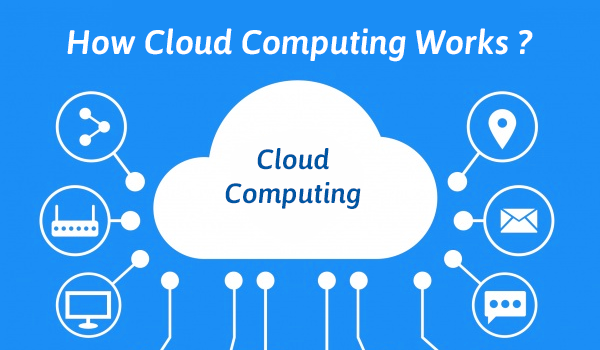
In order for cloud computing to function, a network of distant servers housed on the internet to store, manage, and process data. Instead of relying on a single computer, cloud systems distribute workloads across multiple machines, ensuring efficiency, speed, and security.
The Key Components of Cloud Computing
To understand cloud computing how it works, let's break it down into three major components:
1. Frontend (Client Side)
This is what you, the user, interact with. It includes web browsers, mobile applications, or software that helps you access cloud services. For example, when you use Google Docs, your browser is the front end.
2. Backend (Cloud Infrastructure)
This includes remote servers, databases, and data centers where the actual computing happens. These servers handle requests, process data, and store information. Think of them as the "brain" of cloud computing.
3. Internet (The Bridge)
The internet acts as a bridge that connects the front end to the back end. It enables users to send requests and retrieve information from cloud servers in real-time.
How Cloud Computing Handles Your Data
1. User Request → upload a file to Google Drive.
2. Internet Transmission → Your request is sent via the Internet to Google's cloud servers.
3. Processing & Storage → Google Drive processes and stores your file securely.
4. Data Retrieval → When needed, you can access your file from any device.
Analogy: Think of cloud computing like ordering food from a restaurant. You don’t need to cook; you just place an order (send a request), and the restaurant (cloud server) prepares and delivers your meal (data) to you over the internet.
Types of Cloud Computing
There is no one-size-fits-all when it comes to cloud computing.
Cloud computing isn’t just a single entity—it comes in different types based on deployment models and services offered.
A. Types of Cloud Computing Based on Deployment Models
These define how cloud services are hosted and who can access them.
1. Public Cloud
Definition: Services are available to the general public over the internet. Example: Google Cloud, Amazon Web Services (AWS), Microsoft Azure.
Best For: Startups, individuals, and businesses looking for scalable solutions.
Analogy: Like a public transport system—accessible to everyone, but shared with others.
2. Private Cloud
Definition: A dedicated cloud infrastructure for a single organization, offering better security and control.
Example: Banks, government organizations, and enterprises with sensitive data.
Best For: Companies requiring strict data privacy.
Analogy: Like owning a personal car—more control, but more maintenance.
3. Hybrid Cloud
Definition: A mix of public and private clouds, allowing businesses to use both environments as needed.
Example: A company storing sensitive data in a private cloud but using a public cloud for web applications.
Best For: Businesses needing flexibility.
Analogy: Like having a personal car but also using public transport when convenient.
B. Types of Cloud Computing Based on Services
These define the kind of services cloud computing offers.
1. Infrastructure as a Service (IaaS)
Definition: Provides virtualized computing resources such as servers, storage, and networking.
Example: Amazon Web Services (AWS), Google Cloud Platform (GCP).
Best For: IT administrators and developers who need control over infrastructure.
Analogy: Like renting a fully equipped kitchen—you get the tools, but you cook the food yourself.
2. Platform as a Service (PaaS)
Definition: Provides a platform for developers to build, test, and deploy applications without managing the infrastructure.
Example: Google App Engine, Microsoft Azure App Services.
Best For: Developers looking for a coding environment without worrying about infrastructure.
Analogy: Like a food delivery service that provides ingredients—you cook, but don’t worry about sourcing them.
3. Software as a Service (SaaS)
Definition: Delivers fully developed applications over the internet that users can access via a browser.
Example: Gmail, Dropbox, Zoom.
Best For: End-users who want ready-to-use software.
Analogy: Like dining at a restaurant—everything is ready for you!
Cloud computing has transformed the way businesses and individuals operate. Here’s why it’s a game-changer:
Final Thoughts
The cloud isn’t just a technology; it’s a revolution!
Cloud computing has become an essential part of our digital world, making computing services accessible, affordable, and efficient. Whether you're a student using Google Docs, a business running on AWS, or a developer building an app on Microsoft Azure, the cloud is powering the way forward.
Understanding cloud computing what is it, cloud computing how it works, and types of cloud computing can open doors to exciting career opportunities in cloud engineering, cybersecurity, and more.
So, the next time you hear someone mention “the cloud,” you’ll know exactly what it means. It’s not just a fluffy white thing.


 TRENDING
 BESTSELLER
 BESTSELLER
 TRENDING
 HOT
HOT BESTSELLER
 HOT
HOT BESTSELLER
 BESTSELLER
 HOT
HOT POPULAR