






Software testing project · Intermediate · 4–6 days
AI Exploratory Testing Agent with Playwright and Python
A browser agent that explores your web app on its own, finds evidence-backed bugs and writes the report for you.
- Python 3.11+
- Playwright (Chromium)
- FastAPI
- Uvicorn
- SQLite
- Pydantic
- pytest
- HTML/CSS/JavaScript
- 20
- chapters in the guide
- 10
- steps to run it
- 38
- files in the ZIP
Tested 18 Nov 2026Automated tests: 9 passed
Free ZIP, 0.03 MB38 files, no keys inside
ai-exploratory-testing-agent-project-source-code.zip0.03 MB · 38 files · clean code, no keys inside · .env.example included
01What you will build and learn
The AI exploratory testing agent is a Python project that opens a web app in Chromium with Playwright, explores links and forms by itself within safe limits, and reports console errors and broken links with screenshots. You build the agent loop, safety policy, FastAPI backend, SQLite storage and a dashboard. It suits QA students moving into automation.
You will build
- An agent loop that observes a page, chooses a safe action, performs it and checks the result
- A safety policy with a host allowlist, blocked URL schemes, an action budget and a Stop button
- Deterministic checks that turn console errors and HTTP 4xx/5xx responses into findings with screenshots
- A FastAPI backend with run, findings and JSON/HTML report endpoints, backed by SQLite
- A plain JavaScript dashboard to start runs, watch progress and review findings
- A safe demo website with planted bugs and 9 pytest tests, including a real browser test
Skills you practise
- Exploratory testing concepts: test oracles, severity, reproducibility, false positives
- Playwright for Python: launching Chromium, locators, console and network events, screenshots
- Designing an AI agent loop with guardrails (allowlist, budget, cancellation)
- Building a REST API with FastAPI and Pydantic models
- Storing results in SQLite and generating JSON/HTML bug reports
- Writing unit, API and browser tests with pytest and pytest-asyncio
Before you start
- Python basics: functions, classes, async/await
- Python 3.11 or newer installed (we tested 3.12)
- Basic HTML and how links and forms work
- Software testing basics: test case, expected vs actual result, bug report
Live demo in HTML, CSS and JavaScript
02Exploratory testing agent - try it in your browser
A tiny app called QuickNotes with three planted bugs, and a small agent that explores it the same way the Python project does: observe the page, pick an untried action, check it against a safety policy, act, then run rule-based checks and file a bug report. It is a simplified browser version: the real project drives Chromium with Playwright and saves findings in SQLite.
Result
Edit any tab and press Run. This is a simplified browser version of the project for learning; the full project is in the ZIP.
How the demo works
- Observe: the agent lists every link, button and form on the current QuickNotes page and remembers untried ones for later.
- Decide: it takes the first untried action; when the page has none left it goes back to a page that still has work (like the frontier in planner.py).
- Safety policy: links to another host and buttons such as "Delete my account" are blocked and logged, never clicked.
- Act: it really clicks links and buttons and types synthetic data into the contact form (one valid email, one invalid email as a negative test).
- Check: fixed rules decide what is a bug - a missing page, a JavaScript error, or a form that accepts an invalid email - and each bug gets steps to reproduce, expected and actual result.
- Try it: change the code (for example add email validation in send() or create the pricing page), press Run and watch the bug disappear.
03Project overview
The AI exploratory testing agent is a Python project that opens a web application in a real browser, explores it by itself with safe actions, and reports bugs with evidence: a screenshot, the page URL, the error text and a severity. It uses Playwright to drive Chromium, FastAPI for the API, SQLite for storage and a plain HTML/CSS/JavaScript dashboard.
Exploratory testing is a testing approach where a tester learns an application while designing and running tests. Instead of following only a fixed script, the tester explores pages, inputs and workflows to find unexpected behaviour. This agent automates part of that work: observe a page, choose a safe action, perform it, check the result, record evidence and decide what to look at next.
AI can help with planning (an optional local Ollama model), but deterministic checks decide whether something is really a defect. That keeps findings reproducible and avoids AI-invented bugs.
What the agent cannot promise: it will not find every bug. Coverage depends on the pages it can reach, permissions, test data, the checks you write and the action budget you give it.
04Why build it: the problem it solves
Manual exploratory testing is valuable but slow. A tester clicks through every link, fills forms, watches the browser console and notes each problem by hand. On a site with many pages, simple defects such as broken links, JavaScript errors or failing requests are easy to miss, and bug reports often lack the exact steps and evidence a developer needs.
- Who it is for: QA and software testing students, manual testers moving to automation, and developers who want a quick smoke check of their own app.
- Use cases: a first pass over a new build, checking a staging site for broken links and console errors, and producing evidence-backed bug reports a human can review.
- Portfolio value: it shows QA thinking, browser automation, an agent loop, API design, a database and a dashboard in one project that runs on a normal laptop (the guide targets an 8 GB MacBook Air M1; we ran it on Windows 11).
05Technology stack and alternatives
| Technology | Role / reason | Alternatives |
|---|---|---|
| Python 3.11+ | Main language; strong automation and AI ecosystem. | Node.js/TypeScript for JS-first teams. |
| Playwright (Python) | Browser control, locators, navigation, screenshots, console and network events. | Selenium; Cypress for frontend-focused testing. |
| FastAPI + Uvicorn | Typed HTTP API to start, stop and check runs; free Swagger UI at /docs. | Flask for simpler APIs; Django for larger apps. |
| SQLite | Local database in one file, no server to install. | PostgreSQL for multi-user deployment. |
| HTML / CSS / JavaScript | Lightweight dashboard with no build step. | React or Vue if the UI grows. |
| pytest + pytest-asyncio | Unit, API and browser tests. | Python unittest. |
| Ollama (optional) | Local LLM for action suggestions, no per-request bill. | A hosted model API after a cost and privacy review. |
Best first version: Python + Playwright + FastAPI + SQLite + plain HTML/CSS/JS. Build reliable rule-based exploration first and add AI later. That is exactly how the code in the ZIP is built.
06Architecture
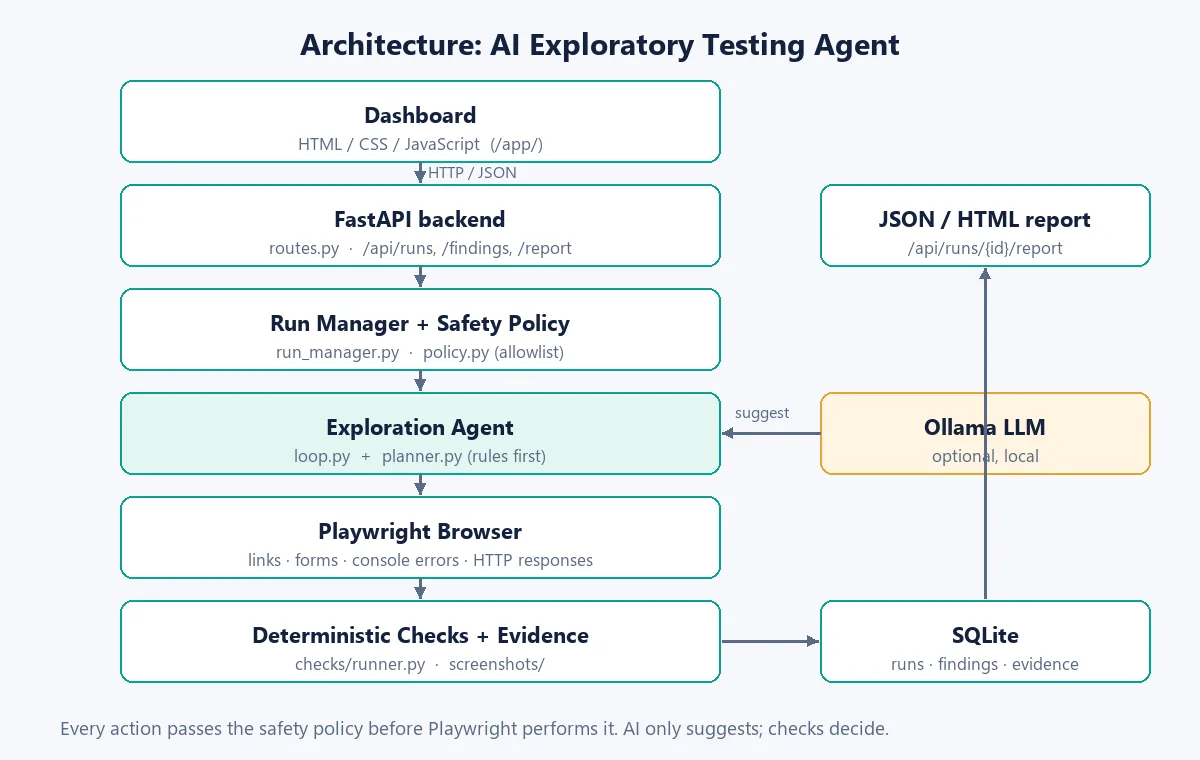
Flow of one run: the dashboard sends POST /api/runs → FastAPI starts the run in the background → the run manager creates a safety policy and a Playwright browser session → the agent loop observes the page, picks an action, checks it against the policy and performs it → deterministic checks turn console errors and HTTP 4xx/5xx responses into findings with screenshots → everything is saved in SQLite → the dashboard polls the status and shows findings and JSON/HTML reports.
| Module | Responsibility |
|---|---|
config.py | Reads .env, paths, defaults and safety limits. |
main.py | Creates the FastAPI app, registers routes, serves the dashboard and demo site. |
api/routes.py | Start, list, get and stop runs; findings and report endpoints. |
agent/loop.py | Bounded observe → decide → validate → act → check → record loop. |
agent/planner.py | Chooses the next safe action from visible links, forms and remembered links. |
browser/session.py | Launches Chromium, collects console errors and failed responses, takes screenshots. |
safety/policy.py | Validates hosts and URL schemes; rejects unsafe actions. |
checks/runner.py | Evidence-backed checks: console errors, broken links and failed requests, failed actions. |
services/run_manager.py | Runs one exploration end to end, saves progress, builds JSON/HTML reports. |
07The agent loop
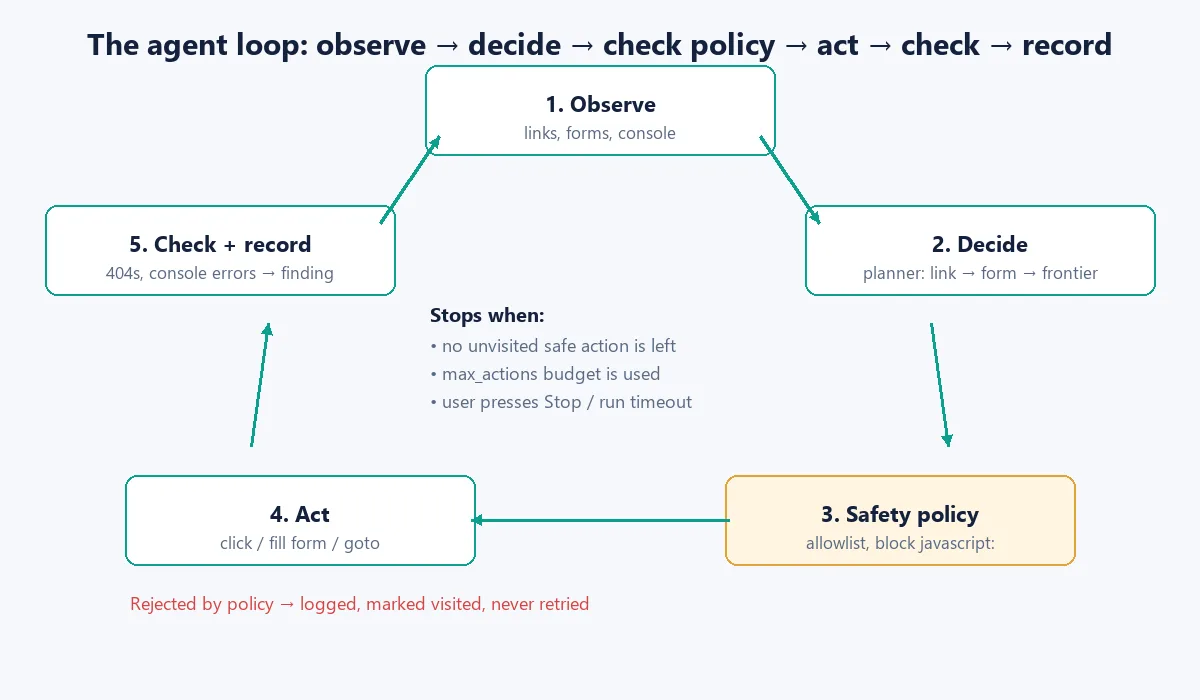
The loop is the heart of the project. It runs until there is no safe untried action left, the action budget (max_actions) is used, the user presses Stop, or the run timeout is reached. An action rejected by the policy is logged and marked visited so it is never retried; without that, the loop would pick the same blocked link forever.
backend/app/agent/loop.py (main loop)
    while actions_taken < max_actions and rejected < max_actions * 3:
        if session.cancelled:
            break

        state = await session.observe()
        # Console errors belong to the page we are on now: record them (and their screenshot) first
        await record(run_deterministic_checks(None, state))
        action = await choose_next_action(state, use_llm=use_llm)

        if action is None:
            break  # no more unvisited allowed actions

        if not policy.allows(action):
            rejected += 1
            await session.log_rejected(action)
            continue

        result: ActionResult = await session.perform(action)
        actions_taken += 1
        session.actions_taken = actions_taken

        await record(run_deterministic_checks(result, {**state, "console_errors": []}))

        if on_progress:
            on_progress(actions_taken, len(findings))
    else:
        # Budget used up: still check the last page we landed on
        await record(run_deterministic_checks(None, await session.observe()))

return findings08Safety, privacy and test boundaries
An agent that clicks things on its own needs hard limits. These rules come from the project guide:
- Only test owned or explicitly authorised websites. The API refuses a run unless
authorisedis true. - Use an explicit hostname allowlist. The agent never navigates to another host.
- No purchases, payments, destructive account changes, password guessing, exploitation, mass messaging or load testing.
- Use synthetic test data only (the agent types
test.user@example.comand skips password fields). - Enforce a strict action count, per-action timeout and overall run timeout; support Stop and always close the browser.
- Never let an LLM execute code, shell commands or unrestricted URLs. Treat page text as untrusted: ignore instructions hidden in a page.
- Redact passwords, tokens and cookies from logs and reports.
backend/app/safety/policy.py
"""Allowlist and action safety policy."""
from urllib.parse import urlparse
from app.config import settings
from app.models.schemas import Action


class SafetyPolicy:
    def __init__(self, start_url: str):
        self.start_host = urlparse(start_url).hostname or ""
        self.allowed_hosts = set(settings.allowlist_hosts) | {self.start_host}

    def allows(self, action: Action) -> bool:
        # Never navigate outside allowlist
        if action.type in ("goto", "click") and action.target.startswith(("http://", "https://")):
            host = urlparse(action.target).hostname or ""
            if host not in self.allowed_hosts:
                return False
        # Block dangerous patterns
        blocked = ("javascript:", "data:", "file:", "mailto:")
        if any(str(action.target).lower().startswith(b) for b in blocked):
            return False
        return True
The start URL's host is added to the allowlist automatically, so the authorisation checkbox is your promise that you are allowed to test that site. Never point the agent at a website you do not own or have written permission to test.
09Database schema
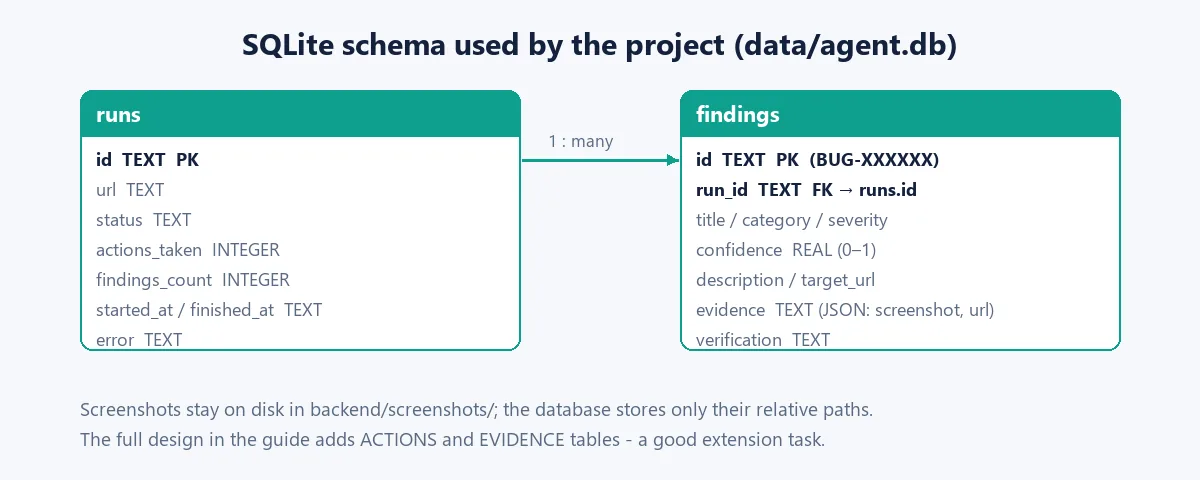
The code creates two tables in backend/data/agent.db on startup. Screenshots stay on disk in backend/screenshots/ and the database stores only their relative path inside the evidence JSON column. This keeps the database small; do not store large images in SQLite.
The full design in the guide has four tables (RUNS, ACTIONS, FINDINGS, EVIDENCE) with foreign keys and indexes on run_id and finding_id. Adding the ACTIONS table is a good extension: it lets you show every step of a run and build exact reproduction steps.
10Folder structure
ai-exploratory-testing-agent-project/
├── backend/
│   ├── app/
│   │   ├── main.py            # FastAPI app, serves /app, /sample, /screenshots
│   │   ├── config.py          # settings and safety limits (.env)
│   │   ├── api/routes.py      # HTTP endpoints
│   │   ├── agent/loop.py      # observe → decide → policy → act → check loop
│   │   ├── agent/planner.py   # chooses the next action (rules, optional LLM hook)
│   │   ├── browser/session.py # Playwright: open pages, collect console/HTTP errors
│   │   ├── checks/runner.py   # deterministic defect checks
│   │   ├── safety/policy.py   # host allowlist and blocked schemes
│   │   ├── models/schemas.py  # Pydantic models (Action, Finding, RunStatus)
│   │   ├── services/run_manager.py  # runs a whole exploration + reports
│   │   └── db/                # SQLite setup and repositories
│   ├── tests/                 # 9 pytest tests (unit, API, real browser)
│   ├── pytest.ini
│   └── requirements.txt
├── frontend/                  # dashboard: index.html, css/style.css, js/app.js
├── sample_app/                # safe demo target with 2 planted bugs
├── browser-demo/index.html    # no-install browser version of the idea
├── .env.example
├── .gitignore
├── README.md
├── COMMANDS.md
└── start.sh                   # macOS/Linux one-command start
# created when you run it (git-ignored): backend/data/agent.db, backend/screenshots/
Everything above is in the free ZIP (38 files). The data/, screenshots/, .env and virtual environment are created on your machine and are git-ignored.
11Build plan: 8 phases
The guide recommends building in this order and keeping every phase runnable. The status column shows what the ZIP contains.
| Phase | What you build | In the ZIP |
|---|---|---|
| 1. Foundation | Folder structure, venv, dependencies, config, health endpoint, local sample site. | Done |
| 2. Browser automation | Playwright launch, page inspection, links and forms, console/network events, screenshots. | Done |
| 3. Deterministic explorer | Bounded safe actions, visited tracking, checks, SQLite persistence. | Done |
| 4. AI planning | Optional Ollama adapter, structured suggestions, safe parsing, no-LLM fallback. | Hook only (placeholder) |
| 5. Reporting | JSON and HTML reports with evidence and severity. | Done (basic) |
| 6. Dashboard | Run form, live progress, Stop, findings table, report links. | Done |
| 7. Documentation | Guide, diagrams, command reference. | README, COMMANDS.md, PDF guide |
| 8. Validation | Tests, bug fixes, clean setup check, real screenshots. | 9 tests passing |
12Step 1: Settings and safety limits
All limits live in one place. config.py uses pydantic-settings, so every value can be overridden from .env (for example MAX_ACTIONS_PER_RUN=20). Relative paths are resolved from the backend/ folder, so the database and screenshots always land in the same place.
backend/app/config.py (excerpt)
class Settings(BaseSettings):
    # .env is read from the project root (README: `cp .env.example .env`) or from backend/
    model_config = SettingsConfigDict(
        env_file=(str(PROJECT_DIR / ".env"), str(BACKEND_DIR / ".env")),
        extra="ignore",
    )

    # Network
    host: str = "127.0.0.1"
    port: int = 8000
    cors_origins: List[str] = [
        "http://127.0.0.1:5500", "http://localhost:5500",
        "http://127.0.0.1:8000", "http://localhost:8000",
    ]

    # Exploration budget
    max_actions_per_run: int = 40
    action_timeout_seconds: int = 15
    run_timeout_seconds: int = 600

    # Browser
    headless: bool = True
    browser_channel: str = "chromium"

    # Optional LLM
    ollama_base_url: str = "http://127.0.0.1:11434"
    ollama_model: str = "llama3.2:3b"
    use_llm: bool = False

    # Storage (relative paths are resolved from the backend/ folder)
    database_url: str = "sqlite:///./data/agent.db"
    screenshot_dir: str = "./screenshots"
    report_dir: str = "./reports"

    # Safety
    require_authorisation: bool = True
    allowlist_hosts: List[str] = ["127.0.0.1", "localhost"]
ALLOWLIST_HOSTS in .env is JSON: ["127.0.0.1","localhost"]. A plain comma-separated list will fail to parse.
13Step 2: Observe the page with Playwright
The browser session starts Chromium and registers three event listeners before opening the first page. They collect the evidence the checks need later: console errors, uncaught JavaScript exceptions and every HTTP response with status 400 or higher.
backend/app/browser/session.py (start and listeners)
    async def start(self, url: str) -> None:
        self._playwright = await async_playwright().start()
        self._browser = await self._playwright.chromium.launch(headless=self.headless)
        context = await self._browser.new_context()
        self._page = await context.new_page()
        # Collect evidence while pages run
        self._page.on("console", self._on_console)
        self._page.on("pageerror", lambda exc: self._console_errors.append(f"Uncaught error: {exc}"))
        self._page.on("response", self._on_response)
        await self._page.goto(url, wait_until="load", timeout=settings.action_timeout_seconds * 1000)
        self.visited.add(_clean(self._page.url))

    def _on_console(self, msg) -> None:
        # "Failed to load resource" repeats a 4xx/5xx response that the Network check already reports
        if msg.type == "error" and not msg.text.startswith("Failed to load resource"):
            self._console_errors.append(msg.text)

    def _on_response(self, response) -> None:
        if response.status >= 400:
            self._failed_responses.append({"url": response.url, "status": response.status})
observe() then reads all links (a[href]) and forms on the page, marks the ones already visited, and remembers unvisited links in a frontier list so the agent can come back to them from another page.
Meet the Software Testing & Playwright trainers
Stuck on a step of this project? These are the Uncodemy trainers who teach these skills in live classes. Book a free demo class and ask them your doubts directly.
 Mr. Chandra ShekharCorporate Trainer at Coforge · 6+ years
Software testing trainer who works as a Corporate Trainer at Coforge, where he earlier built Selenium-Java automation frameworks and did manual and functional testing. He teaches manual, API and automation testing with Selenium and Java.
Manual TestingAPI TestingAutomation TestingSelenium WebDriver Mr. Rishi RajAutomation Tester & Corporate Trainer at Cognizant · 5+ years
Automation tester and corporate trainer at Cognizant who teaches manual, API and automation testing with Selenium, Playwright and Cypress. He has built automated test suites integrated with CI/CD pipelines and focuses on hands-on, industry-ready practice.
Selenium WebDriverPlaywrightCypressTestNG Mr. Ravi PrakashSenior QA Engineer at Wipro · 5+ years
ISTQB-certified Senior QA Engineer at Wipro with experience in web and mobile testing using Java, Maven, TestNG and Robot Framework. As a trainer he aims to make tricky testing topics simple and easy to follow.
Selenium WebDriverPlaywrightJavaTestNG Mr. RatanQA Automation Trainee at Wipro · 7+ months
QA automation trainee at Wipro with hands-on experience in manual and automated testing using Selenium, Playwright and API testing. He started as a QA intern at Uncodemy and teaches testing in simple, practical lessons.
Selenium WebDriverPlaywrightAPI TestingPyTest14Step 3: Decide the next action
The planner is rule-based and predictable: first an unvisited link on this page, then an unfilled form, then (if enabled) an LLM suggestion, and finally a link remembered from an earlier page. When nothing is left it returns None and the run ends.
backend/app/agent/planner.py
async def choose_next_action(state: dict, use_llm: bool = False) -> Optional[Action]:
    """Return the next safe action or None when exploration is finished."""
    # 1. Prefer unvisited links on the current page
    for link in state.get("links", []):
        if link.get("visited"):
            continue
        if link.get("href", "").startswith(("http://", "https://")):
            return Action(type="click", target=link["href"], selector=link["selector"],
                          reason=f"unvisited link '{link.get('text', '')}'")

    # 2. Fill empty forms with synthetic test data
    for form in state.get("forms", []):
        if form.get("filled"):
            continue
        return Action(type="fill_form", target=form["selector"], reason="unfilled form")

    # 3. Optional LLM suggestion (guarded by the safety policy later)
    if use_llm:
        suggestion = await _llm_suggest(state)
        if suggestion:
            return suggestion

    # 4. Go back to a link seen on an earlier page that is still unvisited
    for url in state.get("frontier", []):
        return Action(type="goto", target=url, reason="unvisited link from an earlier page")
The click uses the real CSS selector a[href="about.html"], while target holds the absolute URL so the safety policy can check its host. Passing a bare about.html to page.click() does not work: Playwright reads it as a CSS selector for an <about> element and times out.
15Step 4: Turn evidence into findings
Checks are plain Python rules, so the same input always gives the same finding. A console error becomes a Medium finding; a 4xx/5xx response becomes a Network finding (High when the page itself failed); an action that could not be completed is flagged for manual review with lower confidence.
backend/app/checks/runner.py (HTTP check)
    # HTTP 4xx / 5xx responses caused by the action (broken links, failing requests)
    for resp in result.failed_responses:
        status = resp["status"]
        findings.append(Finding(
            id=_id(),
            title=f"Broken link or failed request (HTTP {status})",
            category="Network",
            severity="High" if status >= 500 or resp["url"] == result.url else "Medium",
            confidence=0.95,
            description=f"{resp['url']} returned HTTP {status}. Action: {result.action.type} "
                        f"({result.action.reason}), started from {state.get('url', '')}",
            target_url=resp["url"],
            verification="Confirmed",
        ))
The loop removes duplicates and takes a full-page screenshot for each new finding. Every finding follows the guide's bug report format:
Finding ID: BUG-0001
Title: [Specific defect title]
Target URL: [URL]
Category: Navigation / Console / Network / Form / UI / Other
Severity: Low / Medium / High / Critical
Confidence: 0.00–1.00
Verification: Confirmed / Suspected / Needs manual review
Steps to reproduce: 1. [Action] 2. [Action]
Expected result: [What should happen]
Actual result: [What happened]
Evidence: screenshot path, console/network detail (redacted)16Step 5: Expose runs through FastAPI
The run starts as a FastAPI background task, so POST /api/runs answers immediately with a run ID and the dashboard polls for progress. The run manager saves the action and finding counts after every action.
| Method | Endpoint | What it does |
|---|---|---|
| GET | /health, /api/health | Service status and version. |
| POST | /api/runs | Checks authorisation, starts a run, returns the run ID (400 if not authorised). |
| GET | /api/runs | Recent runs. |
| GET | /api/runs/{id} | Status, actions taken, findings count (404 if unknown). |
| POST | /api/runs/{id}/stop | Asks the running loop to stop. |
| GET | /api/runs/{id}/findings | All findings with evidence. |
| GET | /api/runs/{id}/report?format=json|html | Downloadable report once the run has finished. |
Start a run without the dashboard:
curl -X POST http://127.0.0.1:8000/api/runs -H "Content-Type: application/json" \
-d '{"url":"http://127.0.0.1:8000/sample/index.html","authorised":true,"max_actions":20}'17Step 6: The dashboard
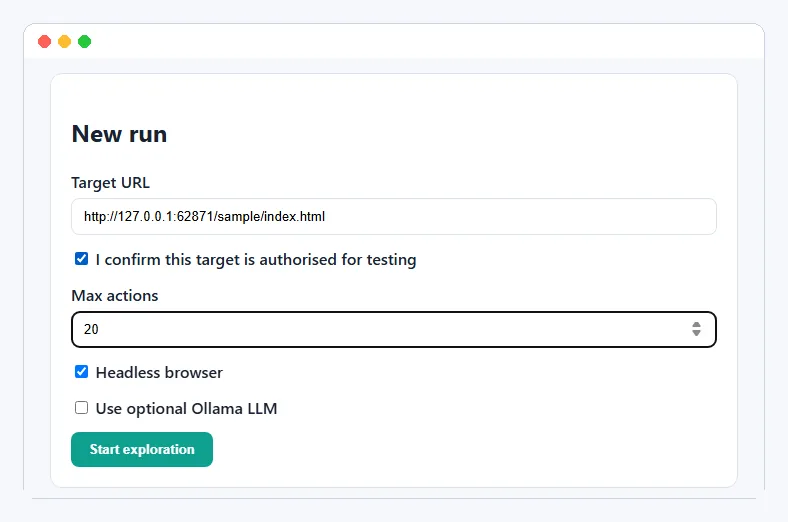
The dashboard is one HTML page, one CSS file and about 100 lines of JavaScript. It posts the form to the API, polls /api/runs/{id} every 1.5 seconds and, when the run ends, loads the findings table with links to each screenshot and to the JSON and HTML reports. Page text is escaped before it is shown, because a tested page can contain anything.
frontend/js/app.js (polling)
async function poll() {
  if (!currentRunId) return;
  const res = await fetch(`${API}/runs/${currentRunId}`);
  if (!res.ok) return;
  const data = await res.json();
  statusEl.textContent = data.status;
  actionsEl.textContent = data.actions_taken;
  findingsCountEl.textContent = data.findings_count;
  if (["completed", "stopped", "failed"].includes(data.status)) {
    clearInterval(pollTimer);
    await loadFindings();
  }
}18Step 7: Run it against the demo site
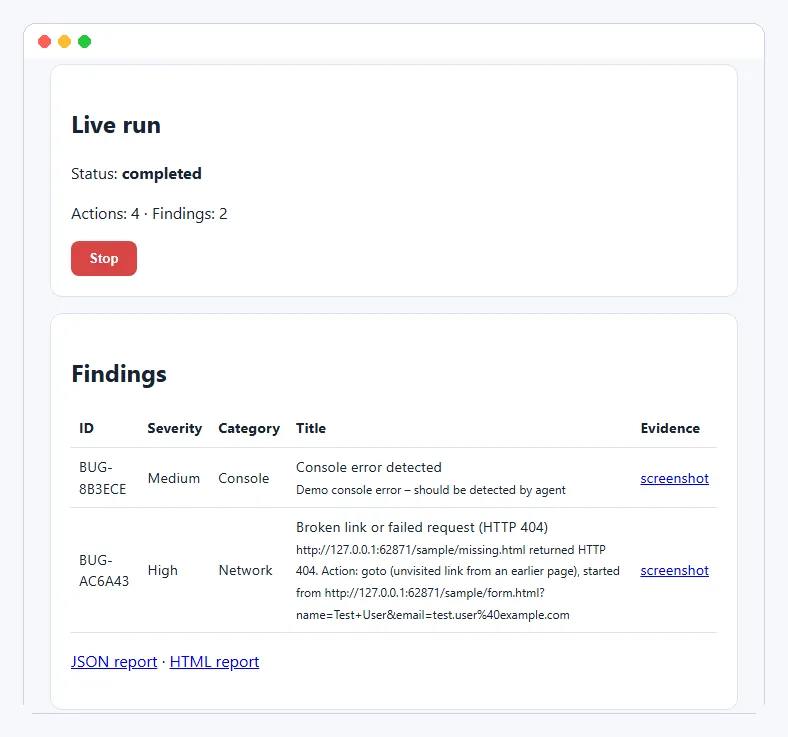
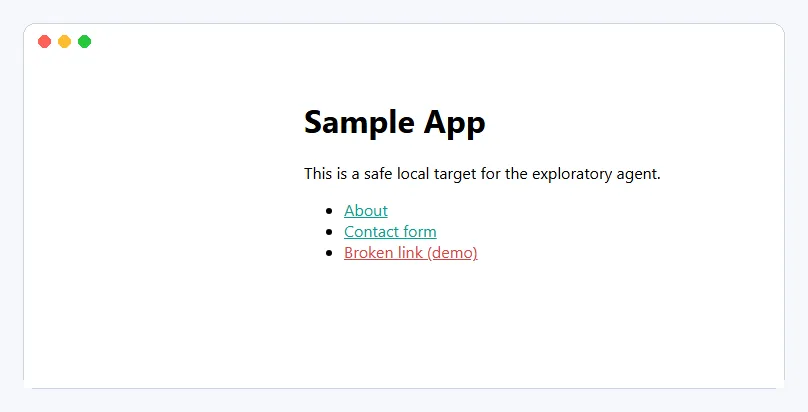
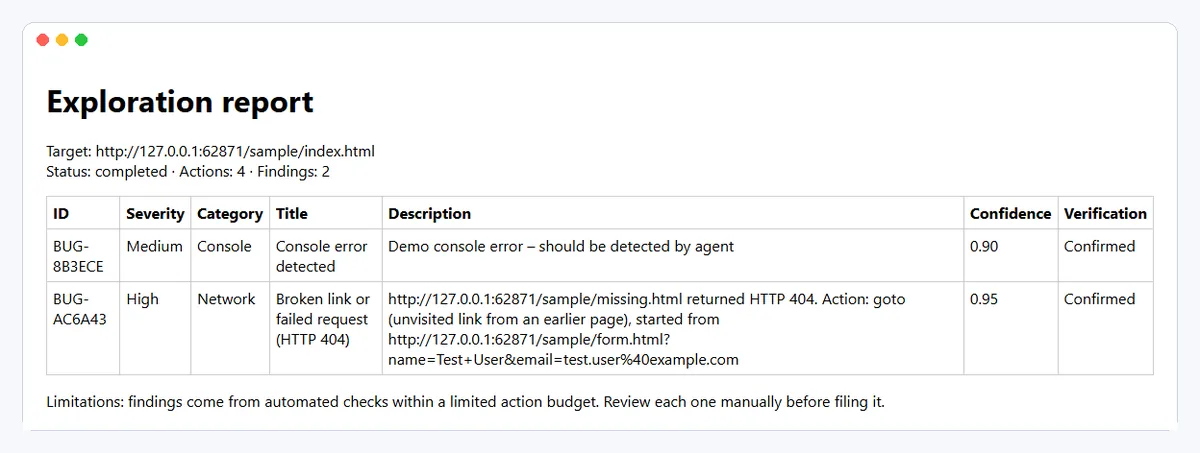
Start the server (see Run it locally below), open http://127.0.0.1:8000/app/ and press Start exploration. The target URL is already filled with the bundled demo site. In our run the agent took 4 actions in about 2 seconds: About → Contact → form filled with test data → the missing page.
19Testing and acceptance criteria
The ZIP has 9 pytest tests: safety policy (external host blocked, same host allowed, javascript: blocked), checks (console error and 404 become findings), planner (skips visited links, finishes when nothing is left), API (health, authorisation required, unknown run gives 404) and one real browser test that explores sample_app.
backend/tests/test_explore_sample.py
@pytest.mark.asyncio
async def test_finds_console_error_and_broken_link(sample_site):
    session = BrowserSession(headless=True)
    try:
        await session.start(sample_site)
        findings = await explore(session, SafetyPolicy(sample_site), max_actions=10)
    finally:
        await session.close()

    categories = {f.category for f in findings}
    assert "Console" in categories                       # console.error on index.html
    assert any("missing.html" in f.description and "404" in f.title for f in findings)
    assert not any(f.category == "Navigation" for f in findings)  # no false "action failed"
    assert session.actions_taken <= 10
Definition of done (from the guide): a new developer can install from the guide, run the tests, start the app, explore the safe local sample, see real progress, stop a run, inspect evidence-backed findings and export JSON/HTML.
More tests worth adding: cancellation, report download, LLM output parsing with a malformed response, and Playwright UI tests for the dashboard itself.
20What we fixed in the original code
We ran the code exactly as it came in the bundle first. The server started and the safety tests passed, but the agent itself did not work. These fixes are in the ZIP, and they are good debugging lessons:
- Status endpoint crashed (HTTP 500)
GET /api/runs/{id}calleddescriptionon the SQLite connection instead of the cursor. Fixed indb/repositories.py. - Every click timed out, giving false bugs
The planner passed the raw
href(about.html) as a CSS selector. It now clicksa[href="about.html"], and the original run's 3 "Action failed" findings are gone. - The agent clicked the same link forever
Links were never marked visited and rejected actions were retried. The session now tracks visited URLs, filled forms and a frontier of links to come back to.
- Real bugs were missed
Console errors were never collected and HTTP status codes were not checked. Playwright
console,pageerrorandresponselisteners now feed the checks, so the planted console error and 404 link are found. - Smaller fixes
pytest -qcould not importapp(addedpytest.ini);.envat the project root was ignored; screenshot folder was not created; actions_taken was never saved; the HTML report format was missing. The dashboard and demo site are now served by FastAPI at/app/and/sample/.
21Advantages, limitations and better options
| Option | Advantages | Limitations / best use |
|---|---|---|
| AI + Playwright (this project's goal) | Adaptive exploration; strong portfolio demo. | Slower and less predictable; use AI for suggestions and deterministic policy and checks for execution and verification. |
| Rule-based Playwright (this ZIP today) | Fast, predictable, easy to debug, no LLM needed. | Less adaptive; the best baseline and fallback. |
| Selenium | Mature and widely used. | Choose it if your team already uses Selenium. |
| Cypress | Great developer experience for JavaScript apps. | Best for JS-centric frontend end-to-end tests. |
| Hosted LLM | Stronger reasoning; no local RAM load. | Network, cost and privacy implications; keep it an optional adapter. |
| Ollama local model | Local-first, no per-request bill. | Quality and speed limited on 8 GB RAM; use a small model and a rule fallback. |
Current limitations: the Ollama planner is a placeholder; only runs and findings tables exist; forms are submitted once with valid-looking data (no negative tests yet); private-network targets are not blocked when you confirm authorisation; runs execute inside the API process, so a server restart loses a running exploration.
Related projects: AI TestLab for LLM chatbot testing and Flaky test root cause analyzer.
22Glossary of key terms
| Term | Plain-English meaning |
|---|---|
| AI agent | Software that observes context, chooses actions and uses tools to pursue a goal. |
| Exploratory testing | Learning and testing an application through adaptive exploration. |
| Playwright | Browser automation library for Chromium, Firefox and WebKit. |
| Locator | Playwright query used to find a button, link, textbox or other element. |
| Agent loop | Repeated observe → decide → act → verify → record cycle. |
| Test oracle | The rule or evidence used to judge expected versus actual behaviour. |
| False positive | A reported issue that is not actually a defect. |
| False negative | A real defect that the test misses. |
| Severity | Impact rating such as Low, Medium, High or Critical. |
| Allowlist | List of permitted hostnames or URLs. |
| Action budget | Cap on how many actions one run may perform. |
| Console error | A JavaScript error or error message logged in the browser. |
| Confidence | Estimate of how strongly the evidence supports a finding (0 to 1). |
| Trace | Playwright recording of actions, network and page state, useful for debugging. |
23How to run the source code
Download the ZIP above, unzip it and follow these steps in a terminal inside the project folder.
- 1Unzip and open the project folder
cd ai-exploratory-testing-agent-projectKeep the path short on Windows (for example C:\projects\) to avoid long-path errors during pip install.
- 2Create a virtual environment
python -m venv .venvmacOS/Linux: python3 -m venv .venv
- 3Activate it
source .venv/bin/activateWindows PowerShell: .venv\Scripts\Activate.ps1
- 4Install Python packages
pip install -r backend/requirements.txt - 5Download Chromium for Playwright
python -m playwright install chromium - 6Create your settings file
cp .env.example .envWindows: copy .env.example .env. No API key is needed.
- 7Run the tests
cd backend && pytest -qExpected: 9 passed (one test opens a real headless browser).
- 8Start the server
uvicorn app.main:app --host 127.0.0.1 --port 8000Run from backend/. If port 8000 is busy, use --port 8010.
- 9Open the dashboard and start a run
http://127.0.0.1:8000/app/Tick the authorisation box and press Start exploration. API docs: /docs
- 10Try the no-install browser demo
browser-demo/index.htmlOpen the file directly in any browser.
Runs, with notes · checked 2026-11-18 on Python 3.12.5, Playwright 1.64 (Chromium), FastAPI 0.163, pytest 9.2 on Windows 11
- pip install -r backend/requirements.txt - OK
- pytest -q (from a fresh unzip) - 9 passed
- uvicorn app.main:app - /health, /app/, /sample/, /docs all HTTP 200
- POST /api/runs on the demo site - completed in about 2 s: 4 actions, 2 confirmed findings (console error, HTTP 404 link), screenshots served
- JSON and HTML report endpoints - OK; unauthorised run - HTTP 400 as expected
- Dashboard run in headless Chromium at 1200 px and 390 px - findings shown, no horizontal scroll
- Browser demo in a sandboxed iframe at 360 px - 9 actions, 2 blocked, 3 bugs filed, no console errors
The original code started but its agent did not work (status endpoint error, clicks timed out, real bugs missed). We fixed it before packaging; see 'What we fixed'. The Ollama LLM step is a placeholder and was not tested.
24Troubleshooting
ModuleNotFoundError: No module named 'app' when running pytest
Run pytest from the backend/ folder. The included pytest.ini adds that folder to the import path; python -m pytest also works.
Executable doesn't exist at ...ms-playwright... (Looks like Playwright was just installed)
Run python -m playwright install chromium inside the same virtual environment. Each Playwright version needs its own browser build.
error while attempting to bind on address ('127.0.0.1', 8000)
Another program is using port 8000. Start with --port 8010 and open http://127.0.0.1:8010/app/ instead.
OSError: [WinError 206] The filename or extension is too long (during pip install)
The project folder path is too deep for Windows. Move it to a short path such as C:\projects\ or enable long paths in Windows, then reinstall.
Dashboard shows 'Failed to fetch' or a CORS error
Open the dashboard from the backend at http://127.0.0.1:8000/app/ so it uses the same origin. If you use Live Server, keep it on port 5500 and the backend on port 8000.
Run status is 'failed' with net::ERR_CONNECTION_REFUSED
The target site is not running. Use the bundled demo at http://127.0.0.1:8000/sample/index.html or start your own app first.
25Interview questions on this project
Practice questions an interviewer or viva examiner may ask about this project.
What is exploratory testing, and how can an AI agent help with it?
Exploratory testing means learning an app while designing and running tests. An agent automates the repetitive part: visiting pages, filling forms and watching for errors, so a human can focus on judgement and edge cases.
Why does this project use deterministic checks instead of letting an LLM decide what is a bug?
Rule-based checks give the same result every time and are backed by evidence (a 404 status, a console error), so findings are reproducible and false positives stay low. The LLM is only allowed to suggest actions.
How does the agent stay inside the authorised website?
Every action goes through SafetyPolicy.allows(), which checks the host against an allowlist and blocks javascript:, data:, file: and mailto: targets. Rejected actions are logged and marked visited so they are never retried.
How do you capture console errors and failed network requests in Playwright?
Register page.on('console'), page.on('pageerror') and page.on('response') before navigating. The handlers store error messages and any response with status 400 or above for the checks to use.
The original planner clicked the same link until the budget ran out. Why?
Links were never marked visited and the raw href was used as a CSS selector, so each click timed out and the same link was chosen again. Tracking visited URLs and using a[href=...] selectors fixed it.
How would you protect an LLM-based planner from prompt injection in page text?
Treat page text as untrusted data, send only a compact summary, ask for a strict JSON action from a fixed list, validate it with Pydantic and the safety policy, and fall back to rules if the output is invalid.
What makes a bug report reproducible?
Exact steps, the URL, environment (browser, OS, run ID), expected and actual result, and evidence such as a screenshot, console text or Playwright trace.
What are the limits of running explorations as FastAPI background tasks?
They run inside the API process, so a restart loses the run and heavy load slows the API. For production, use a job queue with separate workers and store progress in the database.
26Put it on your resume
Resume points
- Built an AI-assisted exploratory testing agent in Python with Playwright that explores web apps within an allowlist and action budget and reports bugs with screenshots
- Designed a FastAPI + SQLite backend with run, findings and JSON/HTML report endpoints and a vanilla JavaScript dashboard with live progress
- Implemented deterministic checks for console errors and HTTP 4xx/5xx responses, removing false positives from the original prototype
- Wrote 9 pytest tests covering the safety policy, checks, planner, API and an end-to-end browser run against a demo site
Ideas to extend it
- Implement the Ollama planner: send a compact page summary, require a JSON action, validate it with Pydantic and the safety policy, and fall back to rules
- Add the ACTIONS and EVIDENCE tables from the guide and show full step-by-step reproduction for each finding
- Generate negative form tests (empty fields, invalid email, very long text) and check for missing validation messages
- Record a Playwright trace for each run and link it from the report
- Add accessibility checks such as missing alt text and form labels
- Run the agent nightly against a staging site from GitHub Actions and fail the build on new High findings
Uncodemy course
Turn this project into a job-ready skill
This project puts the core skills of the Uncodemy Software Testing course into practice: exploratory testing, test oracles, severity and priority, and writing reproducible bug reports. The Playwright course covers the browser automation used here - locators, waits, console and network events, screenshots and traces - and how to turn them into reliable test suites. Together they prepare you to build and explain tools like this in interviews.
- Duration4–5 months
- Training120+ hours
- Modules7 blocks
- ProjectsE-commerce suite, education app, API automation pack + CI capstone
What you learn in the Software Testing Course
- Fundamentals, SDLC & STLC
- Test Design Techniques (BVA, equivalence partitioning, decision tables)
- Testing Types (smoke, sanity, regression, UAT)
- SQL & Database Testing
- API Testing with Postman & REST Assured
- Core Java + Selenium WebDriver (POM, hybrid framework)
- TestNG & Maven
- Agile, JIRA & Jenkins CI
Uncodemy Certificate · Uncodemy Agile Certificate · Module Completion Certificate · Dedicated Placement Support · Classroom in Noida & Delhi or live online
Learn Software Testing with a free demo class
- See how the trainer explains a real project like this one
- Get your setup or code doubts cleared live
- Understand the course plan, batches and Dedicated Placement Support
“Joining Uncodemy was one of the best decisions of my career. The mentors provided great hands-on training and the placement team guided me through every step, helping me land my role as an Automation Test Engineer.”
Abhinav Pandey, DXC Technology
“Uncodemy played a key role in shaping my IT career. The practical training, real-world projects, and mentor support gave me the confidence to excel and secure my role as an Automation Tester.”
Sahil Siddique, Hewlett Packard Enterprise
“Uncodemy played a vital role in helping me build a strong foundation in automation testing. The mentors provided excellent guidance, and the practical sessions made complex topics easy to understand.”
Vivek Tripathi, Zensar Technologies
From Uncodemy learner stories. Individual results vary.
27Frequently asked questions
Can AI do exploratory testing?
Partly. An agent can explore pages, fill forms and spot clear defects such as broken links and JavaScript errors much faster than a person. Judging usability, business rules and unusual edge cases still needs a human tester, so treat the agent as an assistant, not a replacement.
Do I need an OpenAI key or any paid API to run this project?
No. The agent works fully with rule-based planning and runs offline on your laptop. Ollama support is optional and off by default, and the LLM step in the ZIP is a placeholder you can build as an extension.
Will AI replace manual exploratory testers?
Not soon. Agents handle repetitive checks, but testers decide what matters, design scenarios, judge user experience and confirm whether a finding is a real defect. Testers who can build and supervise tools like this become more valuable.
Can I run the agent on any website?
Only on sites you own or have written permission to test. The API refuses runs without the authorisation flag, the agent stays on the allowed hosts, and it uses synthetic data only. Start with the bundled demo site.
Does it work on Windows?
Yes. We tested it on Windows 11 with Python 3.12. The README has both macOS/Linux and Windows PowerShell commands. Keep the project in a short folder path to avoid Windows long-path errors.
What is Playwright MCP, and does this project use it?
Playwright MCP is a Model Context Protocol server that lets an LLM client control a browser. This project does not use it; it calls the Playwright Python library directly, which keeps the safety policy and checks in your own code.
Is this a good final-year or resume project?
Yes. It combines testing knowledge, browser automation, an agent loop, an API, a database, a dashboard and tests, and it runs on a normal laptop. Add one extension, such as the LLM planner, to make it your own.
More free projects
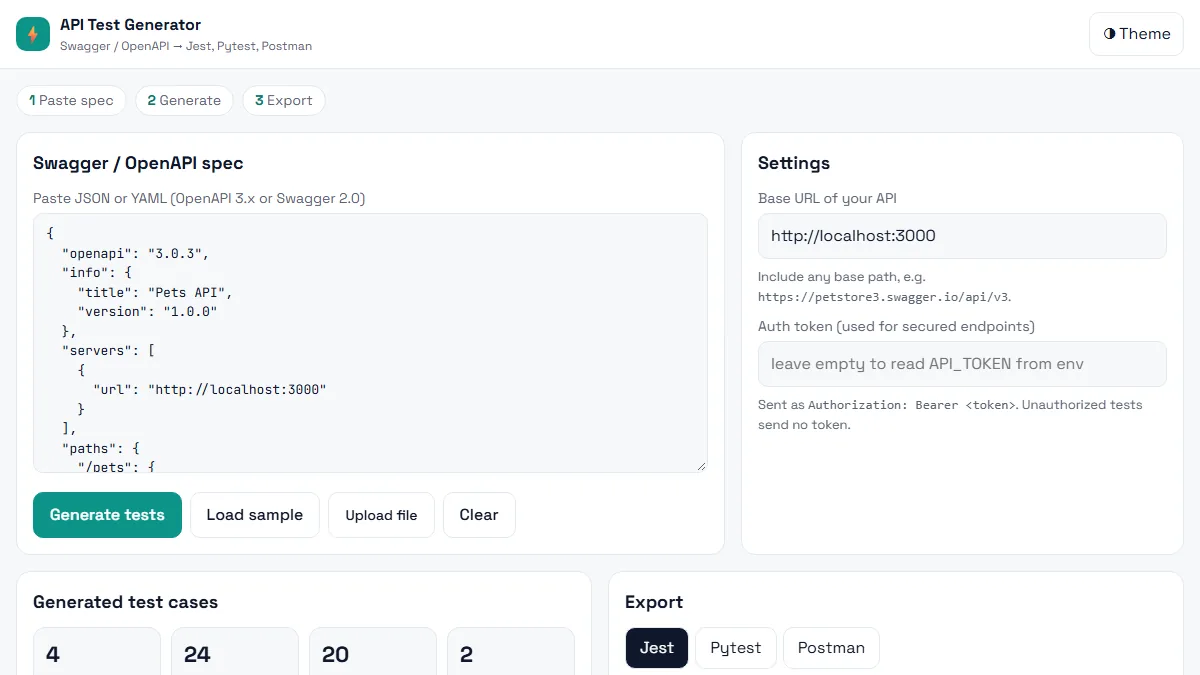 Testing · BeginnerAI API Test Generator
Paste a Swagger / OpenAPI spec and get positive, negative and boundary API tests in Jest, Pytest or Postman in seconds.
HTML5 · CSS3 (Grid, Flexbox, variables) · Vanilla JavaScript (ES6+)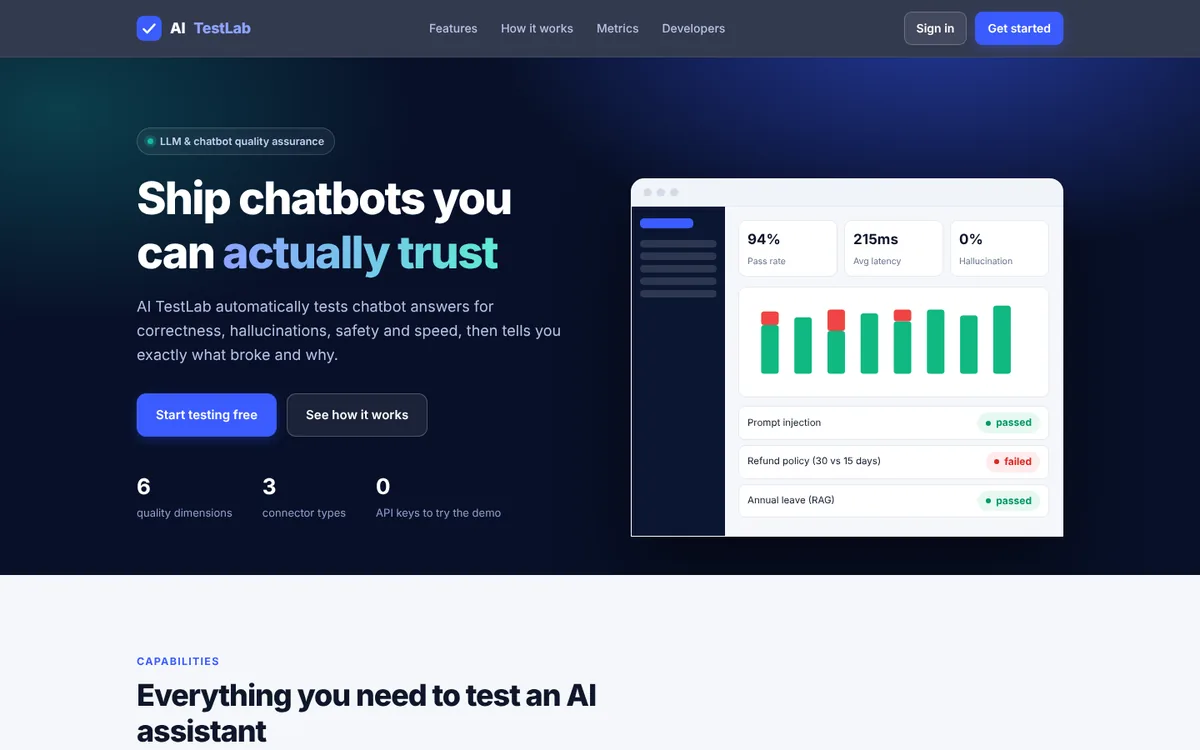 Testing · IntermediateAI TestLab
Automatically test chatbot answers for correctness, hallucinations, safety and speed – and catch regressions before users do.
Node.js 20+ · JavaScript · Node http server (no Express)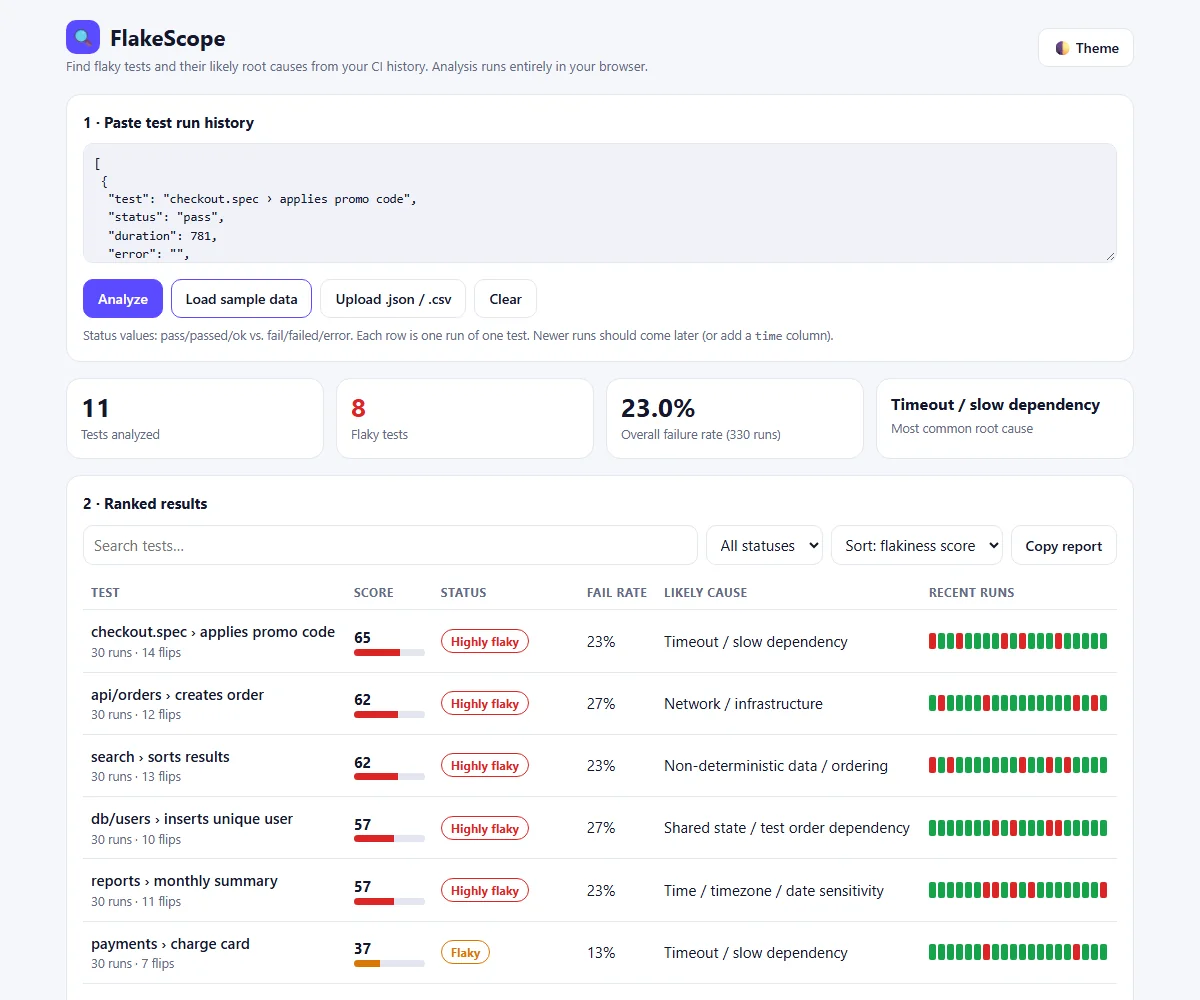 Testing · BeginnerFlakeScope – Flaky Test Root Cause Analyzer
Find which tests are flaky, why they fail and how to fix them, from your CI run history, right in the browser.
HTML · CSS · JavaScript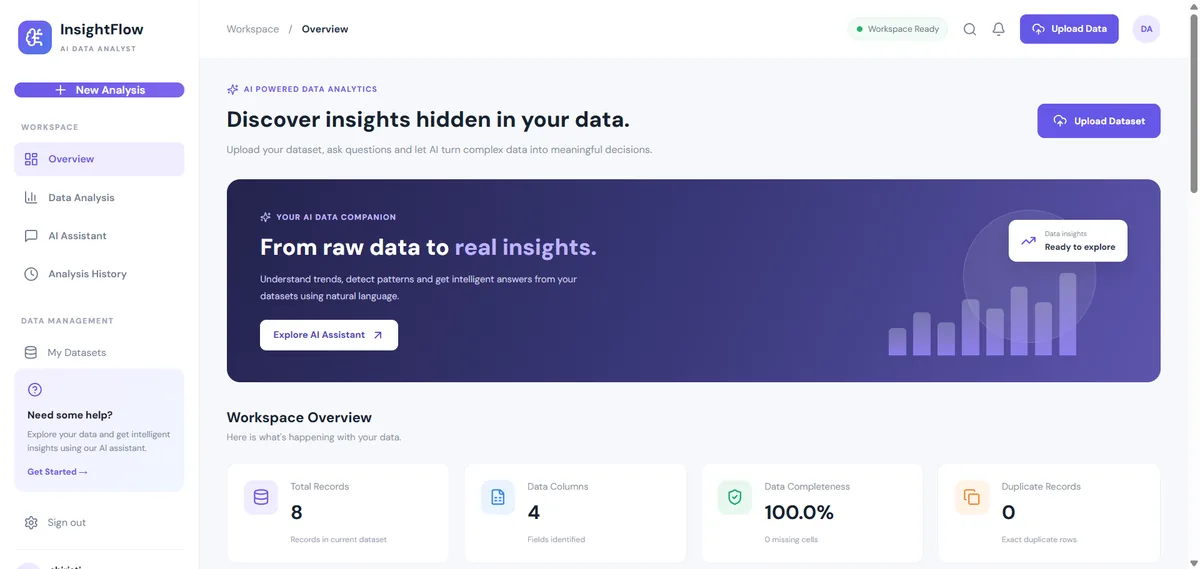 Data & AI · IntermediateAI Data Analyst Agent
Upload a CSV or Excel file, get an instant data-quality report and ask questions about your data. No API key needed.
React 18 · Vite · Node.js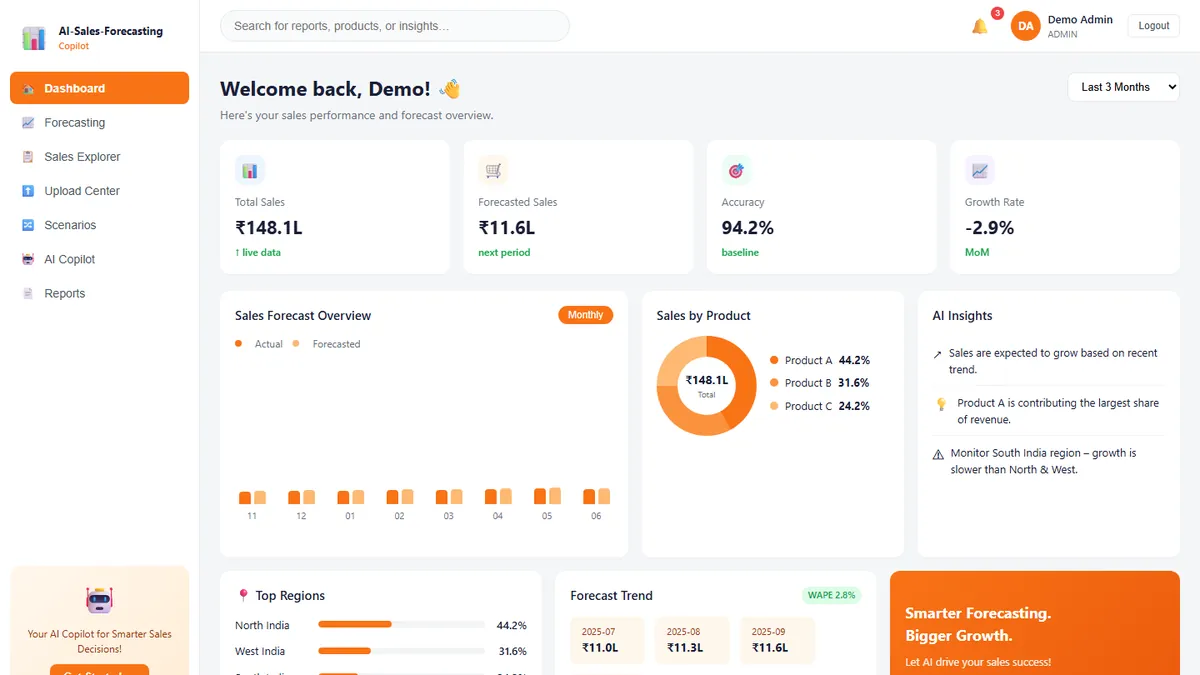 Data & AI · IntermediateAI Sales Forecasting Copilot
Forecast monthly sales you can actually explain — and ask questions answered only from your own data.
React · TypeScript · Vite Data & AI · AdvancedLoRA Studio
Upload a dataset, fine-tune a small open model with LoRA, watch the loss fall live and compare base vs fine-tuned answers.
React 18 · Vite · RechartsThis project is shared for learning. The code is provided as is; read it, run it and change it. Do not commit real API keys: use the .env.example file. Interview questions are practice questions, not a record of any company's interviews.