






Software testing project · Beginner · 1–2 days
Build a Flaky Test Root Cause Analyzer (FlakeScope)
Find which tests are flaky, why they fail and how to fix them, from your CI run history, right in the browser.
- HTML
- CSS
- JavaScript
- Playwright
- Node.js
- Python (optional)
- 19
- chapters in the guide
- 07
- steps to run it
- 20
- files in the ZIP
Tested 18 Nov 2026Automated tests: 22 passed
Free ZIP, 0.03 MB20 files, no keys inside
flaky-test-root-cause-analyzer-project-source-code.zip0.03 MB · 20 files · clean code, no keys inside · .env.example included
01What you will build and learn
FlakeScope is a single-file HTML, CSS and JavaScript tool that reads test run history (JSON, CSV or converted JUnit/Playwright reports), gives each test a flakiness score from 0 to 100, guesses the root cause from error messages and suggests fixes. It is a beginner-friendly testing project for QA students and automation testers.
You will build
- A browser tool that parses JSON or CSV test history and ranks tests by a 0–100 flakiness score
- A rule engine that maps error messages to 8 root causes (timeout, network, race condition, shared state, timezone and more)
- A results dashboard: summary cards, search, filter, sort, detail panel, run timeline, dark mode and mobile layout
- Converters that turn JUnit XML and Playwright JSON reports into FlakeScope input
- A Playwright test suite for the app plus a deliberately flaky demo suite run with --repeat-each
Skills you practise
- Flaky test analysis and root cause thinking
- DOM handling in vanilla JavaScript
- Parsing JSON and CSV
- Grouping data and a simple scoring formula
- Regular expressions for log classification
- Responsive CSS and dark mode
- Playwright end-to-end testing and --repeat-each
- Safe HTML output (escaping)
Before you start
- Basic HTML, CSS and JavaScript
- A modern browser and a text editor (VS Code)
- Node.js 18+ only if you want to run the Playwright tests
- Python 3 only for the optional JUnit converter
Live demo in HTML, CSS and JavaScript
02Flaky or real failure? Try the analyzer in your browser
Each line is one run of a test, oldest first. The demo groups runs by test, scores flakiness with the same formula as FlakeScope and decides if each test is Flaky, a Real failure (fails every run, or started failing and never recovered) or Stable, with the reasons. It is a simplified version of the full app in the ZIP: edit the runs, paste your own CSV, or switch samples.
Result
Edit any tab and press Run. This is a simplified browser version of the project for learning; the full project is in the ZIP.
How the demo works
- parse() reads the CSV text: the header gives the column positions, and every other line becomes { test, ok, err }.
- Runs are grouped by test name, keeping their order (oldest first).
- judge() counts failures and pass/fail flips, then computes score = 100 × min(1, 0.75 × flip rate + 0.4 × 4p(1−p)).
- Verdict: never failed = Stable; failed every run, or passed and then failed in every newer run = Real failure; otherwise Flaky.
- For flaky tests, each error message is checked against the RULES regex list and the rule that explains most failures is shown with a fix tip.
- All text is escaped with esc() before it goes into the table, so pasted data cannot inject HTML.
03Project overview: what is a flaky test?
A test is a small program that checks whether your software works. Normally a test gives the same answer every time. A flaky test does not: it passes on Monday, fails on Tuesday and passes again on Wednesday, and nobody changed any code. Think of a light switch that works only sometimes. You cannot trust it, and you waste time checking the bulb, the wire and the switch.
In this project you build FlakeScope, a flaky test root cause analyzer. It reads a history of test runs and tells you three things:
- Which tests are flaky, ranked from worst to best (a score from 0 to 100).
- Why each test is probably flaky, for example slow timing, a bad network or shared data.
- What you can do to fix it.
Everything happens inside the web browser. There is no server and no database, and your data is never sent anywhere.
Honest note: FlakeScope is rule-based. It uses simple statistics and regular expressions, not a language model, so it works offline and gives the same answer every time. Adding an LLM is listed as a future improvement.
04Why flaky tests are a real problem
Flaky tests waste a team's time and, worse, they teach people to ignore red builds. Once "just re-run it" becomes a habit, a real bug can hide behind a failure that everyone assumes is flaky.
FlakeScope is useful for:
- Software testers and QA engineers who see random failures in their automated tests.
- Developers who keep clicking Re-run on failing builds.
- Students who want a working example of a data analysis tool built with plain HTML, CSS and JavaScript.
Why not just look at the failure rate? A test that fails 100% of the time is broken, not flaky. A test that fails 30% of the time in a random pattern is the real troublemaker. That is why the score also looks at how often the result flips.
05Architecture and analysis flow
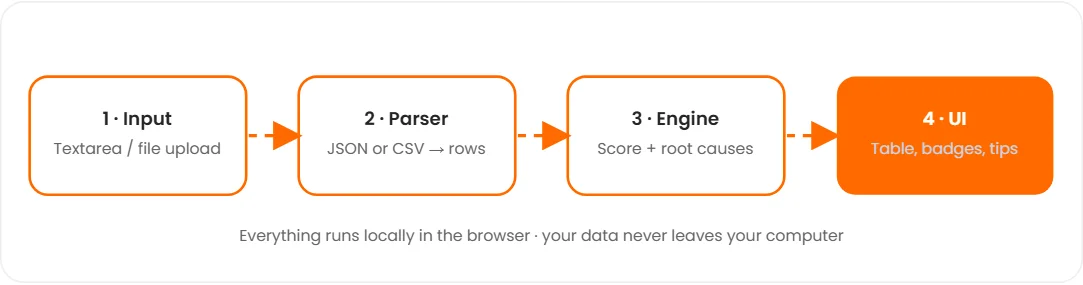
Four layers work one after another, all inside the browser: Input (text box or file upload) → Parser (JSON or CSV to rows) → Engine (score and root causes) → UI (table, badges, tips).
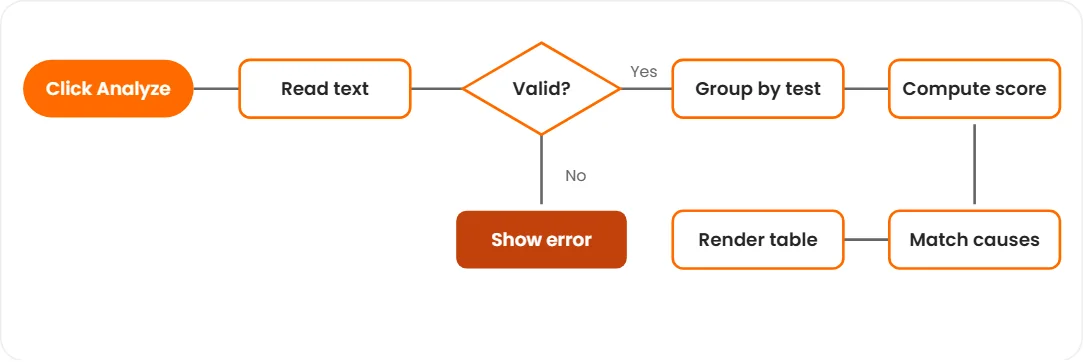
When the user clicks Analyze, the code reads the text, checks that it is valid (or shows an error), groups runs by test, computes the score, matches root causes and renders the table.
06Data model and input format
Even without a database the data has a clear structure. One TEST has many TEST_RUN rows (1 : N). TEST and ROOT_CAUSE are many-to-many (N : M) because one test can match several causes.
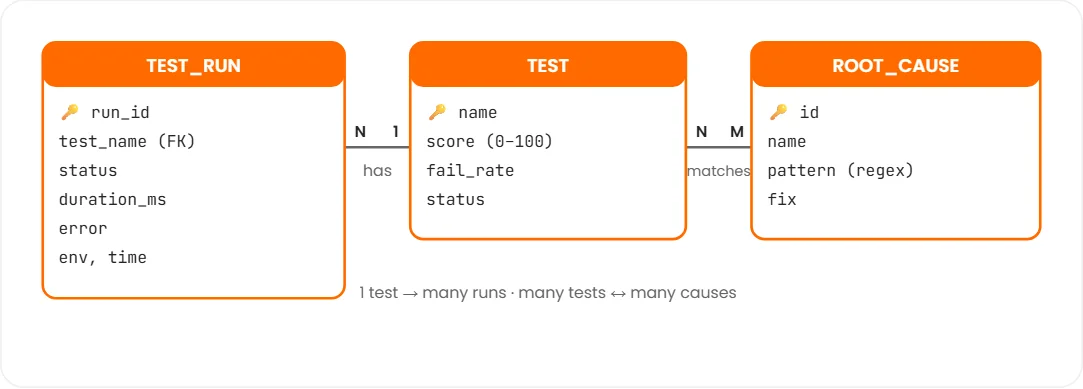
Each input row is one run of one test:
| Field | Required? | What to write |
|---|---|---|
test | Yes | Test name. It must be spelled the same in every run. |
status | Yes | pass / passed / ok / success, or fail / failed / error. |
duration | No | Run time in milliseconds, such as 1250. |
error | No | The failure message. This is what lets the tool find causes. |
env | No | Where it ran: ci, local, staging, a branch or machine name. |
time | No | Date and time such as 2026-11-01T08:00. If missing, row order is used. |
The full app also accepts common alternative names: name/title for test, result/outcome for status, message/log for error and ms for duration. Skipped or pending runs are ignored.
07Tech stack
| Tool | Used for |
|---|---|
| HTML | Page structure: text box, buttons, empty results area. |
| CSS (variables, grid, media queries) | Light and dark themes, summary cards, a table that scrolls inside its own box on phones. |
| Vanilla JavaScript | Parsing JSON/CSV, grouping, scoring, regex rules, rendering, file upload, copy report. |
| Playwright Test (Node.js) | End-to-end tests for the app and a deliberately flaky demo suite (extra, in the ZIP). |
| Python 3 (optional) | junit2csv.py converter and python -m http.server for sharing. |
No frameworks and no npm packages are needed for the app itself. It is one file you can double-click.
08Folder structure
flaky-test-root-cause-analyzer-project/
├── index.html                 # complete FlakeScope app (one file)
├── starter/index.html         # smaller version built in steps 2–6
├── browser-demo/index.html    # "Flaky or real failure?" mini demo
├── samples/
│   ├── small-example.csv      # the P F P F P example from the guide
│   ├── small-example.json
│   ├── playwright-demo-history.csv   # 60 real Playwright runs
│   └── junit/run-2026-11-0*.xml      # 4 JUnit reports
├── tools/
│   ├── junit2csv.py           # JUnit XML  -> FlakeScope CSV
│   ├── pw-json-to-csv.js      # Playwright JSON report -> FlakeScope CSV
│   └── run-flaky-demo.js      # runs the demo 15x and converts the report
├── tests/flakescope.spec.js   # Playwright tests for the app
├── demo/
│   ├── flaky-demo.spec.js     # deliberately flaky tests
│   └── playwright.demo.config.js
├── playwright.config.js
├── package.json
└── README.md
The guide builds starter/index.html step by step. index.html is the finished app with more rules, summary cards, search, filter, sort, a detail panel, extra signals, dark mode and file upload.
09Step 1: Set up the project
You only need a text editor (VS Code is great) and a browser. No installation and no npm for the app.
- Create a folder
Name it
flakescope. - Create one file
Inside it, create
index.html. HTML, CSS and JavaScript live together in this one file, which makes the project easy to share with your teacher. - Open it in VS Code
Optional: install the Live Server extension so the page refreshes when you save.
mkdir flakescope
cd flakescope
code index.html10Step 2: Write the HTML structure
The page needs a title, a text box for data, two buttons and an empty table. JavaScript fills the table later. Give each element an id so JavaScript can find it.
<main class="app">
  <h1>FlakeScope</h1>
  <p>Paste test runs (JSON or CSV), then click Analyze.</p>
  <textarea id="inp" rows="8" placeholder="test,status,error"></textarea>
  <div><button id="go">Analyze</button><button id="demo">Load sample</button></div>
  <div><table id="out"></table></div>
</main>11Step 3: Style it with CSS
Use a max width so it looks good on laptops and a scrolling wrapper so the table fits on phones. Put this inside a <style> tag in the <head>.
:root{--brand:#5b4bff;--bad:#dc2626;--ok:#16a34a}
*{box-sizing:border-box}
body{margin:0;font:15px/1.5 system-ui,sans-serif;background:#f6f7fb;color:#14172b}
.app{max-width:900px;margin:auto;padding:24px 16px}
textarea{width:100%;padding:10px;font:13px monospace;border:1px solid #d5d8e8;border-radius:10px}
button{margin:10px 8px 14px 0;padding:9px 16px;border:0;border-radius:10px;background:var(--brand);color:#fff;font-weight:600;cursor:pointer}
table{width:100%;min-width:620px;border-collapse:collapse;background:#fff}
th,td{padding:10px;text-align:left;border-bottom:1px solid #eceef6}
th{background:#eef0fb;font-size:12px;text-transform:uppercase}
.tag{padding:2px 9px;border-radius:99px;font-size:12px;font-weight:700;color:#fff}
.dot{display:inline-block;width:7px;height:16px;margin-right:2px;border-radius:2px;background:var(--ok)}
.dot.f{background:var(--bad)}12Step 4: Read and clean the data
Users can paste JSON or CSV. First we try JSON.parse. If that fails, we treat the text as CSV: the first line holds column names and every other line is one run. We keep only rows that have a test name and a status.
The RULES list is the tool's "knowledge": a cause name, a regular expression to look for in error messages, and a fix tip. The esc() helper keeps the page safe from harmful text.
const $ = id => document.getElementById(id);
const esc = s => String(s ?? '').replace(/[&<>"']/g, c => '&#' + c.charCodeAt(0) + ';');
const RULES = [
  ['Timeout / slow dependency', /time(d)? ?out|deadline|exceeded/i, 'Find the slow step and stub slow services.'],
  ['Network issue', /ECONN|ENOTFOUND|socket|50[234]|network/i, 'Mock the network or wait for health checks.'],
  ['Async / race condition', /stale|not interactable|not found|detached|promise/i, 'Use explicit waits instead of sleep().'],
  ['Shared state / order', /duplicate|already exists|unique|leftover/i, 'Give every test its own data.'],
  ['Time / timezone', /timezone|midnight|expired|clock/i, 'Use a fake clock and set TZ=UTC.']
];
function parse(text) {
  text = text.trim();
  let rows;
  try { rows = JSON.parse(text); }
  catch {
    rows = text.split(/\r?\n/).filter(Boolean).map(l => l.split(','));
    const head = rows.shift().map(h => h.trim().toLowerCase());
    rows = rows.map(r => Object.fromEntries(head.map((k, i) => [k, (r[i] || '').trim()])));
  }
  const runs = rows.filter(r => r.test && r.status).map(r => ({ test: r.test, ok: /^(pass|passed|ok)$/i.test(r.status), err: r.error || '' }));
  if (!runs.length) throw new Error('No valid rows. Each row needs test and status.');
  return runs;
}
Meet the Software Testing & Playwright trainers
Stuck on a step of this project? These are the Uncodemy trainers who teach these skills in live classes. Book a free demo class and ask them your doubts directly.
 Mr. Chandra ShekharCorporate Trainer at Coforge · 6+ years
Software testing trainer who works as a Corporate Trainer at Coforge, where he earlier built Selenium-Java automation frameworks and did manual and functional testing. He teaches manual, API and automation testing with Selenium and Java.
Manual TestingAPI TestingAutomation TestingSelenium WebDriver Mr. Rishi RajAutomation Tester & Corporate Trainer at Cognizant · 5+ years
Automation tester and corporate trainer at Cognizant who teaches manual, API and automation testing with Selenium, Playwright and Cypress. He has built automated test suites integrated with CI/CD pipelines and focuses on hands-on, industry-ready practice.
Selenium WebDriverPlaywrightCypressTestNG Mr. Ravi PrakashSenior QA Engineer at Wipro · 5+ years
ISTQB-certified Senior QA Engineer at Wipro with experience in web and mobile testing using Java, Maven, TestNG and Robot Framework. As a trainer he aims to make tricky testing topics simple and easy to follow.
Selenium WebDriverPlaywrightJavaTestNG Mr. RatanQA Automation Trainee at Wipro · 7+ months
QA automation trainee at Wipro with hands-on experience in manual and automated testing using Selenium, Playwright and API testing. He started as a QA intern at Uncodemy and teaches testing in simple, practical lessons.
Selenium WebDriverPlaywrightAPI TestingPyTest13Step 5: Build the analysis engine
This is the brain of the project. For each test we calculate:
- Failure rate p = failed runs ÷ total runs.
- Flip rate = how often the result changes from one run to the next.
- Score = 100 × (0.75 × flip rate + 0.4 × balance), capped at 100, where balance = 4 × p × (1 − p).
Then every failure message is tested against RULES and the cause that matches the most failures wins.
function analyze(runs) {
  const groups = {};
  runs.forEach(r => (groups[r.test] = groups[r.test] || []).push(r));
  return Object.entries(groups).map(([name, rs]) => {
    const n = rs.length, fails = rs.filter(r => !r.ok);
    const p = fails.length / n;
    let flips = 0;
    for (let i = 1; i < n; i++) if (rs[i].ok !== rs[i - 1].ok) flips++;
    const flip = n > 1 ? flips / (n - 1) : 0;
    const score = Math.round(100 * Math.min(1, 0.75 * flip + 0.4 * 4 * p * (1 - p)));
    const hits = RULES.map(rule => [rule, fails.filter(r => rule[1].test(r.err)).length]).filter(h => h[1]).sort((a, b) => b[1] - a[1]);
    return { name, p, score, rs, cause: hits[0] ? hits[0][0] : null };
  }).sort((a, b) => b.score - a.score);
}
Worked example: Pass, Fail, Pass, Fail, Pass
| Measure | Value |
|---|---|
| Runs (n) | 5 |
| Failures | 2 |
| Failure rate p = 2 / 5 | 0.40 |
| Flips | 4 of 4 comparisons |
| Flip rate = 4 / 4 | 1.00 |
| Balance = 4 × 0.40 × 0.60 | 0.96 |
| Score = 100 × min(1, 0.75 × 1.00 + 0.4 × 0.96) | 100 |
A test that fails ten times in a row and then passes ten times flips only once, so its flip rate is low. A test that goes pass, fail, pass, fail flips every time. That difference is what separates a flaky test from a broken one.
14Step 6: Show results and connect the buttons
render() turns the results into table rows with a coloured status badge, the likely cause, a fix tip and a strip of green and red boxes for the last 20 runs. Then we connect the buttons. The ZIP version also has a seeded sample() generator, so you can test without your own data and get the same result every time.
const label = r => r.p === 1 ? ['Broken', '#dc2626'] : r.p === 0 ? ['Stable', '#16a34a'] : r.score >= 50 ? ['Highly flaky', '#dc2626'] : r.score >= 25 ? ['Flaky', '#d97706'] : ['Mild', '#5b4bff'];
function render(list) {
  $('out').innerHTML = '<tr><th>Test</th><th>Score</th><th>Status</th><th>Likely cause & fix</th><th>Runs</th></tr>' +
    list.map(r => {
      const l = label(r);
      return `<tr><td>${esc(r.name)}</td><td><b>${r.score}</b></td>
        <td><span class="tag">${l[0]}</span></td>
        <td>${r.cause ? esc(r.cause[0]) + '<br><small>Fix: ' + esc(r.cause[2]) + '</small>' : '-'}</td>
        <td>${r.rs.slice(-20).map(x => `<i class="dot${x.ok ? '' : ' f'}"></i>`).join('')}</td></tr>`;
    }).join('');
}
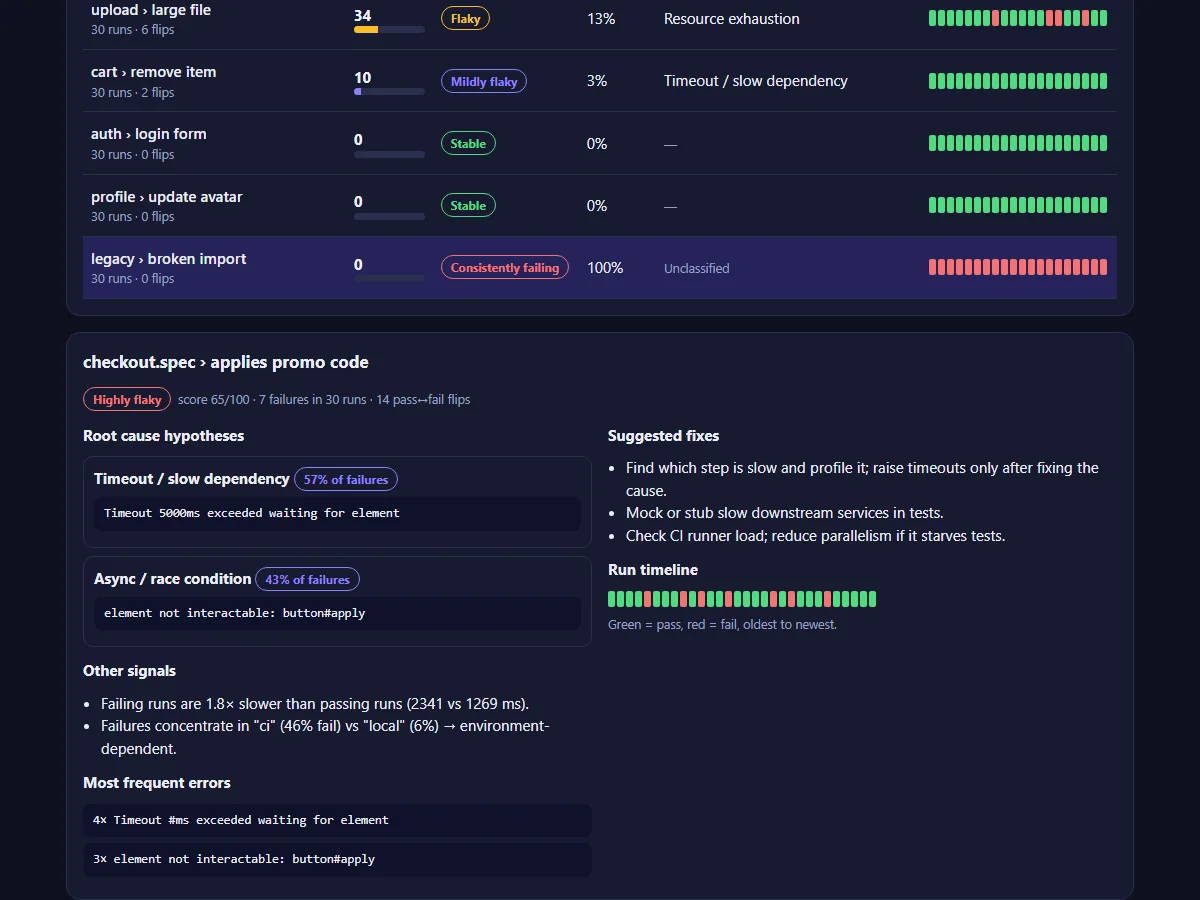
Labels in the finished app: Highly flaky (score 50+, fix first), Flaky (25–49), Mildly flaky (below 25, keep an eye on it), Consistently failing (failed every run: a real bug or broken test) and Stable (never failed).
15Step 7: Use the finished app
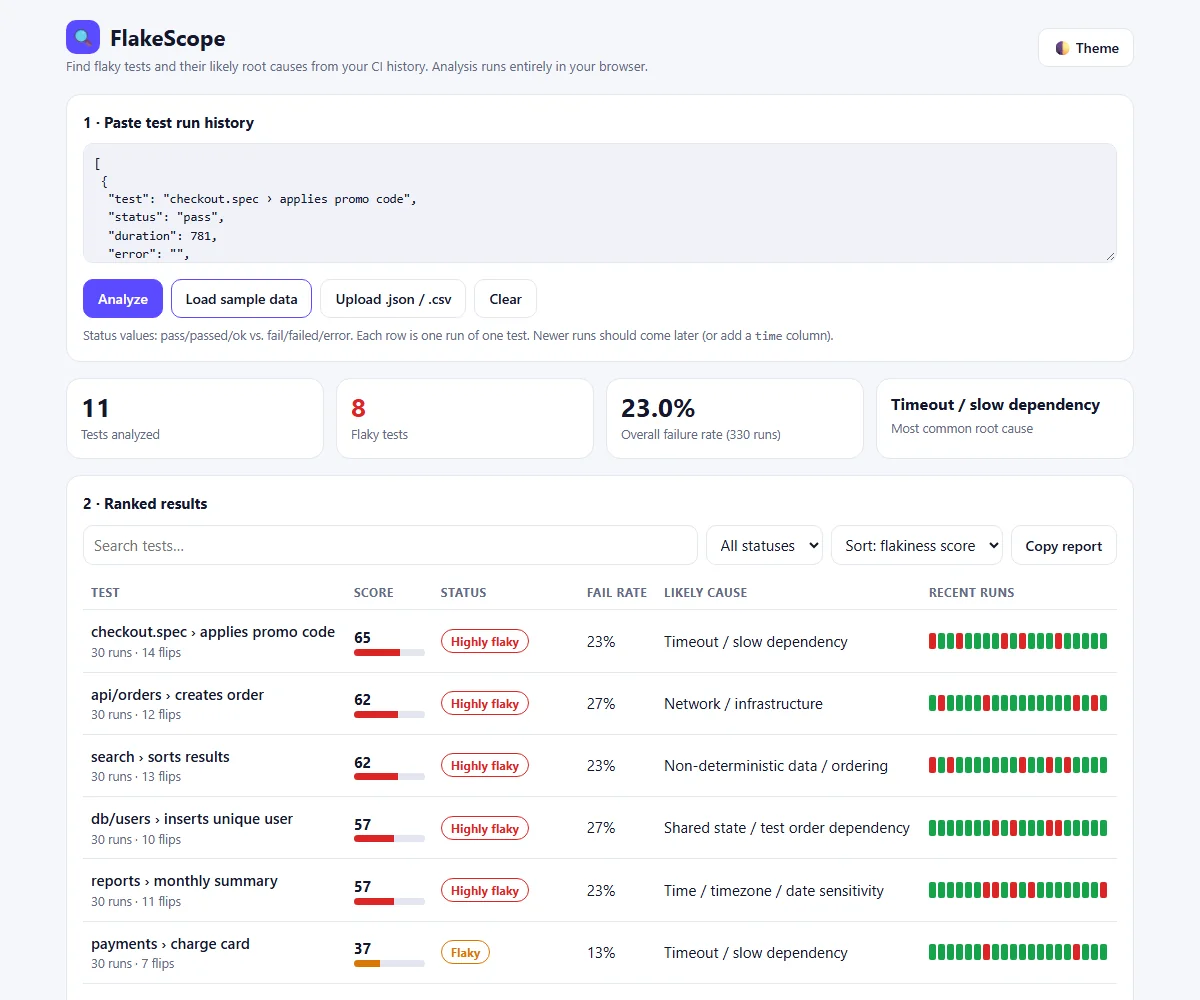
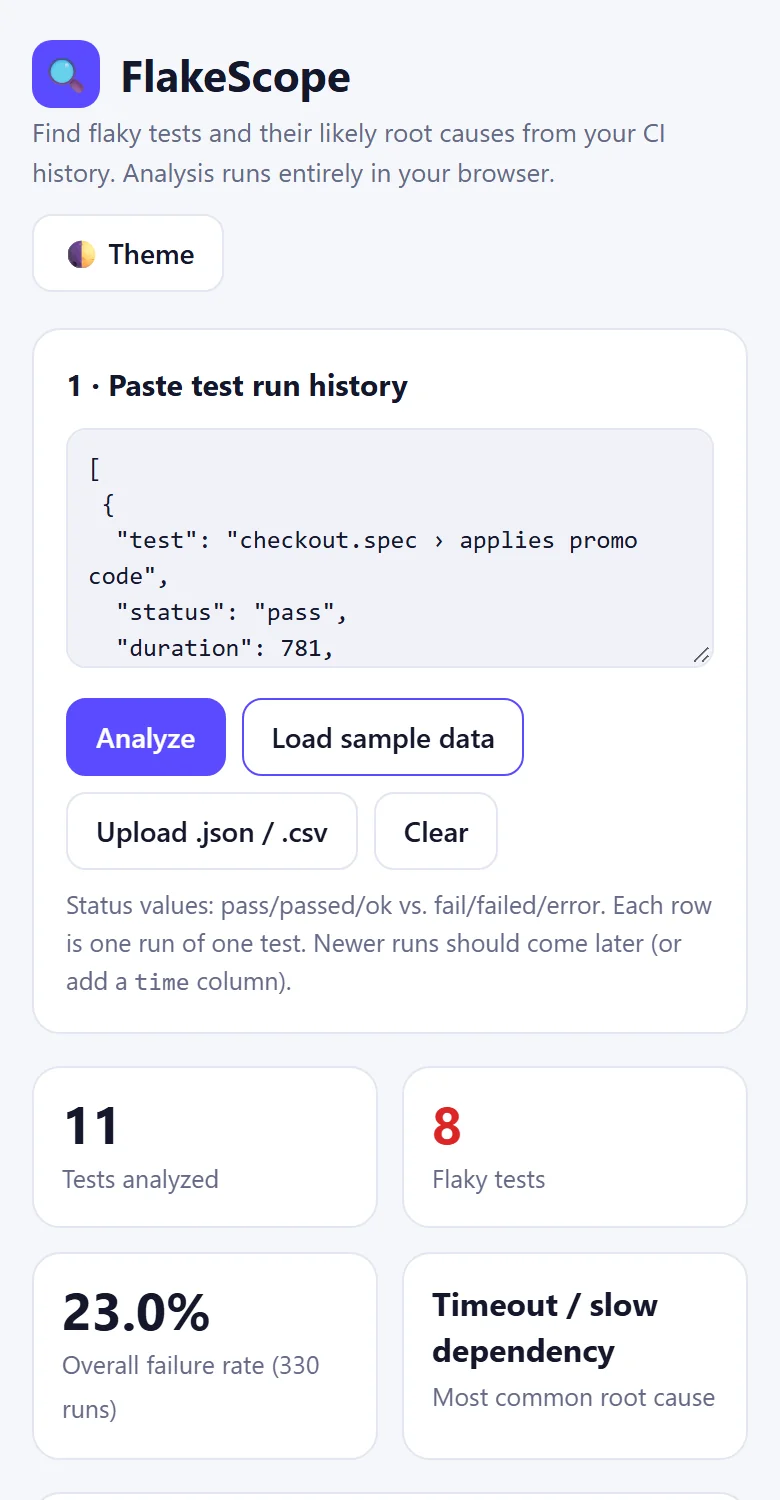
Open index.html and click Load sample data. The text box fills with 330 runs of 11 tests and the analysis starts.
Click any row (or Tab to it and press Enter) to open the detail panel: root cause hypotheses with the share of failures each one explains, other signals, the most frequent errors, suggested fixes and the full run timeline.
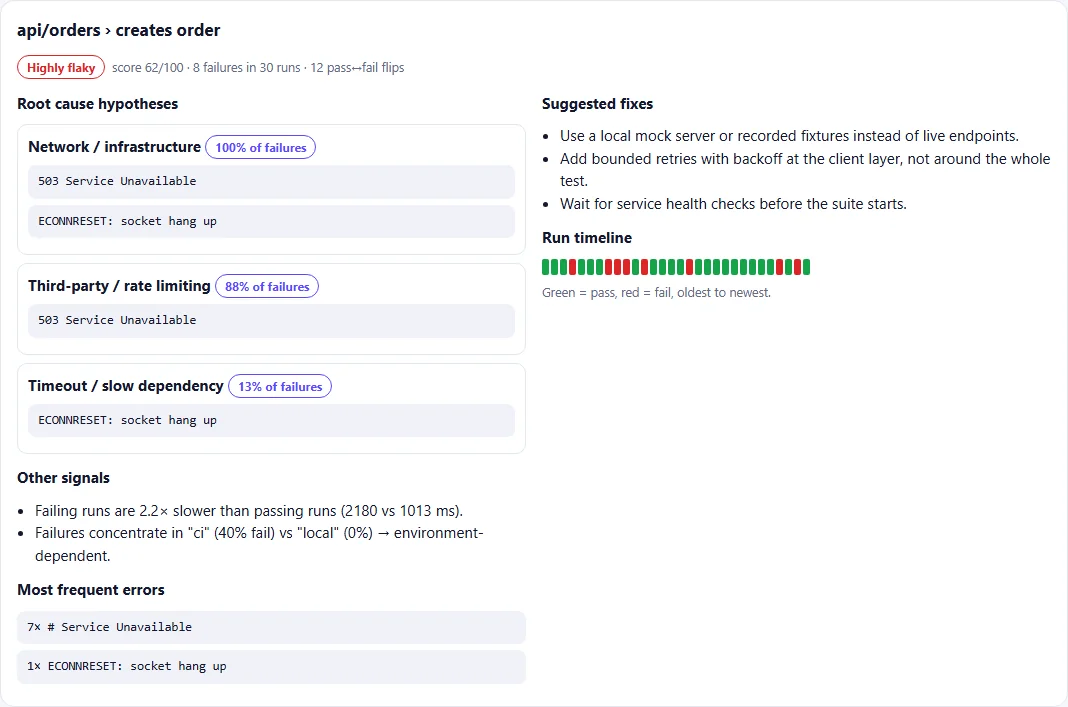
api/orders › creates orderAbove the table you can search by test name, filter by status (flaky, broken, stable), sort by score, failure rate, run count or name, and copy a plain-text report. If the browser blocks the clipboard, the report appears in a text box so you can copy it by hand.
16Use your own test data (CSV, JSON, JUnit)
Paste CSV or JSON into the text box, or click Upload .json / .csv. If an error message contains a comma, put it inside double quotes.
test,status,duration,error,env
login,pass,900,,ci
login,fail,5200,"Timeout 5000ms exceeded",ci
login,pass,950,,ci
login,fail,4800,"element not interactable",ci
login,pass,870,,local
Most CI tools can export test results, and almost every test framework can write JUnit XML. This small converter (tools/junit2csv.py) turns JUnit files into FlakeScope CSV. Name report files so they sort by date, because the file name is used as the time.
import sys, csv
import xml.etree.ElementTree as ET

writer = csv.writer(sys.stdout, lineterminator="\n")
writer.writerow(["test", "status", "duration", "error", "env", "time"])

for path in sorted(sys.argv[1:]):
    for case in ET.parse(path).getroot().iter("testcase"):
        if case.find("skipped") is not None:
            continue
        fail = case.find("failure")
        if fail is None:
            fail = case.find("error")
        name = case.get("classname", "") + " > " + case.get("name", "")
        status = "fail" if fail is not None else "pass"
        ms = int(float(case.get("time", "0")) * 1000)
        msg = (fail.get("message") or fail.text or "").strip().replace("\n", " ")[:300] if fail is not None else ""
        writer.writerow([name, status, ms, msg, "ci", path])
python tools/junit2csv.py samples/junit/run-*.xml > history.csvUse at least 10 runs per test. With only 2 or 3 runs the tool cannot tell a real pattern from chance.
17Root causes FlakeScope detects (and how to fix them)
The tool reads failure messages and looks for known clues. A test can match more than one cause, so read the percentages.
| Cause | What it usually means | What to try |
|---|---|---|
| Async / race condition | The test acts before the page or data is ready. | Wait for a condition (element visible, response received) instead of a fixed pause. |
| Timeout / slow dependency | Something took longer than the time limit. | Find the slow step, stub slow services. Do not just raise the timeout. |
| Network / infrastructure | Connections dropped or a service was unavailable. | Use mocks or recorded responses; wait for health checks first. |
| Shared state / order | Tests leave data behind that breaks other tests. | Give each test its own data and clean up afterwards. |
| Time / timezone | The test depends on the clock, date or timezone. | Use a fake clock and fix the timezone to UTC. |
| Resource exhaustion | Out of memory, too many open files, port already in use. | Close resources in teardown; use free random ports. |
| Non-deterministic data | Random values or unordered lists. | Seed random numbers; sort lists before comparing. |
| Third-party / rate limit | An outside service blocked or throttled calls. | Replace it with a stub in tests. |
Extra signals
- High variation in duration: sometimes fast, sometimes slow, which points to timing problems.
- Failing runs are slower: the test probably waits until something times out.
- Failures concentrate in one environment: for example 46% in ci but 6% locally. Look at CI load, settings and network.
Add your own rule
All causes live in the RULES array near the top of the script. Add one object to teach a new pattern:
{
  id: 'browser',
  name: 'Browser crash',
  re: /target closed|browser has disconnected|page crashed/i,
  fix: [
    'Update the browser and driver to matching versions.',
    'Reduce parallel workers on the CI machine.'
  ]
},
The tool gives hypotheses, not proof. Confirm a cause by running the test many times (for example 50 times in a loop) after you apply the fix.
18Bonus: analyze real Playwright runs
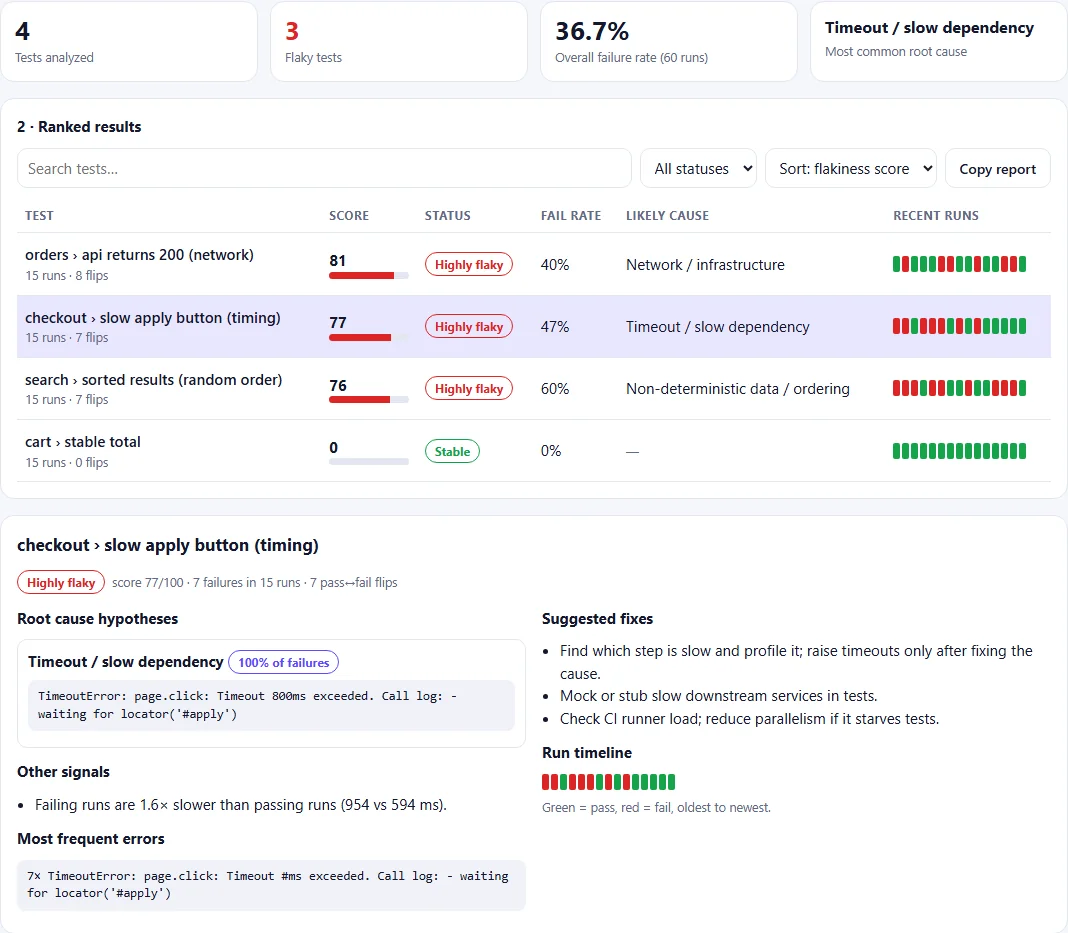
The ZIP includes a small Playwright suite that is flaky on purpose, so you can see FlakeScope work on real test output. One button appears after a random delay while the test waits only 800 ms; a mocked API sometimes answers 503; a list comes back in random order.
test('checkout › slow apply button (timing)', async ({ page }) => {
  // The button appears after a random delay, but the test only waits 800 ms.
  const delay = Math.floor(Math.random() * 1500);
  await page.setContent(`<script>setTimeout(() => {
      const b = document.createElement('button'); b.id = 'apply'; b.textContent = 'Apply';
      document.body.appendChild(b); }, ${delay});</script>`);
  await page.click('#apply', { timeout: 800 });
});

test('orders › api returns 200 (network)', async ({ page }) => {
  // A fake API that sometimes answers 503, like an unstable staging server.
  await page.route('**/api/orders', route =>
    route.fulfill({ status: Math.random() < 0.3 ? 503 : 200, body: '[]' }));
  await page.setContent('<p>orders</p>');
  const status = await page.evaluate(() =>
    fetch('http://flakescope.local/api/orders').then(r => r.status));
  expect(status, 'GET /api/orders returned 503 Service Unavailable').toBe(200);
});
npm run demo runs every test 15 times with --repeat-each=15, saves the JSON report and converts each attempt into one CSV row:
function walk(suite, prefix) {
  for (const spec of suite.specs || []) {
    for (const t of spec.tests || []) {
      for (const r of t.results || []) {
        if (r.status === 'skipped') continue;
        const ok = r.status === 'passed';
        rows.push([spec.title, ok ? 'pass' : 'fail', r.duration,
          ok ? '' : clean(r.error && r.error.message), t.projectName || 'local', r.startTime]);
      }
    }
  }
  for (const s of suite.suites || []) walk(s, prefix);
}
Regex rules are checked on the error text, so wording matters. In our first demo run the random-order message contained the word "unordered", which also matches the order clue of the shared-state rule, and the tie went to the rule listed first. Keep error messages specific, and order your rules from most to least specific.
19Test your project
Manual checks from the guide:
- Click Load sample: a ranked table should appear.
- Paste a tiny CSV with only a header and check that nothing crashes.
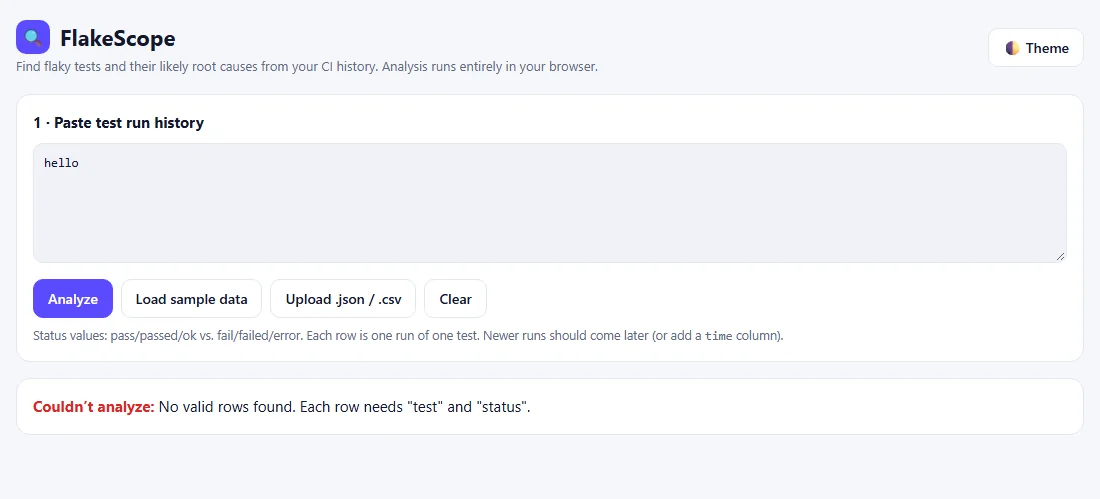
- Paste broken text such as
helloand check that an error message appears. - Resize the browser to phone width and check that the table scrolls sideways inside its box.
- Press F12 and open the Console tab. Red messages there show mistakes in your JavaScript.
The ZIP also has automated Playwright tests (tests/flakescope.spec.js) that run on a desktop viewport and a 390 px mobile viewport: sample data, the worked example, JSON input, the detail panel, search and filter, error messages, HTML escaping, no horizontal scroll, the starter version and the browser demo.
test('worked example from the guide: P F P F P scores 100', async ({ page }) => {
  await page.setInputFiles('#file', path.join(SAMPLES, 'small-example.csv'));
  const row = page.locator('tr[data-n="login"]');
  await expect(row.locator('td:nth-child(2) b')).toHaveText('100');
  await expect(row.locator('.badge')).toHaveText('Highly flaky');
  await expect(row).toContainText('40%');
  // One failure says "Timeout", the other "not interactable". It is a tie, so the
  // rule that comes first in RULES (Async / race condition) is shown.
  await expect(row).toContainText('Async / race condition');
});20Run, share and keep it safe
- Run locally: double-click
index.html. - Share on your network: run
python -m http.server 8000in the folder and openhttp://localhost:8000/index.html. - Publish: upload the file to GitHub Pages, Netlify or any static host to get a public link.
Safety: every piece of text from your data goes through esc() before it is displayed, so error messages cannot run scripts. Keep using esc() if you add new output. Because nothing leaves the browser, it is also safe to analyze private CI logs.
21Limitations and future scope
- Root causes come from keyword rules, so unusual error messages show as Unclassified until you add a rule.
- Very large files (hundreds of thousands of rows) may feel slow in a browser.
- Results are not stored between visits. Use Copy report or a screenshot.
- Future ideas: an optional LLM explanation of unclassified errors, reading JUnit XML directly in the browser, trend charts per week, and a CI step that fails the build when a new test becomes highly flaky.
22How to run the source code
Download the ZIP above, unzip it and follow these steps in a terminal inside the project folder.
- 1Download and unzip
unzip flaky-test-root-cause-analyzer-project-source-code.zipOr right-click the ZIP and choose Extract All.
- 2Open the app
start index.htmlOr just double-click index.html (macOS: open index.html). Then click Load sample data.
- 3Install test dependencies
npm installInstalls @playwright/test only. Needs Node.js 18+.
- 4Install the Chromium browser for Playwright
npx playwright install chromium - 5Run the Playwright tests
npm testExpected: 22 passed (desktop and 390 px mobile).
- 6Create a real flaky history
npm run demoRuns the flaky demo 15 times per test and writes demo/flaky-history.csv. Upload it in the app.
- 7Convert JUnit reports (optional)
python tools/junit2csv.py samples/junit/run-*.xml > history.csv
Ran successfully · checked 2026-11-18 on Node 22.23 / npm 10.5, Python 3.12, Playwright 1.64 (Chromium) on Windows 11
- Opened index.html (the original FlakeScope file) in Chromium: sample data gives 11 tests, 330 runs, 23.0% failure rate
- npm test — 22 passed (11 tests × desktop and 390 px mobile), on a fresh copy of the ZIP folder
- npm run demo — 60 real Playwright runs (4 tests × 15); FlakeScope flagged the network, timing and random-order tests as highly flaky and the stable test as Stable
- python tools/junit2csv.py samples/junit/run-*.xml — 12 rows, skipped test ignored
- Browser demo in an iframe sandbox="allow-scripts" at 1100 px and 360 px: verdicts correct, bad-input error OK, no console errors, no horizontal scroll
The app is the bundle's original single file, unchanged. The Playwright tests, flaky demo, converters for Playwright JSON and the samples were added by us; the JUnit converter is from the documentation.
23Troubleshooting
Message: "Nothing to analyze" or "No valid rows found"
The text box is empty, or rows are missing test and status. Check that the first CSV line has the right column names (test,status,...).
Every test shows Stable
No row has a fail status. Check the spelling of your status values: fail, failed or error count as failures.
Likely cause shows Unclassified
The error column is empty or the messages match no rule. Add error text to your data or add a custom rule to the RULES array.
The same test appears twice
The names differ slightly (extra space or different capital letters). Make them identical in every run.
npm test fails with "Executable doesn't exist"
Playwright's browser is not installed. Run npx playwright install chromium, then npm test again.
Copy report does nothing
Your browser blocked clipboard access. The tool shows the report in a text box instead; select all and copy.
24Interview questions on this project
Practice questions an interviewer or viva examiner may ask about this project.
What is a flaky test?
A test that passes and fails on the same code without any change. Common causes are timing and race conditions, unstable networks, shared test data, time or timezone dependence and random data.
How is a flaky test different from a broken test?
A broken test fails every run, so it points to a real bug or a wrong test. A flaky test flips between pass and fail. FlakeScope separates them by looking at flips, not only the failure rate.
How does FlakeScope calculate the flakiness score?
It combines the flip rate (result changes between neighbouring runs) and balance 4·p·(1−p), where p is the failure rate: score = 100 × min(1, 0.75 × flip rate + 0.4 × balance).
How do you find flaky tests in Playwright?
Run the suite many times with --repeat-each, check the HTML report's 'flaky' status when retries are on, and analyze history across CI runs. Our demo uses --repeat-each=15 plus a JSON report.
Should you just add retries for flaky tests?
Retries can keep CI green short-term, but they hide the problem. Track tests that pass only on retry, find the root cause and fix it, for example by replacing fixed sleeps with web-first assertions.
How do you fix a timing-related flaky test in Playwright?
Avoid waitForTimeout. Use auto-waiting locators and web-first assertions like expect(locator).toBeVisible(), wait for a specific network response, and mock slow services.
Why use regular expressions for root cause detection?
Error messages follow recognizable patterns (Timeout ... exceeded, ECONNRESET, duplicate key). Regex rules are fast, explainable, work offline and are easy to extend, though they can miss unusual wording.
How did you keep the tool safe from malicious input?
All text from the data is passed through an esc() function before it is inserted as HTML, so a test name like <img onerror=...> is shown as text. A Playwright test checks this.
25Put it on your resume
Resume points
- Built FlakeScope, a browser-based flaky test root cause analyzer in vanilla JavaScript that scores tests 0–100 from CI history and maps failures to 8 root causes
- Wrote Playwright end-to-end tests (22 checks on desktop and mobile viewports) covering parsing, scoring, filters, error handling and XSS escaping
- Created converters for JUnit XML (Python) and Playwright JSON reports (Node.js) to feed real CI results into the analyzer
- Reproduced flaky behaviour with a Playwright demo suite run with --repeat-each and used the analyzer to classify timing, network and ordering failures
Ideas to extend it
- Read JUnit XML and Playwright JSON reports directly in the browser (no converter step)
- Add weekly trend charts per test on a <canvas> to show whether a fix really helped
- Run the analyzer in CI with Node and fail the pipeline when a new test becomes highly flaky
- Add an optional LLM explanation for Unclassified errors (keep the rule engine as the default)
- Quarantine list: export flaky tests as a Playwright grep pattern to skip them while they are being fixed
Uncodemy course
Turn this project into a job-ready skill
This project uses the skills taught in Uncodemy's Playwright course: web-first assertions and auto-waiting, running tests with --repeat-each, reading test reports and building stable suites. The Software Testing course adds the test design, defect analysis and CI practice you need to explain flaky failures in interviews. Trainers can review your FlakeScope build during a free demo class.
- Duration2.5–3 months
- Training60+ hours
- Modules8 modules
- ProjectsGuided automation projects + 1 capstone
What you learn in the Playwright Automation Testing Course
- Test Automation & Playwright Fundamentals
- JavaScript/TypeScript Essentials for Automation
- Locators, Selectors & Page Object Model
- Web Element Interactions & Assertions
- API Testing with Playwright (APIRequestContext)
- Cross-Browser & Parallel Execution
- CI/CD with GitHub Actions
- Capstone Project & Interview Preparation
Uncodemy Certificate · Uncodemy Agile Certificate · Module Completion Certificate · Dedicated Placement Support · Classroom in Noida & Delhi or live online
Learn Playwright with a free demo class
- See how the trainer explains a real project like this one
- Get your setup or code doubts cleared live
- Understand the course plan, batches and Dedicated Placement Support
“Joining Uncodemy was one of the best decisions of my career. The mentors provided great hands-on training and the placement team guided me through every step, helping me land my role as an Automation Test Engineer.”
Abhinav Pandey, DXC Technology
“Uncodemy played a key role in shaping my IT career. The practical training, real-world projects, and mentor support gave me the confidence to excel and secure my role as an Automation Tester.”
Sahil Siddique, Hewlett Packard Enterprise
“Uncodemy played a vital role in helping me build a strong foundation in automation testing. The mentors provided excellent guidance, and the practical sessions made complex topics easy to understand.”
Vivek Tripathi, Zensar Technologies
From Uncodemy learner stories. Individual results vary.
26Frequently asked questions
Is my test data uploaded anywhere?
No. All analysis runs inside your browser. Closing the tab removes everything, so it is safe to analyze private CI logs from your company or college project.
Does FlakeScope use real AI?
No. It uses rule-based analysis: statistics (flip rate and failure balance) plus regular expressions on error messages. It does not call a language model, so results are free, offline and repeatable.
What causes flaky tests in Playwright?
Mostly fixed waits instead of web-first assertions, actions on elements that are not ready, unstable test servers or APIs, shared data between tests, timezone or date logic, and parallel workers fighting for the same resources.
How many runs do I need for a reliable result?
At least 10 runs per test is a good start, and more is better. With only 2 or 3 runs the tool cannot tell a real pattern from chance.
How do I run a Playwright test multiple times to check flakiness?
Use npx playwright test --repeat-each=20 (optionally with -g to pick one test). Save a JSON report and convert it with tools/pw-json-to-csv.js, as the npm run demo script in the ZIP does.
Can I use this as a final-year or resume project?
Yes. It is small enough to explain fully, includes automated Playwright tests, and solves a real QA problem. Extend it with one of the listed ideas to make it your own.
Why is a test with only one failure not called flaky?
One failure may be bad luck. FlakeScope still marks it Mildly flaky so you can watch it, and it marks tests that fail every run as Consistently failing.
More free projects
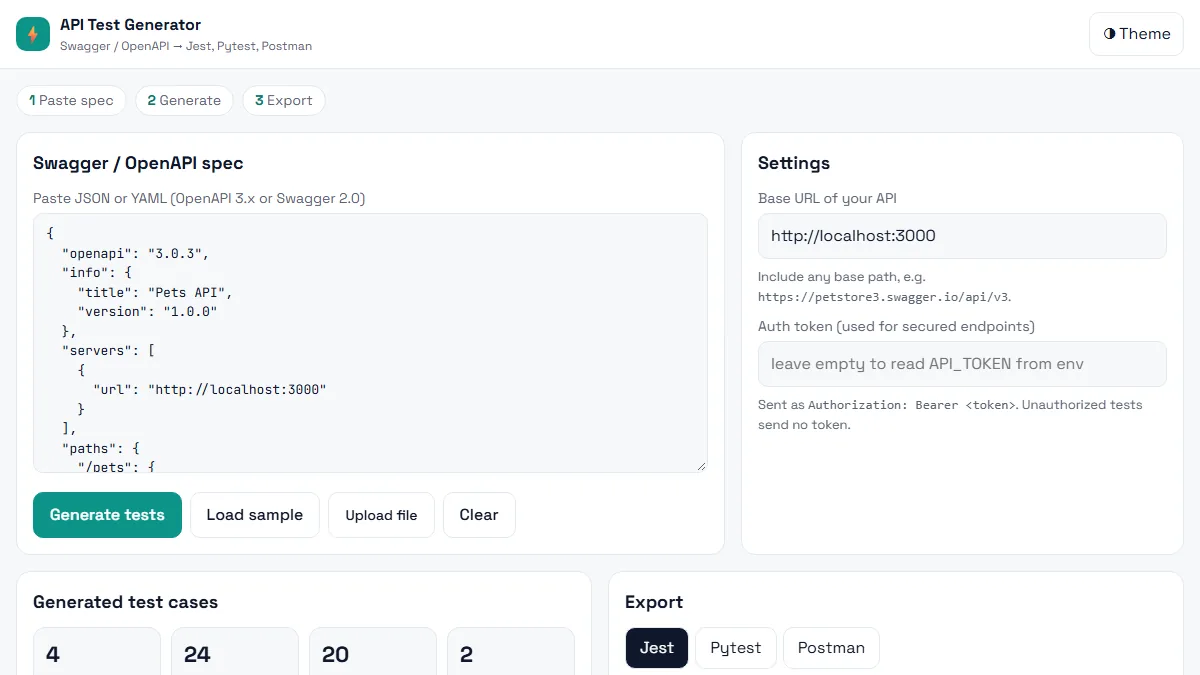 Testing · BeginnerAI API Test Generator
Paste a Swagger / OpenAPI spec and get positive, negative and boundary API tests in Jest, Pytest or Postman in seconds.
HTML5 · CSS3 (Grid, Flexbox, variables) · Vanilla JavaScript (ES6+)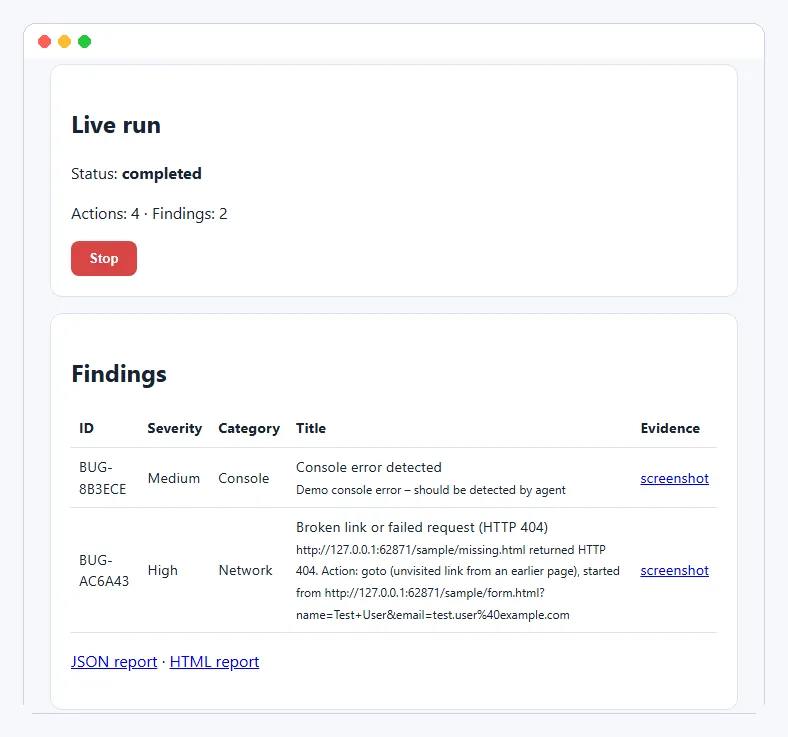 Testing · IntermediateAI Exploratory Testing Agent
A browser agent that explores your web app on its own, finds evidence-backed bugs and writes the report for you.
Python 3.11+ · Playwright (Chromium) · FastAPI Testing · IntermediateAI TestLab
Automatically test chatbot answers for correctness, hallucinations, safety and speed – and catch regressions before users do.
Node.js 20+ · JavaScript · Node http server (no Express)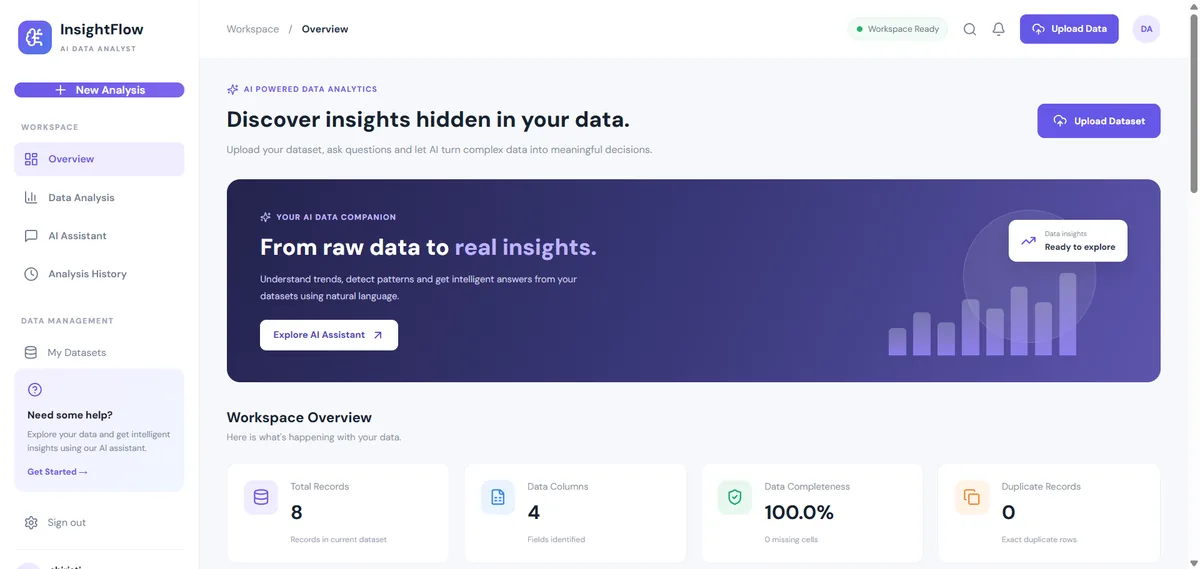 Data & AI · IntermediateAI Data Analyst Agent
Upload a CSV or Excel file, get an instant data-quality report and ask questions about your data. No API key needed.
React 18 · Vite · Node.js Data & AI · IntermediateAI Sales Forecasting Copilot
Forecast monthly sales you can actually explain — and ask questions answered only from your own data.
React · TypeScript · Vite Data & AI · AdvancedLoRA Studio
Upload a dataset, fine-tune a small open model with LoRA, watch the loss fall live and compare base vs fine-tuned answers.
React 18 · Vite · RechartsThis project is shared for learning. The code is provided as is; read it, run it and change it. Do not commit real API keys: use the .env.example file. Interview questions are practice questions, not a record of any company's interviews.