






Data and AI project · Intermediate · 2–3 days
MCP Server for Database Querying: Python + MySQL Project
Let an AI assistant ask your database questions through five safe, read-only tools.
- Python
- MCP Python SDK (FastMCP)
- MySQL 8
- SQLAlchemy 2
- PyMySQL
- sqlglot
- pytest
- 17
- chapters in the guide
- 09
- steps to run it
- 36
- files in the ZIP
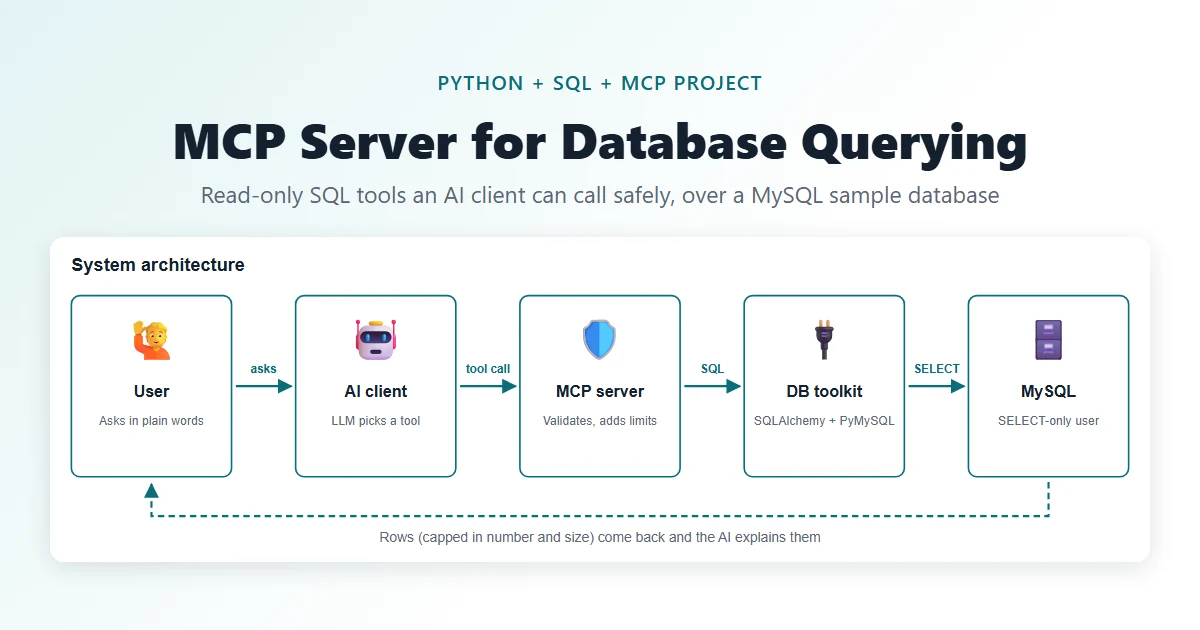
Tested 18 Nov 2026Automated tests: 27 passed
Free ZIP, 0.07 MB36 files, no keys inside
mcp-server-database-query-project-source-code.zip0.07 MB · 36 files · clean code, no keys inside · .env.example included
01What you will build and learn
This project builds a Model Context Protocol (MCP) server in Python that gives an AI assistant five read-only tools over a MySQL sample database. The server validates every SQL query, uses a SELECT-only user and caps results. It suits students who know basic Python and SQL and want a practical AI + data project.
You will build
- A Python MCP server (FastMCP, stdio) with five tools: list_tables, describe_table, query_database, get_table_sample, get_database_stats
- A MySQL sample database (customers, products, orders, order_items) with keys, indexes and fictional data
- A SELECT-only MySQL user and a sqlglot-based SQL validator with a table allowlist
- Bounded query execution: bound parameters, row cap, response-size cap, execution timeout and safe errors
- 27 pytest validation tests and an MCP client smoke test that calls every tool
Skills you practise
- MCP concepts: client, server, tools, stdio transport
- SQL: SELECT, JOIN, GROUP BY, keys and indexes
- Python packaging, virtual environments and .env settings
- SQLAlchemy Core and the PyMySQL driver
- Defensive design: allowlists, least-privilege users, parameterised queries
- Writing pytest tests for security rules
Before you start
- Python 3.10 or newer
- MySQL 8 installed and running
- Basic SQL (SELECT, WHERE, JOIN, GROUP BY)
- Comfort with the terminal and virtual environments
- Optional: an MCP client such as Claude Desktop, or Node.js for the MCP Inspector
Live demo in HTML, CSS and JavaScript
02MCP database tool-call simulator — try it in your browser
This demo runs the same five tools in your browser on an in-memory copy of the sample data. Pick an example or edit the JSON tool call that an AI client would send, and see the result table or the refusal. It is a simplified version: it understands one-table SELECTs and uses regex checks, while the real server parses SQL with sqlglot and runs it on MySQL with a read-only user.
Result
Edit any tab and press Run. This is a simplified browser version of the project for learning; the full project is in the ZIP.
How the demo works
- The four sample tables (customers, products, orders, order_items) are stored as small JavaScript arrays copied from database/seed.sql.
- Each example builds a tool call like {"tool": "query_database", "arguments": {...}}, the same shape an AI client sends to the MCP server.
- validateSelect() refuses anything that is not one SELECT on an approved table: DELETE, two statements, mysql.user, INTO, @variables and SLEEP are blocked before anything runs.
- runSelect() executes a simple one-table SELECT with WHERE, GROUP BY, ORDER BY and LIMIT; :name placeholders are filled from parameters, never pasted into the SQL.
- Results come back as columns, rows, row_count and truncated, with a row cap, just like database.py.
- Like the server's safe() wrapper, errors become short messages and the log stores only the tool name, status and time.
03Project overview
An MCP server exposes five controlled, read-only database tools. An AI client picks a tool; the server validates the request and returns a limited number of rows.
MCP (Model Context Protocol) is a protocol and does not write SQL. The LLM inside the client interprets your question; this server never trusts the SQL it receives. It checks every request before anything touches MySQL.
- Goal: learn MCP, SQL, Python, SQLAlchemy and defensive (security-first) design.
- Use cases: approved analytics questions, data exploration, internal helpers.
- Data: a small fictional online-shop database called
company_analytics(5 customers, 5 products, 6 orders, 9 order items).
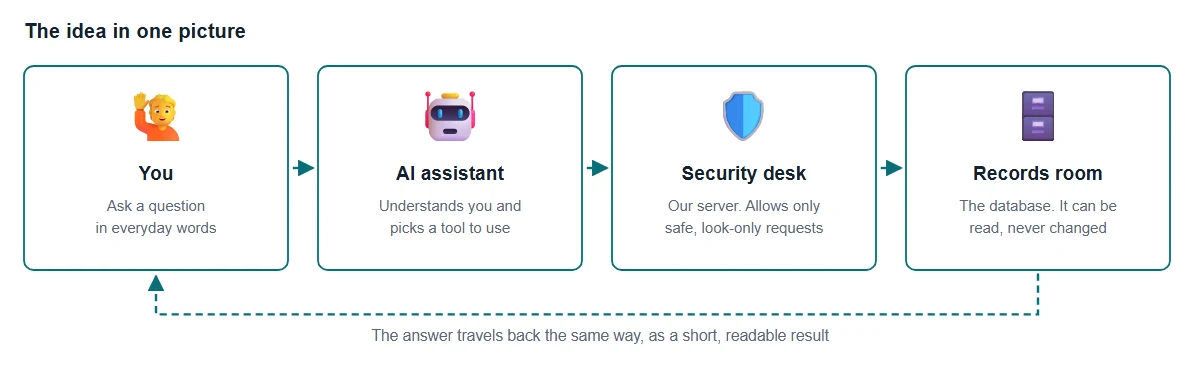
Think of a library with a very careful front desk. You ask a helper (the AI assistant) a question in everyday words. The helper goes through our security desk (the server), which only allows look-only questions about approved lists. The records room (the database) hands back just what was asked, and the helper explains it to you.
04What happens to one question
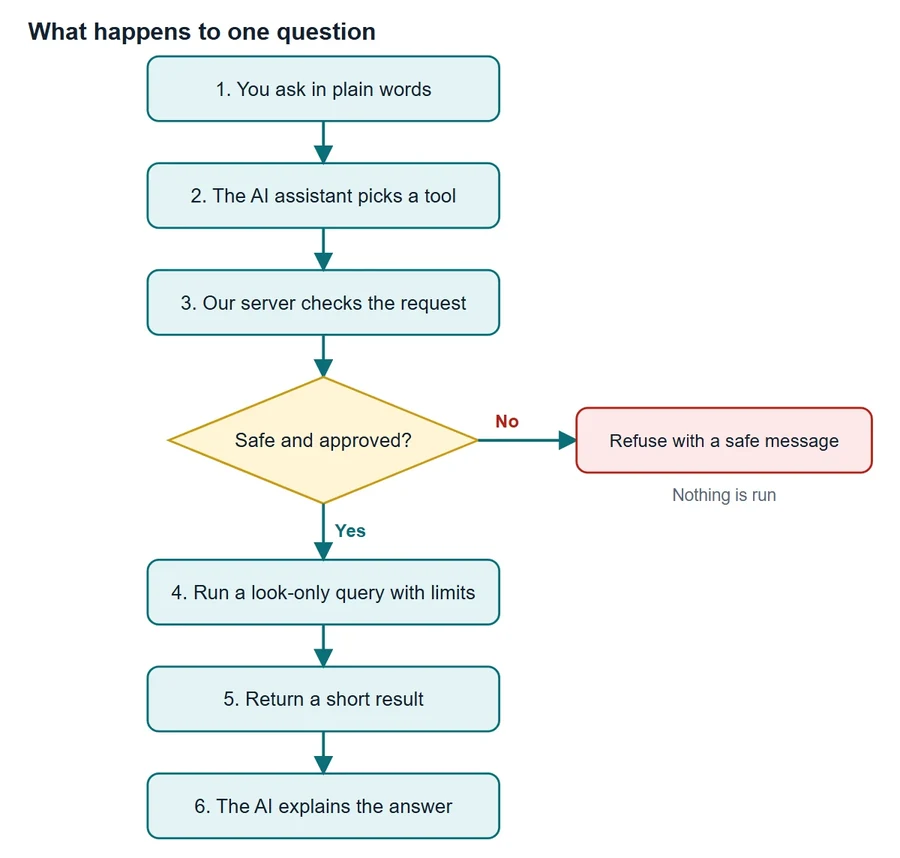
Every question follows the same path. If a request looks risky, such as trying to change or delete information, it is refused and nothing is run. Safe requests run with limits on time and on how many rows come back.
05Architecture
Five parts work together. The AI client understands your question; our MCP server is the only door to the database and checks every request.
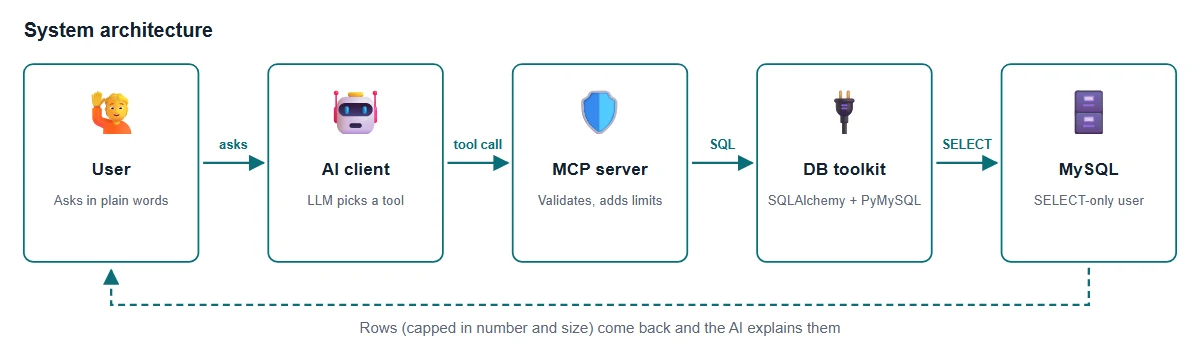
| Part | What it does |
|---|---|
| User | Asks in everyday language. Never touches the database directly. |
| AI client | An MCP-compatible app. Its LLM reads the tool list and picks a tool and arguments. |
| MCP server | Our Python program. Checks the request, applies limits and returns safe errors. |
| DB toolkit | SQLAlchemy runs the query through the PyMySQL driver, with timeouts and a small connection pool. |
| MySQL | Stores the data. The server logs in as a SELECT-only user. |
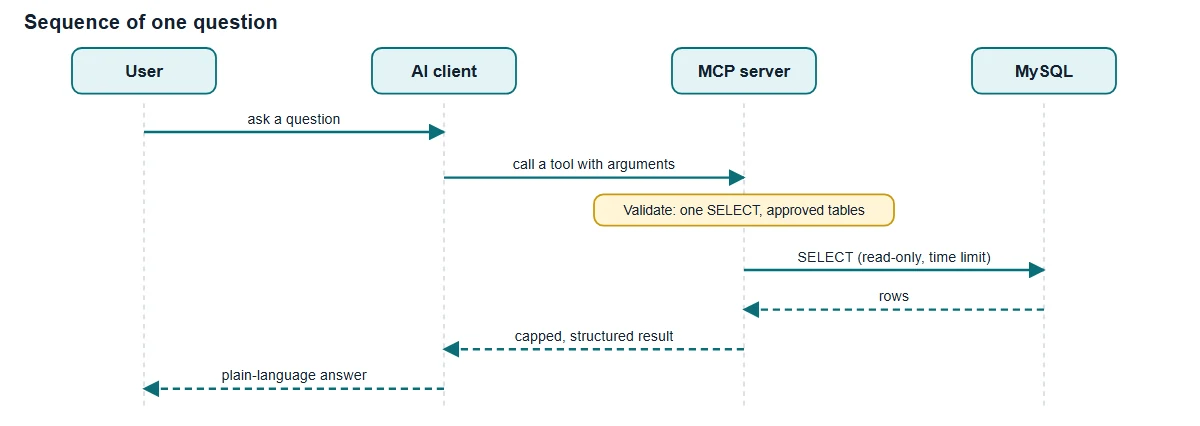
- The user asks; the client hands the question to its LLM.
- The client calls a tool on the server with arguments.
- The server validates before anything touches MySQL.
- Only a validated SELECT is sent, with a time limit.
- MySQL returns rows; the server caps them and returns structured data; the client explains it.
06Tech stack
| Part | Role | Alternative |
|---|---|---|
| Python 3.10+ | Backend language | Node.js / TypeScript |
| MCP Python SDK (FastMCP) | Protocol and tool registration | Hand-written protocol (not advised) |
| MySQL 8 | Data store | PostgreSQL, SQLite |
| SQLAlchemy 2 + PyMySQL | Connections and query execution | Driver only |
| sqlglot | SQL parsing for validation | sqlparse (weaker structure) |
| pytest | Validation tests | unittest |
| HTML/CSS/JS | The included learning website | React (not needed) |
Official docs: modelcontextprotocol.io, SQLAlchemy docs, MySQL docs.
07Database design (ER diagram)
The sample database company_analytics models a small online shop. All people and values are fictional.
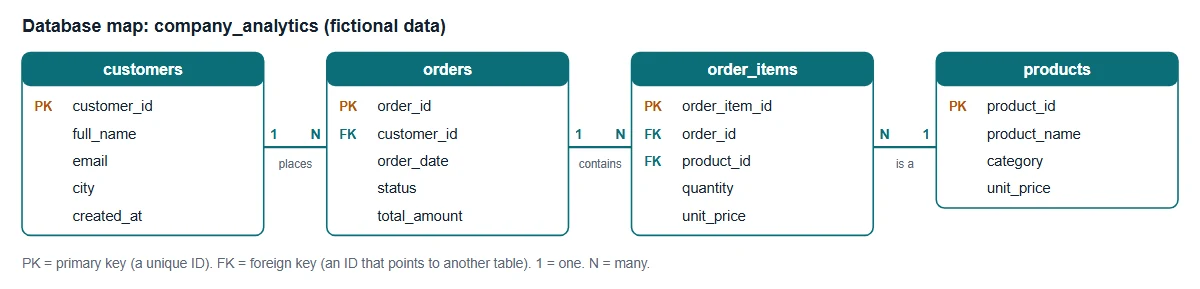
| Table | Meaning | Columns |
|---|---|---|
customers | People who buy | PK customer_id, full_name, email (unique), city, created_at |
products | Things for sale | PK product_id, product_name, category, unit_price |
orders | One purchase by one customer | PK order_id, FK customer_id, order_date, status, total_amount |
order_items | One product line inside an order | PK order_item_id, FK order_id, FK product_id, quantity, unit_price |
A primary key (PK) uniquely identifies a row. A foreign key (FK) points to a row in another table. Indexes on city, category, customer, date and the foreign keys speed up lookups. Example question: total spend per customer.
SELECT c.full_name, SUM(o.total_amount) AS spent
FROM customers c JOIN orders o ON o.customer_id = c.customer_id
GROUP BY c.full_name ORDER BY spent DESC;08The five MCP tools
| Tool | Input | Output |
|---|---|---|
list_tables | none | approved table names |
describe_table | table_name | column names, types, nullability |
query_database | sql, parameters | columns, rows, row_count, truncated |
get_table_sample | table_name, limit (1–50) | sample rows |
get_database_stats | none | row count per table |
Small, well-named tools with clear docstrings help the client's LLM choose the right one. The docstring of each Python function becomes the tool description the AI reads.
09Folder structure
mcp-server-database-query-project/
├── .env.example              settings template (copy to .env)
├── README.md                 setup for macOS / Linux and Windows
├── PREREQUISITES.md          what to learn and install, every command, common errors
├── backend/
│   ├── app/
│   │   ├── server.py         MCP entry point, tool registration, logging
│   │   ├── config.py         .env settings, approved tables
│   │   ├── database.py       engine, timeout, row and size caps
│   │   ├── security.py       SQL validation (sqlglot)
│   │   └── tools/            metadata.py, query.py
│   ├── tests/test_security.py  27 validation tests
│   ├── smoke_test.py         calls every tool through a real MCP client
│   ├── requirements.txt
│   └── pytest.ini
├── database/
│   ├── schema.sql            4 tables with keys and indexes
│   ├── seed.sql              fictional sample rows
│   └── create_readonly_user.sql  SELECT-only MySQL user
├── browser-demo/index.html   no-install browser demo
└── website/ learning site (diagrams, glossary, code viewer)10Step 1: Create the database and a read-only user
Create the four tables, load the fictional rows, then create a MySQL user that can only run SELECT. This user is the main safety boundary: even if validation missed something, MySQL itself refuses writes.
CREATE DATABASE IF NOT EXISTS company_analytics;
USE company_analytics;
DROP TABLE IF EXISTS order_items; DROP TABLE IF EXISTS orders;
DROP TABLE IF EXISTS products; DROP TABLE IF EXISTS customers;
CREATE TABLE customers (
  customer_id INT AUTO_INCREMENT PRIMARY KEY,
  full_name VARCHAR(100) NOT NULL, email VARCHAR(150) NOT NULL UNIQUE,
  city VARCHAR(80), created_at DATE NOT NULL, INDEX idx_customers_city (city));
CREATE TABLE products (
  product_id INT AUTO_INCREMENT PRIMARY KEY,
  product_name VARCHAR(120) NOT NULL, category VARCHAR(60) NOT NULL,
  unit_price DECIMAL(10,2) NOT NULL, INDEX idx_products_category (category));
CREATE TABLE orders (
  order_id INT AUTO_INCREMENT PRIMARY KEY, customer_id INT NOT NULL,
-- ... orders and order_items follow (see database/schema.sql)
-- Run as a MySQL admin. Replace the password, and use the same value in .env.
CREATE USER IF NOT EXISTS 'mcp_readonly'@'localhost' IDENTIFIED BY 'change_me';
GRANT SELECT ON company_analytics.* TO 'mcp_readonly'@'localhost';
FLUSH PRIVILEGES;Replace change_me with your own password before running the file, and put the same password in .env. Never connect the server with root or any account that can write.
In our test run, DELETE FROM orders as mcp_readonly failed with MySQL error 1142 (DELETE command denied), which is exactly what we want.
11Step 2: Load settings from .env
Passwords and limits live in a private .env file, never in code. config.py also holds the allowlist of tables the server may expose.
"""Settings loaded from environment variables / .env (never hard-coded)."""
import os
from dataclasses import dataclass
from pathlib import Path
from dotenv import load_dotenv

load_dotenv(Path(__file__).resolve().parents[2] / ".env")  # project-root .env

# Tables the server may expose. Anything else is rejected.
APPROVED_TABLES = frozenset({"customers", "products", "orders", "order_items"})
DB_HOST=127.0.0.1
DB_PORT=3306
DB_NAME=company_analytics
DB_USER=mcp_readonly
DB_PASSWORD=change_me
MAX_ROWS=100
MAX_RESPONSE_CHARS=100000
QUERY_TIMEOUT_SECONDS=5Meet the Data Analytics trainers
Stuck on a step of this project? These are the Uncodemy trainers who teach these skills in live classes. Book a free demo class and ask them your doubts directly.
 Ms. Rachna VermaData Analyst at GvCloud Secure (ex-Concentrix, ex-Test Yantra) · 4+ years
Data analyst at GvCloud Secure, earlier with Concentrix and Test Yantra, who builds Power BI dashboards and SQL reports. She teaches Power BI, DAX, SQL and Python in simple, beginner-friendly steps.
Power BIDAXSQLPostgreSQL Mr. Anshul GautamAcademic Faculty & Top Mentor at Uncodemy · 5+ years
Certified data scientist with a B.Tech in Computer Science who teaches data science and analytics at Uncodemy. His past roles include data analyst team lead at Amazon and data scientist at Tech Mahindra, working on credit risk analytics.
PythonSQLExcelPower BI Mr. Syed NajeebSenior Business Intelligence Analyst at Air India · 7+ years
Senior Business Intelligence Analyst in Air India's Customer Experience division, where he uses statistics, deep learning and NLP to improve customer experience. He teaches Python, Power BI, Tableau and SQL with live BI dashboards and real case studies.
PythonPower BITableauSQL & RDBMS12Step 3: Validate SQL with sqlglot
The AI client writes the SQL, so the server treats it as untrusted input. security.py parses it with sqlglot (MySQL dialect) and accepts only one plain SELECT on approved tables.
BLOCKED_FUNCS = {"SLEEP", "BENCHMARK", "LOAD_FILE", "GET_LOCK", "RELEASE_LOCK"}
MAX_SQL_CHARS = 5000


def validate_select(sql: object, allowed: frozenset[str]) -> None:
    """Raise QueryRejected unless `sql` is exactly one safe SELECT on approved tables."""
    if not isinstance(sql, str) or not sql.strip():
        raise QueryRejected("sql must be a non-empty string.")
    if len(sql) > MAX_SQL_CHARS:
        raise QueryRejected("SQL is too long.")
    try:
        stmts = [s for s in sqlglot.parse(sql, read="mysql") if s is not None]
    except SqlglotError:
        raise QueryRejected("SQL could not be parsed.") from None
    if len(stmts) != 1:
        raise QueryRejected("Exactly one statement is allowed.")
    tree = stmts[0]
    if not isinstance(tree, exp.Select):
        raise QueryRejected("Only a single SELECT statement is allowed.")
    if tree.find(exp.Into, exp.Lock, exp.Parameter, exp.SessionParameter):
        raise QueryRejected("INTO, locking clauses and variables are not allowed.")
    ctes = {c.alias_or_name.lower() for c in tree.find_all(exp.CTE)}
    for t in tree.find_all(exp.Table):
        if t.db or t.catalog:
            raise QueryRejected("Schema-qualified tables are not allowed.")
        if t.name.lower() not in allowed | ctes:
            raise QueryRejected("Table is not in the approved list.")
    for f in tree.find_all(exp.Func):
        fname = (f.name if isinstance(f, exp.Anonymous) else f.sql_name()).upper()
        if fname in BLOCKED_FUNCS:
raise QueryRejected(f"Function {fname} is not allowed.")- One statement only, so
SELECT 1; DROP TABLE ordersis refused. - The root must be a
SELECT: INSERT, UPDATE, DELETE, DROP, ALTER and UNION are refused. - No
INTO OUTFILE,FOR UPDATElocks or@variables. - Every table must be in the allowlist (CTE names are allowed); schema-qualified names like
mysql.userare refused. - Functions such as
SLEEPandBENCHMARKare blocked.
13Step 4: Run the query with limits
database.py runs the validated SELECT in a read-only session with a MySQL execution time limit, fetches at most MAX_ROWS + 1 rows (to know if there were more), and stops when the response grows too large. Errors become short, safe messages.
    def run(self, sql: str, params: dict[str, Any] | None = None) -> dict[str, Any]:
        """Execute one SELECT with timeout, row cap and response-size cap."""
        try:
            with self.engine.connect() as c:
                c.execute(text("SET SESSION TRANSACTION READ ONLY"))
                c.execute(text(f"SET SESSION MAX_EXECUTION_TIME={self.s.timeout_s * 1000}"))
                res = c.execute(text(sql), params or {})
                cols = list(res.keys())
                raw = res.fetchmany(self.s.max_rows + 1)
        except OperationalError:
            raise DatabaseError("Database is unavailable or the query timed out.") from None
        except SQLAlchemyError:
            raise DatabaseError("The query failed. Check table/column names and parameters.") from None
        truncated = len(raw) > self.s.max_rows
        rows: list[list[Any]] = []
        size = 0
        for r in raw[: self.s.max_rows]:
            row = [_plain(v) for v in r]
            size += len(json.dumps(row))
            if size > self.s.max_chars:
                truncated = True
                break
            rows.append(row)
        return {"columns": cols, "rows": rows, "row_count": len(rows), "truncated": truncated}
Values are passed as bound parameters (:city plus {"city": "Delhi"}), so they can never change the SQL structure. This is the standard defence against SQL injection.
14Step 5: Register the MCP tools
server.py creates a FastMCP server and registers five functions as tools. A safe decorator logs only the tool name, status and time (never the data) and turns any failure into a safe message.
def safe(fn):
    """Log name/duration/status only; convert failures into safe messages."""
    @functools.wraps(fn)
    def wrapper(*a, **kw):
        t0, status = time.perf_counter(), "ok"
        try:
            return fn(*a, **kw)
        except (QueryRejected, DatabaseError) as e:
            status = "rejected" if isinstance(e, QueryRejected) else "db_error"
            raise ValueError(str(e)) from None
        except Exception:
            status = "error"
            raise ValueError("Unexpected server error.") from None
        finally:
            log.info("tool=%s status=%s ms=%.0f", fn.__name__, status, (time.perf_counter() - t0) * 1000)
    return wrapper


@mcp.tool()
@safe
def list_tables() -> dict[str, Any]:
    """List the table names this server is allowed to expose."""
    return metadata.list_tables()


@mcp.tool()
@safe
def query_database(sql: str, parameters: dict[str, Any] | None = None) -> dict[str, Any]:
    """Run ONE read-only SELECT on approved tables. Use :name placeholders and pass values in parameters. Results are capped."""
    return query.query_database(db(), sql, parameters)
The database engine is created lazily, so the server starts even if MySQL is down, and mcp.run() uses the stdio transport: the client starts the server and talks to it over standard input and output.
15Testing: unit tests and an MCP client smoke test
backend/tests/test_security.py checks the validator without a database: valid SELECTs (including a JOIN and a CTE) pass, and INSERT, UPDATE, DELETE, DROP, ALTER, two statements, mysql.user, unknown tables, SLEEP, INTO OUTFILE, FOR UPDATE, broken SQL and bad limits are rejected.
cd backend
pytest -q
# 27 passed
We added backend/smoke_test.py: it starts the server with the official MCP Python client (the same stdio protocol a desktop AI app uses) and calls every tool against the sample database. Our real output (shortened):
Tools: list_tables, describe_table, query_database, get_table_sample, get_database_stats
[OK] list_tables {}
[OK] get_database_stats {}            -> customers 5, order_items 9, orders 6, products 5
[OK] describe_table {"table_name": "orders"}
[OK] get_table_sample {"table_name": "customers", "limit": 3}
[OK] query_database  revenue by category  -> Electronics 2035.00, Furniture 300.00, Stationery 70.00
[OK] query_database  orders by status     -> completed 4, shipped 1, pending 1
[OK] query_database  customers WHERE city = :city {"city": "Delhi"} -> Asha Example, Dev Test
[REFUSED] query_database {"sql": "DELETE FROM orders"}        Only a single SELECT statement is allowed.
[REFUSED] query_database {"sql": "SELECT * FROM mysql.user"}  Schema-qualified tables are not allowed.
[REFUSED] query_database {"sql": "SELECT SLEEP(10)"}          Function SLEEP is not allowed.
[REFUSED] get_table_sample {"table_name": "secrets"}          Table is not in the approved list.
With MySQL stopped, the tools return Database is unavailable or the query timed out. and no internal details.
16Connect an MCP client
Example for Claude Desktop. Replace the placeholders with your absolute paths; the config format varies by client and version, so check its docs.
{"mcpServers": {"company-analytics-db": {
  "command": "/ABS/PATH/mcp-server-database-query-project/.venv/bin/python",
  "args": ["-m", "app.server"],
  "env": {"PYTHONPATH": "/ABS/PATH/mcp-server-database-query-project/backend"}}}}
On Windows the command is C:\\ABS\\PATH\\mcp-server-database-query-project\\.venv\\Scripts\\python.exe. Credentials are read from the project .env, not from the client config. Restart the client fully; the five tools should appear.
To try the tools without an AI app, run the MCP Inspector from backend/ (needs Node.js): npx @modelcontextprotocol/inspector python -m app.server.
17Example questions and answers
| Question | Tool and arguments |
|---|---|
| What data is available? | list_tables |
| Show customers in Delhi | query_database: SELECT full_name FROM customers WHERE city = :c, {"c": "Delhi"} |
| How big is each table? | get_database_stats |
The server returns rows, not charts; an AI client can draw charts like these from those rows. The numbers below match what our test run returned from the sample data.
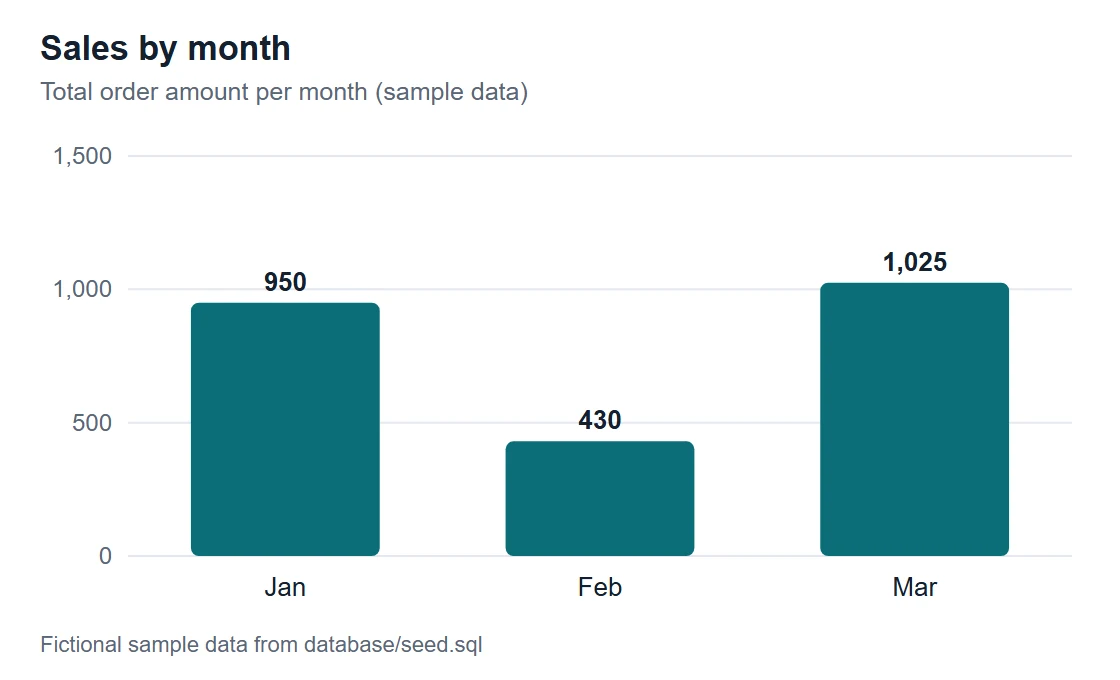
SELECT DATE_FORMAT(order_date, '%Y-%m') AS month, SUM(total_amount) AS revenue
FROM orders GROUP BY month ORDER BY month;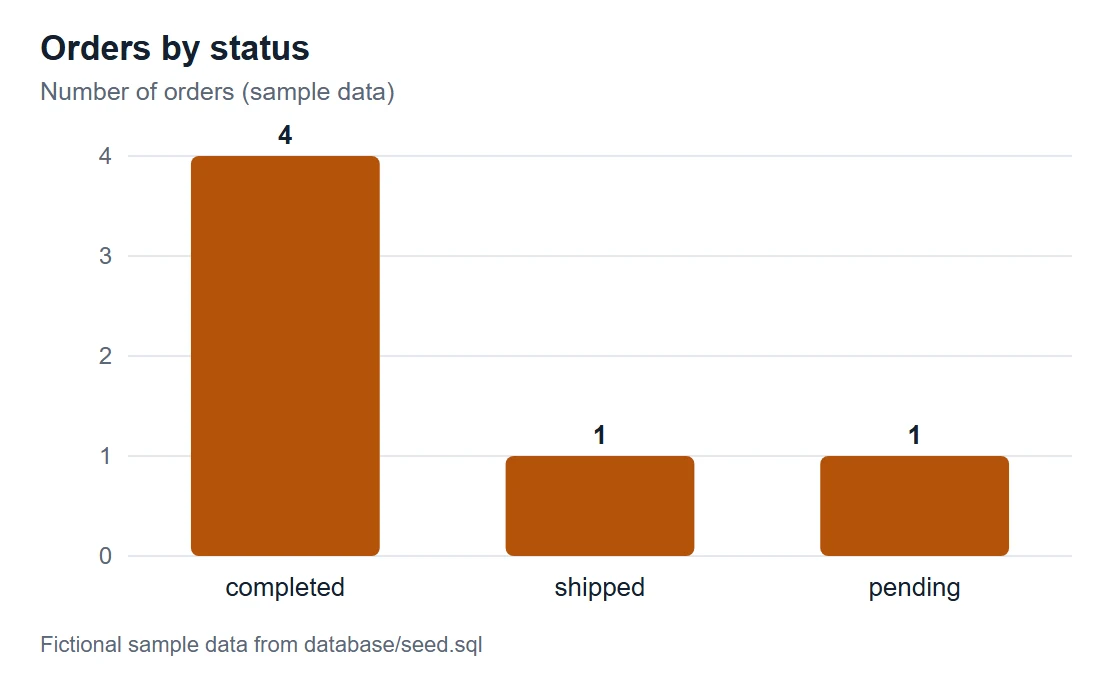
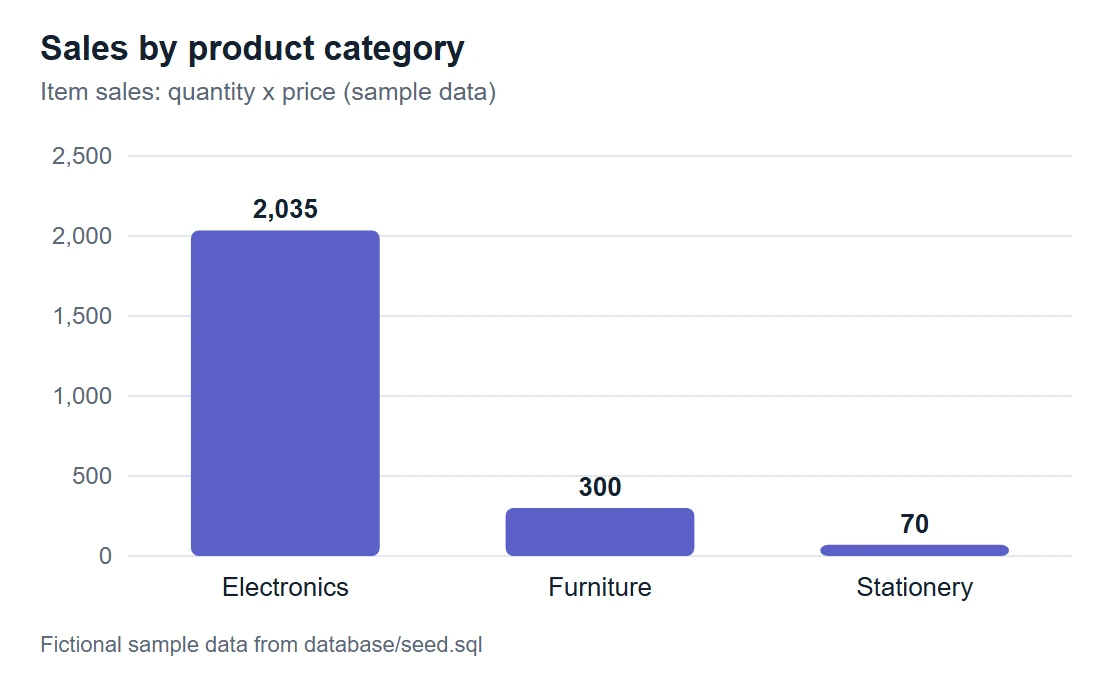
SELECT p.category, SUM(i.quantity * i.unit_price) AS revenue
FROM order_items i JOIN products p ON p.product_id = i.product_id
GROUP BY p.category ORDER BY revenue DESC;18Security design and limits
- SELECT-only MySQL user: the main boundary.
- Parser validation: one SELECT, approved tables, no INTO, locks, variables or SLEEP-style functions.
- Bound parameters, row cap, response cap, execution timeout.
- Safe errors; logs contain tool name, duration and status only.
- A parser and MySQL may disagree on unusual SQL, so database permissions stay the real safety net.
- Valid but heavy queries can still be slow; the timeout and row cap only limit the damage.
- Rows returned to a hosted LLM leave your machine. The sample data is fictional; review privacy rules before using real data.
19Advantages, disadvantages and alternatives
Advantages
- Easier data exploration: people ask approved questions in plain language instead of writing SQL for every need.
- One standard interface: different MCP-compatible AI clients can use the same server.
- Safer by design: a SELECT-only user, parser checks, row caps and timeouts reduce the chance of damage.
- Controlled access: only approved tables are exposed.
- Low cost: runs locally, no paid service, no model training.
Disadvantages
- The AI can be wrong: it may misread a question or pick the wrong tool, so check answers.
- Client support varies: setup steps and config formats differ by client and version.
- Maintenance: schema changes, new tables and permission updates need work.
Alternatives
| Alternative | Better when | Trade-off |
|---|---|---|
| SQL and a database GUI | Users know SQL and want full control | No natural language; skill needed |
| REST API | An app needs fixed, predictable endpoints | Every new question needs new code |
| Text-to-SQL web app without MCP | Only one app needs database access | Not reusable by other AI clients |
| BI dashboard | Teams need governed, repeatable reports | Less flexible for one-off questions |
| SQLite instead of MySQL | A tiny local demo with minimal setup | Fewer permission controls |
20How to run the source code
Download the ZIP above, unzip it and follow these steps in a terminal inside the project folder.
- 1Unzip and enter the project
cd mcp-server-database-query-projectThe folder has backend/, database/, browser-demo/, website/ and README.md.
- 2Create and activate a virtual environment
python3 -m venv .venv && source .venv/bin/activateWindows PowerShell: py -3 -m venv .venv; .\.venv\Scripts\Activate.ps1
- 3Install dependencies
pip install -r backend/requirements.txtInstalls mcp, SQLAlchemy, PyMySQL, python-dotenv, sqlglot and pytest.
- 4Create tables, sample data and the read-only user
mysql -u root -p < database/schema.sql
mysql -u root -p < database/seed.sql
mysql -u root -p < database/create_readonly_user.sql
First replace change_me in create_readonly_user.sql with your own password. On Windows PowerShell use: Get-Content database\schema.sql | mysql -u root -p
- 5Create your settings file
cp .env.example .envSet DB_PASSWORD to the same password (and DB_PORT if MySQL is not on 3306).
- 6Run the validation tests
cd backend && pytest -qExpect 27 passed. No database needed.
- 7Run the MCP client smoke test
python smoke_test.pyFrom backend/ with MySQL running. Calls all five tools and shows four refused unsafe requests.
- 8Start the server
python -m app.serverIt prints nothing and waits for an MCP client. Press Ctrl+C to stop.
- 9Connect an MCP client or the Inspector
npx @modelcontextprotocol/inspector python -m app.serverOr add the JSON config shown above to your AI client and restart it.
Ran successfully · checked 2026-11-18 on Python 3.12.5 + MySQL 8.0.42 on Windows 11 (mcp 1.30, SQLAlchemy 2.0.58, sqlglot 30.33)
- pip install -r backend/requirements.txt — OK
- pytest -q — 27 passed
- schema.sql, seed.sql, create_readonly_user.sql loaded; SELECT COUNT(*) FROM orders = 6; DELETE as mcp_readonly denied by MySQL (error 1142)
- python smoke_test.py (official MCP Python stdio client) — 5 tools listed, 7 calls OK, 4 unsafe calls refused
- MySQL stopped: tools return a safe 'Database is unavailable' message
- Browser demo tested with Playwright in a sandboxed iframe at 360px and 1000px — no console errors
Tested against a temporary local MySQL 8 instance with the official MCP Python client. A desktop AI client (e.g. Claude Desktop) and the MCP Inspector were not tested.
21Troubleshooting
ModuleNotFoundError: No module named 'app'
The command ran from the wrong folder. Run it from backend/, or set PYTHONPATH to the backend path.
No module named 'sqlglot' (or mcp, sqlalchemy, pytest)
The virtual environment is not active or the install was skipped. Activate .venv and run pip install -r backend/requirements.txt again.
Access denied for user 'mcp_readonly'
The password in .env differs from the one in create_readonly_user.sql. Make both match, then re-run create_readonly_user.sql as root.
Tool returns 'Database is unavailable'
MySQL is stopped, the host or port is wrong, or the query timed out. Start MySQL and check the DB_ values in .env (DB_PORT if MySQL is not on 3306).
The client shows no tools
Check the absolute python path and PYTHONPATH in the client config, save, then fully quit and reopen the client.
A query is rejected
The validator allows one SELECT on the four approved tables only. UNION, INTO, locks, variables and SLEEP are blocked. Rewrite it as one SELECT and pass values with :name placeholders.
22Interview questions on this project
Practice questions an interviewer or viva examiner may ask about this project.
What is MCP and what problem does it solve?
The Model Context Protocol is an open standard that lets AI clients discover and call tools and read data from servers in one common way, so one server can work with many compatible clients without custom integrations.
Does MCP generate SQL?
No. The client's LLM writes the SQL; MCP only carries the tool call. That is why the server must treat the SQL as untrusted input and validate it.
Why use a read-only database user if you already validate SQL?
Defence in depth. A parser can miss an edge case, but MySQL will still refuse any write because the user only has SELECT privilege. It limits damage even if validation fails.
Why parameterise queries?
Values travel separately from the SQL text, so they cannot change the query structure. This prevents SQL injection through values like a city name.
Why cap rows and response size?
Large results can exhaust memory, overflow the AI client's context window and expose more data than needed. Fetching MAX_ROWS + 1 rows also tells the client the result was truncated.
How does the validator block SELECT * FROM mysql.user?
sqlglot parses the query into a tree; every Table node is checked. A table with a schema (db) part is rejected, and any table not in the allowlist is rejected.
What happens if MySQL is down?
The engine is created lazily, so the server still starts. Tool calls catch the OperationalError and return a generic 'Database is unavailable' message without internal details.
What is the stdio transport?
The client launches the server as a child process and exchanges JSON-RPC messages over standard input and output. Logs must go to stderr so they do not corrupt the protocol stream.
23Put it on your resume
Resume points
- Built a read-only MCP server in Python (FastMCP, SQLAlchemy, PyMySQL) exposing 5 database tools to AI clients over stdio
- Designed a 4-table MySQL schema with keys and indexes, plus a least-privilege SELECT-only user
- Implemented sqlglot-based SQL validation (single SELECT, table allowlist, blocked functions) covered by 27 pytest tests
- Added bound parameters, row and response caps, execution timeouts and safe error handling; verified end-to-end with an MCP client smoke test
Ideas to extend it
- Add a PostgreSQL or SQLite backend behind the same five tools
- Return a chart-ready summary (labels and values) so the client can draw bar charts directly
- Add per-table column allowlists to hide sensitive columns such as email
- Add MCP resources that expose the schema and a prompt template for common business questions
- Log query cost (rows scanned via EXPLAIN) and reject queries above a threshold
- Package the server with Docker so it runs the same on every machine
Uncodemy course
Turn this project into a job-ready skill
This project runs on the SQL and Python skills taught in the Uncodemy Data Analytics course: writing SELECT, JOIN and GROUP BY queries, designing tables with keys, and using Python to work with data. The course helps you build these foundations with hands-on practice, so you can read the rows this server returns, check whether an AI-written query is correct, and turn results into charts and reports.
- Duration6–7 months
- Training120+ hours
- Modules9 modules
- Projects5 guided projects + 1 capstone
What you learn in the Data Analytics Course
- Excel for Data Analytics (Pivot Tables, Power Query)
- SQL & Database Management (joins, CTEs, window functions)
- Python for Data Analytics (NumPy, Pandas, Matplotlib, Seaborn)
- Statistics & Business Mathematics (hypothesis testing, A/B testing)
- Data Cleaning & Exploratory Data Analysis
- Power BI (data modelling, DAX)
- Tableau
- AI & Gen AI for Data Analysts (prompting, Copilot, checking AI output)
- Capstone Projects & Career Preparation
Uncodemy Certificate · Uncodemy Agile Certificate · Module Completion Certificate · Dedicated Placement Support · Classroom in Noida & Delhi or live online
Learn Data Analytics with a free demo class
- See how the trainer explains a real project like this one
- Get your setup or code doubts cleared live
- Understand the course plan, batches and Dedicated Placement Support
“Uncodemy played a crucial role in transforming my career. The trainers were knowledgeable, approachable, and always focused on practical learning. The hands-on training, live projects, and personalized guidance made complex concepts easy to understand.”
Ankit Singh, Finelabs
“Enrolling at Uncodemy was a turning point in my learning journey. The mentors guided me with real-world projects, practical sessions, and continuous feedback that built my confidence.”
Divya Pandey, Qualys
“Uncodemy has truly transformed my learning journey! The practical sessions, real-time projects, and continuous mentor guidance helped me build strong analytical skills and industry-ready knowledge.”
Hashir, FedEx
From Uncodemy learner stories. Individual results vary.
24Frequently asked questions
What is an MCP server?
An MCP server is a program that offers tools, data or prompts to AI clients using the Model Context Protocol. Here, the server offers five read-only database tools.
What is a database MCP server?
It is an MCP server whose tools read from a database, for example listing tables, describing columns and running a validated SELECT, so an AI assistant can answer data questions.
How do I connect an MCP server to a database?
The server connects using normal database credentials (here from .env, through SQLAlchemy and PyMySQL). The AI client only talks to the server, never directly to the database.
How do I build an MCP server in Python?
Install the official mcp package, create a FastMCP instance, decorate functions with @mcp.tool() and call mcp.run(). This project shows the full pattern with validation and tests.
Is it safe to give an AI agent access to my database?
Only with limits. Use a read-only user, an allowlist of tables, query validation, parameters, row caps and timeouts, and remember that returned rows are seen by the AI model.
Do I need a paid API key to run this project?
No. The server, tests and smoke test run locally with no API key. You only need an MCP-compatible AI client if you want to ask questions in plain language.
Can I run it on Windows?
Yes. We verified it on Windows 11 with Python 3.12 and MySQL 8. The README in the ZIP has PowerShell commands for every step.
More free projects
 Data & AI · IntermediateAI Data Analyst Agent
Upload a CSV or Excel file, get an instant data-quality report and ask questions about your data. No API key needed.
React 18 · Vite · Node.js Data & AI · IntermediateAI Sales Forecasting Copilot
Forecast monthly sales you can actually explain — and ask questions answered only from your own data.
React · TypeScript · Vite Data & AI · AdvancedLoRA Studio
Upload a dataset, fine-tune a small open model with LoRA, watch the loss fall live and compare base vs fine-tuned answers.
React 18 · Vite · Recharts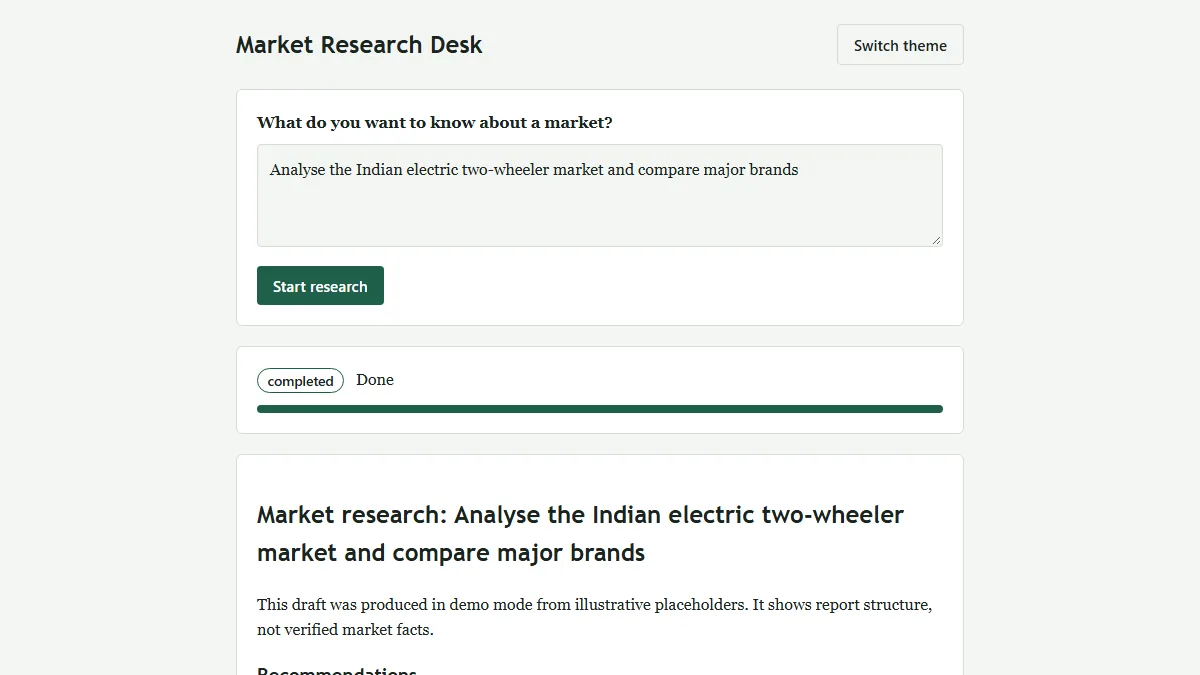 Data & AI · IntermediateMulti-Agent Market Research System
One question in, a structured and evidence-flagged market research report out (HTML + PDF).
Python 3.12 · FastAPI · Uvicorn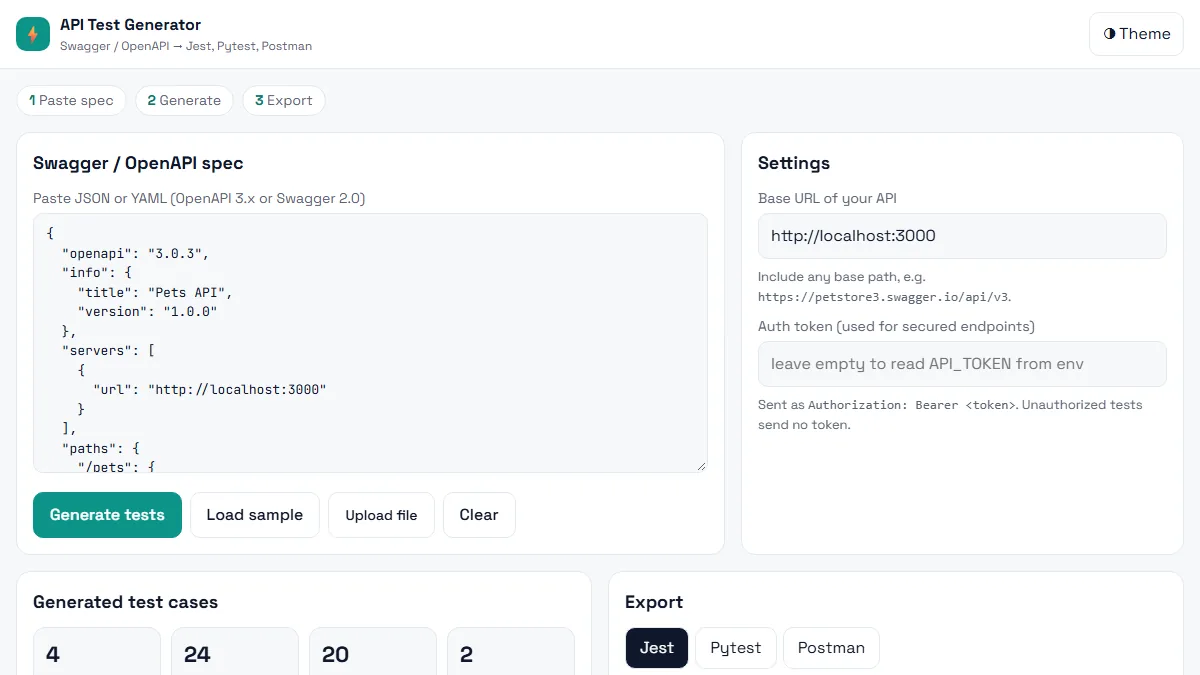 Testing · BeginnerAI API Test Generator
Paste a Swagger / OpenAPI spec and get positive, negative and boundary API tests in Jest, Pytest or Postman in seconds.
HTML5 · CSS3 (Grid, Flexbox, variables) · Vanilla JavaScript (ES6+)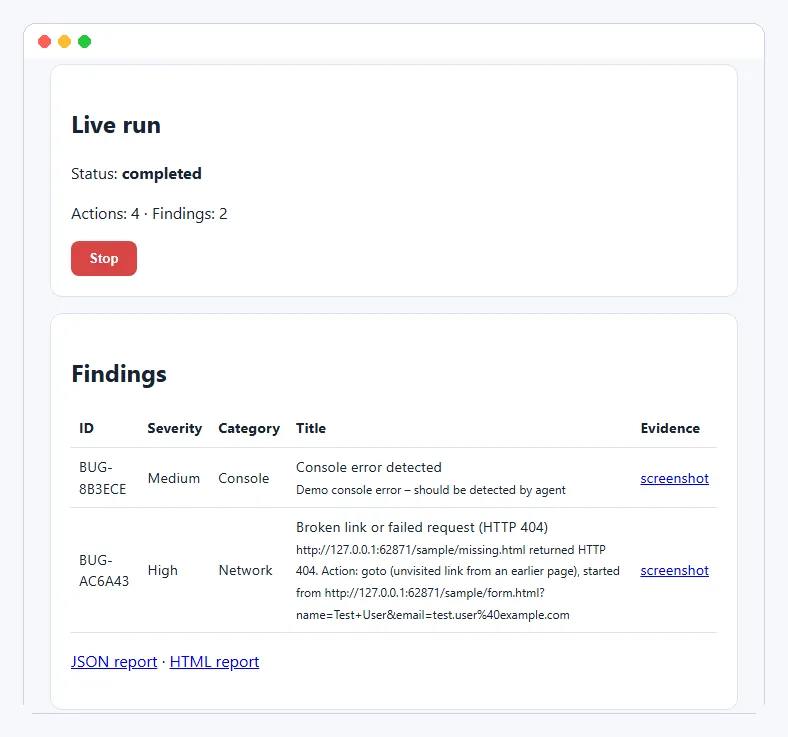 Testing · IntermediateAI Exploratory Testing Agent
A browser agent that explores your web app on its own, finds evidence-backed bugs and writes the report for you.
Python 3.11+ · Playwright (Chromium) · FastAPIThis project is shared for learning. The code is provided as is; read it, run it and change it. Do not commit real API keys: use the .env.example file. Interview questions are practice questions, not a record of any company's interviews.