






Data and AI project · Intermediate · 2–3 days
Multi-Agent Market Research System: Python + FastAPI Project
One question in, a structured and evidence-flagged market research report out (HTML + PDF).
- Python 3.12
- FastAPI
- Uvicorn
- Pydantic v2
- SQLite
- ReportLab
- pytest
- HTML/CSS
- 17
- chapters in the guide
- 07
- steps to run it
- 32
- files in the ZIP
Tested 18 Nov 2026Automated tests: 3 passed
Free ZIP, 0.02 MB32 files, no keys inside
multi-agent-market-research-project-source-code.zip0.02 MB · 32 files · clean code, no keys inside · .env.example included
01What you will build and learn
A Python project where a coordinator agent splits one market question across Market, Competitor, Customer and News agents, fact-checks their findings and writes an HTML and PDF report. It runs offline in demo mode with FastAPI, SQLite and a plain JavaScript UI, so it suits students learning Python, APIs and evidence-based reporting.
You will build
- A coordinator that plans a research job and runs four specialist agents
- A fact-check agent that removes duplicates and flags weak evidence
- A report agent that writes sections, recommendations, limitations and references
- HTML and PDF report export (ReportLab)
- A FastAPI backend with background jobs and SQLite job tracking
- A Market Research Desk web page with live progress and light/dark theme
Skills you practise
- Designing a multi-agent pipeline (plan → research → review → report)
- Structured data with Pydantic models
- REST APIs and background tasks with FastAPI
- Storing job state and JSON in SQLite
- Generating PDF reports from Python
- Evaluating evidence quality: sources, dates, confidence
- Testing an API end to end with pytest
Before you start
- Basic Python (functions, dicts, lists, modules)
- Python 3.10+ installed and comfortable with the terminal
- Basic idea of HTTP requests and JSON
- Optional: basic HTML and JavaScript to follow the frontend
Live demo in HTML, CSS and JavaScript
02Multi-agent research pipeline — try it in your browser
A simplified browser version of the project: the same coordinator plan, four specialist agents, fact-check rules and report structure, written in plain JavaScript. Like the real project's demo mode, the agents return illustrative placeholder findings, not real market data. Add your own finding to see how the fact-check agent flags or drops it.
Result
Edit any tab and press Run. This is a simplified browser version of the project for learning; the full project is in the ZIP.
How the demo works
- The coordinator turns your question into a plan: a scope sentence plus one task each for the market, competitor, customer and news agents.
- Each agent calls retrieve(), which returns three placeholder findings with a demo:// source and low confidence (copied from the project's research.py).
- Your optional finding is added to the pool, just like a real source would be.
- The fact-check agent drops duplicate claims and flags placeholder sources, missing sources and missing dates (same rules as fact_check_agent.py).
- The report agent groups findings into four sections and adds recommendations, limitations and references; the progress bar uses the same values as the server (10, 20–56, 75, 88, 100).
03Project overview
The Multi-Agent Market Research System takes one business question, for example “Analyse the Indian electric two-wheeler market and compare major brands”, and turns it into a structured research report. A Coordinator plans the work and hands it to four specialist agents (Market, Competitor, Customer and News). Their findings go through a fact-check step and then a report agent writes the final report as HTML and PDF.
The backend is a small FastAPI app with SQLite storage. The frontend is a plain HTML/CSS/JavaScript page called Market Research Desk that starts a job, shows live progress and offers the report downloads.
Demo mode: the project runs fully offline. Demo mode returns illustrative placeholders, not verified market data. It shows how a multi-agent pipeline and an evidence-aware report are built; you plug in real, permitted data sources later.
- About 380 lines of code in total, so you can read every file in one sitting.
- No API key, no paid service and no GPU needed.
- Includes 3 automated tests and Swagger API docs at
/docs.
04The problem it solves
Desk research for a market usually means answering the same four questions again and again: how big and how healthy is the market, who are the competitors, what do customers care about, and what changed recently. One person (or one big LLM prompt) mixing all of this together tends to produce a long text with no clear sources.
This project splits the job the way a real research team would:
- One agent per topic, so each part of the report has a clear owner and a predictable shape.
- Every finding is structured (claim, source URL, publisher, date, confidence, flags) instead of free text.
- A reviewer step drops duplicates and flags weak evidence instead of hiding uncertainty.
- The report keeps the limitations and references, so a reader can see what is and is not verified.
This is exactly the habit a data analyst needs: separate collection, validation and reporting, and always show where a number came from.
05Architecture
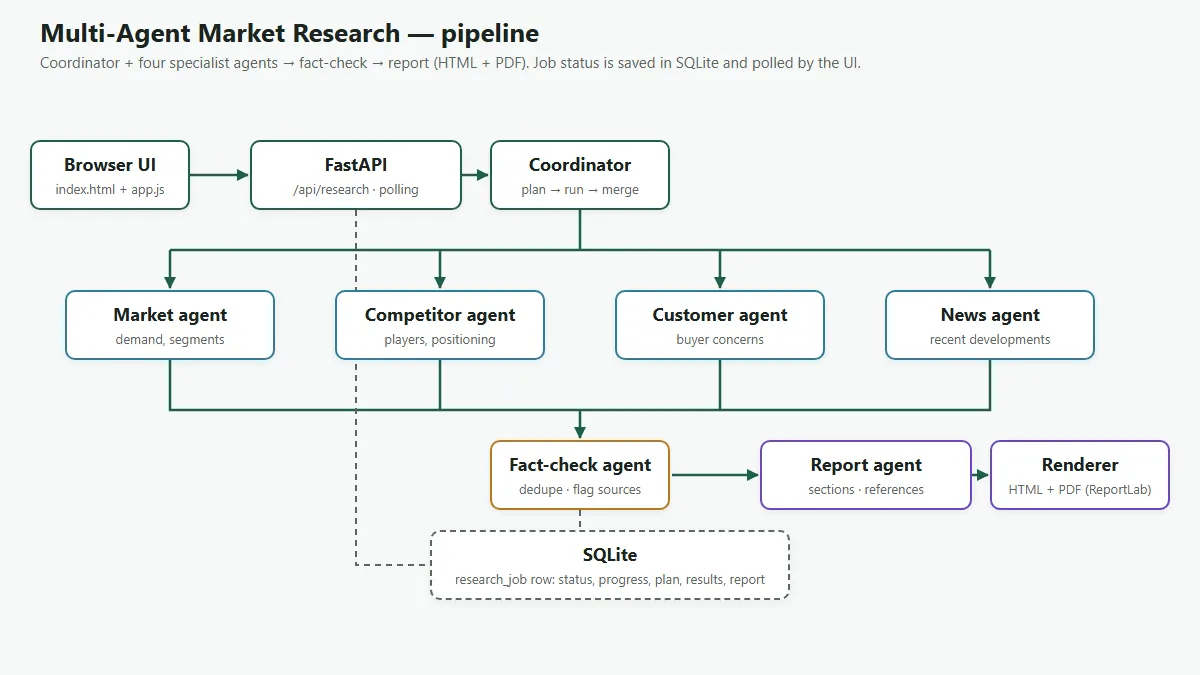
- Request
The browser sends
POST /api/researchwith the question. The API creates aresearch_jobrow (statuspending) and starts the pipeline as a FastAPI background task. - Plan
The coordinator writes a plan: a scope sentence and one task per specialist agent.
- Research
Market, Competitor, Customer and News agents run one after another. Each returns a list of findings.
- Review
The fact-check agent removes duplicate claims and adds evidence flags (placeholder source, no source, no date).
- Report
The report agent groups findings into sections and adds recommendations, limitations and references. The renderer saves HTML and PDF files in
reports/. - Poll
Meanwhile the UI calls
GET /api/research/{job_id}every second and moves the progress bar (progress values 10, 20 to 56, 75, 88 and finally 100).
06Tech stack
| Layer | Tool | Why it is used |
|---|---|---|
| API | FastAPI + Uvicorn | Typed endpoints, automatic Swagger docs, background tasks |
| Validation | Pydantic v2 | ResearchRequest checks the query is 5–500 characters |
| Storage | SQLite (standard library) | One research_job table with JSON columns; no DB server needed |
| Reports | ReportLab | Builds the PDF version of the report |
| Frontend | HTML, CSS, vanilla JavaScript | Form, progress bar, report preview, light/dark theme |
| Tests | pytest + FastAPI TestClient (httpx) | Health check, fact-check rules, full end-to-end job |
All dependencies are in backend/requirements.txt: fastapi, uvicorn, reportlab, pydantic, pytest, httpx.
07Folder structure
multi-agent-market-research-project/
├── README.md
├── .gitignore
├── backend/
│   ├── .env.example          # LLM_PROVIDER=demo (no key needed)
│   ├── requirements.txt      # fastapi, uvicorn, reportlab, pydantic, pytest, httpx
│   ├── pytest.ini            # lets plain `pytest` import the app package
│   ├── app/
│   │   ├── main.py           # FastAPI app + serves the frontend folder
│   │   ├── api/routes.py     # /api/health, /api/research ... endpoints
│   │   ├── agents/
│   │   │   ├── coordinator.py       # plans tasks, runs agents, triggers report
│   │   │   ├── market_agent.py      # specialist agents (one topic each)
│   │   │   ├── competitor_agent.py
│   │   │   ├── customer_agent.py
│   │   │   ├── news_agent.py
│   │   │   ├── fact_check_agent.py  # dedupe + evidence flags
│   │   │   └── report_agent.py      # builds the structured report dict
│   │   ├── services/
│   │   │   ├── research.py       # retrieval layer (demo placeholders)
│   │   │   └── report_render.py  # report dict -> HTML and PDF
│   │   ├── models/schemas.py     # ResearchRequest + Finding (Pydantic)
│   │   └── db/database.py        # SQLite research_job table
│   └── tests/test_pipeline.py
├── frontend/
│   ├── index.html   # "Market Research Desk" page
│   ├── styles.css   # light + dark theme
│   └── app.js       # starts a job, polls progress, shows the report
├── reports/         # generated HTML + PDF reports land here
├── sample-output/   # one demo report (HTML + PDF) to look at first
└── browser-demo/
    └── index.html   # single-file browser version of the pipeline (open by double-click)
Read the files in pipeline order: schemas.py → research.py → market_agent.py → coordinator.py → fact_check_agent.py → report_agent.py → report_render.py → routes.py → app.js.
08Step 1: Define the request and the finding shape
Start with the data contract. Every agent returns findings with the same fields, and the API accepts only a sensible query length. Confidence is a fixed set of values, so the report can show it consistently.
"""Request/response models and the structured finding shape."""
from typing import Literal, Optional
from pydantic import BaseModel, Field

Confidence = Literal["high", "medium", "low", "unknown"]

class ResearchRequest(BaseModel):
    query: str = Field(min_length=5, max_length=500)

class Finding(BaseModel):
    agent: str
    claim: str
    source_url: Optional[str] = None
    title: Optional[str] = None
    publisher: Optional[str] = None
    published_at: Optional[str] = None
    evidence: str = ""
    confidence: Confidence = "unknown"
    flags: list[str] = []
One finding produced in demo mode looks like this after the fact-check step:
{
  "agent": "market",
  "claim": "Demand drivers typically include running cost, urban commuting needs and policy incentives.",
  "source_url": "demo://market/1",
  "title": "Illustrative market note",
  "publisher": "Demo data",
  "published_at": null,
  "evidence": "Placeholder written for the query: Analyse the Indian electric two-wheeler market",
  "confidence": "low",
  "flags": [
    "placeholder source - not verified",
    "no publication date"
  ]
}09Step 2: Store each job in SQLite
Each research request is one row in research_job. Status, progress and the current step are normal columns; the plan, results and final report are stored as JSON text (a prototype simplification). The database file backend/research.db is created automatically when the app starts.
"""SQLite storage. Plan/results/report are JSON columns on the job row (prototype simplification)."""
import json, sqlite3, uuid
from datetime import datetime, timezone
from pathlib import Path

DB_PATH = Path(__file__).resolve().parents[2] / "research.db"
JSON_COLS = {"plan_json", "results_json", "report_json"}

def _conn():
    c = sqlite3.connect(DB_PATH); c.row_factory = sqlite3.Row; return c

def init_db():
    with _conn() as c:
        c.execute("""CREATE TABLE IF NOT EXISTS research_job(
            job_id TEXT PRIMARY KEY, user_id TEXT, query TEXT, status TEXT, progress INTEGER DEFAULT 0,
            step TEXT, plan_json TEXT, results_json TEXT, report_json TEXT,
            html_path TEXT, pdf_path TEXT, error TEXT, created_at TEXT)""")

def create_job(query: str) -> str:
    jid = uuid.uuid4().hex[:12]
    with _conn() as c:
        c.execute("INSERT INTO research_job(job_id,user_id,query,status,step,created_at) VALUES(?,?,?,?,?,?)",
                  (jid, "anonymous", query, "pending", "Queued", datetime.now(timezone.utc).isoformat()))
    return jid

def update_job(jid: str, **f):
    f = {k: json.dumps(v) if k in JSON_COLS else v for k, v in f.items()}
    with _conn() as c:
        c.execute(f"UPDATE research_job SET {','.join(k+'=?' for k in f)} WHERE job_id=?", (*f.values(), jid))

def get_job(jid: str):
    with _conn() as c:
        r = c.execute("SELECT * FROM research_job WHERE job_id=?", (jid,)).fetchone()
    if not r: return None
    d = dict(r)
    for k in JSON_COLS:
        d[k] = json.loads(d[k]) if d[k] else None
    return d
update_job(job_id, status=..., progress=...) takes keyword arguments, so the coordinator can update any mix of columns in one call. The column names come from code, never from the user.
10Step 3: Build the retrieval layer and specialist agents
All four specialist agents share one retrieval function. In demo mode it returns three illustrative notes per topic, each with a demo:// source URL and confidence: low, so nobody mistakes them for facts.
"""Retrieval layer. Demo mode returns ILLUSTRATIVE placeholders, never verified facts.
Replace `retrieve` with real search/LLM calls (respect ToS, robots.txt, licensing)."""
TOPICS = {
    "market": ["Demand drivers typically include running cost, urban commuting needs and policy incentives.",
               "Adoption depends on charging access, upfront price and financing options.",
               "Segments can be split by use: personal commuting, delivery fleets and premium."],
    "competitor": ["Established brands and new entrants compete on price band, range and service network.",
                   "Positioning differs: value-focused, performance-focused and fleet-focused offerings.",
                   "Compare players on price, range, warranty, charging options and dealer reach."],
    "customer": ["Buyers commonly discuss real-world range versus claimed range.",
                 "Charging convenience and battery warranty are recurring concerns.",
                 "Service quality and spare-part availability influence satisfaction."],
    "news": ["Policy changes (subsidies, taxes) can shift pricing and demand quickly.",
             "New launches and battery technology changes alter the competitive picture.",
             "Check dated news for recent launches, recalls and regulation."],
}

def retrieve(topic: str, query: str) -> list[dict]:
    out = []
    for i, claim in enumerate(TOPICS[topic]):
        out.append({"agent": topic, "claim": claim, "source_url": f"demo://{topic}/{i+1}",
                    "title": f"Illustrative {topic} note", "publisher": "Demo data", "published_at": None,
                    "evidence": f"Placeholder written for the query: {query[:80]}", "confidence": "low", "flags": []})
    return out
Each specialist agent is a tiny module with the same run(task) function. This common interface is what lets the coordinator treat them as interchangeable workers:
"""market agent: returns structured findings for its topic."""
from app.services.research import retrieve

def run(task: dict) -> list[dict]:
    return retrieve("market", task["query"])
To make the system real, replace retrieve() with calls to permitted sources (official statistics, company filings, licensed news APIs) or an LLM with search. Respect each site's terms of service, robots.txt and licensing.
11Step 4: Write the coordinator
The coordinator is the brain of the pipeline. It plans tasks, runs the specialists, calls fact-check, merges the results and triggers the report. After every stage it updates the job row, which is how the UI shows live progress. Any exception is caught and saved, so a failed job shows its error in the UI instead of hanging.
"""Coordinator: plans tasks, runs specialists, calls fact-check, merges, triggers the report."""
from pathlib import Path
from app.db import database as db
from app.agents import market_agent, competitor_agent, customer_agent, news_agent, fact_check_agent, report_agent
from app.services import report_render

REPORTS = Path(__file__).resolve().parents[3] / "reports"
SPECIALISTS = {"market": market_agent, "competitor": competitor_agent,
               "customer": customer_agent, "news": news_agent}

def plan(query: str) -> dict:
    return {"scope": f"Market, competitors, customers and recent trends for: {query}",
            "tasks": [{"agent": k, "query": query} for k in SPECIALISTS]}

def run_job(job_id: str, query: str):
    try:
        db.update_job(job_id, status="planning", progress=10, step="Planning research")
        p = plan(query); db.update_job(job_id, plan_json=p)
        findings = []
        for i, t in enumerate(p["tasks"]):  # sequential for clarity; parallelisable
            db.update_job(job_id, status="researching", progress=20 + i * 12, step=f"{t['agent'].title()} agent working")
            findings += SPECIALISTS[t["agent"]].run(t)
        db.update_job(job_id, status="reviewing", progress=75, step="Reviewing evidence")
        accepted, flags = fact_check_agent.review(findings)
        db.update_job(job_id, results_json={"findings": accepted, "flags": flags})
        db.update_job(job_id, status="reporting", progress=88, step="Writing report")
        report = report_agent.write(query, p, accepted, flags)
        REPORTS.mkdir(exist_ok=True)
        html_p, pdf_p = REPORTS / f"{job_id}.html", REPORTS / f"{job_id}.pdf"
        html_p.write_text(report_render.to_html(report), encoding="utf-8")
        report_render.to_pdf(report, str(pdf_p))
        db.update_job(job_id, status="completed", progress=100, step="Done", report_json=report,
                      html_path=str(html_p), pdf_path=str(pdf_p))
    except Exception as e:  # surface failure to the UI
        db.update_job(job_id, status="failed", step="Failed", error=str(e))
The agents run one after another for clarity. Because they do not depend on each other, this loop is the first place to add parallelism (for example with concurrent.futures.ThreadPoolExecutor or asyncio.gather).
Meet the Data Analytics trainers
Stuck on a step of this project? These are the Uncodemy trainers who teach these skills in live classes. Book a free demo class and ask them your doubts directly.
 Ms. Rachna VermaData Analyst at GvCloud Secure (ex-Concentrix, ex-Test Yantra) · 4+ years
Data analyst at GvCloud Secure, earlier with Concentrix and Test Yantra, who builds Power BI dashboards and SQL reports. She teaches Power BI, DAX, SQL and Python in simple, beginner-friendly steps.
Power BIDAXSQLPostgreSQL Mr. Anshul GautamAcademic Faculty & Top Mentor at Uncodemy · 5+ years
Certified data scientist with a B.Tech in Computer Science who teaches data science and analytics at Uncodemy. His past roles include data analyst team lead at Amazon and data scientist at Tech Mahindra, working on credit risk analytics.
PythonSQLExcelPower BI Mr. Syed NajeebSenior Business Intelligence Analyst at Air India · 7+ years
Senior Business Intelligence Analyst in Air India's Customer Experience division, where he uses statistics, deep learning and NLP to improve customer experience. He teaches Python, Power BI, Tableau and SQL with live BI dashboards and real case studies.
PythonPower BITableauSQL & RDBMS12Step 5: Add the fact-check agent
The fact-check agent reviews evidence. It flags placeholder sources, missing dates and duplicates instead of hiding uncertainty. Duplicates (same claim, ignoring case and spaces) are dropped; everything else is kept with flags attached.
"""Evidence review: flags placeholder sources, missing dates and duplicates instead of hiding uncertainty."""
def review(findings: list[dict]):
    seen, accepted, flags = set(), [], []
    for f in findings:
        key = f["claim"].strip().lower()
        if key in seen:
            flags.append(f"Duplicate dropped: {f['claim'][:60]}"); continue
        seen.add(key)
        if (f.get("source_url") or "").startswith("demo://"):
            f["flags"].append("placeholder source - not verified"); f["confidence"] = "low"
        if not f.get("source_url"):
            f["flags"].append("no source")
        if not f.get("published_at"):
            f["flags"].append("no publication date")
        accepted.append(f)
    flags.append(f"{sum(bool(f['flags']) for f in accepted)} of {len(accepted)} findings carry evidence flags.")
    return accepted, flags
In demo mode every finding has a demo:// source and no date, so the summary line reads “12 of 12 findings carry evidence flags.” With real sources this number tells the reader how much of the report still needs checking.
13Step 6: Write the report and render HTML + PDF
The report agent builds a plain Python dict: title, scope, executive summary, one section per agent, recommendations, limitations (including the fact-check flags) and de-duplicated references.
"""Report writer: builds a structured report from reviewed findings."""
TITLES = {"market": "Market overview", "competitor": "Competitor comparison",
          "customer": "Customer insights", "news": "Recent developments"}

def write(query: str, plan: dict, findings: list[dict], flags: list[str]) -> dict:
    sections = [{"title": t, "items": [f for f in findings if f["agent"] == k]} for k, t in TITLES.items()]
    refs = sorted({(f["source_url"], f["title"], f["publisher"]) for f in findings if f.get("source_url")})
    return {
        "title": f"Market research: {query}", "query": query, "scope": plan["scope"],
        "executive_summary": "This draft was produced in demo mode from illustrative placeholders. "
                             "It shows report structure, not verified market facts.",
        "sections": sections,
        "recommendations": ["Replace demo retrieval with real, permitted sources before relying on conclusions.",
                            "Verify key claims manually and record dates and units.",
                            "Have a person review before any high-impact decision."],
        "limitations": flags + ["Demo mode does not call live search or LLM APIs."],
        "references": [{"url": u, "title": t, "publisher": p} for u, t, p in refs],
    }
report_render.py turns the same dict into an HTML page (every value passes through html.escape) and a PDF built with ReportLab's SimpleDocTemplate:
def to_pdf(r: dict, path: str):
    from reportlab.lib.styles import getSampleStyleSheet
    from reportlab.platypus import SimpleDocTemplate, Paragraph, Spacer
    st = getSampleStyleSheet(); s = []
    def add(text,):
        s.append(Paragraph(e(text), st[style])); s.append(Spacer(1, 6))
    add(r["title"], "Title"); add(r["executive_summary"])
    for sec in r["sections"]:
        add(sec["title"], "Heading2")
        for i in sec["items"]: add(f"- {i['claim']} [{i['confidence']}]")
    for name, key in (("Recommendations", "recommendations"), ("Limitations", "limitations")):
        add(name, "Heading2")
        for x in r[key]: add(f"- {x}")
    add("References", "Heading2")
    for x in r["references"]: add(f"- {x['title']} ({x['url']})")
SimpleDocTemplate(path).build(s)14Step 7: Expose the pipeline with FastAPI
Five endpoints are enough. POST /api/research returns a job_id straight away and runs the pipeline in the background, so the browser never waits on a long request.
from fastapi import APIRouter, BackgroundTasks, HTTPException
from fastapi.responses import FileResponse
from app.models.schemas import ResearchRequest
from app.db import database as db
from app.agents.coordinator import run_job

router = APIRouter(prefix="/api")

def _job(job_id):
    j = db.get_job(job_id)
    if not j: raise HTTPException(404, "Job not found")
    return j

@router.get("/health")
def health(): return {"status": "ok"}

@router.post("/research")
def start(req: ResearchRequest, bg: BackgroundTasks):
    jid = db.create_job(req.query)
    bg.add_task(run_job, jid, req.query)
    return {"job_id": jid, "status": "pending"}

@router.get("/research/{job_id}")
def status(job_id: str):
    j = _job(job_id)
    return {k: j[k] for k in ("job_id", "query", "status", "progress", "step", "error")}

@router.get("/research/{job_id}/report")
def report(job_id: str):
    j = _job(job_id)
    if j["status"] != "completed": raise HTTPException(409, f"Report not ready ({j['status']})")
    return j["report_json"]

@router.get("/research/{job_id}/download/{kind}")
def download(job_id: str, kind: str):
    j = _job(job_id)
    path = {"html": j["html_path"], "pdf": j["pdf_path"]}.get(kind)
    if not path: raise HTTPException(404, "File not available")
return FileResponse(path, filename=f"report-{job_id}.{kind}")| Response | When |
|---|---|
| 422 | Query shorter than 5 or longer than 500 characters (Pydantic validation) |
| 404 | Unknown job_id, or a download kind other than html/pdf |
| 409 | Report requested before the job status is completed |
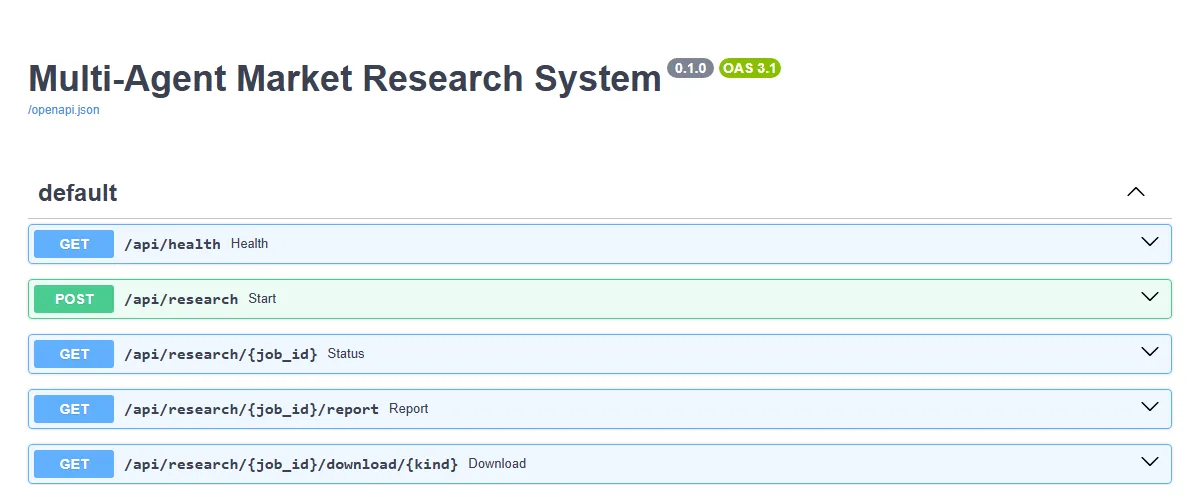
main.py mounts the frontend folder at /, so one Uvicorn process serves both the API and the UI.
15Step 8: Build the Market Research Desk frontend
The UI is one HTML page with a question box, a progress card and a result card. app.js starts a job, then polls the status endpoint once per second:
async function poll(id) {
  try {
    const s = await (await fetch(`${api}/${id}`)).json();
    $("pill").textContent = s.status; $("pill").className = "pill " + s.status;
    $("step").textContent = s.step; $("fill").style.width = s.progress + "%";
    if (s.status === "failed") { clearInterval(timer); $("go").disabled = false; showError(s.error || "The job failed."); }
    if (s.status === "completed") { clearInterval(timer); $("go").disabled = false; await showReport(id); }
  } catch (e) { clearInterval(timer); $("go").disabled = false; showError("Lost connection to the server."); }
}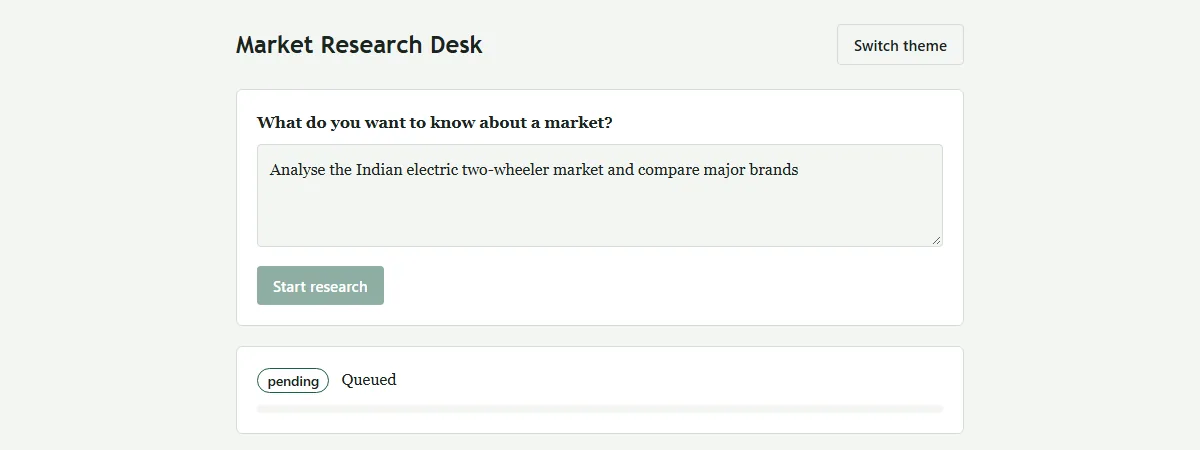
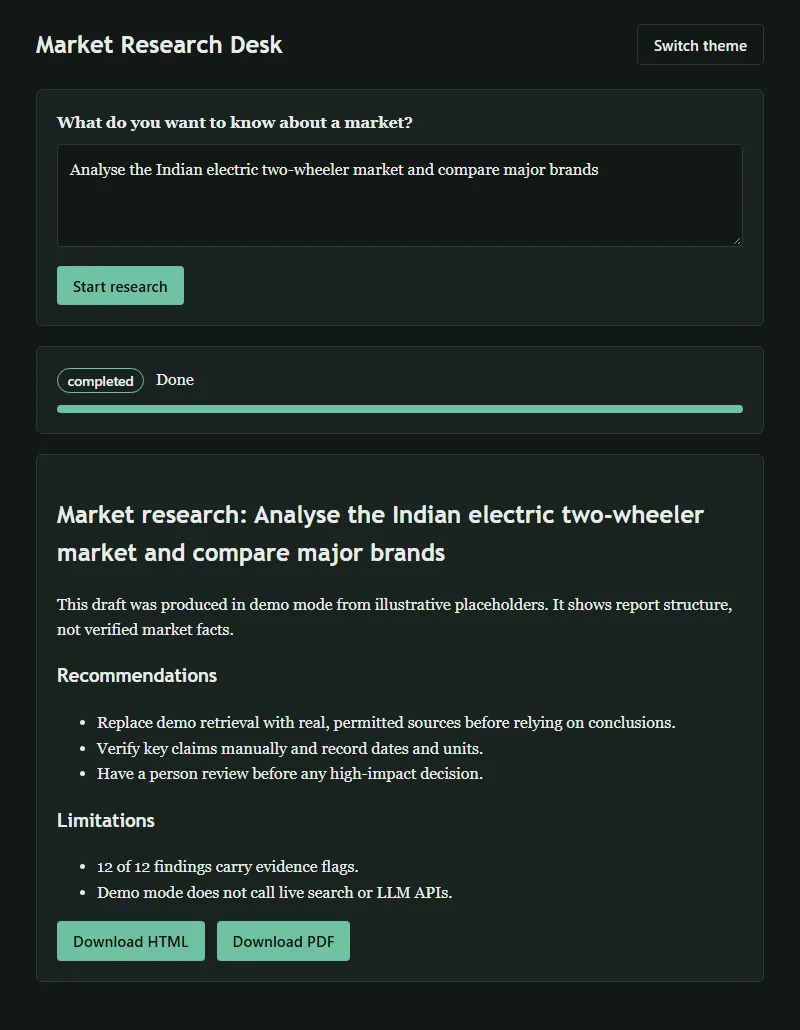
The page starts in the visitor's system theme (light or dark) and has a Switch theme button. Text is set with textContent, never innerHTML, so report text cannot inject markup. The layout is a single column and works on phones:

16Sample output: the generated report
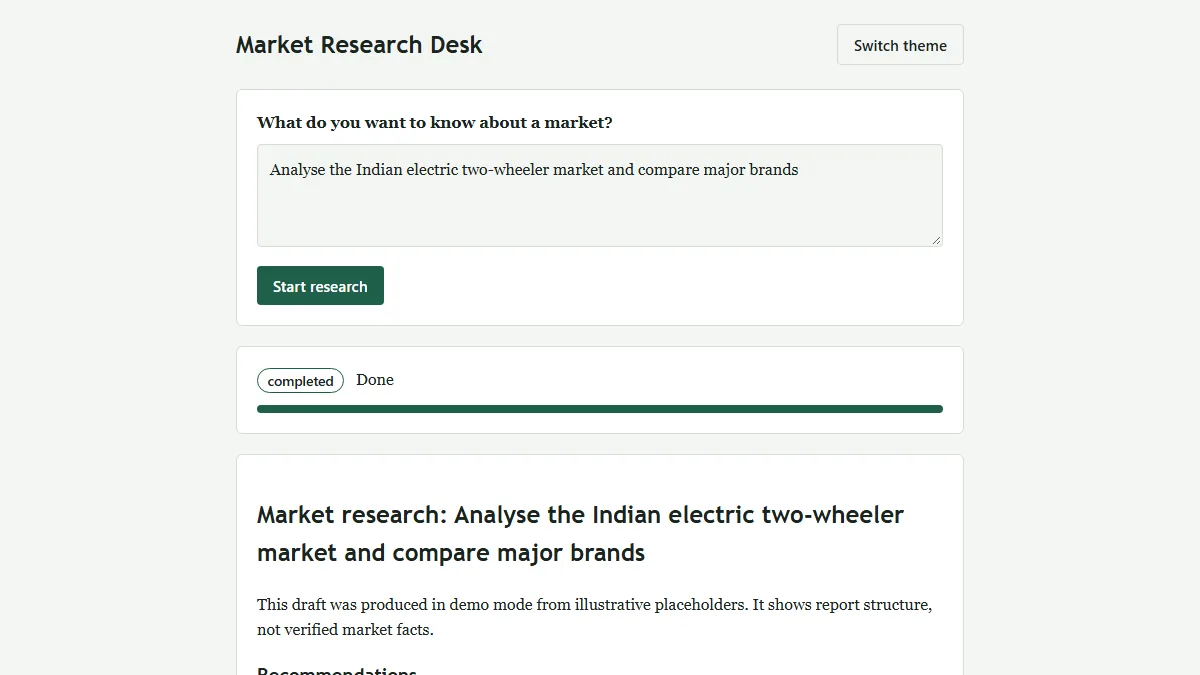
This is the HTML report for the example question, generated in demo mode. Every claim shows its confidence and evidence flags, followed by recommendations, limitations and references. The ZIP includes one sample report (HTML + PDF) in sample-output/.
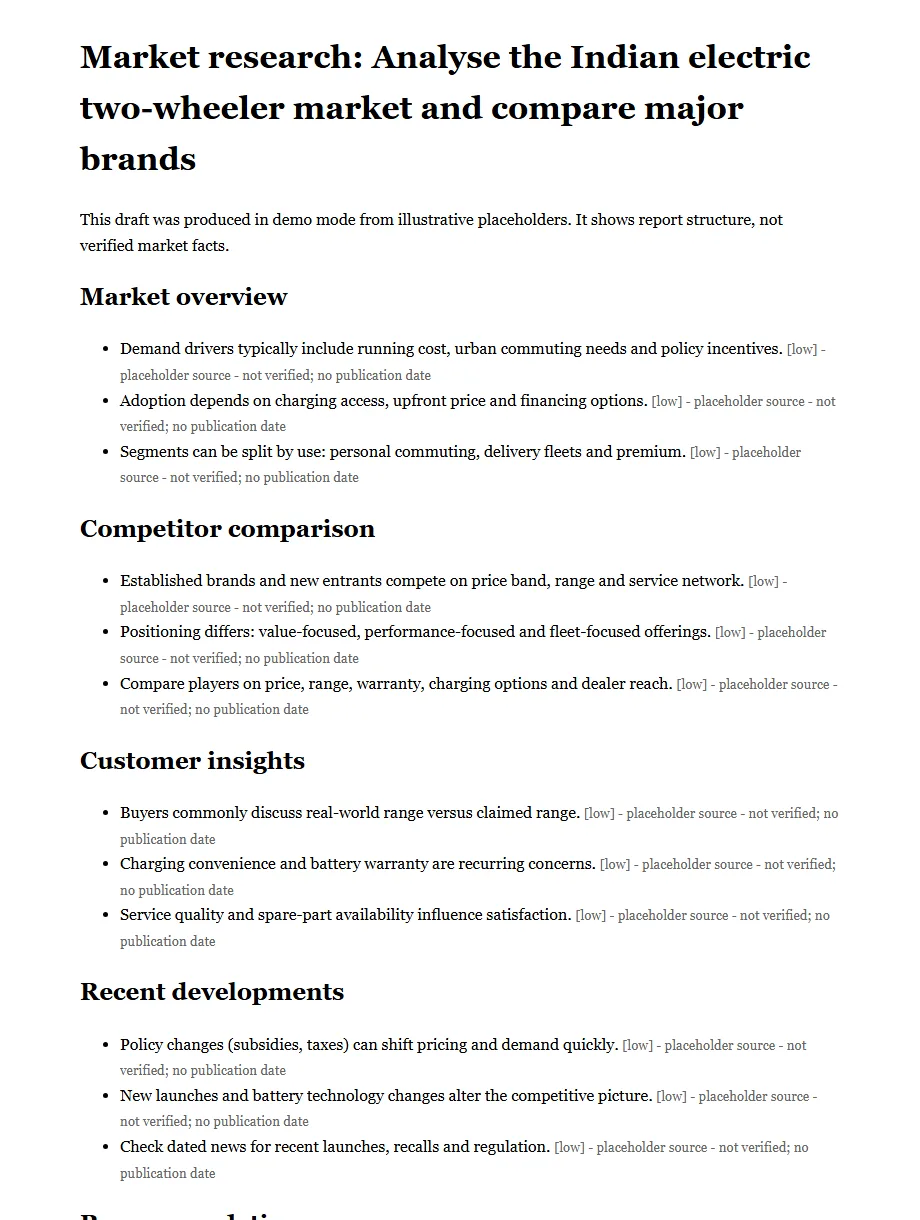
The claims in demo reports are illustrative placeholders. Do not quote them as market facts in a presentation or assignment; connect real sources first.
17Testing the pipeline
Three pytest tests cover the API, the fact-check rules and a full job from request to PDF download:
import time
from fastapi.testclient import TestClient
from app.main import app
from app.agents.fact_check_agent import review

c = TestClient(app)

def test_health():
    assert c.get("/api/health").json() == {"status": "ok"}

def test_fact_check_flags_and_dedupes():
    f = {"agent": "market", "claim": "A", "source_url": "demo://x", "published_at": None, "confidence": "high", "flags": []}
    acc, flags = review([f, dict(f, flags=[])])
    assert len(acc) == 1 and acc[0]["confidence"] == "low" and acc[0]["flags"]

def test_full_job():
    jid = c.post("/api/research", json={"query": "Analyse the Indian electric two-wheeler market"}).json()["job_id"]
    for _ in range(50):
        if c.get(f"/api/research/{jid}").json()["status"] in ("completed", "failed"): break
        time.sleep(0.2)
    assert c.get(f"/api/research/{jid}").json()["status"] == "completed"
    assert c.get(f"/api/research/{jid}/download/pdf").status_code == 200
cd backend
pytest
# ...
# 3 passed, 1 warningYou can also test the API by hand while the server is running:
curl http://127.0.0.1:8000/api/health
curl -X POST http://127.0.0.1:8000/api/research -H "Content-Type: application/json" -d "{\"query\": \"Analyse the Indian electric two-wheeler market\"}"
curl http://127.0.0.1:8000/api/research/<job_id>
curl -o report.pdf http://127.0.0.1:8000/api/research/<job_id>/download/pdf
The single warning (StarletteDeprecationWarning about httpx) comes from the newest Starlette version and does not affect the tests.
18From demo mode to real research
.env.example already reserves LLM_PROVIDER and LLM_API_KEY for a future LLM service (the current code does not read them yet). A safe upgrade path:
- Keep the interface
Leave
retrieve(topic, query) -> list[dict]unchanged, so the agents, fact-check and report code keep working. - Load settings
Read the provider and key from environment variables (for example with
python-dotenv); keep the real.envout of git. - Return real sources
Fill
source_url,publisherandpublished_atfrom the actual source. The fact-check agent then flags only the weak ones. - Raise confidence honestly
Only set
mediumorhighwhen a claim has a dated, named source, ideally two that agree. - Keep a human in the loop
The report already recommends a person review before any high-impact decision. Keep that line.
19Known limitations
Sequential agents, no auth, no live search or LLM calls, JSON-on-one-table storage, basic PDF layout.
- Sequential agents: simple to follow, but slower once agents call real services.
- No auth: every job is saved as user
anonymous; anyone with a job ID can read the report. - No live search or LLM: demo retrieval only.
- One table with JSON columns: fine for a prototype; a real system would store findings in their own table for SQL analysis.
- Basic PDF: plain ReportLab styles, no charts or tables yet.
20How to run the source code
Download the ZIP above, unzip it and follow these steps in a terminal inside the project folder.
- 1Unzip and open the backend folder
cd multi-agent-market-research-project/backendAll commands run from the backend folder.
- 2Create a virtual environment
python -m venv .venv - 3Activate it
.venv\Scripts\activatemacOS / Linux: source .venv/bin/activate
- 4Install dependencies
pip install -r requirements.txt - 5Run the tests
pytestExpected: 3 passed.
- 6Start the server
uvicorn app.main:app --reload --port 8000Demo mode, no API key needed.
- 7Open the app
http://127.0.0.1:8000Ask a market question and download the HTML/PDF report. API docs: http://127.0.0.1:8000/docs
Runs, with notes · checked 2026-11-18 on Python 3.12.5 on Windows 11, fresh venv (fastapi 0.163.2, pydantic 2.14.3, reportlab 5.1.0, pytest 9.2.0)
- pip install -r requirements.txt — installed without errors
- pytest — 3 passed (after adding backend/pytest.ini; see notes)
- uvicorn app.main:app — GET /api/health returned {"status": "ok"}
- POST /api/research — job completed in about 1 second; report JSON, HTML and PDF downloads returned 200
- Error cases checked: short query → 422, unknown job → 404, unknown download kind → 404
- UI tested in Chromium with Playwright: form, progress, result, dark theme and 390px mobile width
Runs offline in demo mode only: the agents return illustrative placeholder findings, not real market data. The original bundle's plain `pytest` failed with ModuleNotFoundError: app (python -m pytest worked); we added a 3-line backend/pytest.ini to the ZIP to fix it.
21Troubleshooting
ModuleNotFoundError: No module named 'app'
Run uvicorn and pytest from inside the backend folder. The ZIP includes backend/pytest.ini so plain pytest finds the app package; if you deleted it, use python -m pytest instead.
Port 8000 is already in use
Another program is using the port. Start on a different one: uvicorn app.main:app --reload --port 8001 and open http://127.0.0.1:8001.
GET /report returns 409 “Report not ready”
The job is still running. Poll GET /api/research/{job_id} until status is completed, then fetch the report.
The /docs page is blank when offline
FastAPI's Swagger page loads its JavaScript and CSS from a CDN, so it needs internet. The API and the Market Research Desk UI still work offline.
Download returns 404 “File not available”
Use html or pdf as the last part of the URL. If the job failed, the status endpoint shows the error message instead of files.
StarletteDeprecationWarning about httpx during tests
It is only a warning from the newest Starlette release. The tests still pass; you can ignore it.
22Interview questions on this project
Practice questions an interviewer or viva examiner may ask about this project.
What is a multi-agent system and why use one for market research?
It splits one big task among small agents with clear roles. Here each agent owns one topic (market, competitors, customers, news), so findings have a predictable shape and the coordinator can add, replace or parallelise agents without touching the others.
What does the coordinator do in this project?
It plans the tasks, runs each specialist, sends all findings to fact-check, passes accepted findings to the report agent, saves the HTML/PDF files and updates the job's status and progress in SQLite after every stage. It also catches errors and marks the job failed.
Why does POST /api/research return immediately instead of returning the report?
Research can take long, so the endpoint creates a job, starts it with FastAPI BackgroundTasks and returns a job_id. The client polls the status endpoint. This avoids HTTP timeouts and lets the UI show progress.
How does the fact-check agent handle uncertain evidence?
It drops exact duplicate claims and adds flags for placeholder sources, missing sources and missing publication dates, lowering confidence for placeholder sources. It keeps flagged findings visible rather than hiding them, and reports how many carry flags.
Why store plan, results and report as JSON columns? What would you change for production?
It keeps the prototype to one table and makes saving nested data easy. For production, put findings in their own table (job_id, agent, claim, source, date, confidence) so they can be queried, filtered and analysed with SQL.
How would you run the four agents in parallel?
They do not depend on each other, so the loop can be replaced with a ThreadPoolExecutor or asyncio.gather. Progress updates would then be based on the number of finished agents rather than the loop index.
How does the project avoid HTML injection in reports and the UI?
report_render.py passes every value through html.escape, and app.js sets text with textContent instead of innerHTML.
What status codes does the API use and why?
422 for an invalid query (Pydantic validation), 404 for an unknown job or file type, 409 when the report is requested before the job is completed, and 200 otherwise.
23Put it on your resume
Resume points
- Built a multi-agent market research system in Python with a coordinator, four specialist agents, a fact-check agent and a report writer
- Developed a FastAPI backend with background jobs, SQLite job tracking and HTML/PDF report export using ReportLab
- Designed an evidence model (source, date, confidence, flags) so every report shows what is verified and what is not
- Created a responsive JavaScript frontend with live progress polling and light/dark themes, covered by end-to-end pytest tests
Ideas to extend it
- Connect a real, permitted data source (official statistics, a licensed news API or an LLM with search) behind retrieve()
- Run the four specialist agents in parallel and show per-agent progress in the UI
- Store findings in their own SQLite table and add a dashboard (counts by agent, confidence and flag type)
- Add charts and tables to the PDF report (for example market share or price-band comparisons)
- Add login and per-user job history instead of the shared anonymous user
- Let the user pick which agents to run and export findings to CSV or Excel
Uncodemy course
Turn this project into a job-ready skill
This project practises the core habits of a data analyst: collecting data in a fixed structure, checking its quality, storing it in a database and turning it into a clear report with sources and limitations. Uncodemy's Data Analytics course covers Python, SQL, data cleaning and validation, and reporting and dashboards, so you can take this pipeline further with real datasets, SQL analysis of findings and visual reports.
- Duration6–7 months
- Training120+ hours
- Modules9 modules
- Projects5 guided projects + 1 capstone
What you learn in the Data Analytics Course
- Excel for Data Analytics (Pivot Tables, Power Query)
- SQL & Database Management (joins, CTEs, window functions)
- Python for Data Analytics (NumPy, Pandas, Matplotlib, Seaborn)
- Statistics & Business Mathematics (hypothesis testing, A/B testing)
- Data Cleaning & Exploratory Data Analysis
- Power BI (data modelling, DAX)
- Tableau
- AI & Gen AI for Data Analysts (prompting, Copilot, checking AI output)
- Capstone Projects & Career Preparation
Uncodemy Certificate · Uncodemy Agile Certificate · Module Completion Certificate · Dedicated Placement Support · Classroom in Noida & Delhi or live online
Learn Data Analytics with a free demo class
- See how the trainer explains a real project like this one
- Get your setup or code doubts cleared live
- Understand the course plan, batches and Dedicated Placement Support
“Uncodemy played a crucial role in transforming my career. The trainers were knowledgeable, approachable, and always focused on practical learning. The hands-on training, live projects, and personalized guidance made complex concepts easy to understand.”
Ankit Singh, Finelabs
“Enrolling at Uncodemy was a turning point in my learning journey. The mentors guided me with real-world projects, practical sessions, and continuous feedback that built my confidence.”
Divya Pandey, Qualys
“Uncodemy has truly transformed my learning journey! The practical sessions, real-time projects, and continuous mentor guidance helped me build strong analytical skills and industry-ready knowledge.”
Hashir, FedEx
From Uncodemy learner stories. Individual results vary.
24Frequently asked questions
Do I need an OpenAI or other LLM API key to run this project?
No. The project runs in demo mode and makes no external API calls. .env.example only reserves settings for a future LLM provider.
Is the market data in the reports real?
No. Demo mode returns illustrative placeholders, not verified market data, and every claim is flagged as a placeholder source with low confidence.
Which Python version do I need?
Python 3.10 or newer is recommended, since current FastAPI and Pydantic releases target recent Python versions. We tested it on Python 3.12.
Can I use this as a final-year or portfolio project?
Yes. It is a complete, tested web app. Make it your own by adding at least one extension, such as a real data source, parallel agents or charts in the report, and explain the design in your viva.
Does it work on Windows, macOS and Linux?
Yes. Only the virtual environment activation command differs: .venv\Scripts\activate on Windows and source .venv/bin/activate on macOS/Linux.
Where are the generated reports saved?
In the reports/ folder at the project root, named by job ID, as both .html and .pdf. They can also be downloaded from the UI or the API.
Is the source code free to download?
Yes. The ZIP is free with no form. It contains the backend, frontend, tests and one sample report.
More free projects
 Data & AI · IntermediateAI Data Analyst Agent
Upload a CSV or Excel file, get an instant data-quality report and ask questions about your data. No API key needed.
React 18 · Vite · Node.js Data & AI · IntermediateAI Sales Forecasting Copilot
Forecast monthly sales you can actually explain — and ask questions answered only from your own data.
React · TypeScript · Vite Data & AI · AdvancedLoRA Studio
Upload a dataset, fine-tune a small open model with LoRA, watch the loss fall live and compare base vs fine-tuned answers.
React 18 · Vite · Recharts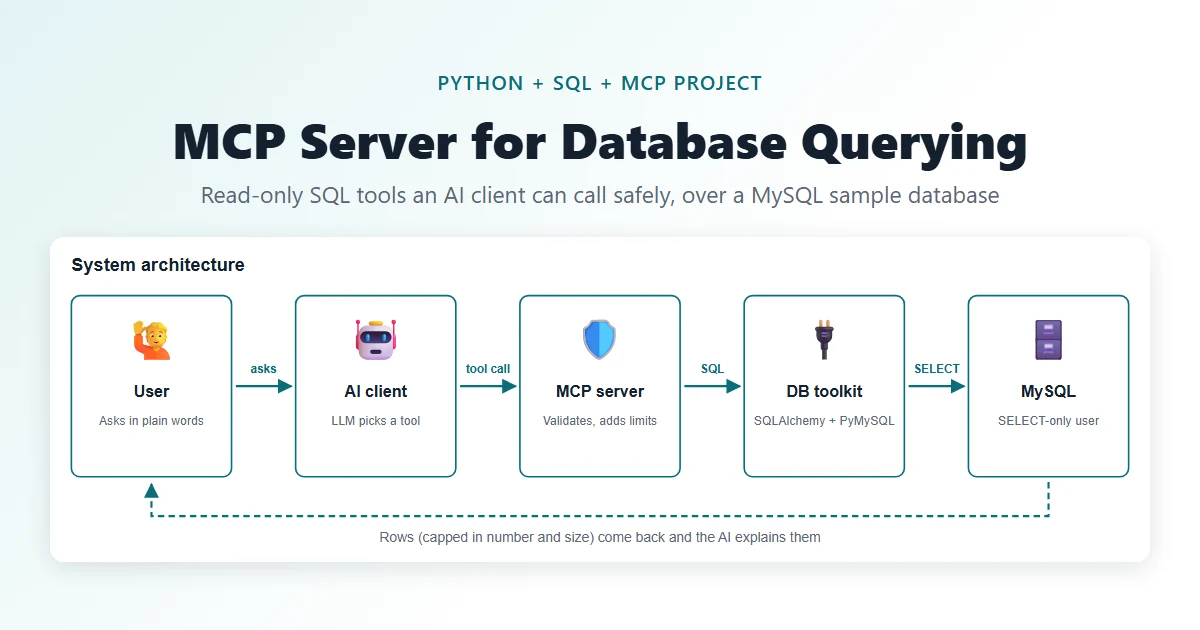 Data & AI · IntermediateMCP Server for Database Querying
Let an AI assistant ask your database questions through five safe, read-only tools.
Python · MCP Python SDK (FastMCP) · MySQL 8 Testing · BeginnerAI API Test Generator
Paste a Swagger / OpenAPI spec and get positive, negative and boundary API tests in Jest, Pytest or Postman in seconds.
HTML5 · CSS3 (Grid, Flexbox, variables) · Vanilla JavaScript (ES6+) Testing · IntermediateAI Exploratory Testing Agent
A browser agent that explores your web app on its own, finds evidence-backed bugs and writes the report for you.
Python 3.11+ · Playwright (Chromium) · FastAPIThis project is shared for learning. The code is provided as is; read it, run it and change it. Do not commit real API keys: use the .env.example file. Interview questions are practice questions, not a record of any company's interviews.